
Tensorflow基本概念
【本文摘自网络,仅供学习使用】
官网上对TensorFlow的介绍是,一个使用数据流图(data flow graphs)技术来进行数值计算的开源软件库。数据流图中的节点,代表数值运算;节点节点之间的边,代表多维数据(tensors)之间的某种联系。我们可以在多种设备(含有CPU或GPU)上通过简单的API调用来使用该系统的功能。
TensorFlow包含构建数据流图与计算数据流图等基本步骤,图中的节点表示数学操作,图中连结各节点的边表示多维数组,即:tensors(张量)。 张量是TensorFlow最核心的组件,所有运算和优化都是基于张量进行的。张量是基于向量和矩阵的推广,可以将标量看为零阶张量,矢量看做一阶张量,矩阵看做二阶张量(后面详细介绍)。
数据流图是描述有向图中的数值计算过程。有向图中的节点通常代表数学运算,但也可以表示数据的输入、输出和读写等操作;有向图中的边表示节点之间的某种联系,它负责传输多维数据(Tensors)。图中这些tensors的flow也就是TensorFlow的命名来源。
基本使用:
将计算流程表示成图;
通过Sessions来执行图计算;
将数据表示为tensors;
使用Variables来保持状态信息;
分别使用feeds和fetches来填充数据和抓取任意的操作结果;
TensorFlow初识,简单实例
- import tensorflow as tf
- a =tf.placeholder("float")
- b =tf.placeholder("float")
- y = tf.multiply(a,b)
- sess = tf.Session()
- print(sess.run(y, feed_dict={a: 3, b: 3}))
上面代码中,首先导入TensorFlow,然后tf.placeholder("float")定义a和b两个浮点类型的变量,tf.multiply(a,b)表示两个变量相乘操作,常用的算术还有:
| Operation | Description |
| tf.add | sum |
| tf.subtract | substraction |
| tf.multiply | multiplication |
| tf.div | division |
| tf.mod | module |
| tf.abs | return the absolute value |
| tf.neg | return negative value |
| tf.sign | return the sign |
| tf.inv | returns the inverse |
| tf.square | calculates the square |
| tf.round | returns the nearest integer |
| tf.sqrt | calculates the square root |
| tf.pow | calculates the power |
| tf.exp | calculates the exponential |
| tf.log | calculates the logarithm |
| tf.maximum | returns the maximum |
| tf.minimum | returns the minimum |
| tf.cos | calculates the cosine |
| tf.sin | calculates the sine |
如果两种不同类型计算时会报错,需要tf.cast()转换类型,例如:
- tf.subtract(tf.constant(3.0),tf.constant(1))
- """
- TypeError: Input 'y' of 'Sub' Op has type int32 that does not
- match type float32 of argument 'x'.
- """
上面代码需改为:
tf.subtract(tf.cast(tf.constant(3.0), tf.int32), tf.constant(1)) 另外,还会用到的矩阵计算方法:
| Operation | Description |
| tf.diag | returns a diagonal tensor with a given diagonal values |
| tf.transpose | returns the transposes of the argument |
| tf.matmul | returns a tensor product of multiplying two tensors listed as arguments |
| tf.matrix_determinant | returns the determinant of the square matrix specified as an argument |
| tf.matrix_inverse | returns the inverse of the square matrix specified as an argument |
接下来 tf.Session()语句表示创建一个session,这是最重要的一步,它用来计算生成的符号表达式。到这一步TensorFlow代码还没有真正被执行, 而调用run()方法后算法才真正被执行。可以看出,TensorFlow既是一个表示机器学习算法的接口,又是对机器学习算法的实现。
为了抓取输出结果,在执行session的run函数后,通过print函数打印状态信息。
填充(Feeds):
TensorFlow提供的机制:先创建特定数据类型的占位符(placeholder),之后再进行数据的填充("feed_dict= ");如果不对placeholder()的变量进行数据填充,将会引发错误。
基本数据类型:
| 数据类型 | Python 类型 | 描述 |
|---|---|---|
DT_FLOAT |
tf.float32 |
32 位浮点数. |
DT_DOUBLE |
tf.float64 |
64 位浮点数. |
DT_INT64 |
tf.int64 |
64 位有符号整型. |
DT_INT32 |
tf.int32 |
32 位有符号整型. |
DT_INT16 |
tf.int16 |
16 位有符号整型. |
DT_INT8 |
tf.int8 |
8 位有符号整型. |
DT_UINT8 |
tf.uint8 |
8 位无符号整型. |
DT_STRING |
tf.string |
可变长度的字节数组.每一个张量元素都是一个字节数组. |
DT_BOOL |
tf.bool |
布尔型. |
DT_COMPLEX64 |
tf.complex64 |
由两个32位浮点数组成的复数:实数和虚数. |
DT_QINT32 |
tf.qint32 |
用于量化Ops的32位有符号整型. |
DT_QINT8 |
tf.qint8 |
用于量化Ops的8位有符号整型. |
DT_QUINT8 |
tf.quint8 |
用于量化Ops的8位无符号整型. |
张量的阶
TensorFlow用张量表示所有的数据,张量可看成一个n维的数组或列表,在图中的节点之间流通。张量的维数称为阶,注:张量的阶和矩阵的阶不是同一个概念。下面的张量(使用Python的list定义)是2阶:
t = [[1, 2, 3], [4, 5, 6], [7, 8, 9]]| 阶 | 数学实例 | Python 例子 |
|---|---|---|
| 0 | 纯量 (只有大小) | s = 1 |
| 1 | 向量(大小和方向) | v = [1, 2, 3] |
| 2 | 矩阵(数据表) | m = [[1, 2, 3], [4, 5, 6], [7, 8, 9]] |
| 3 | 3阶张量 (数据立体) | t = [[[2], [4], [6]], [[8], [10], [12]], [[14], [16], [18]]] |
| n | n阶 | .... |
张量的形状
TensorFlow使用三种记号描述张量的维度:阶,形状及维数,它们之间的关系:
| 阶 | 形状 | 维数 | 实例 |
|---|---|---|---|
| 0 | [ ] | 0-D | 一个 0维张量. 一个纯量. |
| 1 | [D0] | 1-D | 一个1维张量的形式[5]. |
| 2 | [D0, D1] | 2-D | 一个2维张量的形式[3, 4]. |
| 3 | [D0, D1, D2] | 3-D | 一个3维张量的形式 [1, 4, 3]. |
| n | [D0, D1, ... Dn] | n-D | 一个n维张量的形式 [D0, D1, ... Dn]. |
张量的一些常用操作:
| Operation | Description |
| tf.shape | To find a shape of a tensor |
| tf.size | To find the size of a tensor |
| tf.rank | To find a rank of a tensor |
| tf.reshape | To change the shape of a tensor keeping the same elements contained |
| tf.squeeze | To delete in a tensor dimensions of size 1 |
| tf.expand_dims | To insert a dimension to a tensor |
| tf.slice | To remove a portions of a tensor |
| tf.split | To divide a tensor into several tensors along one dimension |
| tf.tile | To create a new tensor replicating a tensor multiple times |
| tf.concat | To concatenate tensors in one dimension |
| tf.reverse | To reverse a specific dimension of a tensor |
| tf.transpose | To transpose dimensions in a tensor |
| tf.gather | To collect portions according to an index |
例如,将一个2维张量扩展为3维:
- vectors = tf.constant(conjunto_puntos)
- extended_vectors = tf.expand_dims(vectors, 0)
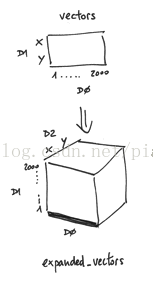
print (expanded_vectors.get_shape())执行上面这句,可以得到扩展后张量的维度。
TensorFlow计算图:
有了张量和基于张量的各种操作,之后需要将各种操作整合起来,输出结果。但不幸的是,随着操作种类和数量的增多,有可能引发各种意想不到的问题,包括多个操作之间应该并行还是顺次执行,如何协同各种不同的底层设备,以及如何避免各种类型的冗余操作等等。这些问题有可能拉低整个深度学习网络的运行效率或者引入不必要的Bug,计算图正是为解决这一问题产生的。
论文《Learning Deep Architectures for AI》作者用不同的占位符(*,+,sin)构成操作结点,以字母x、a、b构成变量结点,以有向线段将这些结点连接起来,组成一个表征运算逻辑关系的清晰明了的“图”型数据结构,这就是最初的计算图。
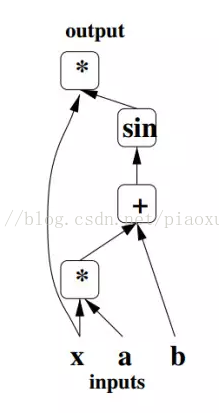
计算图的引入可以让开发者从宏观上俯瞰整个神经网络的内部结构,就好像编译器可以从整个代码的角度决定如何分配寄存器那样,计算图也可以从宏观上决定代码运行时的GPU内存分配,以及分布式环境中不同底层设备间的相互协作方式。除此之外,现在也有许多深度学习框架将计算图应用于模型调试,可以实时输出当前某一操作类型的文本描述。
实例1:
- node1 = tf.constant(3.0, dtype=tf.float32)
- node2 = tf.constant(4.0) # also tf.float32 implicitly
- print(node1, node2)
node1和node2是constant,常量不可改变,其输出结果:
Tensor("Const_2:0", shape=(), dtype=float32) Tensor("Const_3:0", shape=(), dtype=float32)上面并没有直接输出3.0和4.0,而是输出可以生成3.0和4.0的两个张量,如果想要得到3.0和4.0,需要上面介绍的session和run操作:
- sess = tf.Session()
- print(sess.run([node1, node2]))
计算图是将节点列到一个图中的一系列操作,其输入是节点(nodes),输出也是node。或者更复杂一点,操作也是node:
实例2:
- node3 = tf.add(node1, node2)
- print("node3:", node3)
- print("sess.run(node3):", sess.run(node3))
输出结果为:
- node3: Tensor("Add_1:0", shape=(), dtype=float32)
- sess.run(node3): 7.0
为了使算法容易理解,TensorFlow中的可视化工具Tensorboard包含了一些debug函数与优化程序,可以察看不同类型的参数统计结果与图中的计算细节(这部分以后参照实例学习一下)。
实例3:
输入可以是任意量,例如构建模型:y=w*x+b,w和b一定时,x是可变量:
- W = tf.Variable([.3], dtype=tf.float32)
- b = tf.Variable([-.3], dtype=tf.float32)
- x = tf.placeholder(tf.float32)
- linear_model = W*x + b
W和b是Variable,执行上面的语句,W和b并没有被初始化,如果执行程序,需要下面的初始化语句:
init = tf.global_variables_initializer()
完整实例如下:
- import tensorflow as tf
- W = tf.Variable([.5], dtype=tf.float32)
- b = tf.Variable([-.5], dtype=tf.float32)
- x = tf.placeholder(tf.float32)
- linear_model = W*x + b
- #print("linear_model:",linear_model)
- init = tf.global_variables_initializer()
- sess = tf.Session()
- sess.run(init)
- print(sess.run(linear_model, {x: [1, 2, 3, 4]}))
输出结果为:[ 0. 0.5 1. 1.5]
实例4:
- import tensorflow as tf
- W = tf.Variable(1)
- assign_W = W.assign(10)#修改变量方法,assign
- with tf.Session() as sess:
- sess.run(W.initializer)
- print(W.eval())
- sess.run(assign_W)
- print(W.eval())
assign只是一个函数,并且不需要初始化,但是assign_add()和assign_sub()需要初始化。
- import tensorflow as tf
- W = tf.Variable(10)
- sess1 = tf.Session()
- sess2 = tf.Session()
- sess1.run(W.initializer)
- sess2.run(W.initializer)
- print('W add 1=',sess1.run(W.assign_add(1)))
- print('W sun 2=',sess2.run(W.assign_sub(2)))
- sess1.close()
- sess2.close()
Tensorflow基本概念的更多相关文章
- 01炼数成金TensorFlow基本概念
一.Tensorflow基本概念 1.使用图(graphs)来表示计算任务,用于搭建神经网络的计算过程,但其只搭建网络,不计算 2.在被称之为会话(Session)的上下文(context)中执行图 ...
- 深度学习框架之TensorFlow的概念及安装(ubuntu下基于pip的安装,IDE为Pycharm)
2015年11月9日,Google发布人工智能系统TensorFlow并宣布开源. 1.TensorFlow的概念 TensorFlow 是使用数据流图进行数值计算的开源软件库.也就是说,Tensor ...
- tensorflow核心概念和原理介绍
关于 TensorFlow TensorFlow 是一个采用数据流图(data flow graphs),用于数值计算的开源软件库. 节点(Nodes)在图中表示数学操作,图中的线(edges)则表示 ...
- TensorFlow 基本概念
一.概述 使用图(graph)来表示计算任务 在会话(Session)的上下文(context)中执行图(graph) 使用tensor表示数据 通过 变量(Variable)维护状态 使用 feed ...
- Tensorflow基本概念笔记
一.TensorFlow使用简单,部署快捷 TensorFlow使用数据流图(计算图)来规划计算流程,可以将计算映射到不同的硬件和操作平台.凭借着统一的架构,TensorFlow可以方便的部署剑各种平 ...
- TensorFlow 基础概念
初识TensorFlow,看了几天教程后有些无聊,决定写些东西,来夯实一下基础,提供些前进动力. 一.Session.run()和Tensor.eval()的区别: 最主要的区别就是可以使用sess. ...
- Tensorflow开发环境配置及其基本概念
Tensorflow开发环境配置及其基本概念 1.1. 安装Tensorflow开发环境 1.1.1. 安装pycharm 1.1.2. 安装pythe3.6 1.1.3. 安装Tensorflow ...
- 机器学习与Tensorflow(1)——机器学习基本概念、tensorflow实现简单线性回归
一.机器学习基本概念 1.训练集和测试集 训练集(training set/data)/训练样例(training examples): 用来进行训练,也就是产生模型或者算法的数据集 测试集(test ...
- Tensorflow学习:(一)tensorflow框架基本概念
一.Tensorflow基本概念 1.使用图(graphs)来表示计算任务,用于搭建神经网络的计算过程,但其只搭建网络,不计算 2.在被称之为会话(Session)的上下文(context)中执行图 ...
随机推荐
- 后台MemoryStream图片流用ajax接收乱码问题
MemoryStream ms = new MemoryStream(); //要先把二进制流进行编码,再传输,解决乱码问题 Convert.ToBase64String(ms.ToArray()); ...
- oracle用户权限
权限: create session create table unlimited tablespace connect resource dba 例: #sqlplus /nolog SQL> ...
- repository和repertory
在研究.net core的时候知道了仓储这个概念,并发现两个单词repository和repertory 两者都有仓库,储藏所,储藏的意思,repository还指知识渊博的人,repertory除了 ...
- quartz部署出现找不到表的情况,错误提示: Table 'heart_beat.QRTZ_LOCKS' doesn't exist
描述一下,本地可以,部署到Linux就不行,Linux上的数据库是本地直接拷贝上去的,项目环境是Spring Boot2.1.Shiro.MyBatis.Redis.swagger.Bootstrap ...
- ubuntu安装docker以及基本用法
ubuntu安装docker以及基本用法 一.安装 安装前先更新apt-get源到最新版本 apt-get update 使用ubuntu自带的docker安装包安装docker apt-get in ...
- 给OkHttp Client添加socks代理
Okhttp的使用没有httpClient广泛,网上关于Okhttp设置代理的方法很少,这篇文章完整介绍了需要注意的方方面面. 上一篇博客中介绍了socks代理的入口是创建java.net.Socke ...
- CSS总结div中的内容垂直居中的五种方法
一.行高(line-height)法 如果要垂直居中的只有一行或几个文字,那它的制作最为简单,只要让文字的行高和容器的高度相同即可,比如: p { height:30px; line-height:3 ...
- JS中数组去重的九方法
数组去重方法 方法一:运用set结构特点:存储的数据没有重复的,结果为对象,再用Array.from()转换成数组 var arr = [1,1,2,1,3,4,5] ...
- vue-cli脚手架之webpack.base.conf.js
webpack相关的重要配置文件将在这一节给出.webpack水很深啊^o^,在此先弄清楚原配文件内容的含义,后续可以自己根据实际情况配置. webpack.base.conf.js:配置vue开发环 ...
- 【转】MySQL:日期函数、时间函数总结(MySQL 5.X)
转自:http://www.cnblogs.com/she27/articles/1377089.html 一.MySQL 获得当前日期时间 函数1.1 获得当前日期+时间(date + time)函 ...