
C# 爬虫 正则、NSoup、HtmlAgilityPack、Jumony四种方式抓取小说
心血来潮,想爬点小说。通过百度选择了个小说网站,随便找了一本小说http://www.23us.so/files/article/html/13/13655/index.html。
1、分析html规则
思路是获取小说章节目录,循环目录,抓取所有章节中的内容,拼到txt文本中。最后形成完本小说。
1、获取小说章节目录

通过分析,我在标注的地方获取小说名字及章节目录。
<meta name="keywords" content="无疆,无疆最新章节,无疆全文阅读"/>// 获取小说名字

<table cellspacing="" cellpadding="" bgcolor="#E4E4E4" id="at">// 所有的章节都在这个table中。
下面是利用正则,获取名字与目录。
//获取小说名字

Match ma_name = Regex.Match(html, @"<meta name=""keywords"".+content=""(.+)""/>");

string name = ma_name.Groups[].Value.ToString().Split(',')[];

//获取章节目录

Regex reg_mulu = new Regex(@"<table cellspacing=""1"" cellpadding=""0"" bgcolor=""#E4E4E4"" id=""at"">(.|\n)*?</table>");

var mat_mulu = reg_mulu.Match(html);

string mulu = mat_mulu.Groups[].ToString();
2、获取小说正文内容
通过章节a标签中的url地址,查看章节内容。
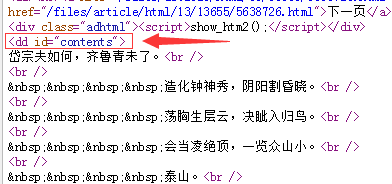
通过分析,正文内容在<dd id="contents">中。
//获取正文
Regex reg = new Regex(@"<dd id=""contents"">(.|\n)*?</dd>");
MatchCollection mc = reg.Matches(html_z);
var mat = reg.Match(html_z);
string content = mat.Groups[].ToString().Replace("<dd id=\"contents\">", "").Replace("</dd>", "").Replace(" ", "").Replace("<br />", "\r\n");
2、C#完整代码
using System;
using System.Collections;
using System.Collections.Generic;
using System.IO;
using System.Linq;
using System.Net;
using System.Text;
using System.Text.RegularExpressions;
using System.Web;
using System.Web.Mvc; namespace Test.Controllers
{
public class CrawlerController : BaseController
{
// GET: Crawler
public void Index()
{
//抓取整本小说
CrawlerController cra = new CrawlerController();//顶点抓取小说网站小说
string html = cra.HttpGet("http://www.23us.so/files/article/html/13/13655/index.html", ""); //获取小说名字
Match ma_name = Regex.Match(html, @"<meta name=""keywords"".+content=""(.+)""/>");
string name = ma_name.Groups[].Value.ToString().Split(',')[]; //获取章节目录
Regex reg_mulu = new Regex(@"<table cellspacing=""1"" cellpadding=""0"" bgcolor=""#E4E4E4"" id=""at"">(.|\n)*?</table>");
var mat_mulu = reg_mulu.Match(html);
string mulu = mat_mulu.Groups[].ToString(); //匹配a标签里面的url
Regex tmpreg = new Regex("<a[^>]+?href=\"([^\"]+)\"[^>]*>([^<]+)</a>", RegexOptions.Compiled);
MatchCollection sMC = tmpreg.Matches(mulu);
if (sMC.Count != )
{
//循环目录url,获取正文内容
for (int i = ; i < sMC.Count; i++)
{
//sMC[i].Groups[1].Value
//0是<a href="http://www.23us.so/files/article/html/13/13655/5638725.html">第一章 泰山之巅</a>
//1是http://www.23us.so/files/article/html/13/13655/5638725.html
//2是第一章 泰山之巅 //获取章节标题
string title = sMC[i].Groups[].Value; //获取文章内容
string html_z = cra.HttpGet(sMC[i].Groups[].Value, ""); //获取小说名字,章节中也可以查找名字
//Match ma_name = Regex.Match(html, @"<meta name=""keywords"".+content=""(.+)"" />");
//string name = ma_name.Groups[1].Value.ToString().Split(',')[0]; //获取标题,通过分析h1标签也可以得到章节标题
//string title = html_z.Replace("<h1>", "*").Replace("</h1>", "*").Split('*')[1]; //获取正文
Regex reg = new Regex(@"<dd id=""contents"">(.|\n)*?</dd>");
MatchCollection mc = reg.Matches(html_z);
var mat = reg.Match(html_z);
string content = mat.Groups[].ToString().Replace("<dd id=\"contents\">", "").Replace("</dd>", "").Replace(" ", "").Replace("<br />", "\r\n"); //txt文本输出
string path = AppDomain.CurrentDomain.BaseDirectory.Replace("\\", "/") + "Txt/";
Novel(title + "\r\n" + content, name, path);
}
}
} /// <summary>
/// 创建文本
/// </summary>
/// <param name="content">内容</param>
/// <param name="name">名字</param>
/// <param name="path">路径</param>
public void Novel(string content, string name, string path)
{
string Log = content + "\r\n";
//创建文件夹,如果不存在就创建file文件夹
if (Directory.Exists(path) == false)
{
Directory.CreateDirectory(path);
} //判断文件是否存在,不存在则创建
if (!System.IO.File.Exists(path + name + ".txt"))
{
FileStream fs1 = new FileStream(path + name + ".txt", FileMode.Create, FileAccess.Write);//创建写入文件
StreamWriter sw = new StreamWriter(fs1);
sw.WriteLine(Log);//开始写入值
sw.Close();
fs1.Close();
}
else
{
FileStream fs = new FileStream(path + name + ".txt" + "", FileMode.Append, FileAccess.Write);
StreamWriter sr = new StreamWriter(fs);
sr.WriteLine(Log);//开始写入值
sr.Close();
fs.Close();
}
} //Post
public string HttpPost(string Url, string postDataStr)
{
CookieContainer cookie = new CookieContainer();
HttpWebRequest request = (HttpWebRequest)WebRequest.Create(Url);
request.Method = "POST";
request.ContentType = "application/x-www-form-urlencoded";
request.ContentLength = Encoding.UTF8.GetByteCount(postDataStr);
request.CookieContainer = cookie;
Stream myRequestStream = request.GetRequestStream();
StreamWriter myStreamWriter = new StreamWriter(myRequestStream, Encoding.GetEncoding("gb2312"));
myStreamWriter.Write(postDataStr);
myStreamWriter.Close(); HttpWebResponse response = (HttpWebResponse)request.GetResponse(); response.Cookies = cookie.GetCookies(response.ResponseUri);
Stream myResponseStream = response.GetResponseStream();
StreamReader myStreamReader = new StreamReader(myResponseStream, Encoding.GetEncoding("utf-8"));
string retString = myStreamReader.ReadToEnd();
myStreamReader.Close();
myResponseStream.Close(); return retString;
} //Get
public string HttpGet(string Url, string postDataStr)
{
HttpWebRequest request = (HttpWebRequest)WebRequest.Create(Url + (postDataStr == "" ? "" : "?") + postDataStr);
request.Method = "GET";
HttpWebResponse response;
request.ContentType = "text/html;charset=UTF-8";
try
{
response = (HttpWebResponse)request.GetResponse();
}
catch (WebException ex)
{
response = (HttpWebResponse)request.GetResponse();
} Stream myResponseStream = response.GetResponseStream();
StreamReader myStreamReader = new StreamReader(myResponseStream, Encoding.GetEncoding("utf-8"));
string retString = myStreamReader.ReadToEnd();
myStreamReader.Close();
myResponseStream.Close(); return retString;
}
}
}
3、最后效果

4、补充
wlong 同学提了个建议,说用NSoup解析html更方便,我就去查了查,目前没有太大的感触,可能不太会用。DLL下载地址http://nsoup.codeplex.com/
NSoup版:
NSoup.Nodes.Document doc = NSoup.NSoupClient.Parse(html);

//获取小说名字

//<meta name="keywords" content="无疆,无疆最新章节,无疆全文阅读"/>
//获取meta

NSoup.Select.Elements ele = doc.GetElementsByTag("meta");

string name = "";

foreach (var i in ele)

{

    if (i.Attr("name") == "keywords")

    {

        name = i.Attr("content").ToString();

    }

}

//获取章节

NSoup.Select.Elements eleChapter = doc.GetElementsByTag("table");//查找table,获取table里的html

NSoup.Nodes.Document docChild = NSoup.NSoupClient.Parse(eleChapter.ToString());

NSoup.Select.Elements eleChild = docChild.GetElementsByTag("a");//查找a标签

//循环目录,获取正文内容

foreach (var j in eleChild)

{

    string title = j.Text();//获取章节标题

    string htmlChild = cra.HttpGet(j.Attr("href").ToString(), "");//获取文章内容

}
HtmlAgilityPack版(NaYoung提供):
DLL下载地址:HtmlAgilityPack.1.4.6.zip
HtmlWeb htmlWeb = new HtmlWeb();
HtmlDocument document = htmlWeb.Load("http://www.23us.so/files/article/html/13/13694/index.html");
HtmlNodeCollection nodeCollection = document.DocumentNode.SelectNodes(@"//table/tr/td/a[@href]"); //代表获取所有
string name = document.DocumentNode.SelectNodes(@"//meta[@name='keywords']")[].GetAttributeValue("content", "").Split(',')[];
foreach (var node in nodeCollection)
{
HtmlAttribute attribute = node.Attributes["href"];
String val = attribute.Value; //章节url
var title = htmlWeb.Load(val).DocumentNode.SelectNodes(@"//h1")[].InnerText; //文章标题
var doc = htmlWeb.Load(val).DocumentNode.SelectNodes(@"//dd[@id='contents']");
var content = doc[].InnerHtml.Replace(" ", "").Replace("<br>", "\r\n"); //文章内容
//txt文本输出
string path = AppDomain.CurrentDomain.BaseDirectory.Replace("\\", "/") + "Txt/";
Novel(title + "\r\n" + content, name, path);
}
Jumony版:
C# 爬虫 正则、NSoup、HtmlAgilityPack、Jumony四种方式抓取小说的更多相关文章
- CMDB资产采集的四种方式
转 https://www.cnblogs.com/guotianbao/p/7703921.html 资产采集的概念 资产采集的四种方式:Agent.SSH.saltstack.puppet 资产采 ...
- C#批量插入数据到Sqlserver中的四种方式
我的新书ASP.NET MVC企业级实战预计明年2月份出版,感谢大家关注! 本篇,我将来讲解一下在Sqlserver中批量插入数据. 先创建一个用来测试的数据库和表,为了让插入数据更快,表中主键采用的 ...
- 【Java EE 学习 80 下】【调用WebService服务的四种方式】【WebService中的注解】
不考虑第三方框架,如果只使用JDK提供的API,那么可以使用三种方式调用WebService服务:另外还可以使用Ajax调用WebService服务. 预备工作:开启WebService服务,使用jd ...
- ASP.NET MVC之下拉框绑定四种方式(十)
前言 上两节我们讲了文件上传的问题,关于这个上传的问题还未结束,我也在花时间做做分割大文件处理以及显示进度的问题,到时完成的话再发表,为了不耽误学习MVC其他内容的计划,我们今天开始好好讲讲关于MVC ...
- SWT组件添加事件的四种方式
在我们CS日常开发过程中会经常去为组件添加事件,我们常用的为AWT与SWT.SWT的事件模型是和标准的AWT基本一样的.下面将按照事件的四种写法来实现它. 一.匿名内部类的写法 new MouseAd ...
- Java实现文件复制的四种方式
背景:有很多的Java初学者对于文件复制的操作总是搞不懂,下面我将用4中方式实现指定文件的复制. 实现方式一:使用FileInputStream/FileOutputStream字节流进行文件的复制操 ...
- C#_批量插入数据到Sqlserver中的四种方式
先创建一个用来测试的数据库和表,为了让插入数据更快,表中主键采用的是GUID,表中没有创建任何索引.GUID必然是比自增长要快的,因为你生成一个GUID算法所花的时间肯定比你从数据表中重新查询上一条记 ...
- java 20 -10 字节流四种方式复制mp3文件,测试效率
电脑太渣,好慢..反正速率是: 高效字节流一次读写一个字节数组 > 基本字节流一次读写一个字节数组 > 高效字节流一次读写一个字节 > 基本字节流一次读写一个字节 前两个远远快过后面 ...
- .NET MVC控制器向视图传递数据的四种方式
.NET MVC控制器向视图传递数据的四种方式: 1.ViewBag ViewBag.Mvc="mvc"; 2.ViewData ViewBag["Mvc"] ...
随机推荐
- [20180627]truncate table的另类恢复.txt
[20180627]truncate table的另类恢复.txt --//前几天看链接http://www.xifenfei.com/2018/06/truncate-table-recovery. ...
- SQL alwayson 辅助接点查询统计信息“丢失”导致查询失败
ALWAYSON 出现以下情况已经2次了,记录下: DBCC 执行完毕.如果 DBCC 输出了错误信息,请与系统管理员联系. 消息 2767,级别 16,状态 1,过程 sp_table_statis ...
- C语言四舍五入
//今天遇到了四舍五入的问题,这些问题如果不看别人的真的难想出这么巧妙的方法啊.努力积累,早日成为大佬. int i = (int)(a + 0.5) ////小数部分大于0.4,加上0.5就会超过整 ...
- 函数重载(overload)
重载的定义及特点 在同一个类中,允许存在一个以上的同名函数, 只要他们的参数个数或者参数类型不同(不仅指两个重载方法的参数类型不同,还指相同参数拥有不同的参数类型顺序)就构成重载. 重载只和参数列表有 ...
- 阿里八八β阶段Scrum(5/5)
今日进度 陈裕鹏: 简单信息抽取编码完成 叶文滔: 处理了信息抽取编码的一些BUG,修复了日程界面不会自动更新添加的日程的BUG,修改了原先测试用的TAG以及数据分析部分数据计算数值错误的问题 王国超 ...
- 如何用jquery实现实时监控浏览器宽度
如何用jquery实现实时监控浏览器宽度 2013-06-05 14:36匿名 | 浏览 3121 次 $(window).width();这代码只能获取浏览器刷新时的那一刻的宽度,如何才能达到实时获 ...
- php 非对称加密解密类
<?phpnamespace app\Parentclient\model;header("Content-Type: text/html;charset=utf-8");/ ...
- Qt+QGis二次开发:矢量图层的显示样式
原文链接:QGis二次开发基础 -- 矢量图层的显示样式
- OpenCV——轮廓填充drawContours函数解析
函数的调用形式 void drawContours(InputOutputArray image, InputArrayOfArrays contours, int contourIdx, const ...
- 你所不了解的javascript操作DOM的细节知识点(一)
你所不了解的javascript操作DOM的细节知识点(一) 一:Node类型 DOM1级定义了一个Node接口,该接口是由DOM中的所有节点类型实现.每个节点都有一个nodeType属性,用于表明节 ...