
centos7安装keepalived问题
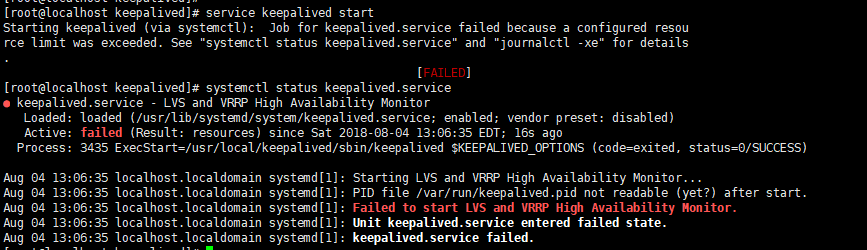
● keepalived.service - LVS and VRRP High Availability Monitor
Loaded: loaded (/usr/lib/systemd/system/keepalived.service; enabled; vendor preset: disabled)
Active: failed (Result: resources) since Sat 2018-08-04 13:06:35 EDT; 16s ago
Process: 3435 ExecStart=/usr/local/keepalived/sbin/keepalived $KEEPALIVED_OPTIONS (code=exited, status=0/SUCCESS)
Aug 04 13:06:35 localhost.localdomain systemd[1]: Starting LVS and VRRP High Availability Monitor...
Aug 04 13:06:35 localhost.localdomain systemd[1]: PID file /var/run/keepalived.pid not readable (yet?) after start.
Aug 04 13:06:35 localhost.localdomain systemd[1]: Failed to start LVS and VRRP High Availability Monitor.
Aug 04 13:06:35 localhost.localdomain systemd[1]: Unit keepalived.service entered failed state.
Aug 04 13:06:35 localhost.localdomain systemd[1]: keepalived.service failed.
搭建keepalived注意事项:
环境
主nginx负载均衡器:192.168.5.129 (通过keepalived配置了VIP:192.168.5.101/0供外使用)
副nginx负载均衡器:192.168.5.130(通过keepalived配置了VIP:192.168.5.101/0供外使用)
1.安装 keepalived-1.4.1
 tar xf keepalived-1.3.4.tar.gz

 cd keepalived-1.3.4

 ./configure --prefix=/usr/local/keepalived

 make && make install
2.配置keepalived文件
复制/sbin/keepalived到/usr/sbin下

> cp /keepalived/sbin/keepalived /usr/sbin/

keepalived默认会读取/etc/keepalived/keepalived.conf配置文件

> mkdir /etc/keepalived

> cp /keepalived/etc/keepalived/keepalived.conf /etc/keepalived/

复制sysconfig文件到/etc/sysconfig下

> cp /keepalived/etc/sysconfig/keepalived /etc/sysconfig/

复制启动脚本到/etc/init.d下

> cd /keepalived-1.3.4

> cp ./keepalived/etc/init.d/keepalived /etc/init.d/

> chmod 755 /etc/init.d/keepalived
3.配置keepalived.conf启动文件
! Configuration File for keepalived

global_defs {

   notification_email {

     acassen@firewall.loc

     failover@firewall.loc

     sysadmin@firewall.loc

   }

   notification_email_from Alexandre.Cassen@firewall.loc

   smtp_server 192.168.200.1

   smtp_connect_timeout 30

   router_id LVS_DEVEL

   vrrp_skip_check_adv_addr

   vrrp_strict

   vrrp_garp_interval 0

   vrrp_gna_interval 0

}

vrrp_instance VI_1 {

    state MASTER(BACKUP)

    interface ens33    -- 注意网卡名字

    virtual_router_id 51

    priority 50

    advert_int 1

    authentication {

        auth_type PASS

        auth_pass 1111

    }

    virtual_ipaddress {

        192.168.5.100

        192.168.5.101

    }

}

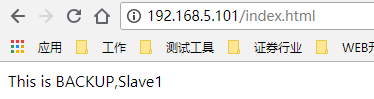
4.启动与验证keepalievd <ip addr list>
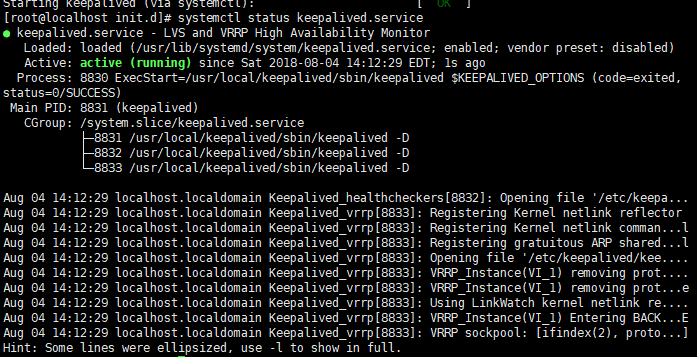
service keepalived start
systemctl status keepalived.service
ps -aux|grep keepalived
5. 遗留问题:
当服务启动后一段时间就自动关闭了服务;(大约几分钟后)
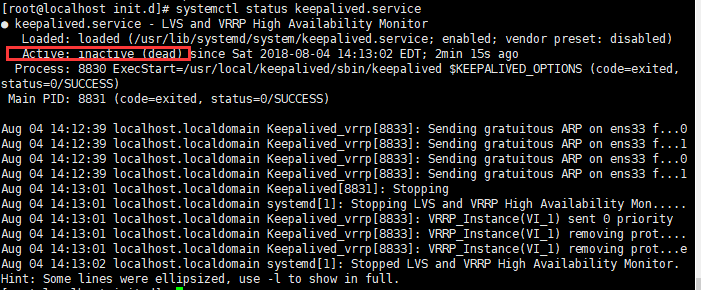
原因:并未设置监听服务,导致自动关闭服务
6. 设置centos7开机自动启动服务
vim /lib/systemd/system/keepalived.service
[Unit]

Description=Keepalived

After=syslog.target network.target remote-fs.target nss-lookup.target

[Service]

Type=forking

PIDFile=/var/run/keepalived.pid

ExecStart=/usr/local/keepalived/sbin/keepalived -D

ExecReload=/bin/kill -s HUP $MAINPID

ExecStop=/bin/kill -s QUIT $MAINPID

PrivateTmp=true

[Install]

WantedBy=multi-user.target
1;systemctl daemon-reload  重新加载

2:systemctl enable keepalived.service  设置开机自动启动

3:systemctl disable keepalived.service 取消开机自动启动

4:systemctl start keepalived.service 启动

5:systemctl stop keepalived.service停止
设置nginx开机自启动
vim /lib/systemd/system/nginx.service

[Unit]

Description=nginx

After=network.target

[Service]

Type=forking

ExecStart=/usr/local/nginx/sbin/nginx

ExecReload=/usr/local/nginx/sbin/nginx reload

ExecStop=/usr/local/nginx/sbin/nginx quit

PrivateTmp=true

[Install]

WantedBy=multi-user.target
systemctl enable nginx.service

systemctl start nginx.service    启动nginx

systemctl stop nginx.service    结束nginx

systemctl restart nginx.service    重启nginx
7.配置监听文件
vi /root/check_nginx.sh
#!/bin/sh
count=`ps aux | grep nginx | grep -v grep | wc -l`
if [ $count -eq 0 ]
then
echo "running....., please starting...."
systemctl start nginx.service
sleep 2
else
echo "running...."
fi
chmod +x /root/check_nginx.sh
加入到作业计划

crontab -e

*/1 * * * * /root/check_nginx.sh >>/root/check_nginx.log
追加keepalived.conf文件
! Configuration File for keepalived
global_defs {
notification_email {
acassen@firewall.loc
failover@firewall.loc
sysadmin@firewall.loc
}
notification_email_from Alexandre.Cassen@firewall.loc
smtp_server 192.168.200.1
smtp_connect_timeout 30
router_id LVS_DEVEL
vrrp_skip_check_adv_addr
vrrp_strict
vrrp_garp_interval 0
vrrp_gna_interval 0
}
vrrp_script check_nginx {
script "/root/check_nginx.sh"
interval 2
weight 2
}
vrrp_instance VI_1 {
state MASTER
interface ens33
virtual_router_id 51
mcast_src_ip 192.168.5.129
priority 100
advert_int 1
authentication {
auth_type PASS
auth_pass 111111
}
track_script { ######执行监控nginx进程的脚本
check_nginx
}
virtual_ipaddress {
192.168.5.100
}
}
8.知识补充:学习shell编程
9. usr/bin 与 usr/local/bin 的区别
usr/bin 是系统自带的应用

usr/local/bin 是自己安装的应用和自己写的全局脚本
centos7安装keepalived问题的更多相关文章
- Centos7 安装keepalived实现高可用
场景:尝试安装keepalived实现高可用,进而在suse环境中部署. 测试过程需要配合Nginx的相关知识:Centos7 Nginx安装 1 安装过程 问题 !!! OpenSSL is not ...
- centos7 安装keepalived
node1 192.168.5.101 node2 192.168.5.102 1.安装 openssl openssl-devel yum install openssl openssl-devel ...
- Centos7安装keepalived(自定义路径安装)-高级篇
0.Keepalived介绍 Keepalived是一个基于VRRP协议来实现的服务高可用方案,可以利用其来避免IP单点故障,类似的工具还有heartbeat.corosync.pacemaker.但 ...
- Centos7 安装 Keepalived
目标: Keeplaived 简单模拟测试一下Nginx 故障切换前言:C7 默认的 1.3.5 似乎有点问题,改装 keepalived-2.0.7 1:安装 Nginx 和确认 (略)2:安装配置 ...
- Centos7+LVS-DR+keepalived实验(包含sorry-server、日志、及HTTP-GET的健康检测)
目录检索 一.简介 1.lvs-dr原理请参考原理篇 2.keepalived原理请参考原理篇 3.基于lvs-dr+keepalived故障切换架构图如下: 二.部署 1.环境 2.准备RS的web ...
- CentOS7.4 Keepalived+LVS 负载均衡 后台节点健康检查
主机信息 VIP 10.10.10.55 LVS01 10.10.10.59 Web01 10.10.10.60 Web02 10.10.10.61 一.apache简单配置 1.(10.10.10. ...
- linux下安装keepalived
keepalived安装文档 1. 安装环境 su - root yum -y install kernel-devel* yum -y install openssl-* yum -y instal ...
- HP服务器 hp 360g5 centos7安装问题
HP服务器 hp 360g5 centos7安装问题 一 :启动盘无法识别硬盘 1.进入安装光盘,用上下键选择安装centos--Install Centos7(注意不可按Enter键),如图: 2 ...
- CentOS7 安装Mono及Jexus
CentOS7安装Mono及Juxes 1 安装Mono 1.1 安装yum-utils 因为安装要用到yum-config-manager,默认是没有安装的,所以要先安装yum-utils包.命令如 ...
随机推荐
- mkimage command not found – U-Boot images will not be built
ubuntu 14.04 64位系统编译Linux kernel时提示: “mkimage” command not found – U-Boot images will not be built 按 ...
- OpenStack Trove组件WSGI和RPC调用流程(参考调用的整个过程)
参考博文:https://blog.csdn.net/bill_xiang_/article/details/72909927
- Linux下安装GitHub
安装GitHub 1.下载安装git: yum -y install git git-core git-doc 2.运行完执行 ssh-keygen -t rsa -C "your@emai ...
- Django Forms 表单
环境 python 3.7 服务端 views.py from django import forms # 引入 froms 模块 from django.forms import widgets ...
- Rabbitmq 与springboot 结合
<dependency> <groupId>org.springframework.boot</groupId> <artifactId>spring- ...
- 学习node.js 第1篇 介绍nodejs
Node.js是什么? Node.js是建立在谷歌Chrome的JavaScript引擎(V8引擎)的Web应用程序框架. 它的最新版本是:v0.12.7(在编写本教程时的版本).Node.js在官方 ...
- c# JSON格式转对象
using Newtonsoft.Json; List<string> ChapterIdList = JsonConvert.DeserializeObject<List<s ...
- MFC笔记8
1.在循环使用数组时需要清理数组 CString str; memset(str,0,strlen(str)); 判断两个字符串包含数字大小是否相等 CString str="22" ...
- Ubuntu安装pyucharm的专业版本
看到了不错的教程,亲测有效. https://www.cnblogs.com/huozf/p/9304396.html
- ubuntu开启远程shell,开启上传下载
需要先安装openshell-server 具体命令如下: 1.先更新下源 sudo apt-get update 2.安装openshell-server sudo apt-get install ...