
记一个jquery 无缝轮播的制作方法
接触前端也很久了,今天才发现,要做好一个轮播,其实有很多东西需要考虑进去,否则做出来的轮播效果并不好,下面我就来做一个轮播,是依赖jquery来写的
1.要做轮播,首先需要的是HTML的内容,css的机构样式,以下为html代码:
 <!DOCTYPE html>

 <html>

 <head>

     <meta charset="utf-8" />

     <link rel="stylesheet" href="./ft-carousel.css" />

     <script src="./jquery-3.3.1.min.js"></script>

     <script src="./ft-carousel.min.js"></script>

     <style>

     </style>

 </head>

 <body>

     <div class="example">

         <div class="ft-carousel" id="carousel_1">

             <ul class="carousel-inner">

                 <li class="carousel-item">

                     <img src="img/a1.jpg" />

                 </li>

                 <li class="carousel-item">

                     <img src="img/a2.jpg" />

                 </li>

                 <li class="carousel-item">

                     <img src="img/a3.jpg" />

                 </li>

                 <li class="carousel-item">

                     <img src="img/a4.jpg" />

                 </li>

             </ul>

         </div>

     </div>

     <script type="text/javascript">

         $("#carousel_1").FtCarousel();

     </script>

 </body>

 </html>
2.css 代码如下:
 ul,

 ol,

 li,

 div {

     margin: 0;

     padding: 0;

 }

 * {

     margin: 0;

     padding: 0;

 }

 ul,

 ol {

     list-style: none;

 }

 .ft-carousel {

     position: relative;

     width: 100%;

     height: 700px;

     overflow: hidden;

 }

 .ft-carousel .carousel-inner {

     position: absolute;

     left: 0;

     top: 0;

     height: 100%;

 }

 .ft-carousel .carousel-inner .carousel-item {

     float: left;

     height: 100%;

 }

 .ft-carousel .carousel-item img {

     width: 100%;

 }

 .ft-carousel .carousel-indicators {

     position: absolute;

     left: 0;

     bottom: 10px;

     width: 100%;

     text-align: center;

     font-size: 0;

 }

 .ft-carousel .carousel-indicators span {

     display: inline-block;

     width: 12px;

     height: 12px;

     background-color: #fff;

     margin: 0 4px;

     border-radius: 50%;

     cursor: pointer;

 }

 .ft-carousel .carousel-indicators span.active {

     background-color: #de3a3a;

 }

 .ft-carousel .carousel-btn {

     position: absolute;

     top: 50%;

     width: 50px;

     height: 45px;

     margin-top: -25px;

     cursor: pointer;

 }

 .ft-carousel .carousel-prev-btn {

     left: 0;

     background: url(./img/prev.png) no-repeat;

 }

 .ft-carousel .carousel-next-btn {

     right: 0;

     background: url(./img/next.png) no-repeat;

 }

 body {

     margin: 0;

     font-family: "微软雅黑";

     background-color: #1F1F1F;

 }

 .example {

     width: 100%;

     font-size: 40px;

     text-align: center;

     margin: 20px auto;

     background-color: #464576;

 }

 .carousel-item {

     line-height: 336px;

     color: #fff;

     font-family: Arial Black

 }
3.轮播的关键在于js;
因为是依赖jquery的,所以先把jquery 传进去,使用一个立即执行函数(注意,加+,减-,波浪线~,感叹号!开始,或者使用小括号括起来,都是立即执行函数的写法):主要有三个步骤,一是创建构造函数i(t,i), 二是改写构造函数的原型对象,三是在jquery上扩展调用函数的方法,如下:
 ~ function (t) {

     // 创建构造函数

     function i(t, i) {

         this.init(t, i);

     };

     // 改写构造函数的原型对象

     i.prototype = {

     };

     // 在jquery 上扩展FtCarousel函数

     t.fn.FtCarousel = function (n) {

         return this.each(function () {

             new i(t(this), n);

         });

     };

 }(jQuery);
4.我们要做的是一个无缝轮播,但是在HTML中,我们只有4 张图片,二制作无缝轮播需要使用 (要轮播的图片数量 + 2 )张图片,所以在做轮播之前,我们需要先加上另外的两张图片,复制第一张图片放到最后一张图片的位置,复制最后一张图片放到第一张图片的位置,这是一个;然后,在轮播中需要控制轮播上一页下一页的按钮,这在html 中也没有写,所以这也需要加上;在控制轮播的时候,我需要直接跳到某一张图片,这也需要一个轮播序号的按钮,在HTML 中也没有,所以,这个也需要加上;这些是硬件方面的要求
5.完成上一点,已经有6 张图片在网页上了,那么就开始做轮播吧;要做轮播,首先要设置起始照片,设置第二张图片开始,因为现在的第二张图是原来的第一张图片;然后设置定位问题,设置装图片的box 为绝对定位,这样才好进行移动,然后设置 box 上一层的div为相对定位;为了使box内的图片之间不留空隙,需要设置图片img 为浮动,即左浮动;
6.因为要达到移动的效果,box上一层的div 设置一个宽度,超出宽度部分禁止显示;然后设置图片box的宽度为显示div宽度的 6 倍,然后设置img图片的宽度与显示div的宽度相同,这样,box 左右移动,就形成了img图片左右移动的效果,当轮播从前到后移动到最后一个时,立即设置left 的值为 附 一个显示宽度的值,当轮播从后到前,移动到第一个时,立即设置left 值为轮播长度负的轮播长度减二个显示宽度,这样,轮播就会立即显示到第一张图片或者最后一张图片,给人的感觉就像是一直循环轮播移动一样,这就是无缝轮播的原理
7. 下面来完成第3个步骤中没有完成的部分:不构造函数的原型对象继续写完;原型对象上的函数,new 出来的对象是可以直接调用的;
 ~ function (t) {

     // 创建构造函数

     function i(t, i) {

         this.init(t, i);

     };

     // 改写构造函数的原型对象

     i.prototype = {

             //  函数初始化

             // 在这里括号中的i 为传入的需要进行轮播移动的对象

             init: function (i, n) {

                 // 把ele属性设置到调用函数上,设置ele的值为需要进行轮播的对象

                 this.ele = i,

                     // 添加一个opts 对象扩展到jquery 对象上,在这里t 为外部传入的jquery 对象,对象上有index /auto/time/indecators/button 等参数

                     this.opts = t.extend({}, {

                         index: 0,

                         auto: !0,

                         time: 3e3,

                         indicators: !0,

                         buttons: !0,

                         oresize: true

                     }, n),

                     // 在构造函数上添加index 属性,this.index 的属性值为 this.opts 对象上的index属性值,把opts 对象上的属性值赋值给this对象上的index 值

                     this.index = this.opts.index,

                     // 在执行初始化函数时,执行以下几个方法:render,eventBind,loop,resize

                     this.render(),

                     this.eventBind(),

                     this.opts.auto && this.loop(),

                     this.opts.oresize && this.resize()

             },

             render: function () {

                 this.renCas();

                 this.opts.indicators && this.renIns();

                 this.opts.buttons && this.renBtns();

             },

             renCas: function () {

                 var t = this.ele.find(".carousel-inner"),

                     i = t.find(".carousel-item"),

                     n = i.length,

                     e = i.eq(n - 1).clone(),

                     s = i.eq(0).clone(),

                     o = this.ele.width(), ///获取轮播框的宽度

                     startW = 1863,

                     startH = 700;

                 this.ele.height(parseInt(o * startH / startW)),

                     // this.index 表示获取当前显示的轮播图图片的索引值,

                     this.index = this.index < 1 || this.index > (n + 2 - 2) ? 1 : this.index,

                     t.width((n + 2) * o).prepend(e).append(s).css("left", (this.index) * -o),

                     t.find(".carousel-item").width(o);

             },

             renIns: function () {

                 for (var t = this.ele.find(".carousel-item").length - 2, i = '<div class="carousel-indicators">', n = 0; n < t; n++) i += '<span data-index="' + n + '"></span>';

                 i += "</div>",

                     this.ele.append(i).find(".carousel-indicators span").eq(this.index - 1).addClass("active")

             },

             renBtns: function () {

                 this.ele.append('<span class="carousel-btn carousel-prev-btn"></span><span class="carousel-btn carousel-next-btn"></span>')

             },

             // 在这里,要把 t 改为 index

             // 这里传入参数,传入1 未左右,传入-1 为右移,

             // 移动时,如此设置  tarLeft = -(this.index+t)*e;

             animate: function (t) {

                 if (this.ele.find(".carousel-inner").is(":animated")) return;

                 var i = this,

                     n = this.ele.find(".carousel-inner"),

                     e = this.ele.width(),

                     s = n.find(".carousel-item").length;

                 var tarLeft = -(this.index + t) * e + 'px';

                 n.stop(true, !0).animate({

                     left: tarLeft,

                 }, 1000, function () {

                     i.index = i.index + t,

                         i.index > (s - 2) && (i.index = 1) && n.css("left", -e * i.index + 'px'),

                         i.index < 1 && (i.index = s - 2) && n.css("left", -e * i.index + 'px'),

                         i.opts.buttons && i.showBtn();

                 });

             },

             showBtn: function () {

                 this.ele.find(".carousel-indicators span").removeClass("active").eq(this.index - 1).addClass("active")

             },

             loop: function () {

                 clearInterval(i.timer);

                 var t = this.ele.find(".carousel-next-btn");

                 this.timer = setInterval(function () {

                     t.trigger("click")

                 }, this.opts.time)

             },

             eventBind: function () {

                 var i = this,

                     n = this.ele.find(".carousel-prev-btn"),

                     e = this.ele.find(".carousel-next-btn"),

                     s = this.ele.find(".carousel-indicators"),

                     o = this.ele.width(),

                     a = this.opts.auto;

                 var that = this;

                 e.on("click", function () {

                     i.animate(1)

                 }), n.on("click", function () {

                     i.animate(-1)

                 }), s.on("click", "span", function () {

                     var curindex = i.ele.find(".carousel-indicators span.active").attr("data-index");

                     var tarindex = $(this).attr("data-index");

                     var tarmove = tarindex - curindex;

                     i.animate(tarmove);

                 }), a && this.ele.hover(function () {

                     clearInterval(i.timer)

                 }, function () {

                     i.loop()

                 });

             },

             resize: function () {

                 var i = this,

                     startW = 1863,

                     startH = 700;

                 $(window).on('resize', function () {

                     o = i.ele.width(),

                         t = i.ele.find(".carousel-inner"),

                         limg = t.find(".carousel-item"),

                         s = t.find(".carousel-item").length;

                     //设置宽

                     t.width(o * s), limg.width(o);

                     var Oheight = parseInt(o * startH / startW);

                     i.ele.height(Oheight)

                 });

             },

         },

         // 在jquery 上扩展FtCarousel函数

         t.fn.FtCarousel = function (n) {

             return this.each(function () {

                 new i(t(this), n);

             });

         };

 }(jQuery);
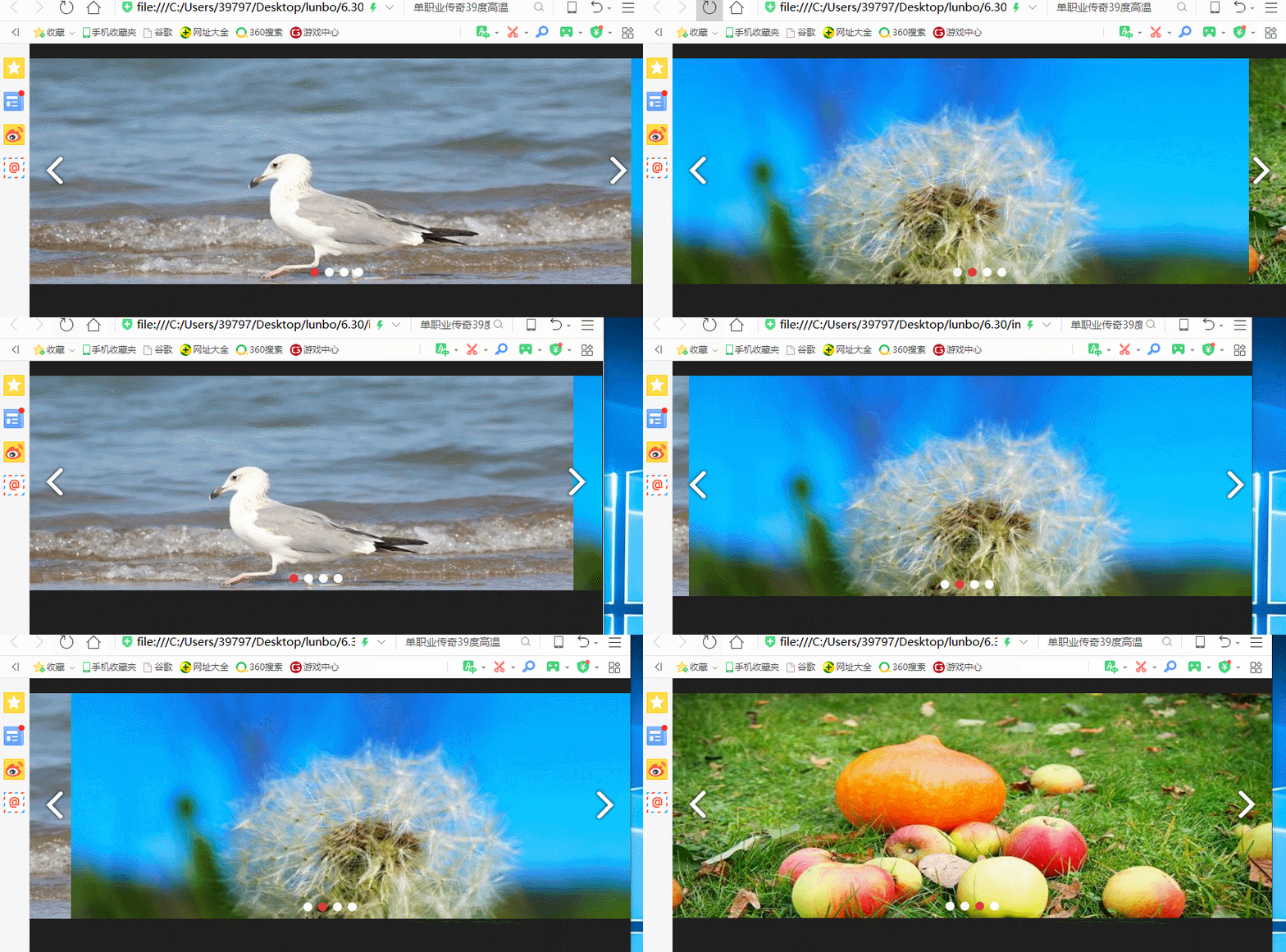
以上,轮播图完成了,支持窗口自适应;
不过有一点瑕疵,就是在窗口自适应的时候,个人感觉不太连续,目前还不知道问题出在哪里,有知道的大神请留言提示一下,谢谢;
记一个jquery 无缝轮播的制作方法的更多相关文章
- Jquery无缝轮播图的制作
轮播是html页面中比较常见的一种展现形式,也是基础,把轮播图做好,是排版中比较关键的 1.首先是轮播的html元素放置:做轮播之前,要有一个初步的认识 2.每个元素的位置怎样摆放,也是很关键的,这里 ...
- jquery 无缝轮播
新闻公告无缝轮播--demo 理解:向上移动一个li的高度+margin-bottom值,同时将ul第一个的li插入到ul的最后一个位置. <!DOCTYPE html> <html ...
- jQuery无缝轮播图思路详解-唯品会
效果图如上: 需求:图片自动轮播,鼠标移上停止播放,离开恢复播放,箭头切换图片. html代码 <!--轮播图大盒子开始--> <div class="wrap" ...
- jQuery插件slides实现无缝轮播图特效
初始化插件: slides是一款基于jQuery无缝轮播图插件,支持图内元素动画,可以自定义动画类型 1 2 3 4 5 6 7 8 9 10 $(".slideInner").s ...
- JQuery制作基础的无缝轮播与左右点击效果
在网页中我们想要的无缝轮播左右循环有好多好多中,这是我第一个轮播效果,也是最基础的,和大家分享一下,对于初学者希望你们能有所借鉴,对于大神我想让你们尽情的虐我给我宝贵的意见. 这个是我要的效果 进入正 ...
- jQuery图片无缝轮播
<!DOCTYPE html> <html> <head> <meta http-equiv="Content-Type" content ...
- js和jquery实现图片无缝轮播的不同写法
多掌握一种方法总是会有好处的,学习编程就要多思考,举一反三 下面写一下实现图片自动播放的代码,由于学习的是javascript,代码量很大,所以又学习了jquery库的操作,非常简便 还有非常有逼格的 ...
- jquery做一个小的轮播插件---有BUG,后续修改
//首页无缝轮播 ; (function($, window, document, undefined) { $.fn.slider = function(options) { var default ...
- js、jQuery实现文字上下无缝轮播、滚动效果
因项目需要实现消息通知上下无缝轮播的效果,所以写了一下,在这个分享出来,希望再次遇到此需求的道友,可以直接拷贝来用,节约一点不必要的时间. 原生JS版本 <!DOCTYPE html> & ...
随机推荐
- 解决android 9上无法使用http协议
用户反应本来好用的app,突然无法访问服务器,不能正常用了,拿到手机,从头检查权限,重新安装都不能解决,网络是正常的,怎么就不能访问网络了呢?所有想到的办法都用了而不能解决,最后想起看一下androi ...
- FCC JS基础算法题(4):Title Case a Sentence(句中单词首字母大写)
题目描述: 确保字符串的每个单词首字母都大写,其余部分小写.像'the'和'of'这样的连接符同理. 算法: function titleCase(str) { // 转小写及分割成数组 var st ...
- L2-020. 功夫传人*
L2-020. 功夫传人 参考博客 #include<vector> #include<cstring> #include<algorithm> using nam ...
- Js 编程题汇总
Coding题: 1. 预测以下代码的输出结果: var Foo = function(a) { function bar() { console.log(a); }; this.baz = func ...
- erlang工作总结
总结下自己在做erlang的经验 1.不管什么样的情况下,一定要关注好函数的返回值再来使用,不知道返回值盲目的使用的话,不仅不能达到目标,而且不存在代码/报错提醒.得不偿失. 2.构思好自己的想法,定 ...
- 拓扑排序bfs_dfs
dfs #include <cstdio> #include <cstring> using namespace std; ; struct Edge{ int lst; in ...
- alpha冲刺(3/10)
前言 队名:旅法师 作业链接 队长博客 燃尽图 会议 会议照片 会议内容 陈晓彬(组长) 今日进展: 召开会议 安排任务 博客撰写 制定计划 问题困扰: 前后端的交互沟通有点缺失,以至后端进度很慢,需 ...
- Socket基础之-启动异步服务侦听
Socket网络编程第一篇: 本文主要是以代码为主. .NET技术交流群 199281001 .欢迎加入 1 //负责监听的套接字 private Socket socketServer; //通知一 ...
- docker lamp
可以直接使用官方镜像搭建LAMP环境从官方下载PHP+Apache镜像和MySQL两个镜像来组成(如:php:7.2.3-apache-stretch和mysql:5.7.21)docker pull ...
- Spring/Spring MVC
90.为什么要使用 spring? 答:spring是一个开源框架,是个轻量级的控制反转(IoC)和面向切面(AOP)的容器框架 方便结构简化开发 AOP编码的支持 声明式事物的支持 方便程序的测试 ...