
spring-boot-learning-监控相关
springboot提供了对项目的监控功能,首先我们需要引入需要的jar包:
<!--监控包-->

        <!-- https://mvnrepository.com/artifact/org.springframework.boot/spring-boot-starter-actuator -->

        <dependency>

            <groupId>org.springframework.boot</groupId>

            <artifactId>spring-boot-starter-actuator</artifactId>

<!--            <version>2.3.2.RELEASE</version>-->

        </dependency>

        <!-- https://mvnrepository.com/artifact/org.springframework.hateoas/spring-hateoas -->

<!--        hateoas:Hypermedia as the engine of application state-->

<!--        REST架构风格中复杂的约束,支持springboot http监控端点的需要-->

        <dependency>

            <groupId>org.springframework.hateoas</groupId>

            <artifactId>spring-hateoas</artifactId>

            <version>1.1.1.RELEASE</version>

        </dependency>
spring-boot-starter-actuator 是springboot实施监控所必须的包。
Actuator默认会提供的端点包括下面:
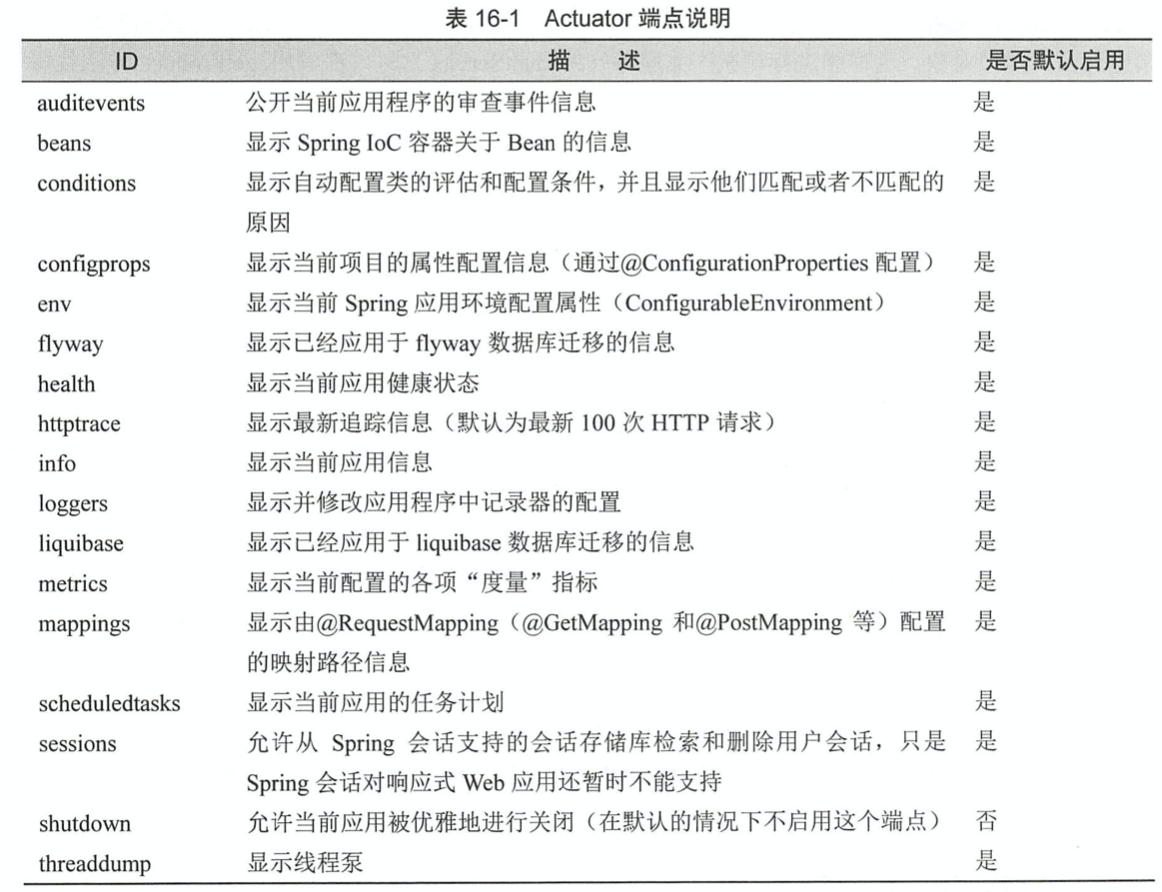
Springboot为这些断电提供多种监控手段,包括http和jmx等。
JMX是什么
JMX(Java Management Extensions,即 Java 管理扩展)是一个为应用程序、设备、系统等植入管理功能的框架。
JMX 可以跨越一系列异构操作系统平台、系统体系结构和网络传输协议,灵活的开发无缝集成的系统、网络和服务管理应用。

JMX 在 Java 编程语言中定义了应用程序以及网络管理和监控的体系结构、设计模式、应用程序接口以及服务。通常使用
JMX 来监控系统的运行状态或管理系统的某些方面,比如清空缓存、重新加载配置文件等。
这里学习的是http
当我们引用的包包括web和actuator的starter包之后,
我们启动项目后可以访问:
http://localhost:8181/actuator/health
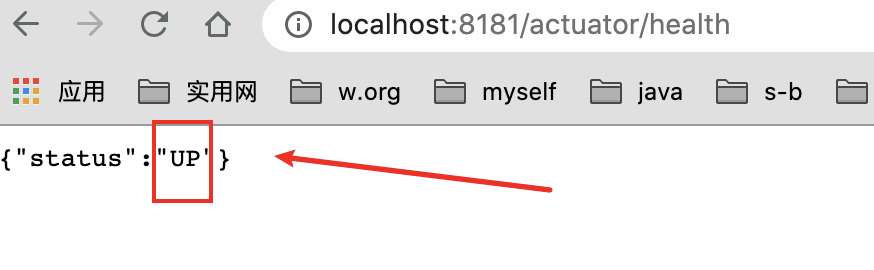
默认只开启了health和info
一些端点会显示一些项目的铭感信息,在默认情况下,springboot只会暴露info和health。其余的不暴露,
不过我们可以通过application.properties配置文件可以开启:
management.endpoints.web.exposure.include=info,health,beans

#不暴露env端点

#management.endpoints.web.exposure.exclude=env

#暴露所有端点

#management.endpoints.web.exposure.include=*
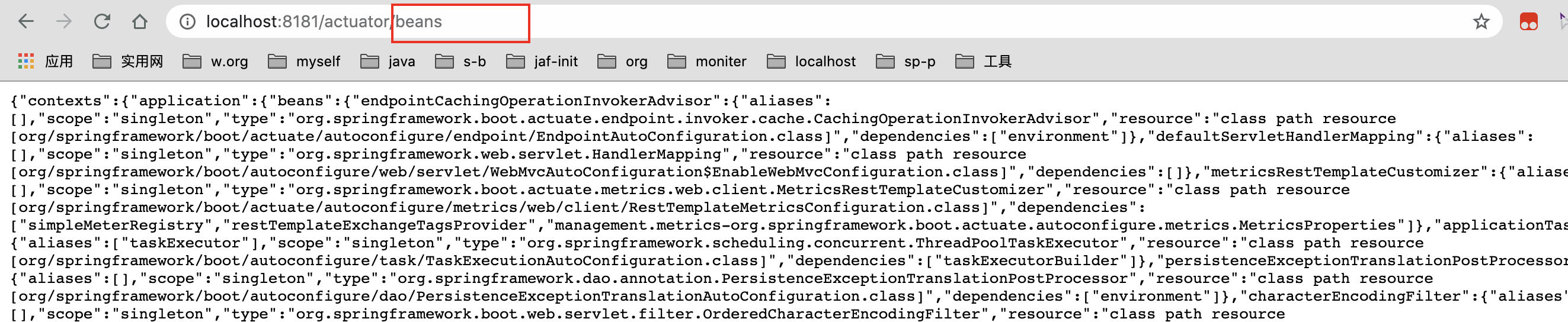
集合spring security 限制敏感信息特定人员登录:
shutdown端点:
。事实上,在默认的情况下, Actuator并不会给开发者启动这个端点, 因为请求它是危险的,从名称就可以知道, 请求它将关闭服务,不过我们可以通过配置文件开启,
#shutdown端点; 直接通过post请求URL关闭服务,

#默认是不会开启的,配置之后可以通过post请求进行访问,直接关闭应用

management.endpoint.shutdown.enabled=true
注意:这个是post请求
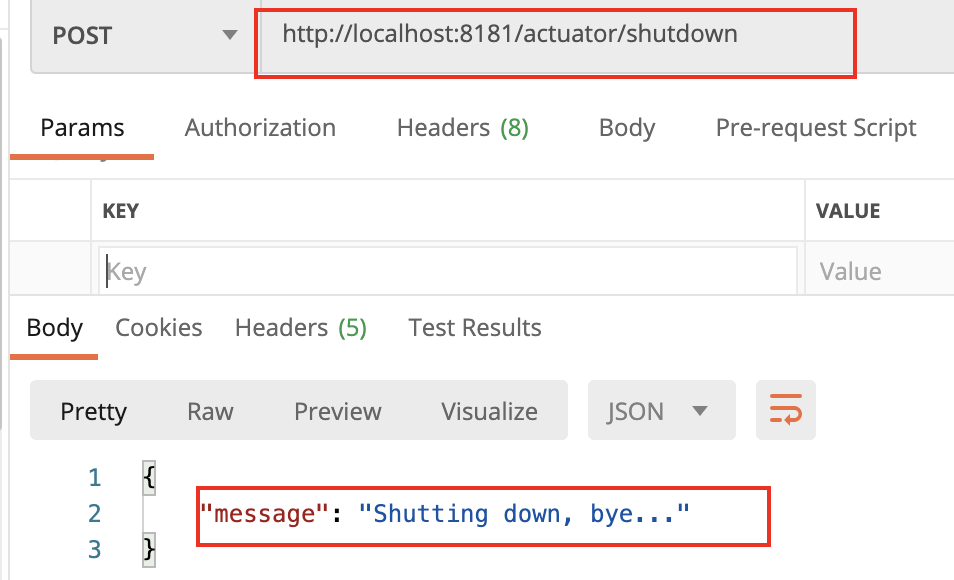
结果

配置端点:
我们可以安装Acuator的默认规则进行使用,也可以自己定义端点的配置:
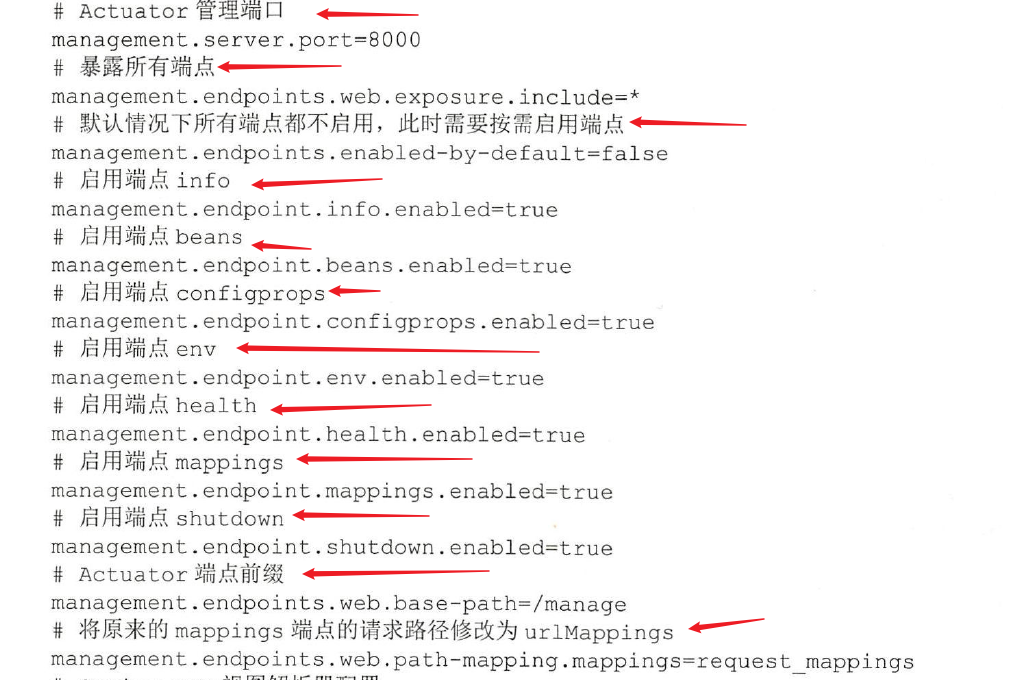
设置了服务器的监控端口为:8000,

通过配置属性management.endpoints.web.base_path=/manage将请求的前缀改为/manage,

所以请求的地址为http://localhost:8000/manage/{endpoint-path}

例如:http://localhost:8000/manage/health

上面设置了不启动任何端点,但是通过下面格式配置可以开启

management.endpoint.<endpointId>.enabled= true

management.endpoints.web.path-mapping.mappings=request_mappings将原来mappings的
端点请求路径从mappings修改为request_mappings
management.endpoints.web.path-mapping.env=/mapping/env将原来env的
端点请求路径从env修改为/mapping/env
自定义端点:
/**

 * 我们可以自定义自己的端点,加入注解@Endpoint,同时提供JMX监控和WEB监控

 * 注意:@JmxEndpoint:只开启JMX监控;@WebEndpoint:只开启web监控

 *

 * 场景:开发一个端点来检测数据是够能够连接上。

 *

 * @Endpoint 定义端点,端点id就是我们的Endpoint的name enableByDefault:默认起不起动端点

 *

 * @ReadOperation 一个端点只能存在一个这个注解去标注方法,代表http的get请求。

 *

 * 最好配置文件加入management.endpoint.dbcheck.enabled=true

 *

 * @ReadOperation == get    成功200  没有返回404

 * @WriteOperation == post  成功200 没有返回值204

 * @DeleteOperation == delete

 */

@Component

@Endpoint(id = "dbcheck",enableByDefault = true)

public class DataBaseConnectionEndPoint {

    private static final String DRIVER = "com.mysql.jc.jdbc.Driver";

    @Value("spring.datasource.url")

    private String url = null;

    @Value("spring.datasource.username")

    private String username= null;

    @Value("spring.datasource.password")

    private String password = null;

    @ReadOperation

    public Map<String,Object> test(){

        Connection connection =null;

        Map<String,Object> msgMap = new HashMap<>();

            try {

                Class.forName(DRIVER);

                connection = DriverManager.getConnection(url,username,password);

                msgMap.put("success",true);

                msgMap.put("message","数据库连接测试");

            } catch (ClassNotFoundException | SQLException e) {

                e.printStackTrace();

            }finally {

                if (connection != null){

                    try {

                        connection.close();

                    } catch (SQLException throwables) {

                        throwables.printStackTrace();

                    }

                }

            }

        return msgMap;

    }

}
配置文件中加入:
management.endpoint.dbcheck.enabled=true
即可启动访问
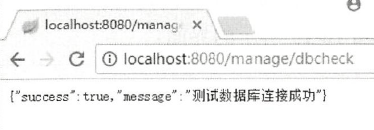
加入的配置就是开启我们自定义的端点dbcheck。
健康指标项
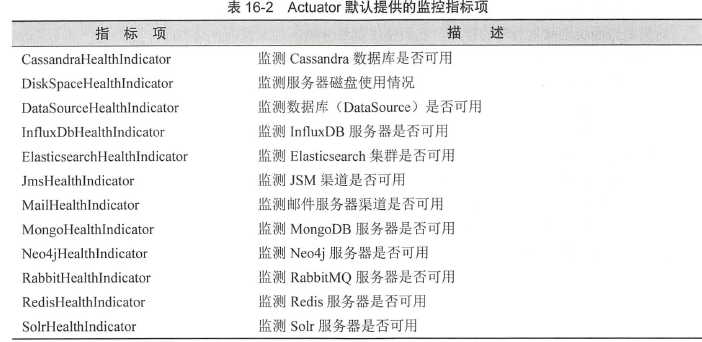
上面的健康指标是Actuator根据我们配置的项目进行自动开启的,只是他们默认请款下,不会进行展示
如果需要展示,需要进行下面配置
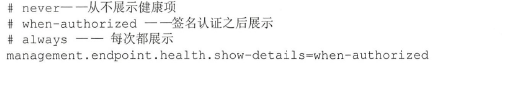
这里设置为always后,访问健康检查:
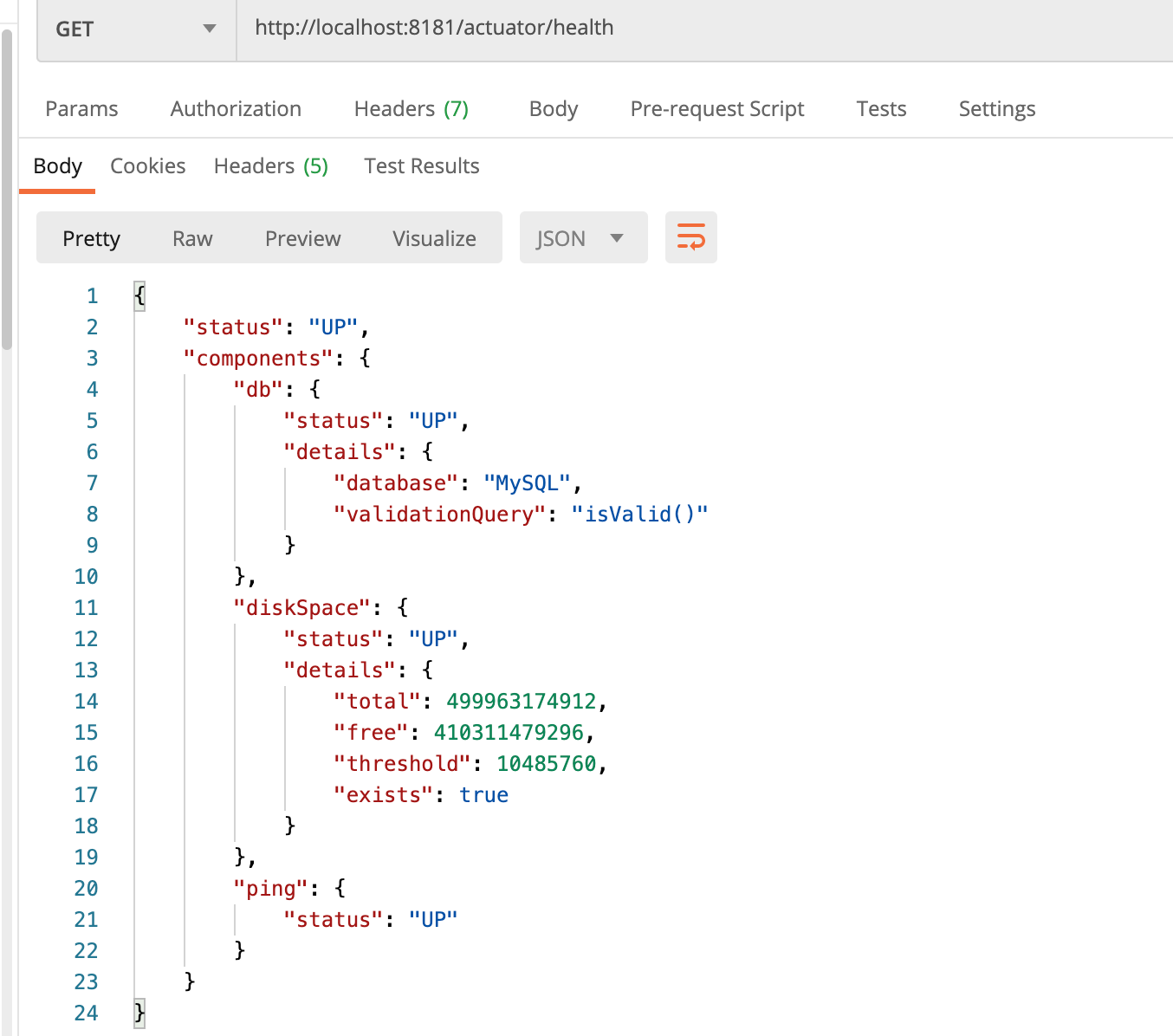
111也可以根据自己的需求区开启或者关闭自己的健康指标:
management.health.db.enabled=false
关闭对数据库的健康指标
222也可以先关闭所有健康检查指标,在开放自己感兴趣的指标
management.health.defaults.enabled=false

management.health.db.enabled=true
健康指标的严重级别
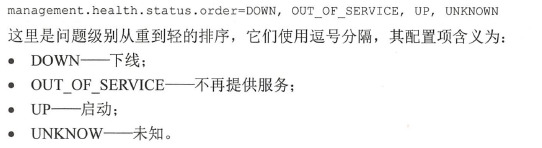
我们可以自定义自己的健康指标:
场景:现在需要监测服务器是否可以访问万维网( World Wide Web , WWW )
Actuator中的指标设计:

提供作为指标项的接口HealthIndicator,还基于这个接口提供了抽象类AbstractHealthIndicator和指标组合
CompositeHealthIndicator6
@Component

public class WwwHealthIndecator extends AbstractHealthIndicator {

    private final static String BAIDU_HOST = "www.baidu.com";

    private final static int TIME_OUT = 30000;

    @Override

    protected void doHealthCheck(Health.Builder builder) throws Exception {

        boolean status = ping();

        if (status) {

            builder.withDetail("message", "当前服务器可以反问百度").up();

        }else {

            builder.withDetail("message","当前无法访问百度").down();

        }

    }

    private boolean ping() throws Exception{

        try{

            return InetAddress.getByName(BAIDU_HOST).isReachable(TIME_OUT);

        }catch (Exception ex){

            return false;

        }

    }

}
的指标项类标注了@Component ,这样它将被扫描为Spring Bean 。这个指标项继承了

AbstractHealthlndicator,所以需要实现doHealthCheck 方法。doHealthCheck 方法有个Builder 参数,这

个参数的withDetail 方法可以添加一些消息项,还可以根据上下文环境来设置监控状态为“可用”( UP )

或者“不再提供服务” COUT OF SERVICE )。这里,通过监测百度服务器是否可以访问, 来判定万维

网是否可以访问,
结果:

spring-boot-learning-监控相关的更多相关文章
- spring Boot(十九):使用Spring Boot Actuator监控应用
spring Boot(十九):使用Spring Boot Actuator监控应用 微服务的特点决定了功能模块的部署是分布式的,大部分功能模块都是运行在不同的机器上,彼此通过服务调用进行交互,前后台 ...
- 转载-Spring Boot应用监控实战
概述 之前讲过Docker容器的可视化监控,即监控容器的运行情况,包括 CPU使用率.内存占用.网络状况以及磁盘空间等等一系列信息.同样利用SpringBoot作为微服务单元的实例化技术选型时,我们不 ...
- Spring Boot (十): Spring Boot Admin 监控 Spring Boot 应用
Spring Boot (十): Spring Boot Admin 监控 Spring Boot 应用 1. 引言 在上一篇文章<Spring Boot (九): 微服务应用监控 Spring ...
- Spring Boot Actuator监控使用详解
在企业级应用中,学习了如何进行SpringBoot应用的功能开发,以及如何写单元测试.集成测试等还是不够的.在实际的软件开发中还需要:应用程序的监控和管理.SpringBoot的Actuator模块实 ...
- java spring boot 开启监控信息
效果: 配置 // pom <dependency> <groupId>org.springframework.boot</groupId> <artifac ...
- 使用 Spring Boot Admin 监控应用状态
程序员优雅哥 SpringBoot 2.7 实战基础 - 11 - 使用 Spring Boot Admin 监控应用状态 1 Spring Boot Actuator Spring Boot Act ...
- springboot(十九):使用Spring Boot Actuator监控应用
微服务的特点决定了功能模块的部署是分布式的,大部分功能模块都是运行在不同的机器上,彼此通过服务调用进行交互,前后台的业务流会经过很多个微服务的处理和传递,出现了异常如何快速定位是哪个环节出现了问题? ...
- Spring Boot Actuator [监控与管理]
1. 如何添加 2. actuator 的原生端点(API) 2.1 应用类配置 2.1.1 http://localhost:8080/actuator/conditions 2.1.2 http: ...
- (转)Spring Boot (十九):使用 Spring Boot Actuator 监控应用
http://www.ityouknow.com/springboot/2018/02/06/spring-boot-actuator.html 微服务的特点决定了功能模块的部署是分布式的,大部分功能 ...
- Springboot 系列(十七)迅速使用 Spring Boot Admin 监控你的 Spring Boot 程序,支持异常邮件通知
1. Spring Boot Admin 是什么 Spring Boot Admin 是由 codecentric 组织开发的开源项目,使用 Spring Boot Admin 可以管理和监控你的 S ...
随机推荐
- ASP.NET Core 6框架揭秘实例演示[10]:Options基本编程模式
依赖注入使我们可以将依赖的功能定义成服务,最终以一种松耦合的形式注入消费该功能的组件或者服务中.除了可以采用依赖注入的形式消费承载某种功能的服务,还可以采用相同的方式消费承载配置数据的Options对 ...
- [题解]UVA10026 Shoemaker's Problem
链接:http://uva.onlinejudge.org/index.php?option=com_onlinejudge&Itemid=8&page=show_problem&am ...
- [Unity] 在软件标题栏显示工作路径
(一)问题 项目开发中常会有开多个分支,同时启动多个 Unity 程序的情况,来回切换的时候就容易混淆,有时候还需要用 Show In Explorer 或者其他标志来确认当前使用的是哪个分支. 于是 ...
- ALPS TCP新建配置——网络测试仪实操
本文主要介绍如何在ALPS平台上Step-By-Step配置TCP新建. 一.TCP新建介绍 TCP新建速率是防火墙等设备的一个重要指标,它用来评估防火墙等设备每秒能够处理的TCP创建的速率. 信而泰 ...
- SRv6规模部署,离不开测试技术保驾护航!
什么是SRv6? SRv6技术就是采用现有的IPv6转发技术,通过扩展IPv6报文的头域,实现类似标签转发的处理.SRv6将一些IPv6地址定义成实例化的SID(Segment ID),每个SID有着 ...
- 可视化BI工具选型,应该注意什么
伴随着大数据时代的到来,企业对数据的需求从"IT主导的报表模式"转向"业务主导的自助分析模式",可视化BI工具也随之应运而生.面对如此众多的可视化BI工具,我 ...
- 2021年国内BI厂商推荐_大数据分析工具
随着互联网大数据时代的不断发展,BI让企业的工作效率变得更高效.BI的功能也随着需求的增长不断地丰富,例如,数据可视化大屏.可视化表格.商业化数据分析.数据地图等.国外的厂商在很多场景下无法满足国内的 ...
- 【C# 调试】.net中的 .pdb文件是什么,有什么用
mscn:在 Visual Studio 调试器(C#)中指定符号 (.pdb) 和源文件 PDB全称Program Database,程序数据库 ( .pdb) 文件(也称为符号文件)将项目源代码中 ...
- 磁盘管理及shell脚本编程练习
转至:http://www.178linux.com/88405 1.创建一个10G分区,并格式为ext4文件系统 a) 要求其block大小为2048,预留空间百分比为2,卷标为MYDATA,默认挂 ...
- WPS:为什么无法页眉页脚同前节(同前节是灰的)
问题:,同前节是灰的 原因:全文只有一节,插入分节符就可以设置同前节了