
ROS librviz库
1、可视化管理类:rviz::VisualizationManager
The VisualizationManager class is the central manager class of rviz, holding all the Displays, Tools, ViewControllers, and other managers.
It keeps the current view controller for the main render window. It has a timer which calls update() on all the displays. It creates and holds pointers to the other manager objects: SelectionManager, FrameManager, the PropertyManager s, and Ogre::SceneManager.
  /**

   * \brief Constructor

   * Creates managers and sets up global properties.

   * @param render_panel a pointer to the main render panel widget of the app.

   * @param wm a pointer to the window manager (which is really just a

   *        VisualizationFrame, the top-level container widget of rviz).

   */

  explicit VisualizationManager(RenderPanel* render_panel, WindowManagerInterface* wm = nullptr);
在使用librviz时一般需要创建一个VisualizationManager对象,创建时给它指定渲染窗口RenderPanel,如下为在一个Qt运用的主窗口中嵌入librviz渲染窗口的示例:
// 创建渲染窗口,并将其添加到Qt主窗口布局中

render_panel_ = new rviz::RenderPanel();

QVBoxLayout* main_layout = new QVBoxLayout;

main_layout->addLayout( controls_layout );

main_layout->addWidget( render_panel_ );

setLayout( main_layout );

// 创建可视化管理对象

manager_ = new rviz::VisualizationManager( render_panel_ );

// 为渲染窗口关联场景相机及渲染上下文

render_panel_->initialize( manager_->getSceneManager(), manager_ );

// 初始化操作(必须,)

manager_->initialize();

// 启动刷新定时器,定时刷新librviz中的显示窗口

manager_->startUpdate();
用于管理Display的接口,Display就是rviz中左侧面板中可以显示的网格、坐标轴、话题等可视化元素
  // 用于管理Display的接口,Display就是rviz中左侧面板中可以显示的网格、坐标轴、话题等可视化元素

  /**

   * \brief Create and add a display to this panel, by class lookup name

   * @param class_lookup_name "lookup name" of the Display subclass, for pluginlib.

   *        Should be of the form "packagename/displaynameofclass", like "rviz/Image".

   * @param name The name of this display instance shown on the GUI, like "Left arm camera".

   * @param enabled Whether to start enabled

   * @return A pointer to the new display.

   */

  Display* createDisplay(const QString& class_lookup_name, const QString& name, bool enabled);

  /**

   * \brief Add a display to be managed by this panel

   * @param display The display to be added

   */

  void addDisplay(Display* display, bool enabled);

  /**

   * \brief Remove and delete all displays

   */

  void removeAllDisplays();
示例:添加点云话题显示
m_pointCloud2 = m_rvizManager->createDisplay("rviz/PointCloud2","pointCloud2", true);

ROS_ASSERT(m_pointCloud2 != nullptr);

m_pointCloud2->subProp("Topic")->setValue("/pcd_points");

m_pointCloud2->subProp("Unreliable")->setValue("false");

m_pointCloud2->subProp("Selectable")->setValue("true");

m_pointCloud2->subProp("Style")->setValue("Flat Squares");

m_pointCloud2->subProp("Size (m)")->setValue("0.1");

m_pointCloud2->subProp("Alpha")->setValue("1");

m_pointCloud2->subProp("Decay Time")->setValue("0");

m_pointCloud2->subProp("Position Transformer")->setValue("XYZ");//

m_pointCloud2->subProp("Color Transformer")->setValue("Intensity");

m_pointCloud2->subProp("Queue Size")->setValue("10");

m_pointCloud2->subProp("Use rainbow")->setValue("true");

m_pointCloud2->subProp("Invert Rainbow")->setValue("false");

m_pointCloud2->subProp("Autocompute Intensity Bounds")->setValue("true");

// m_pointCloud2->subProp("Min Intensity")->setValue("1");

// m_pointCloud2->subProp("Max Intensity")->setValue("255");

m_rvizManager->setFixedFrame("hx_map");
rviz/PointCloud2是rviz提供的默认插件,其所有的属性设置均显示在左侧面板: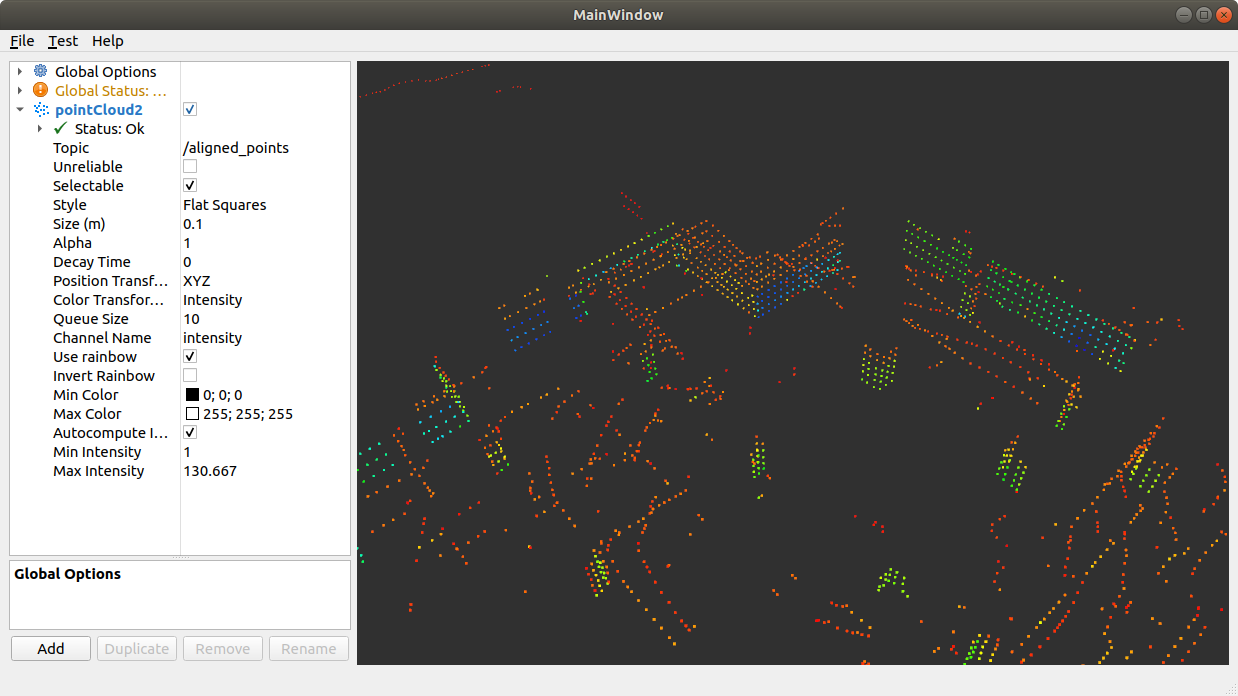
参考坐标系设置获取接口:
  /** @brief Return the fixed frame name.

   * @sa setFixedFrame() */

  QString getFixedFrame() const override;

  /** @brief Set the coordinate frame we should be transforming all fixed data into.

   * @param frame The name of the frame -- must match the frame name broadcast to libTF

   * @sa getFixedFrame() */

  void setFixedFrame(const QString& frame);
rviz配置保存与加载
  /** @brief Load the properties of each Display and most editable rviz data.

   *

   * This is what is called when loading a "*.rviz" file.

   *

   * @param config The Config object to read from.  Expected to be a Config::Map type.

   * @sa save()

   */

  void load(const Config& config);

  /**

   * \brief Save the properties of each Display and most editable rviz

   *        data.

   *

   * This is what is called when saving a "*.vcg" file.

   * \param config The object to write to.

   * \sa loadDisplayConfig()

   */

  void save(Config config) const;
还有其他接口暂未用到,具体可查看头文件:rviz/visualization_manager.h
ROS librviz库的更多相关文章
- ROS常用库(四)API学习之常用common_msgs(下)
一.前言 承接ROS常用库(三)API学习之常用common_msgs(上). 二.sensor_msgs 1.sensor_msgs / BatteryState.msg #电源状态 uint8 P ...
- ROS常用库(二) Serial库(单片机和上位机串口通讯)
比如我们做了个单片机,在win里面用串口调试助手接收和下发数据,那么在ubuntu里用ros怎么实现?换个说法,怎么实现上位机和下位机的通讯? 首先,用python自带的库就可以实现这个功能. 安装p ...
- TX2 安装 ROS 依赖库错误解决办法
一.更换ubuntu 16.04 更新源 1. 更新源 deb http://mirrors.ustc.edu.cn/ubuntu-ports/ xenial main multiverse rest ...
- ROS常用库(五)navigation之Tutorials
一.TF 详见古月居 https://www.guyuehome.com/355 重点:广播TF,订阅,编译时Cmakelist添加编译选项 broadcaster.sendTransform( tf ...
- ROS常用库(三)API学习之常用common_msgs(上)
一.概述 common_msgs包含其他ROS软件包广泛使用的消息.这些消息包括动作消息(actionlib_msgs),诊断消息(diagnostic_msgs),几何图元(geometry_msg ...
- ROS常用库(一) fake_localization
wiki是最好的学习资料,以下直接参考了wiki官网.另外po出官网网址,建议英语较好的朋友之接看原版 http://wiki.ros.org/fake_localization 概述 fake_lo ...
- ROS初探:(一)ROS架构
一.ROS架构 ROS架构上分为三个层级: 计算图级(Computation Graph level):体现进程与系统的关系,描述系统怎么运行. 文件系统级(Filesystem level):组织构 ...
- 快速了解 Robot Operating System(ROS) 机器人操作系统
http://www.ros.org/ 关于ROS About ROS http://www.ros.org/about-ros/ 机器人操作系统(ROS)是用于编写机器人软件的灵活框架.目的在简化 ...
- ROS机器人程序设计(原书第2版)补充资料 (柒) 第七章 3D建模与仿真 urdf Gazebo V-Rep Webots Morse
ROS机器人程序设计(原书第2版)补充资料 (柒) 第七章 3D建模与仿真 urdf Gazebo V-Rep Webots Morse 书中,大部分出现hydro的地方,直接替换为indigo或ja ...
- 关于ROS学习的一些反思
距离发布上一篇ROS的博客已经过去两年了,才发现原来自己已经这么久可没有写过关于ROS的文章,想来很是惭愧.这两年时间,自己怀着程序员的梦想,研究过RTOS,探索过Linux,编写过Android应用 ...
随机推荐
- Django框架:8、聚合查询、分组查询、F与Q查询、ORM查询优化、ORM事务操作、ORM常用字段类型、ORM常用字段参数
Django 数据库 目录 Django 数据库 一.聚合查询 二.分组查询 三.F查询与Q查询 1.F查询 2.Q查询 3.Q查询进阶操作 四.ORM查询优化 1.only与defer 五.ORM事 ...
- linux挖矿处置
挖矿的类型 主动挖矿:用户在个人电脑或服务器使用挖矿程序进行CPU,GPU计算,获取虚拟货币. 被动挖矿:挖矿病毒通过系统漏洞,恶意程序,弱口令等方式入侵服务器,设备感染挖矿病毒后会开始挖掘虚拟货币. ...
- Dubbo架构设计与源码解析(三)责任链模式
作者:周可强 一.责任链模式简介 1.责任链模式定义 责任链(Chain of Responsibility)模式的定义:为了避免请求发送者与多个请求处理者耦合在一起,于是将所有请求的处理者通过前一对 ...
- 对于goland相对较新一些版本新建项目时没用go mod模式选项的坑
前言 对于一些小白在网上看很早的一些go视频,使用goland2020.3.x版本或者其之前版本创建新项目,里面会有GO Modules(vgo)这个选项,也就是gomod模式创建新项目,然而对于现在 ...
- Java内存区域有哪些构成?
目录 前言 Java 内存区域 程序计数器 虚拟机栈 本地方法栈 堆 方法区 字符串常量池 运行时常量池 直接内存 小结 作者:小牛呼噜噜 | https://xiaoniuhululu.com 计算 ...
- Ubuntu 安装播放器
安装 VLC sudo snap install vlc snap 下载慢的看这里https://www.cnblogs.com/Ahtelek/p/ubuntu-snap.html
- 微机原理与系统设计笔记2 | 8086CPU结构与功能
打算整理汇编语言与接口微机这方面的学习记录.本部分讲解8086CPU的结构和基本功能以及特性. 参考资料 西电<微机原理与系统设计>周佳社 西交<微机原理与接口技术> 课本&l ...
- SpringCloud————>了解什么是微服务技术
SpringCloud是Spring为微服务架构思想做的一个一站式实现.从某种程度是可以简单的理解为,微服务是一个概念.一个项目开发的架构思想.SpringCloud是微服务架构的一种java实现. ...
- 软工综合实践课设——员工招聘系统(参考BOSS直聘);Pyhton实现
应用背景: 随着科学技术的发展,岗位数量越来越多,特别是每逢毕业季找工作的人数也很多,如果人们找工作或者企业招人靠纯手工的话,费时费力,仅仅是筛选简历和费劲,并且员工找工作投简历可能得需要克服时间和空 ...
- ES的基本语法
1 基本使用 使用kibaba来执行语句 es安装和kibaba安装:https://www.cnblogs.com/jthr/p/17075759.html 1)添加PUT 已存在会直接覆盖 PUT ...