
pytest测试实战和练习
开头
经过前面几章的学习,这时候要来个测试实战会比较好巩固一下学过的知识
任务要求
1、实现计算器(加法,除法)的测试用例
2、使用数据驱动完成测试用例的自动生成
3、在调用测试方法之前打印【开始计算】,在调用测试方法之后打印【计算结束】
目录结构
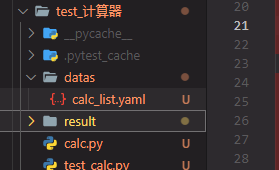
目录解析
datas/calc_list.yaml yaml文件用来保存相关的测试用例 要使用yaml先得安装yaml相关的包 pyyaml
result目录为pytest生成的来存放测试报告的目录
calc.py 为 计算器通用函数的一个类
test_cala.py 执行pytest测试用例的文件
calc_list.yaml
# 计算器的测试用例合集

calc_case:

  add_list:

      - [1,2,3]

      - [100,200,300]

      - [0.1,0.2,0.3]

      - [-1,-2,-3]

      - [-0.1, 0.2, 0.3]

  sub_list:

      - [2,1,1]

      - [300,200,100]

      - [0.1,0.2,-0.1]

      - [-1,-2, 1]

      - [-0.1, -0.2, 0.3]

  mul_list:

      - [1,2,2]

      - [100,200,20000]

      - [0.1,0.2,0.02]

      - [-1,-2,2]

      - [-0.1, 0.2, 0.2]

  div_list:

      - [1,2,0.5]

      - [100,200,0.5]

      - [0.1,0.2,0.5]

      - [-1,-2,0.5]

      - [-0.1, 0, 0]

  all_ids:

      - 'int'

      - 'bigint'

      - 'float'

      - 'negative'

      - 'fail'
calc.py
# 计算器

class Calculator:

    def add(self, a, b):

        return a + b

    def sub(self, a, b):

        return a - b

    def mul(self, a, b):

        return a * b

    def division(self, a, b):

        return a / b
test_calc.py
from calc import Calculator

import yaml

import pytest

import allure

with open('./datas/calc_list.yaml', 'r', encoding='utf-8') as f:

    datas = yaml.safe_load(f)['calc_case']

    add_list = datas['add_list']  # 加法测试用例

    sub_list = datas['sub_list']  # 减法测试用例

    mul_list = datas['mul_list']  # 乘法测试用例

    div_list = datas['div_list']  # 除法测试用例

    ids = datas['all_ids']  # 全部的标签

    print(datas)

@allure.feature("计算器模块")

class TestCalc:

    def setup_class(self):

        print("计算器开始计算")

        self.calc = Calculator()

    def teardown_class(self):

        print("计算器结束计算")

    @allure.story("加法运算")

    @pytest.mark.parametrize("a, b, expect", add_list, ids=ids)

    def test_add(self, a, b, expect):

        with allure.step(f"输入测试用例{a}, {b}, 预期结果为{expect}"):

            result = self.calc.add(a, b)

            if isinstance(result, float):  # 判断浮点数

                result = round(result, 2)

        assert expect == result

    @allure.story("减法运算")

    @pytest.mark.parametrize("a, b, expect", sub_list, ids=ids)

    def test_sub(self, a, b, expect):

        with allure.step(f"输入测试用例{a}, {b}, 预期结果为{expect}"):

            result = self.calc.sub(a, b)

            if isinstance(result, float):  # 判断浮点数

                result = round(result, 2)

        assert expect == result

    @allure.story("乘法运算")

    @pytest.mark.parametrize("a, b, expect", mul_list, ids=ids)

    def test_mul(self, a, b, expect):

        with allure.step(f"输入测试用例{a}, {b}, 预期结果为{expect}"):

            result = self.calc.mul(a, b)

            if isinstance(result, float):  # 判断浮点数

                result = round(result, 2)

        assert expect == result

    @allure.story("除法运算")

    @pytest.mark.parametrize("a, b, expect", div_list, ids=ids)

    def test_div(self, a, b, expect):

        with allure.step(f"输入测试用例{a}, {b}, 预期结果为{expect}"):

            result = self.calc.division(a, b)

            if isinstance(result, float):  # 判断浮点数

                result = round(result, 2)

        assert expect == result

if __name__ == '__main__':

    # pytest.main(["-vs", "test_calc.py::TestCalc::test_div"])  # 不需要allure的时候执行, 指定某个测试用例

    pytest.main(["--alluredir=result/2", "test_calc.py"])  # 生成allure

    # 查看allure用例 allure serve .\result\2\
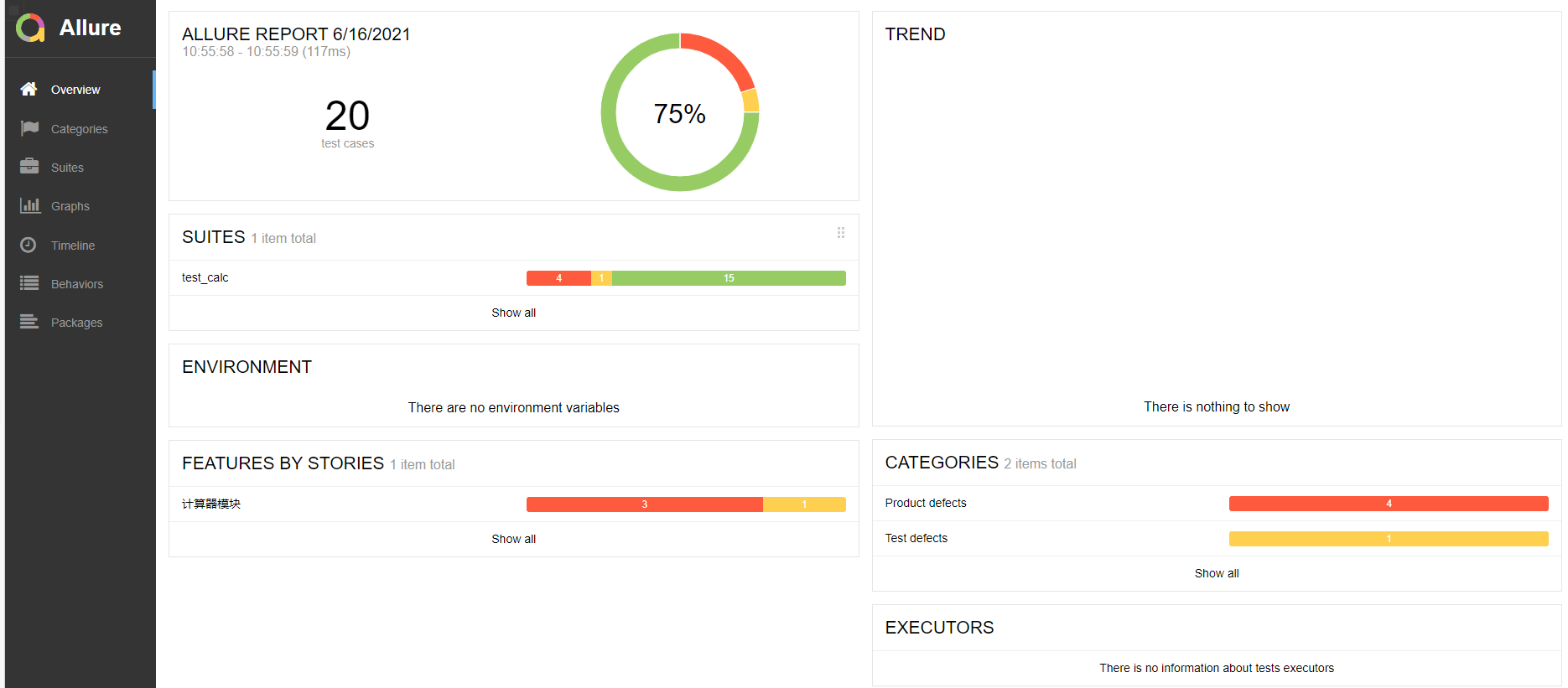
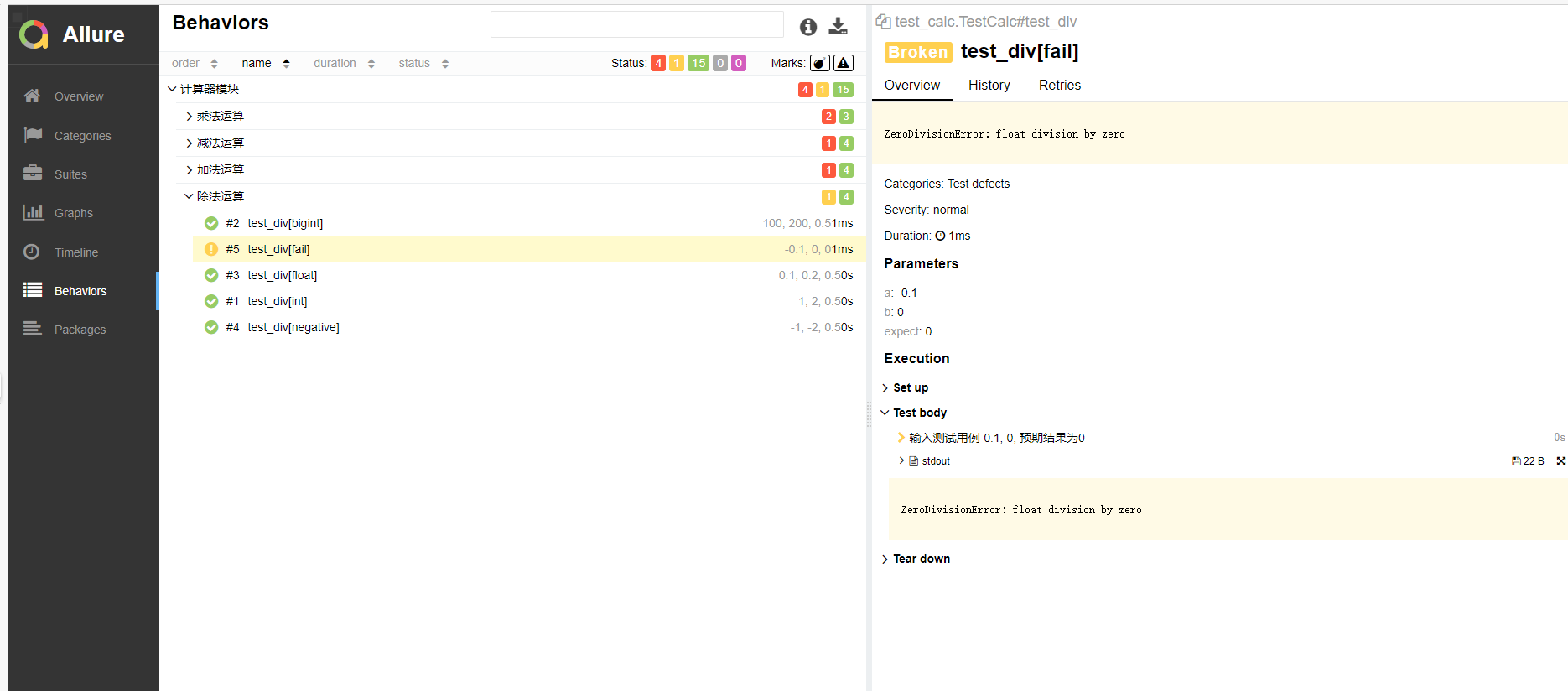
生成的allure如图所示
任务改写2
1、改造 计算器 测试用例,使用fixture函数获取计算器的实例
2、计算之前打印开始计算,计算之后打印结束计算
3、添加用例日志,并将日志保存到日志文件目录下
4、生成测试报告,展示测试用例的标题,用例步骤,与测试日志,截图附到课程贴下
目录结构

目录解析
datas/calc_list.yaml yaml文件用来保存相关的测试用例 要使用yaml先得安装yaml相关的包 pyyaml
result目录为pytest生成的来存放测试报告的目录
calc.py 为 计算器通用函数的一个类
test_cala2.py 执行pytest测试用例的文件
conftest.py 为所有测试用例执行前都会执行到这个的文件,要有__init__.py文件跟在同目录下
pytest.ini pytest框架的一个设置, 可以设置开启日志
conftest.py 用fixture改写:
import pytest

from .calc import Calculator

@pytest.fixture(scope="class")

def get_cal():

    print("====实例化计算器, 开始计算===")

    cal = Calculator()

    yield cal

    print("====计算完成====")
pytest.ini 增加保存的日志
[pytest]

log_cli=true

log_level=NOTSET

log_format = %(asctime)s %(levelname)s %(message)s

log_date_format = %Y-%m-%d %H:%M:%S

addopts = -vs

log_file = ./test.log

log_file_level = info

log_file_format = %(asctime)s %(levelname)s %(message)s

log_file_date_format = %Y-%m-%d %H:%M:%S
test_cala2.py 改写第一部分
import yaml

import allure

import pytest

import logging

logging.basicConfig(level=logging.info)

logger = logging.getLogger()

with open('./datas/calc_list.yaml', 'r', encoding='utf-8') as f:

    datas = yaml.safe_load(f)['calc_case']

    add_list = datas['add_list']  # 加法测试用例

    sub_list = datas['sub_list']  # 减法测试用例

    mul_list = datas['mul_list']  # 乘法测试用例

    div_list = datas['div_list']  # 除法测试用例

    ids = datas['all_ids']  # 全部的标签

    print(datas)

@allure.feature("计算器模块")

class TestCalc2:

    @allure.story("加法运算")

    @pytest.mark.parametrize("a, b, expect", add_list, ids=ids)

    def test_add(self, a, b, expect, get_cal):

        logger.info('增加加法日志')

        with allure.step(f"输入测试用例{a}, {b}, 预期结果为{expect}"):

            result = get_cal.add(a, b)

            if isinstance(result, float):  # 判断浮点数

                result = round(result, 2)

        assert expect == result

    @allure.story("减法运算")

    @pytest.mark.parametrize("a, b, expect", sub_list, ids=ids)

    def test_sub(self, a, b, expect, get_cal):

        with allure.step(f"输入测试用例{a}, {b}, 预期结果为{expect}"):

            result = get_cal.sub(a, b)

            if isinstance(result, float):  # 判断浮点数

                result = round(result, 2)

        assert expect == result

    @allure.story("乘法运算")

    @pytest.mark.parametrize("a, b, expect", mul_list, ids=ids)

    def test_mul(self, a, b, expect, get_cal):

        with allure.step(f"输入测试用例{a}, {b}, 预期结果为{expect}"):

            result = get_cal.mul(a, b)

            if isinstance(result, float):  # 判断浮点数

                result = round(result, 2)

        assert expect == result

    @allure.story("除法运算")

    @pytest.mark.parametrize("a, b, expect", div_list, ids=ids)

    def test_div(self, a, b, expect, get_cal):

        with allure.step(f"输入测试用例{a}, {b}, 预期结果为{expect}"):

            result = get_cal.division(a, b)

            if isinstance(result, float):  # 判断浮点数

                result = round(result, 2)

                print(result)

        assert expect == result

if __name__ == '__main__':

    # pytest.main(["-vs", "test_calc2.py::TestCalc2::test_add"])  # 不需要allure的时候执行, 指定某个测试用例

    pytest.main(["--alluredir=result/3", "test_calc2.py"])  # 生成allure

    # 查看allure用例 allure serve .\result\2\
最后完结。
pytest测试实战和练习的更多相关文章
- 关于《精通移动App测试实战:技术、工具和案例》图书勘误信息
首先,对由于我们工作的疏忽向<精通移动App测试实战:技术.工具和案例>读者朋友们表示歉意,同时已将这些问题反馈给了出版社编辑同志,再版时将会统一修正: 其次,勘误信息请参看附件pdf文档 ...
- Jmeter分布式测试实战
一.Jmeter分布式测试基础 1.Jmeter分布式测试原因: 在使用Jmeter进行接口的性能测试时,由于Jmeter 是JAVA应用,对负载机的CPU和内存消耗比较大.所以当需要模拟数以万计的并 ...
- Pytest 测试框架
一 . Pytest 简介 Pytest是python的一种单元测试框架. 1. pytest 特点 入门简单,文档丰富 支持单元测试,功能测试 支持参数化,重复执行,部分执行,测试跳过 兼容其他测试 ...
- 《Web安全攻防 渗透测试实战指南 》 学习笔记 (五)
Web安全攻防 渗透测试实战指南 学习笔记 (五) 第四章 Web安全原理解析 (一) (一)SQL注入的原理 1.web应用程序对用户输入数据的合法性没有判断. 2.参数用户可控:前端传给 ...
- 《Web安全攻防 渗透测试实战指南》 学习笔记 (四)
Web安全攻防 渗透测试实战指南 学习笔记 (四) Nmap Network Mapper 是一款开放源代码的网 ...
- 《Web安全攻防 渗透测试实战指南 》 学习笔记 (三)
Web安全攻防 渗透测试实战指南 学习笔记 (三) burp suite详解 是一款集成化渗透测试工 ...
- 《Web安全攻防 渗透测试实战指南》 学习笔记 (二)
Web安全攻防 渗透测试实战指南 学习笔记 (二) 第二章 漏洞环境及实践
- 《Web安全攻防 渗透测试实战指南》 学习笔记(一)
Web安全攻防 渗透测试实战指南 学习笔记 (一) 第一章 信息收集 在信息收集中,最重要是收集服务器的配置信息和网站敏感信息(域名及子域名信息目标网站系统.CMS指纹.目标网站真实I ...
- pytest测试框架 -- 简介
一.pytest测试框架简介: (1)pytest是python的第三方测试框架,是基于unittest的扩展框架,比unittest更简洁,更高效. (2)pytest框架可以兼容unittest用 ...
- pytest测试框架入门
安装pytest 命令行输入: pip install -U pytest 检查是否安装了正确的版本: λ pytest --version This is pytest version 5.3.5, ...
随机推荐
- 大数据组件对应Ranger插件的选择
在都是开源组件的前提下,一般需要我们多关注到组件和插件的版本和类型选择. 参考 https://zhuanlan.zhihu.com/p/370263573 https://www.bookstack ...
- Leecode 21.合并两个有序链表(Java 迭代、递归两种方法)
想法: 1.迭代 设两个指针pa和pb,不断移动pa和pb,并进行比较,则将较小元素接到新链表,该过程直至pa或pb为null,之后将未空的接到已空之后,得到升序链表 1 //官方: 2 cl ...
- 2022.07.13 vue3下pinia的简单使用及持久化
使用前说明: 当前demo使用了vue3 + vite + typescript + pinia搭建的简单项目,主要介绍了在单文件组件(sfc)基础上使用pinia的用法,懒得看api的兄弟们,来这瞅 ...
- 在win10上装vmware虚拟机+ubuntu一打开就蓝屏重启怎么办?
一般就是虚拟机和系统一些性能不兼容导致的 因为我原来装的版本是15.0的vmware,现在重新装了16的vmware
- jmeter--操作
Jmeter响应断言--正则表达式判断纯数字 这样是匹配14位数字,如果响应是纯数字可以直接用上 jmeter 随机取一个值的方法 1.添加用户自定义变量 在要用到随机值的地方写入 ${__Ran ...
- token解决cookie的弊端
token解决cookie的弊端 目录 token解决cookie的弊端 cookie的弊端 token解决弊端一 什么是token和JWT JWT的构成 token工作流程 token解决弊端二 C ...
- 记录一次线上gitlab11.x升级gitlab14.x版本操作
前言:gitlab11升级到14还是有挺多需要注意的坑,也算是做一次积累吧,升级前后,gitalb的WEB界面也变化了很多,升级过程需要注意的地方我放到最后说明,挺关键的 一.首先需要下载好要升级的包 ...
- 在wxpython框架写的GUI中调用GIF格式图片,显示在指定行列的方法
#首先需要从 wx.adv 模块导入 Animation, AnimationCtrl方法 from wx.adv import Animation, AnimationCtrl #然后在面板实现过程 ...
- pyinstall打包工具使用简介
使用pyinstall进行多个文件打包,直接打包主入口文件即可 pyinstaller MainUI.py -F -n ServerMonitorv200 -i PIC.ico -w 此处MainUI ...
- v-model 和 .sync
v-model的本质是父子组件间的通讯,父组件给子组件传递一个value自定义属性和input自定义事件:子组件接收value 并触发自定义事件修改value 父组件中 <Child v-mod ...