
Vue 实现小小记事本
1、实现效果
用户输入后按回车,输入的内容自动保存,下方会显示记录的条数,鼠标移动到文字所在div上,会显示删除按钮,点击按钮,相应记录会被删除,下方的记录条数会相应变化,点击clear,所有记录会被删除。效果如下:
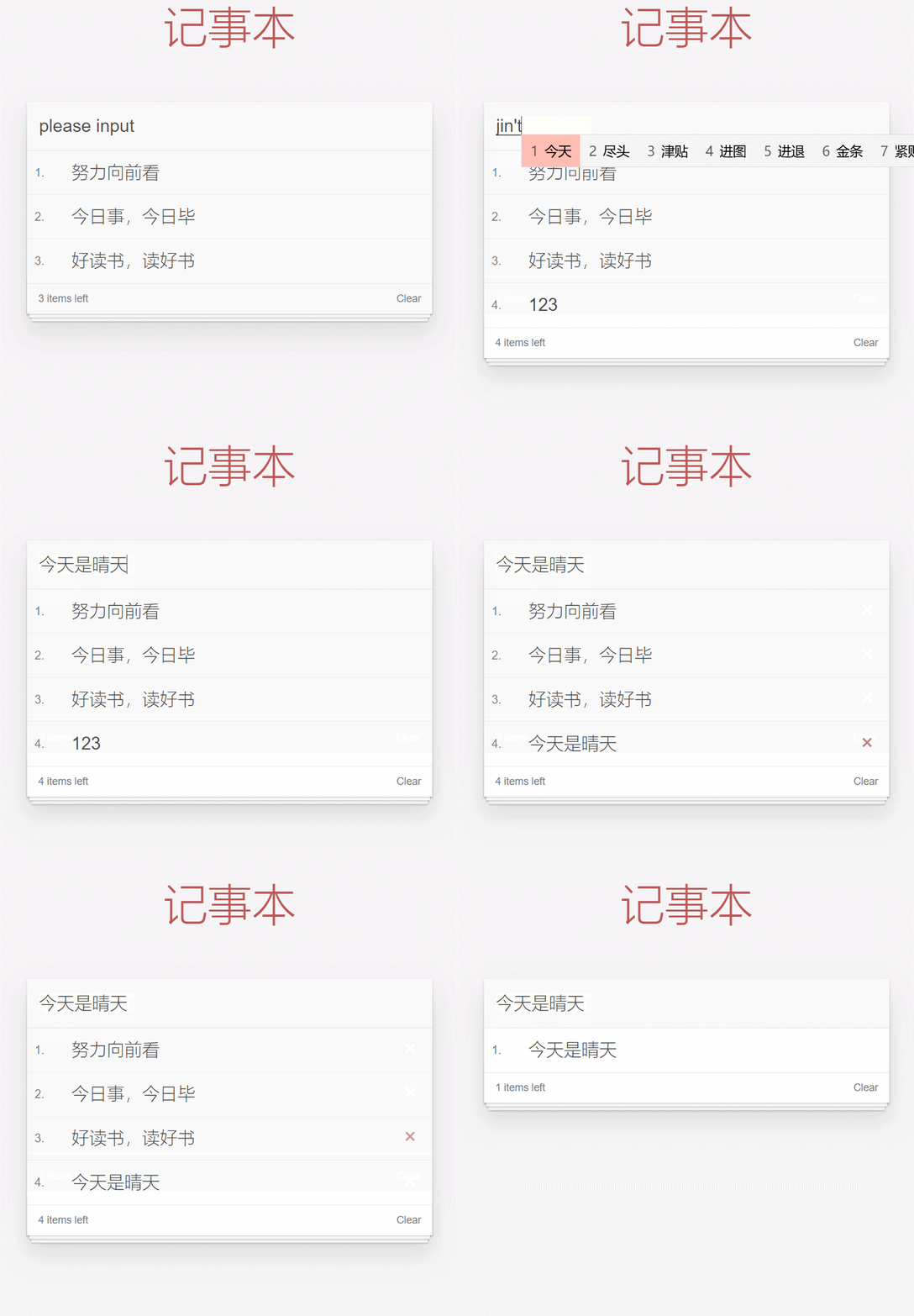
2、实现思路
- 先写出记事本的基本样式,在vue实例中的data对象里定义list数组,以及message的初始值。通过 v-model实现input标签文本和message的双向绑定。通过v-for循环遍历li标签,取出list数组中的数据。
- 给input框通过keyup.enter绑定回车事件add,直接把当前输入的值添加到list数组里,然后遍历到li标签里。
- 在li标签的button标签里添加remove事件。先传入index,通过this.list.splice(index, 1) 删除当前记录。
- 在下方的footer部分,判断是否存在记录,若不存在,则销毁标签,若存在,则添加clear事件,直接把list数组赋值为空,就可以清除所有的记录。
3、实现代码
index.css
html,
body {
margin: 0;
padding: 0;
}
body {
background: #fff;
}
button {
margin: 0;
padding: 0;
border: 0;
background: none;
font-size: 100%;
vertical-align: baseline;
font-family: inherit;
font-weight: inherit;
color: inherit;
-webkit-appearance: none;
appearance: none;
-webkit-font-smoothing: antialiased;
-moz-osx-font-smoothing: grayscale;
} body {
font: 14px "Helvetica Neue", Helvetica, Arial, sans-serif;
line-height: 1.4em;
background: #f5f5f5;
color: #4d4d4d;
min-width: 230px;
max-width: 550px;
margin: 0 auto;
-webkit-font-smoothing: antialiased;
-moz-osx-font-smoothing: grayscale;
font-weight: 300;
} :focus {
outline: 0;
} .hidden {
display: none;
}todoapp {
background: #fff;
margin: 180px 0 40px 0;
position: relative;
box-shadow: 0 2px 4px 0 rgba(0, 0, 0, 0.2), 0 25px 50px 0 rgba(0, 0, 0, 0.1);
}todoapp input::-webkit-input-placeholder {
font-style: italic;
font-weight: 300;
color: #e6e6e6;
}todoapp input::-moz-placeholder {
font-style: italic;
font-weight: 300;
color: #e6e6e6;
}todoapp input::input-placeholder {
font-style: italic;
font-weight: 300;
color: gray;
}todoapp h1 {
position: absolute;
top: -160px;
width: 100%;
font-size: 60px;
font-weight: 100;
text-align: center;
color: rgba(175, 47, 47, .8);
-webkit-text-rendering: optimizeLegibility;
-moz-text-rendering: optimizeLegibility;
text-rendering: optimizeLegibility;
} .new-todo,
.edit {
position: relative;
margin: 0;
width: 100%;
font-size: 24px;
font-family: inherit;
font-weight: inherit;
line-height: 1.4em;
border: 0;
color: inherit;
padding: 6px;
border: 1px solid #999;
box-shadow: inset 0 -1px 5px 0 rgba(0, 0, 0, 0.2);
box-sizing: border-box;
-webkit-font-smoothing: antialiased;
-moz-osx-font-smoothing: grayscale;
} .new-todo {
padding: 16px;
border: none;
background: rgba(0, 0, 0, 0.003);
box-shadow: inset 0 -2px 1px rgba(0, 0, 0, 0.03);
} .main {
position: relative;
z-index: 2;
border-top: 1px solid #e6e6e6;
} .toggle-all {
width: 1px;
height: 1px;
border: none; /* Mobile Safari */
opacity: 0;
position: absolute;
right: 100%;
bottom: 100%;
} .toggle-all + label {
width: 60px;
height: 34px;
font-size: 0;
position: absolute;
top: -52px;
left: -13px;
-webkit-transform: rotate(90deg);
transform: rotate(90deg);
} .toggle-all + label:before {
content: "❯";
font-size: 22px;
color: #e6e6e6;
padding: 10px 27px 10px 27px;
} .toggle-all:checked + label:before {
color: #737373;
} .todo-list {
margin: 0;
padding: 0;
list-style: none;
max-height: 420px;
overflow: auto;
} .todo-list li {
position: relative;
font-size: 24px;
border-bottom: 1px solid #ededed;
height: 60px;
box-sizing: border-box;
} .todo-list li:last-child {
border-bottom: none;
} .todo-list .view .index {
position: absolute;
color: gray;
left: 10px;
top: 20px;
font-size: 16px;
} .todo-list li .toggle {
text-align: center;
width: 40px;
/* auto, since non-WebKit browsers doesn't support input styling /
height: auto;
position: absolute;
top: 0;
bottom: 0;
margin: auto 0;
border: none; / Mobile Safari */
-webkit-appearance: none;
appearance: none;
} .todo-list li .toggle {
opacity: 0;
} .todo-list li .toggle + label {
/*
Firefox requires#to be escaped - https://bugzilla.mozilla.org/show_bug.cgi?id=922433
IE and Edge requires everything to be escaped to render, so we do that instead of just the#- https://developer.microsoft.com/en-us/microsoft-edge/platform/issues/7157459/
*/
background-image: url("data:image/svg+xml;utf8,%3Csvg%20xmlns%3D%22http%3A//www.w3.org/2000/svg%22%20width%3D%2240%22%20height%3D%2240%22%20viewBox%3D%22-10%20-18%20100%20135%22%3E%3Ccircle%20cx%3D%2250%22%20cy%3D%2250%22%20r%3D%2250%22%20fill%3D%22none%22%20stroke%3D%22%23ededed%22%20stroke-width%3D%223%22/%3E%3C/svg%3E");
background-repeat: no-repeat;
background-position: center left;
} .todo-list li .toggle:checked + label {
background-image: url("data:image/svg+xml;utf8,%3Csvg%20xmlns%3D%22http%3A//www.w3.org/2000/svg%22%20width%3D%2240%22%20height%3D%2240%22%20viewBox%3D%22-10%20-18%20100%20135%22%3E%3Ccircle%20cx%3D%2250%22%20cy%3D%2250%22%20r%3D%2250%22%20fill%3D%22none%22%20stroke%3D%22%23bddad5%22%20stroke-width%3D%223%22/%3E%3Cpath%20fill%3D%22%235dc2af%22%20d%3D%22M72%2025L42%2071%2027%2056l-4%204%2020%2020%2034-52z%22/%3E%3C/svg%3E");
} .todo-list li label {
word-break: break-all;
padding: 15px 15px 15px 60px;
display: block;
line-height: 1.2;
transition: color 0.4s;
} .todo-list li.completed label {
color: #d9d9d9;
text-decoration: line-through;
} .todo-list li .destroy {
display: none;
position: absolute;
top: 0;
right: 10px;
bottom: 0;
width: 40px;
height: 40px;
margin: auto 0;
font-size: 30px;
color: #cc9a9a;
margin-bottom: 11px;
transition: color 0.2s ease-out;
} .todo-list li .destroy:hover {
color: #af5b5e;
} .todo-list li .destroy:after {
content: "×";
} .todo-list li:hover .destroy {
display: block;
} .todo-list li .edit {
display: none;
} .todo-list li.editing:last-child {
margin-bottom: -1px;
} .footer {
color: #777;
padding: 10px 15px;
height: 20px;
text-align: center;
border-top: 1px solid #e6e6e6;
} .footer:before {
content: "";
position: absolute;
right: 0;
bottom: 0;
left: 0;
height: 50px;
overflow: hidden;
box-shadow: 0 1px 1px rgba(0, 0, 0, 0.2), 0 8px 0 -3px #f6f6f6,
0 9px 1px -3px rgba(0, 0, 0, 0.2), 0 16px 0 -6px #f6f6f6,
0 17px 2px -6px rgba(0, 0, 0, 0.2);
} .todo-count {
float: left;
text-align: left;
} .todo-count strong {
font-weight: 300;
} .filters {
margin: 0;
padding: 0;
list-style: none;
position: absolute;
right: 0;
left: 0;
} .filters li {
display: inline;
} .filters li a {
color: inherit;
margin: 3px;
padding: 3px 7px;
text-decoration: none;
border: 1px solid transparent;
border-radius: 3px;
} .filters li a:hover {
border-color: rgba(175, 47, 47, 0.1);
} .filters li a.selected {
border-color: rgba(175, 47, 47, 0.2);
} .clear-completed,
html .clear-completed:active {
float: right;
position: relative;
line-height: 20px;
text-decoration: none;
cursor: pointer;
} .clear-completed:hover {
text-decoration: underline;
} .info {
margin: 50px auto 0;
color: #bfbfbf;
font-size: 15px;
text-shadow: 0 1px 0 rgba(255, 255, 255, 0.5);
text-align: center;
} .info p {
line-height: 1;
} .info a {
color: inherit;
text-decoration: none;
font-weight: 400;
} .info a:hover {
text-decoration: underline;
} /*
Hack to remove background from Mobile Safari.
Can't use it globally since it destroys checkboxes in Firefox
*/
@media screen and (-webkit-min-device-pixel-ratio: 0) {
.toggle-all,
.todo-list li .toggle {
background: none;
} .todo-list li .toggle {
height: 40px;
}
} @media (max-width: 430px) {
.footer {
height: 50px;
}.filters {
bottom: 10px;
}
}
html与Vue部分
<html lang="en"> <head>
<meta charset="UTF-8">
<meta http-equiv="X-UA-Compatible" content="IE=edge">
<meta name="viewport" content="width=device-width, initial-scale=1.0">
<title>记事本</title>
</head>
<link rel="stylesheet" type="text/css" href="index.css" /> <body>
<!-- 主体区域 -->
<section id="todoapp">
<!-- 输入框 -->
<header class="header">
<h1>记事本</h1>
<input autofocus="autofocus" autocomplete="off" placeholder="请输入任务" class="new-todo" v-model="message"
@keyup.enter="add" />
</header>
<!-- 列表区域 -->
<section class="main">
<ul class="todo-list">
<li class="todo" v-for="(item,index) in list">
<div class="view">
<span class="index">{{ index+1 }}.</span>
<label>{{ item }}</label>
<button class="destroy" @click="remove(index)"></button>
</div>
</li>
</ul>
</section>
<!-- 统计和清空 -->
<footer class="footer" v-show="list.length!=0">
<span class="todo-count" v-if="list.length!=0">
<strong>{{list.length}}</strong> items left
</span>
<button class="clear-completed" @click="clear">
Clear
</button>
</footer>
</section>
</body>
<script src="https://cdn.jsdelivr.net/npm/vue/dist/vue.js"></script>
<script>
let vm = new Vue({
el: "#todoapp",
data: {
list: ["努力向前看", "今日事,今日毕", "好读书,读好书"],
message: "please input",
},
methods: {
add() {
this.list.push(this.message)
},
remove(index) {
this.list.splice(index, 1);
},
clear() {
this.list = [];
}
}
})
</script></html>
Vue 实现小小记事本的更多相关文章
- angular项目——小小记事本1
这次的项目是制作一个记事本,有点类似于手机qq聊天信息. 内容:在一个input当中输入一行数据,之后提交,这个数据便会记录在下面.随着提交的增加,数据会以列表形式排列下来. 列表中,前面有一个组件, ...
- vue之小小动态按钮
Vue是前台框架,可以独立完成前后端分离式web项目渐进式的javascript框架 ,今天我们来设计一个简单的动态按钮 具体效果图如下: 点击后会变成这样: 首先我们需要下载vue.js:htt ...
- angular.js——小小记事本3
app.js部分,首先是路由.这个之前讲过了,链接在这里—— http://www.cnblogs.com/thestudy/p/5661556.html var app = angular.modu ...
- angular项目——小小记事本2
一,路由的规划. 需要模拟的页面有三个:all,active,conplete. 首先,写好铺垫需要的各种东西,重要的组件的引用等—— 这里我们会将index.html设为主页,将body.html加 ...
- Vue开源项目库汇总
最近做了一个Vue开源项目库汇总,里面集合了OpenDigg 上的优质的Vue开源项目库,方便移动开发人员便捷的找到自己需要的项目工具等,感兴趣的可以到GitHub上给个star. UI组件 elem ...
- Vue常用经典开源项目汇总参考-海量
Vue常用经典开源项目汇总参考-海量 Vue是什么? Vue.js(读音 /vjuː/, 类似于 view) 是一套构建用户界面的 渐进式框架.与其他重量级框架不同的是,Vue 采用自底向上增量开发的 ...
- Vue常用开源项目汇总
前言:Vue (读音 /vjuː/,类似于 view) 是一套用于构建用户界面的渐进式框架.与其它大型框架不同的是,Vue 被设计为可以自底向上逐层应用.Vue 的核心库只关注视图层,不仅易于上手,还 ...
- Vue应用框架整合与实战--Vue技术生态圈篇
实用框架以及工具 UI组件 开发框架 实用库 服务端 辅助工具 应用实例 Demo示例 UI组件 Element-UI ★13489 - 饿了么出品的Vue2的web UI工具套件 Vux ★8133 ...
- vue各种插件汇总
https://blog.csdn.net/wh8_2011/article/details/80497620(copy) Vue是什么? Vue.js(读音 /vjuː/, 类似于 view) 是一 ...
随机推荐
- 获取进程产生了多少次pagefault
怎么获取某个进程产生了多少次pagefault? 这个在ps 命令中可以看到,比如查看java的pagefault情况. ps -o maj_flt -o min_flt -p `ps -e|grep ...
- Java源码分析 | CharSequence
本文基于 OracleJDK 11, HotSpot 虚拟机. CharSequence 定义 CharSequence 是 java.lang 包下的一个接口,是 char 值的可读序列, 即其本身 ...
- 【java】基础1-字符串、堆、栈、静态与引用类型
/*结论:1,一般变量(int,float,boolean..)使用==比较,引用类型(String,int[],对象)使用equals比较.2,一般的变量存放在栈中,new出来的对象都存放在堆中,字 ...
- KingbaseESV8R6等待事件之lwlock buffer_content
前言 等待事件是排查数据库性能的指标之一.简单理解,cpu在处理业务时由于业务逻辑,和不可避免的数据库其他原因造成的前台进程等待,这里的等待事件包含buffer类,io类,以及网络类等等,当我们遇到等 ...
- PostgreSQL 涉及复杂视图查询的优化案例
一.前言 对于含有union , group by 等的视图,我们称之为复杂视图. 这类的视图会影响优化器对于视图的提升,也就是视图无法与父查询进行合并,从而影响访问路径.连接方法.连接顺序等.本文通 ...
- 聊聊单点登录(SSO)中的CAS认证
SSO介绍 背景 随着企业的发展,一个大型系统里可能包含 n 多子系统, 用户在操作不同的系统时,需要多次登录,很麻烦,我们需要一种全新的登录方式来实现多系统应用群的登录,这就是单点登录. web 系 ...
- Python数据科学手册-Numpy数组的计算:广播
广播可以简单理解为用于不同大小数组的二元通用函数(加减乘等)的一组规则 二元运算符是对相应元素逐个计算 广播允许这些二元运算符可以用于不同大小的数组 更高维度的数组 更复杂的情况,对俩个数组的同时广播 ...
- MySQL DDL执行方式-Online DDL介绍
1 引言 大家好,今天与大家一起分享一下 mysql DDL执行方式. 一般来说MySQL分为DDL(定义)和DML(操作). DDL:Data Definition Language,即数据定义语言 ...
- Linux shell猜数游戏
题目:猜随机数随机1-100中的一个数字,要求用户猜数字,猜中则退出脚本并告知用户猜测次 数和随机数字,否则要求用户继续猜,并告知当前猜的数字和随机数的关系. #!/bin/bash #猜数游戏 Ra ...
- proxy解决跨域问题
首先我们在本地开发,域名都是localhost,当我们需要请求后台数据时,就会出现跨域的问题 下面就是在vue.config.js配置文件里: devServer: { proxy: { ...