
可视化—AntV G6 高亮相邻节点的两种方式
通过官方文档,可知高亮相邻节点分为两种方法,文档描述并不是很清楚,对刚接触这个库的小白并不是很友好,慢慢总结慢慢来吧
内置的高亮节点
是通过内置的Behavior activate-relations来实现,Behavior 是 G6 提供的定义图上交互事件的机制。与交互模式 Mode配合使用
activate-relations:当鼠标移到某节点时,突出显示该节点以及与其直接关联的节点和连线;
- 参数:
trigger: 'mouseenter'。表示出发机制,可以是mouseenter、click;activeState: 'active'。活跃节点状态,默认为active,可以与 graph 实例的xxxStateStyles结合实现丰富的视觉效果。inactiveState: 'inactive'。非活跃节点状态,默认值为inactive。同样可以与 graph 实例的xxxStateStyles结合实现丰富的视觉效果。- 文档上还提到了另外两个参数,但是本案例中并未使用,暂不做说明 resetSelected、shouldUpdate(e)
- 具体用法
let drawGraph = document.getElementById("drawGraph");

this.graphWidth = drawGraph.scrollWidth;

this.graphHeight = drawGraph.scrollHeight || 1200;

graphG = new this.G6.Graph({

  container: "drawGraph",

  width: this.graphWidth,

  height: this.graphHeight,

  modes: {

    default: [

      { type: "activate-relations", activeState: 'active', inactiveState: 'inactive' },

    ],

    // default: ['activate-relations']  // 由于活跃节点及非活跃节点状态均采用默认值,因此可以简写为这种形式

  },

  nodeStateStyles:{},    // 配置节点状态样式

  edgeStateStyles:{},    // 配置边状态样式

  comboStateStyles:{},   // 配置分组状态样式

}

graphG.data(data);

graphG.render();
如果仅采用内置的高亮节点,会采用默认的样式,最终的渲染效果为:
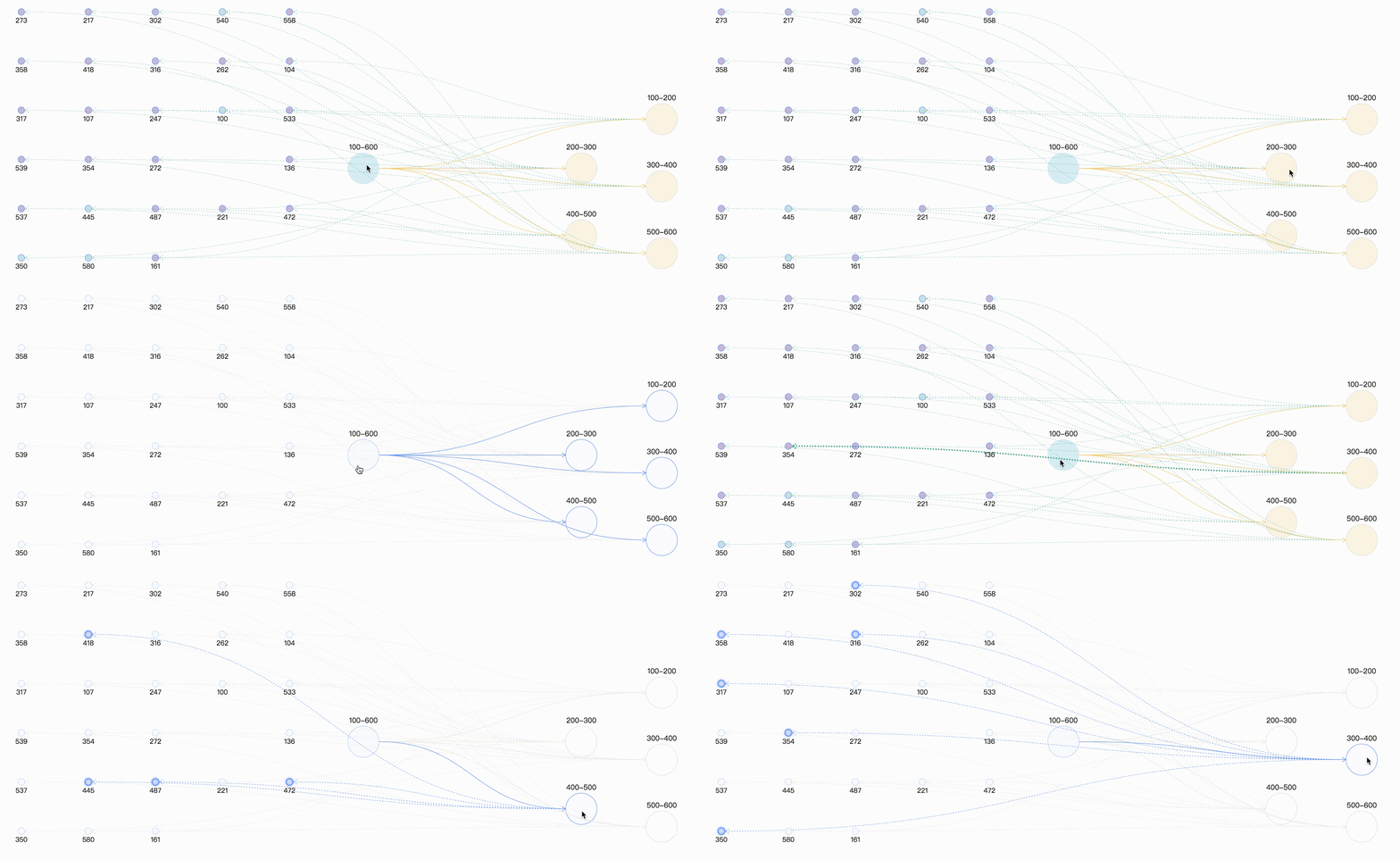
自定义高亮
这种方式是通过自定义状态,在通过实例提供的setItemState、 clearItemStates设置和清除目标的状态信息,同样需要与graph 实例的 xxxStateStyles 结合实现。
graphG = new this.G6.Graph({

  container: "drawGraph",

  width: this.graphWidth,

  height: this.graphHeight,

  nodeStateStyles:{  // 配置节点状态样式,此处就先写一个,后续会有完整的案例分享

    highlight: {

        fill: "#db4437",

        shadowColor: '#fff',

        stroke: "#db4437",

        cursor: "pointer",

        'text-shape': {

          lineWidth: 1,

          fill: "#db4437",

          stroke: "#db4437",

        },

      },

  },

  edgeStateStyles:{},    // 配置边状态样式

  comboStateStyles:{},   // 配置分组状态样式

}

graphG.data(data);

graphG.render();

graphG.on("combo:mouseenter", (e) => {

  let edgeItem = e.item

  graphG.setItemState(edgeItem, 'highlight', true)

  edgeItem.getEdges().forEach(edge => {

    graphG.setItemState(edge.getTarget(), 'highlight', true)

    graphG.setItemState(edge.getSource(), 'highlight', true)

    graphG.setItemState(edge, 'highlight', true)

  })

  graphG.paint()

  graphG.setAutoPaint(true)

});

graphG.on('combo:mouseleave', (e) => {

  graphG.setAutoPaint(false)

  graphG.getNodes().forEach(node => {

    graphG.clearItemStates(node)

  })

  graphG.getEdges().forEach(edge => {

    graphG.clearItemStates(edge)

  })

  graphG.getCombos().forEach(combo => {

    graphG.clearItemStates(combo)

  })

  graphG.paint()

  graphG.setAutoPaint(true)

})
如果仅采用自定义高亮节点,最终的渲染效果为:
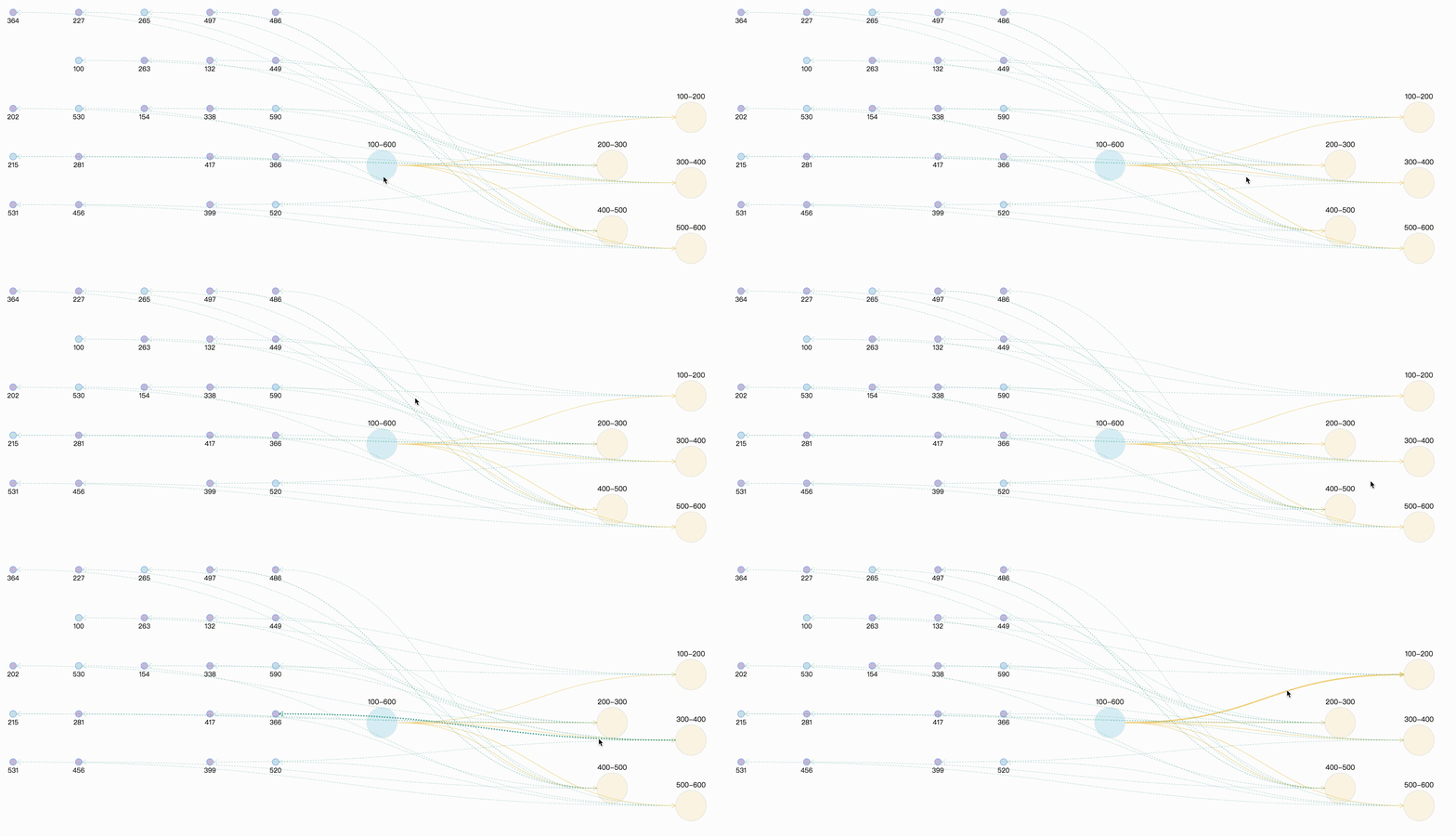
自定义高亮时保持原始颜色
通过上面的案例,可以看出,combo:mouseenter时相关联的边和点全部高亮,并且统一了连线的颜色,此时可能会与我们的需求相违背,可能连线还是想要保持原来的颜色,因为不同的颜色描述两点之间的不同类型的指向关系。那么此时在处理鼠标事件时,需要获取要节点和连线 原始样式。
graphG.on("combo:mouseenter", (e) => {

        let comboItem = e.item;

        const originStyle = comboItem._cfg.originStyle["circle-combo"].fill;

        comboItem._cfg.styles.highlight.fill = originStyle;

        graphG.setItemState(comboItem, "highlight", true);

        comboItem.getEdges().forEach((edge) => {

          const originStyle = edge._cfg.originStyle["edge-shape"].stroke; // 获取边edge 原始颜色

          edge._cfg.styles.highlight.stroke = originStyle;

          let edgeSource = edge.getSource();

          let edgeTarget = edge.getTarget();

          if ( edgeSource._cfg.type === "combo" && edgeSource._cfg.model.id =="100-600" ) {

            const originStyle = edgeSource._cfg.originStyle["circle-combo"].fill; // 获取分组combo 原始颜色

            edgeSource._cfg.styles.highlight.fill = originStyle;

          }

          if ( edgeTarget._cfg.type === "combo" && edgeTarget._cfg.model.id =="100-600" ) {

            const originStyle = edgeTarget._cfg.originStyle["circle-combo"].fill;

            edgeTarget._cfg.styles.highlight.fill = originStyle;

          }

          graphG.setItemState(edgeSource, "highlight", true);

          graphG.setItemState(edgeTarget, "highlight", true);

          graphG.setItemState(edge, "highlight", true);

        });

      });
那么此时最终的效果为:
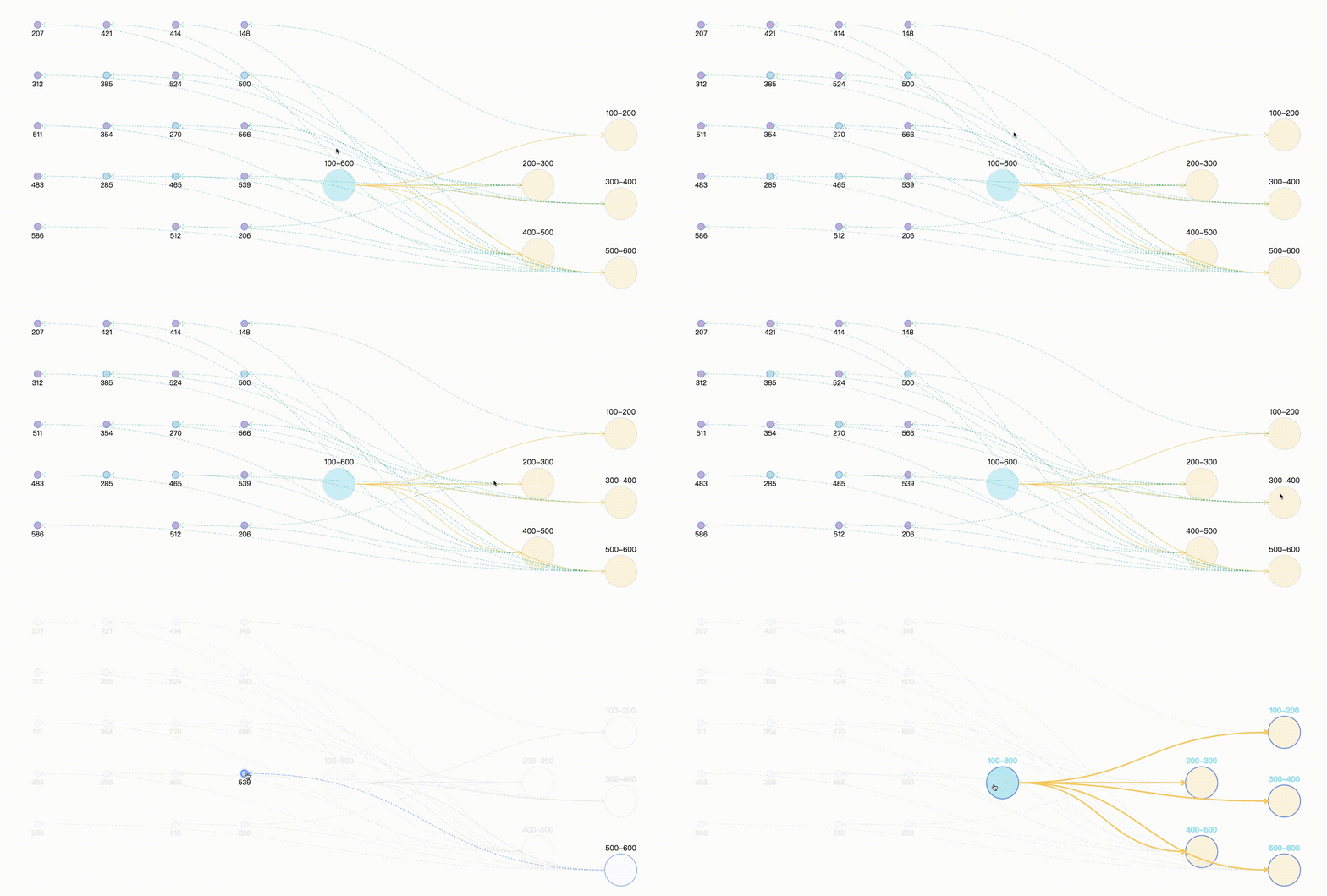
总结
其实两种方法与异曲同工之妙,都是进行状态的处理,只不过一个是帮我们处理了一部分状态与样式,可以直接拿来用,但往往内置的样式与我们实际使用时不相符,因此可以使用两者结合的方式,最终效果及完整demo,采用随机数来模拟实体与关系。
案例完整代码
<template>

  <div>

    <div id="drawGraph"></div>

  </div>

</template>

<script>

let graphG = null

export default {

  mounted() {

    this.initData();

  },

  methods: {

    initData() {

      let combos = [

        { id: '100-600', label: '100-600' },

        { id: '100-200', label: '100-200' },

        { id: '200-300', label: '200-300' },

        { id: '300-400', label: '300-400' },

        { id: '400-500', label: '400-500' },

        { id: '500-600', label: '500-600' },

      ]

      let edges = [

        { source: '100-600', target: '100-200' },

        { source: '100-600', target: '200-300' },

        { source: '100-600', target: '300-400' },

        { source: '100-600', target: '400-500' },

        { source: '100-600', target: '500-600' },

      ]

      // 生成(20-30)随机数 模拟节点node

      let randomCount = Math.floor(Math.random() * 10) + 20;

      let row_clo = Math.floor(Math.sqrt(randomCount));

      let origin = [-150, 50], row = 110, clo = 150;

      let nodes = []

      for (let i = 0; i < randomCount; i++) {

        let randomNum = String(Math.floor(Math.random() * 500) + 100);    // 生成100-600之间的随机数,并与combo进行连线

        let rowindex = Math.floor(i / row_clo);

        let cloindex = i % row_clo;

        let x = origin[0] + clo * cloindex

        let y = origin[1] + row * rowindex

        let node = {

          label: randomNum,

          id: randomNum,

          x,

          y,

          style: {

            fillOpacity: 0.5,

            cursor: "pointer",

            fill: randomNum % 5 == 0 ? "#81C7D4" : "#986DB2"

          }

        }

        let index = Math.floor(randomNum / 100)

        let edge = {

          source: combos[index].id,

          target: randomNum,

          lineWidth: 1,

          style: {

            lineDash: [3, 3],

            lineWidth: 0.5,

            stroke: "#00AA90"

          }

        }

        nodes.push(node)

        edges.push(edge)

      }

      let data = { combos, edges, nodes }

      console.log(data);

      this.makeRelationData(data);

    },

    // 分组 点 连线处理

    makeRelationData(data) {

      if (graphG) {

        graphG.destroy();

      }

      let drawGraph = document.getElementById("drawGraph");

      this.graphWidth = drawGraph.scrollWidth;

      this.graphHeight = drawGraph.scrollHeight || 1200;

      let origin = [this.graphWidth / 2, 100];

      let row = 150, clo = 180;

      let combos = data.combos

      let row_clo = Math.floor(Math.sqrt(combos.length));

      for (let i = 0; i < combos.length; i++) {

        let rowindex = Math.floor(i / row_clo) + 1;

        let cloindex = (i % row_clo) + 1;

        // 分组默认样式设置

        if (i === 0) {

          combos[i].x = this.graphWidth / 3

          combos[i].y = this.graphHeight / 3

          combos[i].style = {

            fill: "#a5e4f0",

            opacity: 0.5,

            cursor: "pointer",

          };

        } else {

          // 分组定位

          combos[i].x = origin[0] + clo * cloindex;

          combos[i].y = origin[1] + row * rowindex;

          if (i % 2 === 1) {

            combos[i].y += 40;

          }

          combos[i].style = {

            fill: "#f6cd6b",

            fillOpacity: 0.2,

          }

        }

      }

      this.drawQfast(data)

    },

    drawQfast(data) {

      graphG = new this.G6.Graph({

        container: "drawGraph",

        width: this.graphWidth,

        height: this.graphHeight,

        modes: {

          default: [

            { type: "zoom-canvas", enableOptimize: true, optimizeZoom: 0.2 },

            { type: "drag-canvas", enableOptimize: true },

            { type: "drag-node", enableOptimize: true, onlyChangeComboSize: true },

            { type: "drag-combo", enableOptimize: true, onlyChangeComboSize: true },

            { type: "activate-relations", activeState: 'active', inactiveState: 'inactive' },

          ],

        },

        defaultEdge: {

          type: 'cubic-horizontal',

          lineWidth: 1,

          style: {

            endArrow: true,

            stroke: "#FAD069",

          },

        },

       defaultNode: {

          type: "circle",

          size: 15,

          labelCfg: {

            position: "bottom",

            style: {

              fontSize: 15,

            },

          },

        },

        defaultCombo: {

          cursor: "pointer",

          opacity: 0,

          type: "circle",

          lineWidth: 1,

          collapsed: true,

          labelCfg: {

            position: "top",

            refY: 5,

            style: {

              fontSize: 16,

            },

          },

        },

        nodeStateStyles: {

          highlight: {

            fill: "#db4437",

            shadowColor: '#fff',

            stroke: "#db4437",

            cursor: "pointer",

            'text-shape': {

              lineWidth: 1,

              fill: "#db4437",

              stroke: "#db4437",

            },

          },

          inactive: {

            stroke: '#eee',

            lineWidth: 1,

            'text-shape': {

              fill: "#eee",

              stroke: "#eee",

            },

          },

        },

        edgeStateStyles: {

          hover: {

            lineWidth: 3,

          },

          highlight: {

            stroke: '#00AA90',

            lineWidth: 3,

          },

        },

        comboStateStyles: {

          highlight: {

            fill: "#f6cd6b",

            opacity: 0.7,

            cursor: "pointer",

            'text-shape': {

              fill: "#A5E4F0",

              stroke: "#A5E4F0",

              lineWidth: 1,

            },

          },

          inactive: {

            stroke: '#eee',

            lineWidth: 1,

            'text-shape': {

              fill: "#eee",

              stroke: "#eee",

            },

          },

        },

      });

      graphG.data(data);

      graphG.render(); // 渲染图

      graphG.on("edge:mouseenter", (e) => {

        graphG.setItemState(e.item, "hover", true);

      });

      graphG.on("edge:mouseleave", (e) => {

        graphG.setItemState(e.item, "hover", false);

      });

       graphG.on("combo:mouseenter", (e) => {

        let comboItem = e.item;

        const originStyle = comboItem._cfg.originStyle["circle-combo"].fill;

        comboItem._cfg.styles.highlight.fill = originStyle;

        graphG.setItemState(comboItem, "highlight", true);

        comboItem.getEdges().forEach((edge) => {

          const originStyle = edge._cfg.originStyle["edge-shape"].stroke; // 获取边edge 原始颜色

          edge._cfg.styles.highlight.stroke = originStyle;

          let edgeSource = edge.getSource();

          let edgeTarget = edge.getTarget();

          if ( edgeSource._cfg.type === "combo" && edgeSource._cfg.model.id =="100-600" ) {

            const originStyle = edgeSource._cfg.originStyle["circle-combo"].fill; // 获取分组combo 原始颜色

            edgeSource._cfg.styles.highlight.fill = originStyle;

          }

          if ( edgeTarget._cfg.type === "combo" && edgeTarget._cfg.model.id =="100-600" ) {

            const originStyle = edgeTarget._cfg.originStyle["circle-combo"].fill;

            edgeTarget._cfg.styles.highlight.fill = originStyle;

          }

          graphG.setItemState(edgeSource, "highlight", true);

          graphG.setItemState(edgeTarget, "highlight", true);

          graphG.setItemState(edge, "highlight", true);

        });

      });

      graphG.on('combo:mouseleave', () => {

        graphG.setAutoPaint(false)

        graphG.getNodes().forEach(node => {

          graphG.clearItemStates(node)

        })

        graphG.getEdges().forEach(edge => {

          graphG.clearItemStates(edge)

        })

        graphG.getCombos().forEach(combo => {

          graphG.clearItemStates(combo)

        })

        graphG.paint()

        graphG.setAutoPaint(true)

      })

    },

  }

};

</script>
可视化—AntV G6 高亮相邻节点的两种方式的更多相关文章
- 【C#表达式树 六】表达式树中创建节点的两种方式
创建表达式树节点的两种方式1.用expression的静态方法MakeBinary|MakeUnary(ExpressionType,参数)的方式创建表达式树节点: BinaryExpression ...
- jQuery 获取DOM节点的两种方式
jQuery中包裹后的DOM对象实际上是一个数组,要获得纯粹的DOM对象可以有两种方式: 1.使用数组索引方式访问,例如: var dom = $(dom)[0]; 如: $("#id&qu ...
- MongoDB添加secondary节点的两种方法
前段时间维护的一个事业群的其中一条业务线的开发找到运维,提出来了一个MongoDB的优化问题,那段时间MongoDB正在从op管理移交给db进行维护,整个部门都对MongoDB的运维经验缺乏,Mong ...
- Keras中间层输出的两种方式,即特征图可视化
训练好的模型,想要输入中间层的特征图,有两种方式: 1. 通过model.get_layer的方式.创建新的模型,输出为你要的层的名字. 创建模型,debug状态可以看到模型中,base_model/ ...
- 数据可视化之DAX篇(十)在PowerBI中累计求和的两种方式
https://zhuanlan.zhihu.com/p/64418286 假设有一组数据, 已知每一个产品贡献的利润,如果要计算前几名产品的贡献利润总和,或者每一个产品和利润更高产品的累计贡献占总体 ...
- System.Web.Http.Cors配置跨域访问的两种方式
System.Web.Http.Cors配置跨域访问的两种方式 使用System.Web.Http.Cors配置跨域访问,众多大神已经发布了很多文章,我就不在详细描述了,作为小白我只说一下自己的使用心 ...
- 简介C#读取XML的两种方式
简介C#读取XML的两种方式 作者: 字体:[增加 减小] 类型:转载 时间:2013-03-03 在程序中访问进而操作XML文件一般有两种模型,分别是使用DOM(文档对象模型)和流模型,使用DOM的 ...
- Log4Net日志记录两种方式
简介 log4net库是Apache log4j框架在Microsoft .NET平台的实现,是一个帮助程序员将日志信息输出到各种目标(控制台.文件.数据库等)的工具. log4net是Ap ...
- 【剑指offer】递归循环两种方式反转链表
转载请注明出处:http://blog.csdn.net/ns_code/article/details/25737023 本文分别用非递归和递归两种方式实现了链表的反转,在九度OJ上AC. 题目描写 ...
- jQuery中开发插件的两种方式
jQuery中开发插件的两种方式(附Demo) 做web开发的基本上都会用到jQuery,jQuery插件开发两种方式:一种是类扩展的方式开发插件,jQuery添加新的全局函数(jQuery的全局函数 ...
随机推荐
- Java连接MySQL数据库。编写一个应用程序,在主类Test_4类中,通过JDBC访问stu数据库,显示t_student表中的内容(表结构见表1),显示效果自己设计。
题目2:编写一个应用程序,在主类Test_4类中,通过JDBC访问stu数据库,显示t_student表中的内容(表结构见表1),显示效果自己设计.之后,可根据显示的内容进行某条记录的删除(以id为条 ...
- mac通过docker一键部署MySQL8
目录 mac通过docker一键部署MySQL8 一.前言 二.系统配置 三.安装步骤 Dockerhub查看镜像地址 1.一键安装 1.1.克隆脚本 1.2.安装程序 1.2.1.安装程序详情 1. ...
- AgileBoot - 手把手一步一步带你Run起全栈项目(SpringBoot+Vue3)
AgileBoot是笔者在业余时间基于ruoyi改造优化的前后端全栈项目. 关于AgileBoot的详细介绍:https://www.cnblogs.com/valarchie/p/16777336. ...
- linux 自动备份mysql数据库
今天一早打开服务器.13W个木马.被爆破成功2次,漏洞3个.数据库被删.这是个悲伤的经历 还好之前有备份,服务器也升级了安全机制,只是备份是上个月的备份.所以想写个脚本,试试自动备份数据库. 1. 先 ...
- 思维分析逻辑 1 DAY
数据分析原则:坚决不做提数机器. 数据分析工作模块 日报 了解业务现状 提升数据敏感性 数据波动解释 周报 了解数据的短期趋势 版本迭代分析 为结论型报告背书 月报 梳理业务的流程 为决策提供部分建议 ...
- perl哈希嵌套和引用的使用
数组,哈希嵌套 数组,哈希的引用 1.哈希的嵌套和引用 %hash = ( 'group1', {'fruit', 'banana', 'drink', 'orange juice', 'vegeta ...
- Optional对象
Optional对象 Optional 类是一个可以为null的容器对象,用于简化Java中对空值的判断处理,以防止出现各种空指针异常. 静态方法-of 必须确定对象不为null 在使用of封装成op ...
- 如何重启kafka
修改配置文件 ps -ef |grep kafka kill (kafka进程号) 启动kafka [root@lecode-dev-001 bin]# ./kafka-server-start.sh ...
- 给ofo共享单车撸一个微信小程序
想学一下微信小程序,发现文档这东西,干看真没啥意思.所以打算自己先动手撸一个.摩拜单车有自己的小程序,基本功能都有,方便又小巧,甚是喜爱.于是我就萌生了一个给ofo共享单车撸一个小程序(不知道为啥of ...
- 靶机练习: Hacker_Kid-v1.0.1
靶机: Hacker_Kid-v1.0.1 准备工作 靶机地址: https://download.vulnhub.com/hackerkid/Hacker_Kid-v1.0.1.ova MD5 校验 ...