
Navisworks 2014 Api 简单的使用
初次接触Navisworks Api .NET 的二次开发.主要是研究了一下。关于NavisWorks 结构树的加载.
     void LoadModel()

        {

            //清空当前的结构树信息

            treeView1.Nodes.Clear();

            //当前加载的模型

            Document doc = Autodesk.Navisworks.Api.Application.ActiveDocument;

            //循环现有模型

            foreach (var documentModel in doc.Models)

            {

                var modelItemList = documentModel.RootItem.Descendants;

                Model model = documentModel;

                var modelItems = modelItemList.Where(o => o.Parent == model.RootItem);

                if (modelItems.Any())

                {

                    TreeNode cNode;

                    foreach (var quItem in modelItems)

                    {

                         cNode = new TreeNode(quItem.DisplayName);

                        cNode.Tag = quItem;

                       // cNode.Text = quItem.DisplayName;//判断名称

                        treeView1.Nodes.Add(cNode);

                        if (quItem.Children.Any())

                        {

                            LoadChild(quItem.Children, quItem, cNode);

                        }

                    }

                }

            }

        }

        /// <summary>

        /// 递归判断结构树信息

        /// </summary>

        /// <param name="modelItemEnumerableCollection">数据源信息</param>

        /// <param name="parentItem">父级节点信息</param>

        /// <param name="pNode">子节点信息</param>

        private void LoadChild(IEnumerable<ModelItem> modelItemEnumerableCollection, ModelItem parentItem, TreeNode pNode)

        {

            var query = modelItemEnumerableCollection.Where(o => o.Parent == parentItem);

            if (query.Count()>)

            {

                foreach (var quItem in query)

                {

                    TreeNode chNode = new TreeNode(quItem.DisplayName);

                    chNode.Tag = quItem;

                    pNode.Nodes.Add(chNode);

                    if (quItem.Children.Any())

                    {

                        LoadChild(quItem.Children, quItem, chNode);

                    }

                }

            }

        }
TreeView Node 选中事件
       void treeView1_NodeMouseClick(object sender, TreeNodeMouseClickEventArgs e)

        {

            TreeNode node = e.Node;

            if (node != null)

            {

                ModelItem oCurrentNode = (ModelItem)node.Tag;

                propertyGrid1.SelectedObject = oCurrentNode;

                if (oCurrentNode != null)

                {

                    //设置选择集合

                    ModelItemCollection oMC = new ModelItemCollection();

                    oMC.Add(oCurrentNode);

                    Document oDoc = view.ViewControl.DocumentControl.Document;

                    //设置选中

                    oDoc.CurrentSelection.CopyFrom(oMC);

                }

          }

        }
模型加载窗口:
    public partial class FrmModelView : DevExpress.XtraEditors.XtraForm

    {

        public ViewControl ViewControl;

        public FrmModelView()

        {

            InitializeComponent();

            if (this.components == null)

                this.components = new Container();

            //初始化Document控件

            DocumentControl document = new DocumentControl(this.components);

            document.Document.SetGraduatedBackground(Autodesk.Navisworks.Api.Color.FromByteRGB(,,),Autodesk.Navisworks.Api.Color.FromByteRGB(,,));

            //初始化View控件  并添加Document控件

            ViewControl = new ViewControl();

            ViewControl.DocumentControl = document;

            ViewControl.BackColor = System.Drawing.Color.LightSteelBlue;

            ViewControl.Dock = DockStyle.Fill;

            ViewControl.Name = "viewControl";

            this.Controls.Add(ViewControl);

        }

    }
模型选择事件:
        #region 模型选择事件

        private void CurrentSelection_Changed(object sender, EventArgs e)

        {

            try

            {

                Document doc = (Document)sender;

                if (doc != null)

                {

                    var item = doc.CurrentSelection.SelectedItems[];

                    if (item != null)

                    {

                        TreeNode tnRet = null;

                        foreach (TreeNode tn in treeView1.Nodes)

                        {

                            tnRet = FindNode(tn, item.DisplayName);

                            if (tnRet != null)

                                break;

                        }

                        if (tnRet != null)

                        {

                            if (oldNode != null)

                                oldNode.BackColor = Color.White;

                            tnRet.BackColor = Color.YellowGreen;

                            treeView1.SelectedNode = tnRet;

                            oldNode = tnRet;

                            GetProperty();

                        }

                    }

                }

            }

            catch (Exception exception)

            {

                Console.WriteLine(exception);

            }

        }

        #endregion
模型的属性加载:
  #region 属性信息加载

        void GetProperty()

        {

            //验证模型

            if (Autodesk.Navisworks.Api.Application.ActiveDocument != null &&

                !Autodesk.Navisworks.Api.Application.ActiveDocument.IsClear)

            {

                this.vGridControl1.Rows.Clear();

                // 获取选中的相关的模型信息

                foreach (ModelItem item in Autodesk.Navisworks.Api.Application.ActiveDocument.CurrentSelection.SelectedItems)

                {

                    //获取想的模型属性信息

                    foreach (PropertyCategory category in item.PropertyCategories)

                    {

                        CategoryRow  categoryRow=new CategoryRow(category.DisplayName);

                        foreach (var control in category.Properties)

                        {

                            EditorRow row1 = new EditorRow();

                            row1.Properties.FieldName = "Value";

                            row1.Properties.Caption = control.DisplayName;

                            var itemValue = control.Value;

                            string valueInfo;

                            switch (itemValue.DataType)

                            {

                                case VariantDataType.Boolean:

                                    valueInfo = itemValue.ToBoolean().ToString();

                                    break;

                                case VariantDataType.DateTime:

                                    valueInfo = itemValue.ToDateTime().ToString(CultureInfo.InvariantCulture);

                                    break;

                                case VariantDataType.DisplayString:

                                    valueInfo = itemValue.ToDisplayString();

                                    break;

                                case VariantDataType.Double:

                                    valueInfo = itemValue.ToDouble().ToString();

                                    break;

                                case VariantDataType.DoubleAngle:

                                    valueInfo = itemValue.ToDoubleAngle().ToString();

                                    break;

                                case VariantDataType.DoubleArea:

                                    valueInfo = itemValue.ToDoubleArea().ToString();

                                    break;

                                case VariantDataType.DoubleLength:

                                    valueInfo = itemValue.ToDoubleLength().ToString();

                                    break;

                                case VariantDataType.DoubleVolume:

                                    valueInfo = itemValue.ToDoubleVolume().ToString();

                                    break;

                                case VariantDataType.IdentifierString:

                                    valueInfo = itemValue.ToIdentifierString();

                                    break;

                                case VariantDataType.Int32:

                                    valueInfo = itemValue.ToInt32().ToString();

                                    break;

                                default:

                                    valueInfo = itemValue.ToString();

                                    break;

                            }

                            row1.Properties.Value = valueInfo;

                            categoryRow.ChildRows.Add(row1);

                        }

                        this.vGridControl1.Rows.Add(categoryRow);

                    }

                }

            }

        }

        #endregion
最终效果:
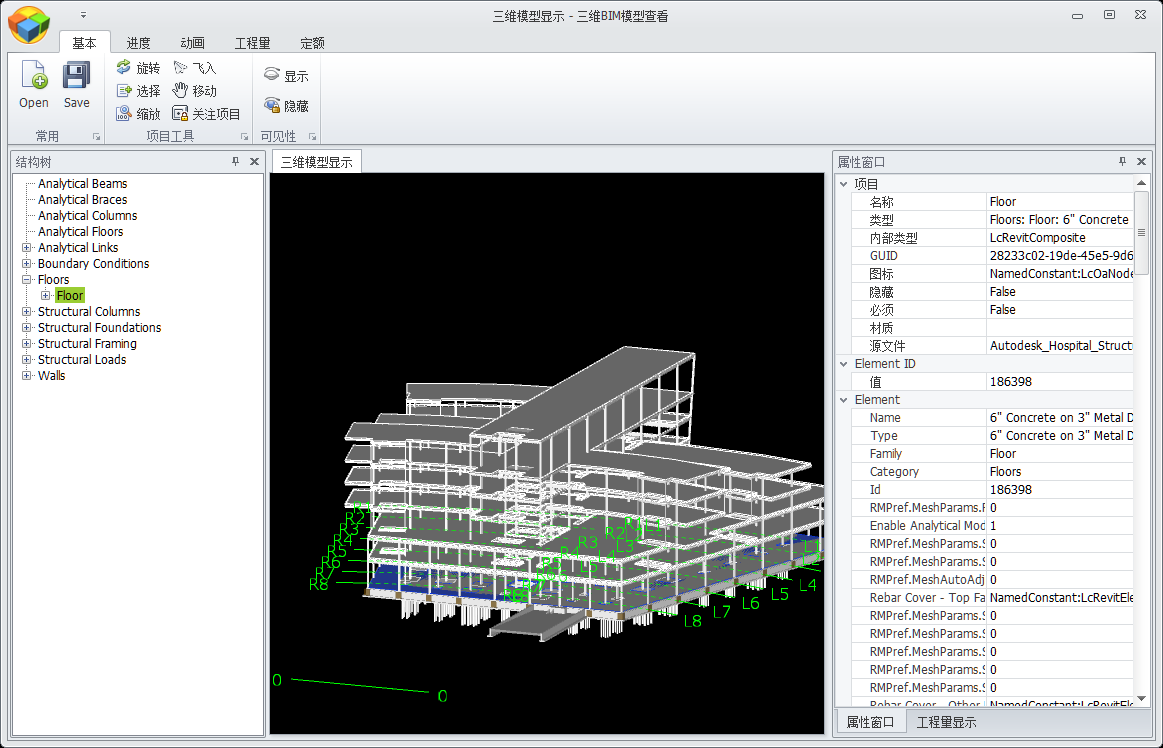
主要是刚接触这个.不懂 只是自己在这写的。如果那位网友有更好的解决方案。请告诉我.谢谢哈。
源代码 下载。
Navisworks 2014 Api 简单的使用的更多相关文章
- Libvlc API 简单说明 [转]
Libvlc API 简单说明 原文来自http://www.xuebuyuan.com/1519616.html libvlc_instance_t* libvlc_new(int argc, co ...
- salesforce零基础学习(八十五)streaming api 简单使用(接近实时获取你需要跟踪的数据的更新消息状态)
Streaming API参考链接: https://trailhead.salesforce.com/en/modules/api_basics/units/api_basics_streaming ...
- 基于C语言libvirt API简单小程序
libvirt API简单小程序 1.程序代码如下 #include<stdio.h> #include<libvirt/libvirt.h> int getDomainInf ...
- 常用函数式接口与Stream API简单讲解
常用函数式接口与Stream API简单讲解 Stream简直不要太好使啊!!! 常用函数式接口 Supplier<T>,主要方法:T get(),这是一个生产者,可以提供一个T对象. C ...
- Navisworks API 简单二次开发 (自定义工具条)
在Navisworks软件运行的时候界面右侧有个工具条.比较方便.但是在二次开发的时候我不知道在Api那里调用.如果有网友知道请告诉我.谢谢. 我用就自己设置一个工具.界面比较丑!没有美工. 代码: ...
- NavisWorks Api 简单使用与Gantt
相信很多朋友在做BIM项目的时候.都有客户会提出项目计划,形象进度 等需求. 那么当前最主要的问题就是计划与BIM模型的关联问题.那么我在项目中是用户用Project软件编辑计划然后手动跟三维模型关联 ...
- 百度地图API简单应用
在做移动端应用时经常用到百度地图API,百度API有强大的示例和文档,开发之前去百度相关网站注册密钥,很块博主只花了几分钟 百度地图API范例 百度地图API文档说明 例子1:输入特定关键字绘制地图标 ...
- 百度地图api简单使用方法
百度地图API的使用方法 百度地图API 开始学习百度地图API最简单的方式是看一个简单的示例.以下代码创建了一个520x340大小的地图区域并以天安门作为地图的中心: 1. <html&g ...
- Web API 简单示例
一.RESTful和Web API Representational State Transfer (REST) is a software architecture style consisting ...
随机推荐
- 引人瞩目的 CSS 变量(CSS Variable)
这是一个令人激动的革新. CSS 变量,顾名思义,也就是由网页的作者或用户定义的实体,用来指定文档中的特定变量. 更准确的说法,应该称之为 CSS 自定义属性 ,不过下文为了好理解都称之为 CSS 变 ...
- .NET中AOP方便之神SheepAspect
SheepAspect 简介以及代码示列: SheepAspect是一个AOP框架为.NET平台,深受AspectJ.它静织目标组件作为一个编译后的任务(编译时把AOP代码植入). 多有特性时,可根据 ...
- WPF中Grid实现网格,表格样式通用类
/// <summary> /// 给Grid添加边框线 /// </summary> /// <param name="grid"></ ...
- 关于CSS inline-block、BFC以及外边距合并的几个小问题
CSS inline-block和BCF对于初学者来说,总是弄不太明白,下面记录下我在学习这块知识的过程中遇到的几个问题,供大家参考,有不足的地方,欢迎大家批评指正. 一.在什么场景下会出现外边距合并 ...
- jQuery中取消后续执行内容
<html xmlns="http://www.w3.org/1999/xhtml"><head> <title></title&g ...
- MySQL常见面试题
1. 主键 超键 候选键 外键 主 键: 数据库表中对储存数据对象予以唯一和完整标识的数据列或属性的组合.一个数据列只能有一个主键,且主键的取值不能缺失,即不能为空值(Null). 超 键: 在关系中 ...
- 我的MYSQL学习心得(二) 数据类型宽度
我的MYSQL学习心得(二) 数据类型宽度 我的MYSQL学习心得(一) 简单语法 我的MYSQL学习心得(三) 查看字段长度 我的MYSQL学习心得(四) 数据类型 我的MYSQL学习心得(五) 运 ...
- Raspkate - 基于.NET的可运行于树莓派的轻量型Web服务器
最近在业余时间玩玩树莓派,刚开始的时候在树莓派里写一些基于wiringPi库的C语言程序来控制树莓派的GPIO引脚,从而控制LED发光二极管的闪烁,后来觉得,是不是可以使用HTML5+jQuery等流 ...
- MyBatis4:动态SQL
什么是动态SQL MyBatis的一个强大特性之一通常是它的动态SQL能力.如果你有使用JDBC或其他相似框架的经验,你就明白条件串联SQL字符串在一起是多么地痛苦,确保不能忘了空格或者在列表的最后的 ...
- CSharpGL(36)通用的非托管数组排序方法
CSharpGL(36)通用的非托管数组排序方法 如果OpenGL要渲染半透明物体,一个方法是根据顶点到窗口的距离排序,按照从远到近的顺序依次渲染.所以本篇介绍对 UnmanagedArray< ...