
当fixed元素相互嵌套时chrome下父元素会影响子元素的层叠关系
问题:fixed元素被另一个fixed元素包含的时候在chrome下fixed子元素的定位会受到父元素的影响。
demo(http://jsbin.com/qumah/1):
<!DOCTYPE html>

<html>

<head>

  <meta charset="utf-8">

  <title>JS Bin</title>

  <style>

       .fixed {

         position: fixed;

         left:0;

         top:20px;

         width:200px;

         height:200px;

         background:#fee;

       }

       .fixed-child {

         width:150px;

         height:150px;

         background: #fcc;

         top:40px;

         right: 20px;

         left: auto;

         z-index: 100;

       }

    .absolute {

      position: absolute;

      right: 20px;

      width:100px;

      height:100px;

      background:#f11;

    }

    </style>

</head>

<body>

  <div class="fixed">fixed position<div class="fixed fixed-child">fixed child position</div></div>

  <div class="absolute">absolute position</div>

</body>

</html>
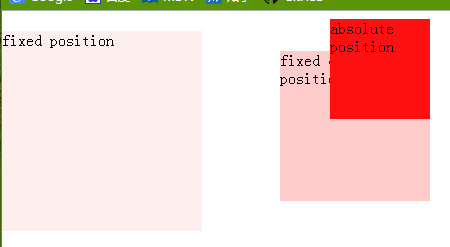
IE(IE8-IE11效果一致,IE7没有测试,IE6不支持fixed元素)下效果:

chrome下效果:
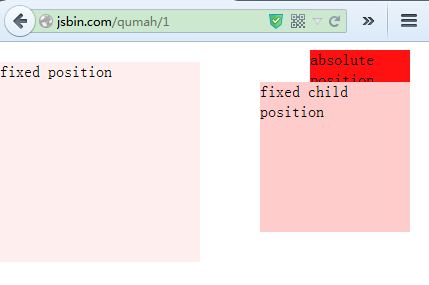
firefox下效果:
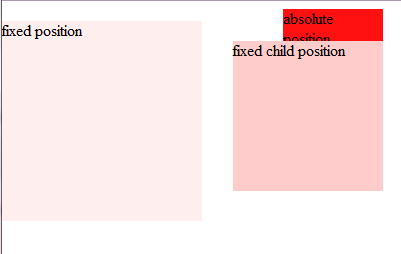
Safari下效果:
解释:层叠关系是受层叠上下文影响的。文档中的层叠上下文由满足以下任意一个条件的元素形成:
- 根元素 (HTML),
- 绝对(absolute)定位或相对(relative)定位且z-index值不为"auto",
- z-index不为“auto”的flex列表,
- 元素的
opacity属性值小于1. (参考 the specification for opacity), transform属性值不为“none”,mix-blend-mode属性值不为“normal”,isolation属性值为“isolate”,- 在mobile WebKit 和 Chrome 22+内核的浏览器中,
position: fixed总是创建一个新的层叠上下文, 即使z-index的值是"auto" (See this post), - will-change属性值为上述属性名,即使属性值不直接为上述属性名(例如:all)--参见:https://dev.opera.com/articles/css-will-change-property/
参考来源:The stacking context - MDN
每个层叠上下文都有如下的层叠级别组成(显示顺序从后到前):
- 父级层叠上下文的背景和边框;
- 层叠级别为负值的层叠上下文(越小越在下);
- 非行内、非定位的子元素;
- 非定位的浮动子元素和它们的内容;
- 行内非定位子元素;
- 'z-index:auto' 的定位子元素,和任何 'z-index:0' 的层级上下文;
- 层叠级别为正值的层叠上下文(越大越在上)。
参考来源:RM8015: IE6 IE7 IE8(Q) 中定位元素 'z-index' 为默认值在某些情况下会产生新的层叠上下文
结论:在chrome22+的浏览器中,position为fixed总是会创建新的重叠上下文,所以子fixed元素在此时会以父fixed元素为层叠上下文,子元素的层叠关系会受到父元素的影响。而在非chrome浏览器下子fixed元素并不会创建新的层叠上下文,fixed元素的层叠上下文为最近的层叠上下文。
因此,我们应该尽量避免出现fixed元素相互嵌套的问题。如果必须有嵌套的情况,建议修改fixed父元素的z-index值来修正在chrome下fixed子元素的层叠问题。
题外话:
对于opacity小于1的元素也会产生层叠上下文的问题,可能很多人都不知道。但是规范里面是明文规定的:
Since an element with opacity less than 1 is composited from a single offscreen image, content outside of it cannot be layered in z-order between pieces of content inside of it. For the same reason, implementations must create a new stacking context for any element with opacity less than 1. If an element with opacity less than 1 is not positioned, implementations must paint the layer it creates, within its parent stacking context, at the same stacking order that would be used if it were a positioned element with ‘
z-index: 0’ and ‘opacity: 1’. If an element with opacity less than 1 is positioned, the ‘z-index’ property applies as described in [CSS21], except that ‘auto’ is treated as ‘0’ since a new stacking context is always created. See section 9.9 andAppendix E of [CSS21] for more information on stacking contexts. The rules in this paragraph do not apply to SVG elements, since SVG has its own rendering model ([SVG11], Chapter 3). ---摘自《CSS Color Module Level 3》
简单来说:
- opacity值小于1的元素会创建新的层叠上下文
- opacity值小于1的元素的层叠级别相当于z-index:0的定位元素。此时设置z-index会失效,除非该元素同时为定位元素
- opacity值小于1的元素如果同时为定位元素时,则该元素将同时具有定位元素和opacity小于1元素的特性之和。换句话说,就是z-index等于“auto”时会被当成z-index等于“0”时创建新的层叠上下文
参考文章:
https://developer.mozilla.org/zh-CN/docs/Web/CSS/Understanding_z-index/The_stacking_context
http://www.w3.org/TR/CSS21/visuren.html#z-index
https://developer.mozilla.org/en-US/docs/Web/Guide/CSS/Understanding_z_index
RM8015: IE6 IE7 IE8(Q) 中定位元素 'z-index' 为默认值在某些情况下会产生新的层叠上下文
当fixed元素相互嵌套时chrome下父元素会影响子元素的层叠关系的更多相关文章
- 当fixed元素相互嵌套时,父元素会影响子元素的层叠关系,最好不要嵌套使用fixed
问题:fixed元素被另一个fixed元素包含的时候在chrome下fixed子元素的定位会受到父元素的影响. 解释:层叠关系是受层叠上下文影响的.文档中的层叠上下文由满足以下任意一个条件的元素形成: ...
- CSS 设置背景透明度,不影响子元素
由于 opacity 属性能被子元素继承,使用它设置父元素背景透明度时也会影响子元素. 解决方法: 1> 使用 RGBA Example .classname { /* RGBa, 透明度0.6 ...
- 【IE6的疯狂之十】父级使用padding后子元素绝对定位的BUG
在前端开发中,经常会用到css的position:absolute来使层浮动,前通过left,top,right等属性来对层进行定位,但ie6对left,top,right等属性的解释和ie7,ie8 ...
- LinearLayout的gravity属性以及其子元素的layout_gravity何时有效;RelativeLayout如何调整其子元素位置只能用子元素中的属性来控制,用RelativeLayout中的gravity无法控制!!!
LinearLayout的gravity属性以及其子元素的layout_gravity何时有效:RelativeLayout如何调整其子元素位置只能用子元素中的属性来控制,用RelativeLayou ...
- html 子元素和父元素都监听了 click 事件,点击子元素时为何先触发的是父元素的 click 事件?
先上一段代码,点击子元素时先触发的是父元素的 click 事件 <html> <head> <script type="text/javascript" ...
- 使用RGBa和Filter实现不影响子元素的CSS透明背景
点击查看原文 问题 如果我们想要一个元素拥有半透明的背景,我们有两个选择: 使用CSS和 opacity 做一张 24-bit PNG 背景图片 在CSS中使用opacity有两个问题,一是为了适应所 ...
- CSS中如何设置父元素透明度不影响子元素透明度
原因分析: 使用css的opcity属性改变某个元素的透明度,但是其元素下的子元素的透明度也会被改变,即便重定义也没有用,不过有个方法可以实现,大家可以看看. 可以使用一张透明的图片做背景可以达成效果 ...
- 改变父元素的透明度,不影响子元素的透明度—css
1.如果我们给父元素添加opacity:0.4后,子元素的red颜色也变成了0.4的透明度, 例子如下: <!DOCTYPE html> <html> <head> ...
- jquery根据(遍历)html()的内容/根据子元素的内容(元素文本)来选择(查询),在子元素前加入元素
<ul> <li>First</li> <li>second</li> <li>third</li> </ul ...
随机推荐
- Nodejs in Visual Studio Code 05.Swig+Bootstrap
1. 开始 准备好Express+Swig的练习代码:https://github.com/Mengkzhaoyun/nodepractise 准备好AdminLTE后台管理模版:https://ww ...
- 【转】Contrary to the answers here, you DON'T need to worry about encoding!
For those goals, I honestly do not understand why people keep telling you that you need the encoding ...
- [Design Pattern] Mediator Pattern 简单案例
Meditor Pattern,即调解模式,用一个调解类类处理所有的沟通事件,使得降低多对象之间的沟通难度,属于行为类的设计模式.为了方便理解记忆,我也称其为,沟通模式. 下面是一个调解模式的简单案例 ...
- 简单的多表插入(oracle)
简单的多表插入语句: insert all into 表1(字段1,2...) values(值1,值2......) into 表2(字段1,2...)) values(值1,值2......) s ...
- centos 7 卸载 mariadb 安装mysql
1,卸载mariadbsystemctl stop mariadbrpm -qa | grep mariadbrpm -e --nodeps mariadb-5.5.52-1.el7.x86_64rp ...
- [AngularJS] Exploring the Angular 1.5 .component() method
Angualr 1.4: .directive('counter', function counter() { return { scope: {}, restrict: 'EA', transclu ...
- 奇妙的go语言(网页下载)
[ 声明:版权全部,欢迎转载,请勿用于商业用途. 联系信箱:feixiaoxing @163.com] 眼下,网上关于网页爬行的代码非常多.可是,自从看了go语言的web下载代码之后,我才发现原来它 ...
- 让linux(centos)支持中文文件和文件夹
一.让linux支持中文 1.将Linux的env设置了LANG=en_US.UTF-8: 2.本地的Shell客户端编码也设置成UTF-8,这样让在windows上传到linux的文件或者目录不会出 ...
- codevs 2449 骑士精神 (IDDfs)
/* 限制步数 写迭代加深 注意剪枝:当先步数+不同的个数-1>当前限制的步数 就cut */ #include<cstdio> #include<cstring> #i ...
- hdu 2304
题意: 插座插空问题 水题.....只要知道最后一个不需要插即可.... 直接贴代码.. AC代码: #include <iostream> using namespace std; in ...