
vue 多组件路由处理方法
实现页面:
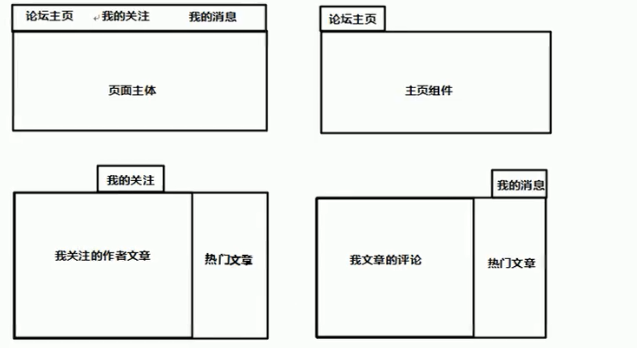
实现效果:
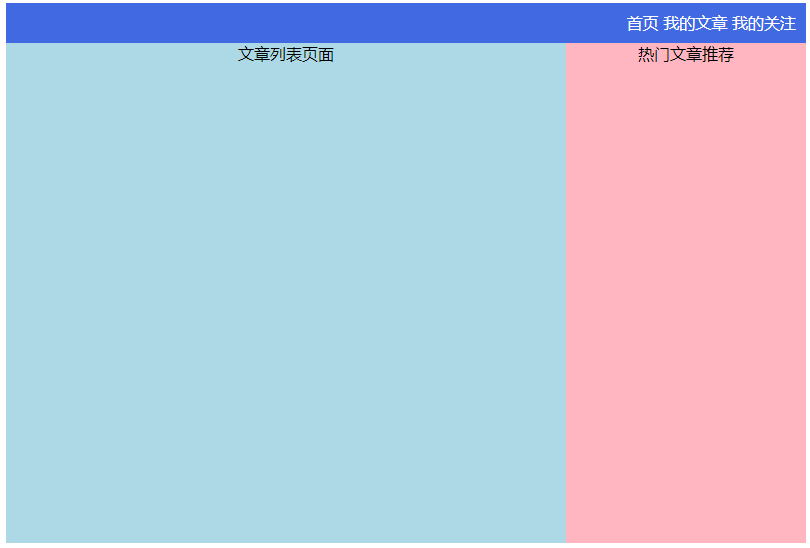
实现代码:
<!DOCTYPE html>

<html>

    <head>

        <meta charset="UTF-8">

        <title></title>

        <script type="text/javascript" src="js/vue.js" ></script>

        <script type="text/javascript" src="js/vue-router.js" ></script>

        <style type="text/css">

            #app{width: 800px;margin: 0 auto;}

            #banner{text-align: right;line-height: 40px;background-color: royalblue;color: #fff;padding: 0 10px;}

            #container{display: flex;text-align: center;height: 500px;}

            .index{flex: 10;background-color: lightblue;}

            .article{flex:7;background-color: lightblue;}

            .attention{flex:7;background-color: lightblue;}

            .hot{flex:3;background-color: lightpink;}

        </style>

    </head>

    <body>

        <div id="app">

            <div id="banner">

                <router-link to="/index" tag="span">首页</router-link>

                <router-link to="/article" tag="span">我的文章</router-link>

                <router-link to="/attention" tag="span">我的关注</router-link>

            </div>

            <div id="container">

                <router-view></router-view>

                <router-view name="article"></router-view>

                <router-view name="attention"></router-view>

                <router-view name="hot"></router-view>

            </div>

        </div>

        <template id="index">

            <div class="index">主体页面</div>

        </template>

        <template id="article">

            <div class="article">文章列表页面</div>

        </template>

        <template id="attention">

            <div class="attention">我的关注页面</div>

        </template>

        <template id="hot">

            <div class="hot">热门文章推荐</div>

        </template>

        <script type="text/javascript">

            var indexTemp = {template:"#index"}

            var articleTemp = {template:"#article"}

            var attentionTemp = {template:"#attention"}

            var hotTemp = {template:"#hot"}

            Vue.component('index',indexTemp)

            Vue.component('article',articleTemp)

            Vue.component('attention',attentionTemp)

            Vue.component('hot',hotTemp)

            var routerRules = new VueRouter({

                routes:[

                    {path:'/index',component:indexTemp},

                    {

                        path:'/article',

                        components:{article:articleTemp,hot:hotTemp}

                    },

                    {

                        path:'/attention',

                        components:{attention:attentionTemp,hot:hotTemp}

                    },

                ]

            })

            var vm = new Vue({

                el:"#app",

                router:routerRules

            })

        </script>

    </body>

</html>
vue 多组件路由处理方法的更多相关文章
- element-ui(vue)upload组件的http-request方法的使用
element-ui(vue)upload组件的http-request方法的使用 官方文档: http-request方法有一个默认的参数 content content 是一个object对象:里 ...
- vue 父子组件传值以及方法调用,平行组件之间传值以及方法调用大全
vue项目经常需要组件间的传值以及方法调用,具体场景就不说了,都知道.基本上所有的传值都可以用vuex状态管理来实现,只要在组件内监听vuex就好. vue常用的传值方式以及方法有: 1. 父值传子( ...
- vue的组件之间传值方法
父组件 <template> <div> 这是父组件 <children v-bind:parentToChild="toChild" v-on:sh ...
- vue父子组件路由传参的方式
一.get方式(url传参): 1.动态路由传参: 父组件: selectItem (item) { this.$router.push({ path: `/recommend/${item.id}` ...
- vue 2.0 路由切换以及组件缓存源代码重点难点分析
摘要 关于vue 2.0源代码分析,已经有不少文档分析功能代码段比如watcher,history,vnode等,但没有一个是分析重点难点的,没有一个是分析大命题的,比如执行router.push之后 ...
- vue 父组件使用keep-alive和infinite-scroll导致在子组件触发父组件的infinite-scroll方法
(vue.js)vue 父组件使用keep-alive和infinite-scroll导致在子组件触发父组件的infinite-scroll方法”问题疑问,本网通过在网上对“ (vue.js)vue ...
- vue中组件的四种方法总结
希望对大家有用 全局组件的第一种写法 html: <div id = "app"> <show></show></div> js: ...
- vue父子组件之间互相获取data值&调用方法(非props)
vue 子组件调用父组件方法&数据 vue有$parent这么一个属性,在子组件中就能拿到父组件的数据 this.$parent.xxx 就能调用父组件的方法 this.$parent.xxx ...
- vue 父子组件的方法调用
$emit 子组件触发父组件的方法: <!-- 子组件 --> <template> <div id="child"> <button @ ...
随机推荐
- ModbusTCP协议解析 —— 利用Wireshark对报文逐字节进行解析详细解析Modbus所含功能码
现在网上有很多类似的文章.其实这一篇也借鉴了很多其他博主的文章. 写这篇文章的重点是在于解析功能和报文.对Modbus这个协议并不会做很多介绍. 好了,我们开始吧. 常用的功能码其实也没多少.我也就按 ...
- java设计模式学习笔记——里氏替换原则
oo中的继承性的思考和说明 1.继承包含这样一层含义:父类中凡是已经实现好的方法,实际上是在设定规范和契约,虽然它不强制要求所有的子类必须遵循这些七月,但是如果子类对这些已经实现的方法任意修改,就会对 ...
- OpenLayers动态测量距离和面积,并可自定义测量的线样式
全局操作变量 /** * @description 标注弹出框 */ HtmlPopup = null; /** * @description 临时图层类数据源 */ VectorSource = n ...
- mysql添加索引(建表之后)
一.使用ALTER TABLE语句创建索引 语法如下: alter table table_name add index index_name (column_list) ; alter table ...
- luogu2173 [ZJOI2012]网络
题目链接 problem 给出一个无向图,每条边有一种颜色.每种颜色都构成一个森林.需要完成以下操作. 修改点权 修改边的颜色 询问某种颜色的森林中某条路径上点权最大值 solution 颜色数量不超 ...
- Nginx-4.Nginx如何处理请求
原文 基于server_name 的虚拟站点 Nginx首先需要确定使用哪个server来处理请求.举个简单的例子,有下面几个server 第一个,监听80端口,为org站点 server { lis ...
- day16 匿名函数
# 匿名函数# 函数名 = lambda 参数1,(参数2,....) : 返回值 [注意:匿名函数不允许换行]# 匿名函数返回值和正常函数一样可以是任意数据类型# def add(x,y):# re ...
- 《HTML&CSS design and build websites》学习笔记(1)
Chapter 1: Structure Chapter 2: Text <head>表示标题,默认显示在第一行. <title>表示抬头,显示在浏览器的标签页,还有窗口栏. ...
- python格式化输出保留2位小数
我是小白就不用多说了,学习python做了个练习题,结果运行了一遍,发现输入金额后得到的有很多位小数, 虽然不知道为什么,但是看得很不舒服, 就想到应该把让小数点后只保留2位数 找到了方法:将{0}改 ...
- 关于将sublime中的代码高亮导出到博客中
第一步:打开sublime编辑器,用快捷键ctrl+shift+p调出control panel,在出现的输入框中输入install,按回车键 第二步:然后输入插件名称sublimehighlight ...