
Django项目:CRM(客户关系管理系统)--48--39PerfectCRM实现登录+验证码+过期时间+页面保留账号
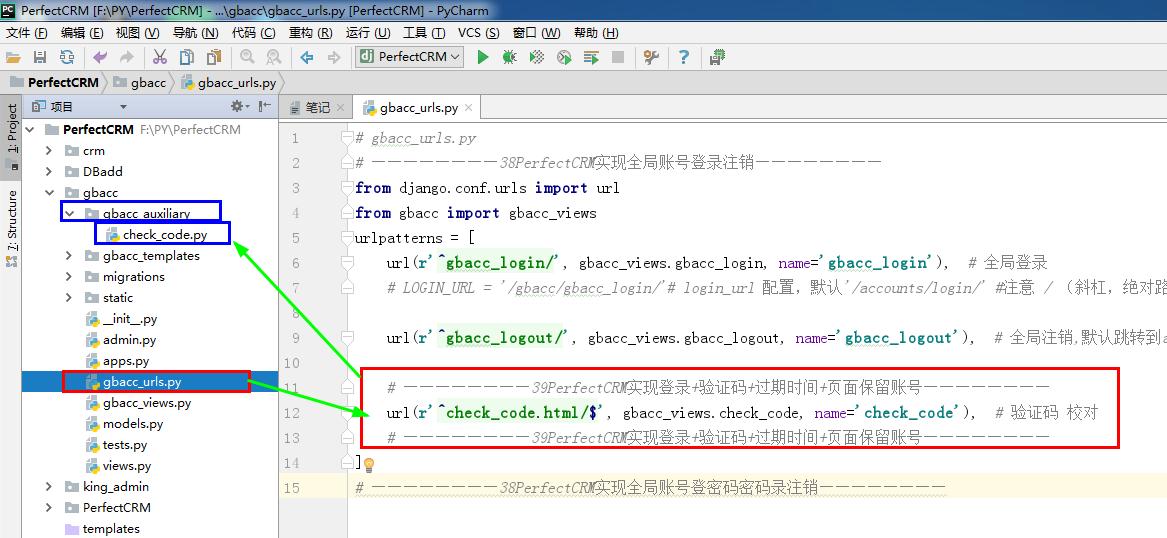
 # gbacc_urls.py

 # ————————38PerfectCRM实现全局账号登录注销————————

 from django.conf.urls import url

 from gbacc import gbacc_views

 urlpatterns = [

     url(r'^gbacc_login/', gbacc_views.gbacc_login, name='gbacc_login'),  # 全局登录

     # LOGIN_URL = '/gbacc/gbacc_login/'# login_url 配置,默认'/accounts/login/' #注意 / (斜杠,绝对路径)#settings.py

     url(r'^gbacc_logout/', gbacc_views.gbacc_logout, name='gbacc_logout'),  # 全局注销,默认跳转到accounts/login

     # ————————39PerfectCRM实现登录+验证码+过期时间+页面保留账号————————

     url(r'^check_code.html/$', gbacc_views.check_code, name='check_code'),  # 验证码 校对

     # ————————39PerfectCRM实现登录+验证码+过期时间+页面保留账号————————

 ]

 # ————————38PerfectCRM实现全局账号登密码密码录注销————————
# gbacc_urls.py
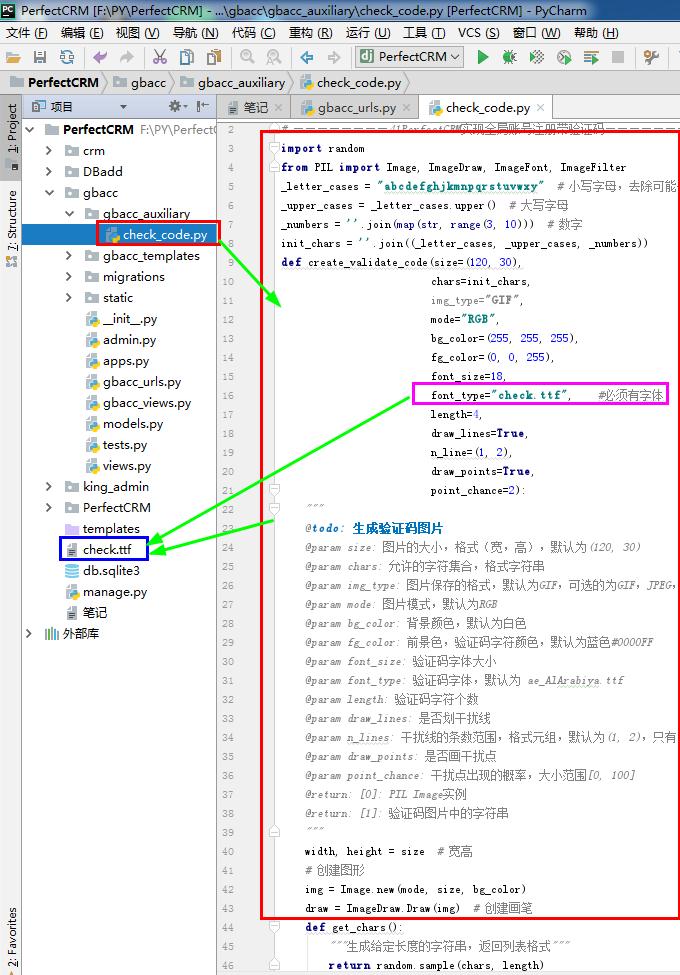
 # check_code.py

 # ————————41PerfectCRM实现全局账号注册带验证码————————

 import random

 from PIL import Image, ImageDraw, ImageFont, ImageFilter

 _letter_cases = "abcdefghjkmnpqrstuvwxy"  # 小写字母,去除可能干扰的i,l,o,z

 _upper_cases = _letter_cases.upper()  # 大写字母

 _numbers = ''.join(map(str, range(3, 10)))  # 数字

 init_chars = ''.join((_letter_cases, _upper_cases, _numbers))

 def create_validate_code(size=(120, 30),

                          chars=init_chars,

                          img_type="GIF",

                          mode="RGB",

                          bg_color=(255, 255, 255),

                          fg_color=(0, 0, 255),

                          font_size=18,

                          font_type="check.ttf",    #必须有字体

                          length=4,

                          draw_lines=True,

                          n_line=(1, 2),

                          draw_points=True,

                          point_chance=2):

     """

     @todo: 生成验证码图片

     @param size: 图片的大小,格式(宽,高),默认为(120, 30)

     @param chars: 允许的字符集合,格式字符串

     @param img_type: 图片保存的格式,默认为GIF,可选的为GIF,JPEG,TIFF,PNG

     @param mode: 图片模式,默认为RGB

     @param bg_color: 背景颜色,默认为白色

     @param fg_color: 前景色,验证码字符颜色,默认为蓝色#0000FF

     @param font_size: 验证码字体大小

     @param font_type: 验证码字体,默认为 ae_AlArabiya.ttf

     @param length: 验证码字符个数

     @param draw_lines: 是否划干扰线

     @param n_lines: 干扰线的条数范围,格式元组,默认为(1, 2),只有draw_lines为True时有效

     @param draw_points: 是否画干扰点

     @param point_chance: 干扰点出现的概率,大小范围[0, 100]

     @return: [0]: PIL Image实例

     @return: [1]: 验证码图片中的字符串

     """

     width, height = size  # 宽高

     # 创建图形

     img = Image.new(mode, size, bg_color)

     draw = ImageDraw.Draw(img)  # 创建画笔

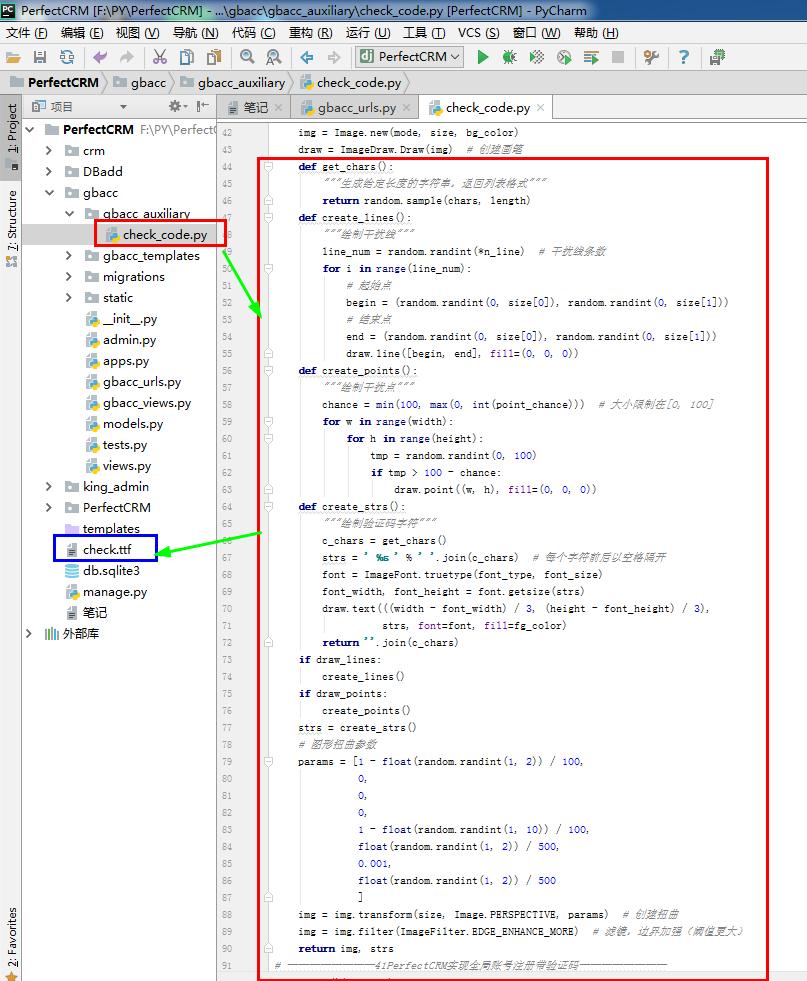
     def get_chars():

         """生成给定长度的字符串,返回列表格式"""

         return random.sample(chars, length)

     def create_lines():

         """绘制干扰线"""

         line_num = random.randint(*n_line)  # 干扰线条数

         for i in range(line_num):

             # 起始点

             begin = (random.randint(0, size[0]), random.randint(0, size[1]))

             # 结束点

             end = (random.randint(0, size[0]), random.randint(0, size[1]))

             draw.line([begin, end], fill=(0, 0, 0))

     def create_points():

         """绘制干扰点"""

         chance = min(100, max(0, int(point_chance)))  # 大小限制在[0, 100]

         for w in range(width):

             for h in range(height):

                 tmp = random.randint(0, 100)

                 if tmp > 100 - chance:

                     draw.point((w, h), fill=(0, 0, 0))

     def create_strs():

         """绘制验证码字符"""

         c_chars = get_chars()

         strs = ' %s ' % ' '.join(c_chars)  # 每个字符前后以空格隔开

         font = ImageFont.truetype(font_type, font_size)

         font_width, font_height = font.getsize(strs)

         draw.text(((width - font_width) / 3, (height - font_height) / 3),

                   strs, font=font, fill=fg_color)

         return ''.join(c_chars)

     if draw_lines:

         create_lines()

     if draw_points:

         create_points()

     strs = create_strs()

     # 图形扭曲参数

     params = [1 - float(random.randint(1, 2)) / 100,

               0,

               0,

               0,

               1 - float(random.randint(1, 10)) / 100,

               float(random.randint(1, 2)) / 500,

               0.001,

               float(random.randint(1, 2)) / 500

               ]

     img = img.transform(size, Image.PERSPECTIVE, params)  # 创建扭曲

     img = img.filter(ImageFilter.EDGE_ENHANCE_MORE)  # 滤镜,边界加强(阈值更大)

     return img, strs

 # ————————41PerfectCRM实现全局账号注册带验证码————————
# check_code.py


控制面板\所有控制面板项\字体
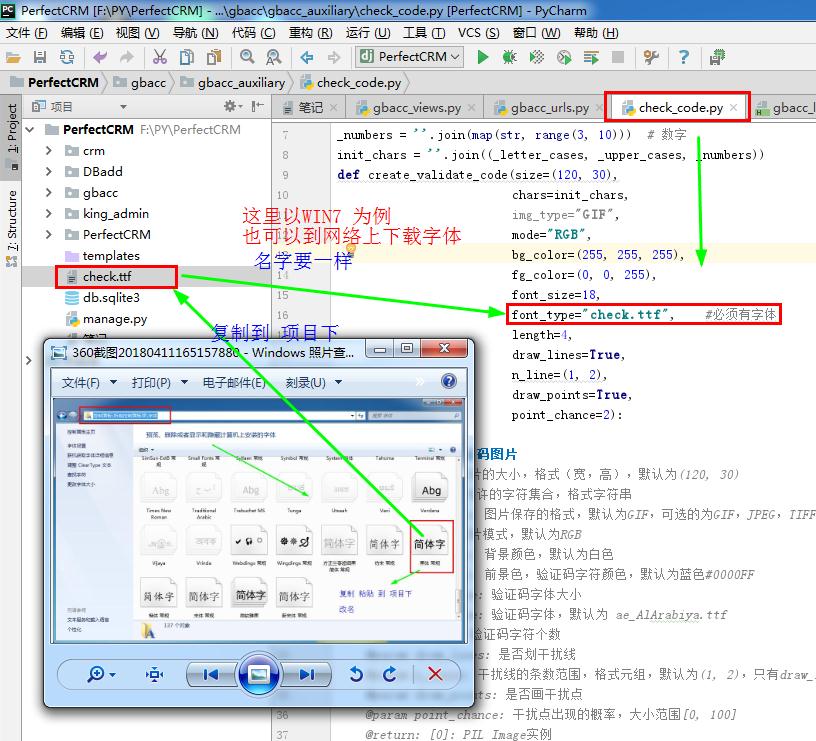
由于无法上传字体 ,请自己复制一个字体到项目下


 # gbacc_views.py

 # ————————38PerfectCRM实现全局账号登录注销————————

 from django.contrib.auth import login #记录登录 #Django在数据库创建一条记录 #记住密码,免登录

 from django.contrib.auth import authenticate #调用用户认证模块

 from django.contrib.auth import logout #注销功能

 from django.shortcuts import render  #页面返回

 from django.shortcuts import redirect  #页面返回

 # ————————39PerfectCRM实现登录+验证码+过期时间+页面保留账号————————

 #验证码函数 #处理注册的内容

 from io import BytesIO #创建内存空间

 from django.shortcuts import HttpResponse #页面返回

 from gbacc.gbacc_auxiliary.check_code import create_validate_code #验证图片

 def check_code(request):

     stream = BytesIO()#创建内存空间

     img, code = create_validate_code()#调用验证码图片生成函数 返回图片 和 对应的验证码

     img.save(stream, 'PNG')#保存为PNG格式

     request.session['CheckCode'] = code#保存在session中

     return HttpResponse(stream.getvalue())

 # ————————39PerfectCRM实现登录+验证码+过期时间+页面保留账号————————

 #全局账号登录

 def gbacc_login(request):

     # ————————39PerfectCRM实现登录+验证码+过期时间+页面保留账号————————

     email={} #变字典#传前端#页面获取值

     _email = request.POST.get('email')  #关键语句 #获取前端输入的值

     request.session['email'] = _email  #保存到 session 里

     email=request.session.get('email')   #保存到变量#变字典#传前端

     import datetime

     today_str = datetime.date.today().strftime("%Y%m%d")   #获取时间#登陆过期

     # ————————39PerfectCRM实现登录+验证码+过期时间+页面保留账号————————

     errors={}

     if request.method =="POST":

         _email=request.POST.get('email')

         _password=request.POST.get('password')

         # ————————39PerfectCRM实现登录+验证码+过期时间+页面保留账号————————

         #后台生成的验证码#调用上面def check_code(request):        #页面输入的验证码

         if request.session.get('CheckCode').upper() == request.POST.get('check_code').upper():#验证码

         # ————————39PerfectCRM实现登录+验证码+过期时间+页面保留账号————————

             user =authenticate(username=_email,password=_password)#调用用户认证模块

             print('认证账号密码',user)

             if user:

                 login(request,user)#记录登录 #Django在数据库创建一条记录 #记住密码,免登录

                 # ————————39PerfectCRM实现登录+验证码+过期时间+页面保留账号————————

                 request.session.set_expiry(60*60)  #登陆过期时间

                 # ————————39PerfectCRM实现登录+验证码+过期时间+页面保留账号————————

                 next_url =request.GET.get('next','/')#跳转的页面,默认为首页

                 return redirect(next_url)

             else:

                 errors['error']='认证失败!'

         # ————————39PerfectCRM实现登录+验证码+过期时间+页面保留账号————————

         else:

             errors['error']= "验证码错误!"

         # ————————39PerfectCRM实现登录+验证码+过期时间+页面保留账号————————

     return render(request,'gbacc_specific/gbacc_login.html',locals())

 #全局账号注销

 def gbacc_logout(request):

     logout(request)  #调用Djangao 注销功能

     return redirect('/gbacc/gbacc_login/')

 # ————————38PerfectCRM实现全局账号登录注销————————
# gbacc_views.py
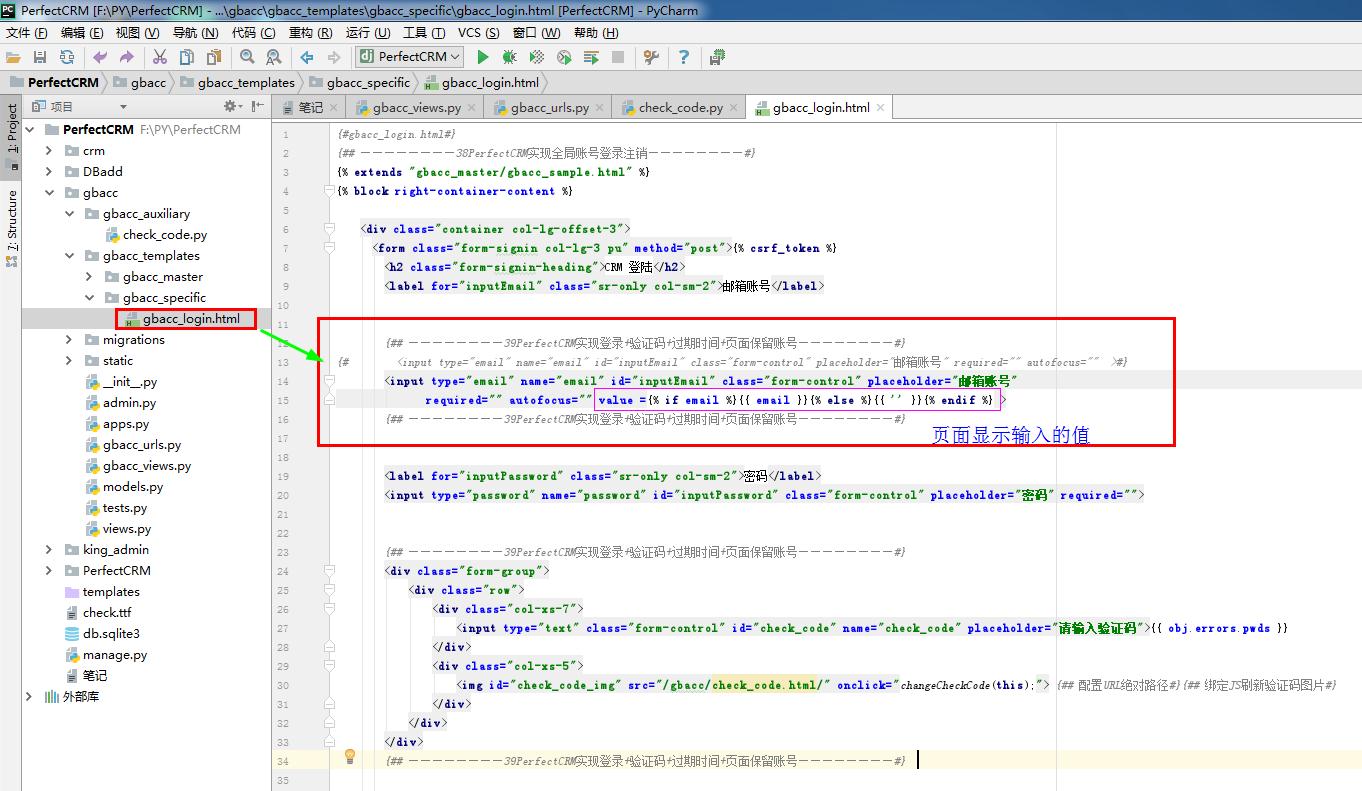
 {#gbacc_login.html#}

 {## ————————38PerfectCRM实现全局账号登录注销————————#}

 {% extends "gbacc_master/gbacc_sample.html" %}

 {% block right-container-content %}

     <div class="container col-lg-offset-3">

       <form class="form-signin col-lg-3 pu" method="post">{% csrf_token %}

         <h2 class="form-signin-heading">CRM 登陆</h2>

         <label for="inputEmail" class="sr-only col-sm-2">邮箱账号</label>

         {## ————————39PerfectCRM实现登录+验证码+过期时间+页面保留账号————————#}

 {#        <input type="email" name="email" id="inputEmail" class="form-control" placeholder="邮箱账号" required="" autofocus=""  >#}

         <input type="email" name="email" id="inputEmail" class="form-control" placeholder="邮箱账号"

                required="" autofocus="" value ={% if email %}{{ email }}{% else %}{{ '' }}{% endif %} >

         {## ————————39PerfectCRM实现登录+验证码+过期时间+页面保留账号————————#}

         <label for="inputPassword" class="sr-only col-sm-2">密码</label>

         <input type="password" name="password" id="inputPassword" class="form-control" placeholder="密码" required="">

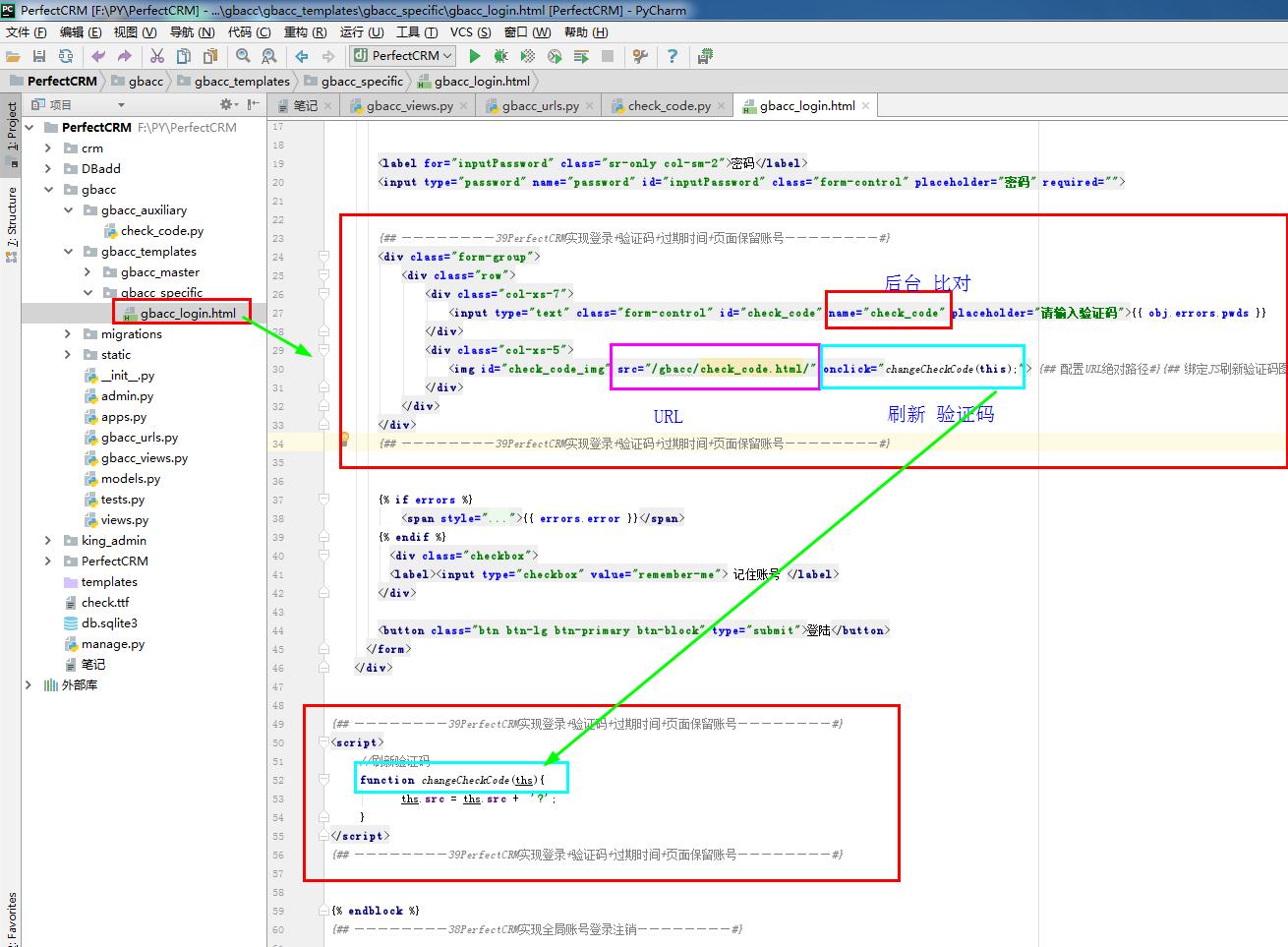
         {## ————————39PerfectCRM实现登录+验证码+过期时间+页面保留账号————————#}

         <div class="form-group">

             <div class="row">

                 <div class="col-xs-7">

                     <input type="text" class="form-control" id="check_code" name="check_code" placeholder="请输入验证码">{{ obj.errors.pwds }}

                 </div>

                 <div class="col-xs-5">

                     <img id="check_code_img" src="/gbacc/check_code.html/" onclick="changeCheckCode(this);"> {## 配置URL绝对路径#}{## 绑定JS刷新验证码图片#}

                 </div>

             </div>

         </div>

         {## ————————39PerfectCRM实现登录+验证码+过期时间+页面保留账号————————#}

         {% if errors %}

             <span style="color: #761c19">{{ errors.error }}</span>

         {% endif %}

           <div class="checkbox">

           <label><input type="checkbox" value="remember-me"> 记住账号 </label>

         </div>

         <button class="btn btn-lg btn-primary btn-block" type="submit">登陆</button>

       </form>

     </div>

 {## ————————39PerfectCRM实现登录+验证码+过期时间+页面保留账号————————#}

 <script>

      //刷新验证码

      function changeCheckCode(ths){

             ths.src = ths.src +  '?';

      }

 </script>

 {## ————————39PerfectCRM实现登录+验证码+过期时间+页面保留账号————————#}

 {% endblock %}

 {## ————————38PerfectCRM实现全局账号登录注销————————#}
{#gbacc_login.html#}

Django项目:CRM(客户关系管理系统)--48--39PerfectCRM实现登录+验证码+过期时间+页面保留账号的更多相关文章
- Django项目:CRM(客户关系管理系统)--50--41PerfectCRM实现全局账号密码修改
# gbacc_urls.py # ————————38PerfectCRM实现全局账号登录注销———————— from django.conf.urls import url from gbacc ...
- Django项目:CRM(客户关系管理系统)--49--40PerfectCRM实现全局账号注册+验证码+页面刷新保留信息
# gbacc_urls.py # ————————38PerfectCRM实现全局账号登录注销———————— from django.conf.urls import url from gbacc ...
- Django CRM客户关系管理系统
CRM需求分析 随着信息化时代带来的科技创新,CRM客户关系管理系统带来的效益在已经成为很多企业提高竞争优势的一分部,CRM客户关系管理系统将企业管理和客户关系管理集成到统一的平台,其系统功能主要体现 ...
- Django项目:CRM(客户关系管理系统)--54--45PerfectCRM实现账号快速重置密码
# gbacc_ajax_urls.py # ————————42PerfectCRM实现AJAX全局账号注册———————— from django.conf.urls import url fro ...
- Django项目:CRM(客户关系管理系统)--53--44PerfectCRM实现账号快速注册登陆
# gbacc_ajax_urls.py # ————————42PerfectCRM实现AJAX全局账号注册———————— from django.conf.urls import url fro ...
- CRM 客户关系管理系统
CRM(Customer Relationship Manager)客户关系管理系统 企业为提高核心竞争力,利用相应的信息技术以及互联网技术协调企业与顾客间在销售.营销和服务上的交互,从而提升其管理方 ...
- CRM客户关系管理系统-需求概设和详设
大概设计 大概设计就是对需求进行一个整体性分析,把需要实现的功能都列出来,对于客户关系管理系统,我们需要从角色出发,从而确定有哪些需求,最好是画个思维导图 首先我们是为培训学校这么一个场景来开发的,所 ...
- CRM客户关系管理系统 北京易信软科信息技术有限公司
北京易信软科信息技术有限公司 推出大型erp系统,库存管理系统,客户关系管理系统,车辆登记管理系统,员工管理系统,采购管理系统,销售管理系统,为您的企业提供最优质的产品服务 北京易信软科您可信赖的北京 ...
- Django项目:CRM(客户关系管理系统)--84--74PerfectCRM实现CRM权限和权限组限制访问URL
#models.py # ————————01PerfectCRM基本配置ADMIN———————— from django.db import models # Create your models ...
随机推荐
- Slim模型部署多GPU
1 多GPU原理 单GPU时,思路很简单,前向.后向都在一个GPU上进行,模型参数更新时只涉及一个GPU. 多GPU时,有模型并行和数据并行两种情况. 模型并行指模型的不同部分在不同GPU上运行. 数 ...
- 【期望DP】[UVA1498] Activation
显然是概率DP 我们用dp[i][j]表示队伍中有i个人,lyk的小迷妹现在排在j这个位置时的概率大小 不难列出下列转移方程: (显然已经排到前面k个位置的时候是要加上爆炸也就是p4的概率的) $$f ...
- Luogu P4180 【模板】严格次小生成树[BJWC2010]
P4180 [模板]严格次小生成树[BJWC2010] 题意 题目描述 小\(C\)最近学了很多最小生成树的算法,\(Prim\)算法.\(Kurskal\)算法.消圈算法等等.正当小\(C\)洋洋得 ...
- odoo 下 get_object_reference 函数
get_object_reference是 ir.model.data 模块中下的一个函数 该函数通过调用ir.model.data 模块中另外一个函数 xmlid_lookup 返回结果 def g ...
- 边缘节点服务ENS重磅升级 阿里云首次定义“边缘云计算”概念层层深入
随着5G.物联网时代的到来以及云计算应用的逐渐增加,传统集中式的云计算技术已经无法满足终端侧“大连接,低时延,大带宽”的需求.结合边缘计算的概念,云计算将必然发展到下一个技术阶段,也就是将云计算的能力 ...
- Django缓存机制以及使用redis缓存数据库
目录 Django 配置缓存机制 缓存系统工作原理 Django settings 中 默认cache 缓存配置 利用文件系统来缓存 使用Memcache来缓存: 使用Local-memory来缓存: ...
- Less适配移动端rem
@ue-width: 750; /* 设计图的宽度 */ .px2rem(@px) { @remValue: @px/@ue-width*10; @pxToRem: ~"@{remValue ...
- 为什么要使用Vue.$set(target,key,value)
vue中不能检测到数组和对象的两种变化: 1.数组长度的变化 vm.arr.length = 4 2,数组通过索引值修改内容 vm.arr[1] = 'aa' Vue.$set(target,key, ...
- MUI离线原生打包,利用Android Studio进行原生打包MUI项目
首先从官网http://www.dcloud.io/ 下载HBuilder,用该软件创建一个HTML5的移动APP项目,具体可去官网查看相应的文档. 接下来就是如何将写好的HBuilder引入到我们的 ...
- 查询sitemap中重复的记录
; ;