
day39-Spring 16-Spring的JDBC模板:设置参数到属性文件
<?xml version="1.0" encoding="UTF-8"?>

<!-- 引入beans的头 -->

<beans xmlns="http://www.springframework.org/schema/beans"

       xmlns:xsi="http://www.w3.org/2001/XMLSchema-instance"

       xsi:schemaLocation="

http://www.springframework.org/schema/beans http://www.springframework.org/schema/beans/spring-beans.xsd">

    <!-- 配置Spring默认的连接池 -->

    <!-- 这个类由Spring来帮我们创建,它默认情况下只创建一次,因为是单例的. -->

    <bean id="dataSource" class="org.springframework.jdbc.datasource.DriverManagerDataSource">

        <property name="driverClassName" value="com.mysql.jdbc.Driver"></property>

        <property name="url" value="jdbc:mysql:///spring3_day02"></property>

        <property name="username" value="root"></property>

        <property name="password" value=""></property>

    </bean>

    <!-- 配置DBCP连接池 -->

    <bean id="dataSource1" class="org.apache.commons.dbcp.BasicDataSource">

        <property name="driverClassName" value="com.mysql.jdbc.Driver"></property>

        <property name="url" value="jdbc:mysql:///spring3_day02"></property>

        <property name="username" value="root"></property>

        <property name="password" value=""></property>

    </bean>

    <!-- 配置C3P0连接池 -->

    <bean id="dataSource2" class="com.mchange.v2.c3p0.ComboPooledDataSource">

        <property name="driverClass" value="com.mysql.jdbc.Driver"></property>

        <property name="jdbcUrl" value="jdbc:mysql:///spring3_day02"></property>

        <property name="user" value="root"></property>

        <property name="password" value=""></property>

    </bean>

    <!-- 定义jdbctemplate -->

    <bean id="jdbcTemplate" class="org.springframework.jdbc.core.JdbcTemplate">

          <property name="dataSource" ref="dataSource2"></property><!-- 把上面定义好的连接池注入进来了 -->

    </bean>

</beans>
每一次去修改里面的参数都要修改Spring的核心配置文件.


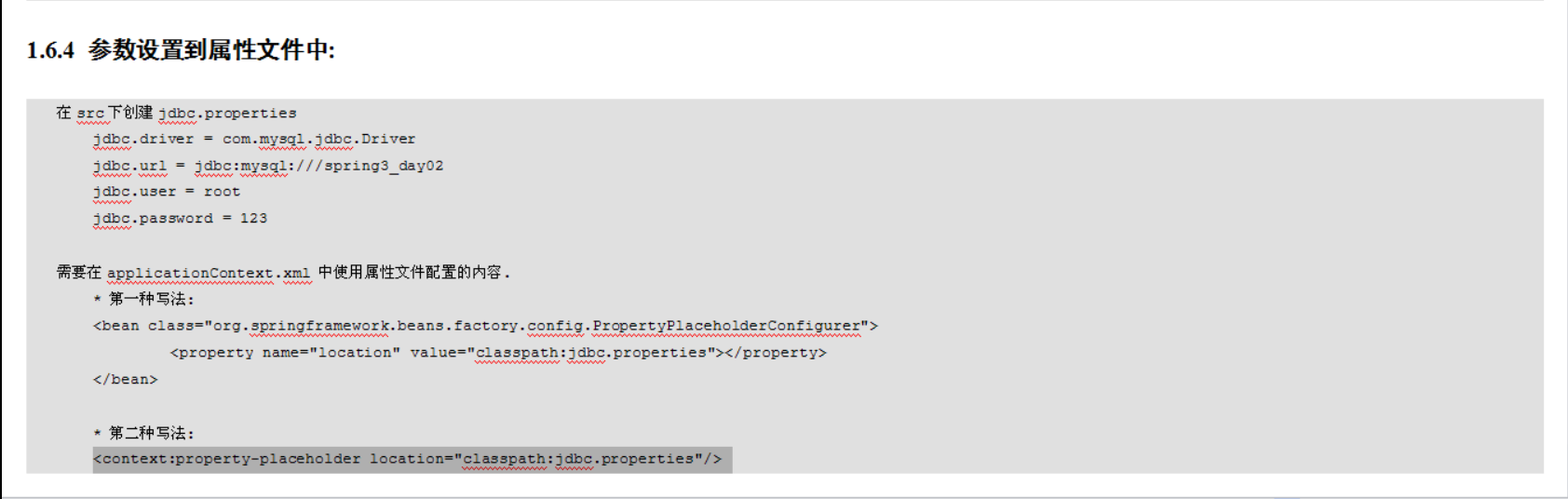
第一种方式要写的东西比较多,所以一般会使用context标签.

要使用context标签就要引入context标签的头.在配置文件xsd-config.html中找到context标签的头.

<context:property-placeholder location="classpath:jdbc.properties"/>
<?xml version="1.0" encoding="UTF-8"?>

<!-- 引入beans的头 -->

<beans xmlns="http://www.springframework.org/schema/beans"

       xmlns:xsi="http://www.w3.org/2001/XMLSchema-instance"

              xmlns:context="http://www.springframework.org/schema/context"

       xsi:schemaLocation="

http://www.springframework.org/schema/beans http://www.springframework.org/schema/beans/spring-beans.xsd

http://www.springframework.org/schema/beans http://www.springframework.org/schema/beans/spring-beans.xsd

http://www.springframework.org/schema/context http://www.springframework.org/schema/context/spring-context.xsd">

    <!-- 配置Spring默认的连接池 -->

    <!-- 这个类由Spring来帮我们创建,它默认情况下只创建一次,因为是单例的. -->

    <bean id="dataSource" class="org.springframework.jdbc.datasource.DriverManagerDataSource">

        <property name="driverClassName" value="com.mysql.jdbc.Driver"></property>

        <property name="url" value="jdbc:mysql:///spring3_day02"></property>

        <property name="username" value="root"></property>

        <property name="password" value=""></property>

    </bean>

    <!-- 配置DBCP连接池 -->

    <bean id="dataSource1" class="org.apache.commons.dbcp.BasicDataSource">

        <property name="driverClassName" value="com.mysql.jdbc.Driver"></property>

        <property name="url" value="jdbc:mysql:///spring3_day02"></property>

        <property name="username" value="root"></property>

        <property name="password" value=""></property>

    </bean>

    <!--

    <bean class="org.springframework.beans.factory.config.PropertyPlaceholderConfigurer">

    <property name="location" value="classpath:jdbc.properties">--><!-- jdbc.properties也是在src下 --><!-- </property>

    </bean>

    -->

    <context:property-placeholder location="classpath:jdbc.properties"/>

    <!-- 配置C3P0连接池 -->

    <bean id="dataSource2" class="com.mchange.v2.c3p0.ComboPooledDataSource">

    <!--

        <property name="driverClass" value="com.mysql.jdbc.Driver"></property>

        -->

        <property name="driverClass" value="${jdbc.driver}"></property>

        <!--

        <property name="jdbcUrl" value="jdbc:mysql:///spring3_day02"></property>

        -->

        <property name="jdbcUrl" value="${jdbc.url}"></property>

        <!--

        <property name="user" value="root"></property>

        -->

        <property name="user" value="${jdbc.user}"></property>

        <!--

        <property name="password" value=""></property>

        -->

        <property name="password" value="${jdbc.password}"></property>

    </bean>

    <!-- 定义jdbctemplate -->

    <bean id="jdbcTemplate" class="org.springframework.jdbc.core.JdbcTemplate">

          <property name="dataSource" ref="dataSource2"></property><!-- 把上面定义好的连接池注入进来了 -->

    </bean>

</beans>
package cn.itcast.spring3.demo1;

import java.sql.DriverManager;

import org.junit.Test;

import org.junit.runner.RunWith;

import org.springframework.beans.factory.annotation.Autowired;

import org.springframework.beans.factory.annotation.Qualifier;

import org.springframework.jdbc.core.JdbcTemplate;

import org.springframework.jdbc.datasource.DriverManagerDataSource;

import org.springframework.test.context.ContextConfiguration;

import org.springframework.test.context.junit4.SpringJUnit4ClassRunner;

import org.springframework.transaction.jta.SpringJtaSynchronizationAdapter;

@RunWith(SpringJUnit4ClassRunner.class)

@ContextConfiguration("classpath:applicationContext.xml")

public class SpringTest1 {

    @Autowired

    @Qualifier("jdbcTemplate")

    private JdbcTemplate jdbcTemplate;//注入Jdbc模板

    @Test

    public void demo2(){

        jdbcTemplate.execute("create table user (id int primary key auto_increment,name varchar(20))");

    }

    @Test

    public void demo1(){

        // 创建连接池:

        DriverManagerDataSource dataSource = new DriverManagerDataSource();//Spring自带的连接池

        // 设置参数:

        dataSource.setDriverClassName("com.mysql.jdbc.Driver");

        dataSource.setUrl("jdbc:mysql:///spring3_day02");

        dataSource.setUsername("root");

        dataSource.setPassword("");

        //使用JDBC的模板:

        //JdbcTemplate jdbcTemplate = new JdbcTemplate();

        //jdbcTemplate.setDataSource(dataSource);

        JdbcTemplate jdbcTemplate = new JdbcTemplate(dataSource);

        jdbcTemplate.execute("create table user (id int primary key auto_increment,name varchar(20))");

    }

}
jdbc.driver = com.mysql.jdbc.Driver

jdbc.url = jdbc:mysql:///spring3_day02

jdbc.user = root

jdbc.password =
day39-Spring 16-Spring的JDBC模板:设置参数到属性文件的更多相关文章
- 十八 Spring的JDBC模板:引入外部属性文件
配置外部属性文件 配置文件里引入属性文件,两种方式 第一种: 第二种: 引入属性文件的值: 测试: <?xml version="1.0" encoding="UT ...
- Spring - 配置Bean - 自动装配 关系 作用域 引用外部属性文件
1 Autowire自动装配1.1 使用:只需在<bean>中使用autowire元素<bean id="student" class="com.kej ...
- spring与jpa整合 简化persistence.xml配置文件 使用属性文件 数据源dbcp访问数据库
===========appliction.xml配置文件======================= <?xml version="1.0" encoding=" ...
- spring(16)------spring的数据源配置
在spring中,通过XML的形式实现数据源的注入有三种形式. 一.使用spring自带的DriverManagerDataSource 使用DriverManagerDataSource配置数据源与 ...
- Spring入门(三)— AOP注解、jdbc模板、事务
一.AOP注解开发 导入jar包 aop联盟包. aspectJ实现包 . spring-aop-xxx.jar . spring-aspect-xxx.jar 导入约束 aop约束 托管扩展类和被扩 ...
- Spring 框架的JDBC模板技术
1. 概述 Spring 框架提供了很多持久层的模板类来简化编程; Spring 框架提供的JDBC模板类: JdbcTemplate 类; Spring 框架提供的整合 Hibernate 框架的模 ...
- Spring 框架系列之 JDBC 整合实例
微信公众号:compassblog 欢迎关注.转发,互相学习,共同进步! 有任何问题,请后台留言联系! 1.Spring框架整合 DAO 模板 JDBC:org.springframework.jdb ...
- day39-Spring 15-Spring的JDBC模板:C3P0连接池配置
<!-- 配置C3P0连接池 --> <bean id="dataSource2" class="com.mchange.v2.c3p0.ComboPo ...
- day39-Spring 14-Spring的JDBC模板:DBCP连接池配置
一般常用的连接池是DBCP和C3P0. package cn.itcast.spring3.demo1; import java.sql.DriverManager; import org.junit ...
随机推荐
- Maven实战02_Maven的安装和配置
1:在Windows上安装Maven 本人系统环境:win10 + JDK1.8 + apache-maven-3.3.9 在安装Maven之前,首先要确定你的Java环境是否已经配置好了,你是否已 ...
- JSP - (Java Server Pages) - Java服务器界面
JSP简介: 在HTML中嵌入Java脚本代码,由应用服务器中的JSP引擎来编译和执行嵌入的Java脚本代码,然后将生成的整个页面信息返回给客户端: 一个JSP页面包含:静态内容(HTML静态文本), ...
- 两周的业余时间,写了个简单的shell
Linux下的,环境是 Fedora 实现了基本的内部命令功能,及比较完善的内部命令框架. 类似于MFC消息映射表的方式,写完一个内部命令,只需要向这个头文件中,导入一个头文件,再写入命令处理函数,就 ...
- mac上python3.x安装 图文详解
mac安装brew报错及解决办法 https://blog.csdn.net/zdp072/article/details/82563320 更改脚本中的资源链接,替换成中国科学技术大学的镜像 htt ...
- shiro+jwt+springboot理解
转自 https://www.cnblogs.com/fengli9998/p/6676783.html https://www.jianshu.com/p/0366a1675bb6 https:// ...
- 如何提高英语听力(内容摘自NECCS)+ 乘法表
乘法表 print('\n'.join([' '.join(['%s*%s=%-2s'%(y,x,x*y) for y in range(1,x+1)]) for x in range(1,10)]) ...
- Delphi 设计模式:《HeadFirst设计模式》Delphi7代码---状态模式[转]
{没有应用状态模式的代码} //工程文件 program Project1; {$APPTYPE CONSOLE} uses uGumballMachine in 'uGumballMachine. ...
- oracle-视图-索引-序列
Oracle提高查询性能 一 视图 视图是一个虚拟表,就是对select查询的结果取个名字.其内容由查询定义.同真实的表一样,视图包含一系列带有名称的列和行数据.但是,视图并不在数据库中以存储的数据值 ...
- PHP 学习1.0
1.简单一个class 类: 获取表单提交的值 采用post方式 <html><head><title>PHP TEST</title></hea ...
- Java加密AES算法及spring中应用
开门见山直接贴上代码 .AESUtil加密解密工具类 import java.security.Key; import java.security.SecureRandom; import java. ...