
Fish Shell使用心得
Fish的官网宣传语是 Finally, a command line shell for the 90s。 翻译过来就是 Fish shell 是一个为90后准备的 shell。
有人说:“二逼青年用bash,普通青年用zsh,文艺青年用fish。”[4]
其次由于zsh 的速度实在是太慢,所以决定换用fish,fish速度快,智能提示强大。
本文的亮点在于三点:
1、Fish的入门使用
2、与bash兼容性的方案
3、一个属于自己的Fish主题
Fish配置请参考:https://github.com/iceqing/linux-template-setting/blob/master/fish/config.fish
下面分别介绍
一、fish 入门使用
1 、ubuntu 安装fish
apt-get install software-properties-common

sudo apt-add-repository ppa:fish-shell/release-2

sudo apt-get update

sudo apt-get install fish

#切换到fish

echo /usr/bin/fish | sudo tee -a /etc/shells

sudo chsh -s /usr/bin/fish && fish
其他平台类似,可以根据官网说明来 [1]
fish的鲜明特征在于安装时已经默认集成了很多需要的功能。
比如:
- 命令行语法高亮,错误会显示红色
- 智能提示
- 可以使用web网页的进行终端配置
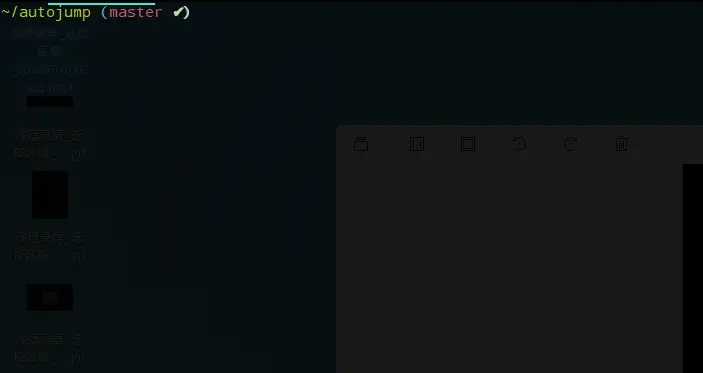
fish 有智能提示,一个命令一旦输入过一次,会自动显示上一次的全部命令,细心一点会发现会有一层灰色的字体表示上一次的命令,按Ctrl+F或者 右方向键→, 即可自动补全,如下图:
2、 安装autojump
git clone https://github.com/wting/autojump.git

cd autojump

./install.py

vim ~/.config/fish/config.fish


按照install.py 命令给出的提示来修改config.fish, 添加


if test -f /home/ice/.autojump/share/autojump/autojump.fish; . /home/ice/.autojump/share/autojump/autojump.fish; end
3、网页配置fish
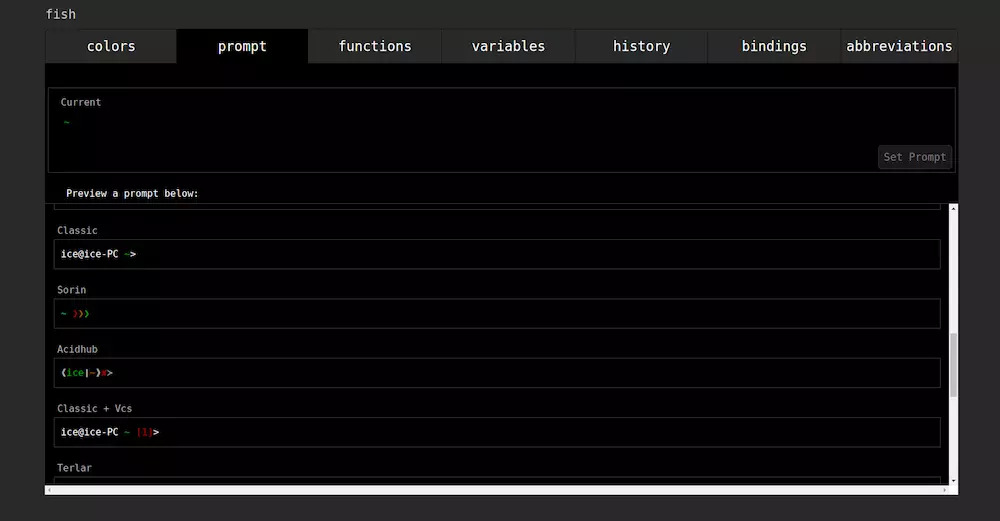
fish_config 可以直接跳出网页版本配置fish的界面。
web版本可以设置主题, 推荐其中的"Tomorrow Night"主题颜色。

选择想要的主题,然后点击set theme即可设置主题。
在命令里按enter 即可退出web版本的界面。
在prompt里面可以自己选择fish终端的主题。
4、插件管理
https://github.com/oh-my-fish/oh-my-fish
omf install thefuck
虽然有fisher这个管理工具,但是目前还不稳定。
5、git 配置
我们只需要配置alias 既可以满足日常git命令的使用。对于终端主题样式,我们可以自行进行配置。(后边有介绍)
# git 相关的配置

alias g "git"

alias gst "git status"

alias grs "git reset --soft"

alias grh "git reset --hard"

alias gb "git branch"

alias gba "git branch -a"

alias gl "git pull"
二、兼容bash脚本
由于fish 很多不兼容bash的功能导致了很多脚本无法运行,这一点是很多人吐槽fish的地方,我们需要一种方式来运行bash脚本。
比如
arc land --onto `git rev-parse --abbrev-ref HEAD`
这条命令在fish里无法执行。
我们只需要在前面添加一个bash -c 命令即可,如下所示。
bash -c "arc land --onto `git rev-parse --abbrev-ref HEAD`"
顺手加个alias就更方便了,可以直接在命令行里使用命令arcl。
alias arcl bash -c "arc land --onto `git rev-parse --abbrev-ref HEAD`"
对于脚本文件,比如我将需要执行的命令或文件放到repomerge.sh
在~/.config/fish/config.fish添加
alias up "bash -c /usr/bin/repomerge.sh"
然后就可以自由的使用up命令了
配置自己的终端
样式显示如下:

其中function fish_prompt 函数用于定义fish终端的显示样式。
我们只需要写一个fish_prompt函数即可。集成了git的分支名称以及当前的变化。
显示的样式如下:

说明:
✔代表当前git项目是干净的。
%1 表示有一个文件未追踪
+1 表示一个文件已暂存
# 终端显示样式的配置

function fish_prompt --description 'Write out the prompt'

    if not set -q __fish_prompt_normal

        set -g __fish_prompt_normal (set_color normal)

    end
__fish_git_prompt >/dev/null 2>&1

<span class="hljs-keyword">if</span> git_is_repo

    <span class="hljs-keyword">if</span> not <span class="hljs-built_in">set</span> -q __git_cb

        <span class="hljs-built_in">set</span> __git_cb (set_color blue)<span class="hljs-string">" ("</span>(set_color brred)(git branch | grep \* | sed <span class="hljs-string">'s/* //'</span>) (set_color -o bryellow)(__fish_git_prompt_informative_status)(set_color blue)<span class="hljs-string">")"</span>

    end

end

<span class="hljs-keyword">if</span> not <span class="hljs-built_in">set</span> -q __fish_prompt_cwd

    <span class="hljs-built_in">set</span> -g __fish_prompt_cwd (set_color <span class="hljs-variable">$fish_color_cwd</span>)

end

<span class="hljs-built_in">printf</span> <span class="hljs-string">'%s%s%s%s '</span> <span class="hljs-string">"<span class="hljs-variable">$__fish_prompt_cwd</span>"</span> (prompt_pwd) <span class="hljs-string">"<span class="hljs-variable">$__fish_prompt_normal</span>"</span> <span class="hljs-variable">$__git_cb</span>


end
隐藏欢迎语
在confin.sh文件里添加如下函数即可
function fish_greeting

end
其他配置
alias l "ll"

alias dir "dde-file-manager . &"

alias docker "sudo docker"

alias apt "sudo apt"
参考:
- 官网
- fish 安装 https://launchpad.net/~fish-shell/+archive/ubuntu/release-2
- Fish shell 入门教程 (阮一峰) http://www.ruanyifeng.com/blog/2017/05/fish_shell.html
- 宇宙第一shell——fish入门 https://www.jianshu.com/p/7ffd9d1af788
全部配置如下
# git配置
alias g "git"
alias gst "git status"
alias grs "git reset --soft"
alias grh "git reset --hard"
alias gb "git branch"
alias gba "git branch -a"
alias gl "git pull"
# 系统相关配置
alias l "ll"
alias dir "dde-file-manager . &"
alias docker "sudo docker"
alias apt "sudo apt"
# 终端显示样式的配置
function fish_prompt --description 'Write out the prompt'
if not set -q __fish_prompt_normal
set -g __fish_prompt_normal (set_color normal)
end
__fish_git_prompt ><span class="hljs-regexp">/dev/null</span> <span class="hljs-number">2</span>>&<span class="hljs-number">1</span>
<span class="hljs-keyword">if</span> git_is_repo
<span class="hljs-keyword">if</span> <span class="hljs-keyword">not</span> set -q __git_cb
set __git_cb (set_color blue)<span class="hljs-string">" ("</span>(set_color brred)(git branch <span class="hljs-params">| grep \* |</span> sed <span class="hljs-string">'s/* //'</span>) (set_color -o bryellow)(__fish_git_prompt_informative_status)(set_color blue)<span class="hljs-string">")"</span>
<span class="hljs-keyword">end</span>
<span class="hljs-keyword">end</span>
<span class="hljs-keyword">if</span> <span class="hljs-keyword">not</span> set -q __fish_prompt_cwd
set -g __fish_prompt_cwd (set_color $fish_color_cwd)
<span class="hljs-keyword">end</span>
printf <span class="hljs-string">'%s%s%s%s '</span> <span class="hljs-string">"$__fish_prompt_cwd"</span> (prompt_pwd) <span class="hljs-string">"$__fish_prompt_normal"</span> $__git_cb
end
# 终端提示语配置
function fish_greeting
end
# 判断是否是git仓库的工具函数
function git_is_repo --description 'Check if directory is a repository'
test -d .git
or command git rev-parse --git-dir >/dev/null ^/dev/null
end
如果你喜欢在前面加上用户名称可以使用
printf '%s %s%s%s%s ' "$USER" "$__fish_prompt_cwd" (prompt_pwd) "$__fish_prompt_normal" $__git_cb
替换掉上面的
printf '%s%s%s%s ' "$__fish_prompt_cwd" (prompt_pwd) "$__fish_prompt_normal" $__git_cb
本文采用署名-相同方式共享 4.0 国际 (CC BY-SA 4.0),转载请注明出处。
系列文章
1. Fish Shell使用心得
2. Fish Shell 3.0 新功能
原文地址:https://www.jianshu.com/p/bf03bce60987
Fish Shell使用心得的更多相关文章
- Fish Shell
今天看到阮一峰同学的一篇博客(Fish shell 入门教程),讲述的非常详细.清楚,有兴趣的可以直接转去查看此文,本文仅提供一下个人使用心得. 一.fish shell 想必接触过类unix(包括w ...
- anaconda的fish shell支持
最近在用fish shell,但是无法使用conda的activate命令来激活环境.官方给的有解决方案 https://github.com/conda/conda/blob/5b97a96d78e ...
- fish shell 下gopath的设置问题
GOPATH可以设置多个工程目录,linux下用冒号分隔(必须用冒号,fish shell的空格分割会出错),windows下用分号分隔,但是go get 只会下载pkg到第一个目录,但是编译的时候会 ...
- fish shell version
如果你使用 fish shell, 想要自己定义变量,或者函数,或者alias, 不要使用 version 这个名字, 因为,version 这个名字 被 fish 本身占了.... ...
- Mac开发必备工具(三)—— Fish shell
Fish shell 简介 fish 可以根据输入自动匹配历史命令.它的一大特点是开箱即用,没有zsh那些繁琐的配置.官网:http://www.fishshell.com/. 安装与配置 在终端里使 ...
- fish shell 自动补全子命令
之前在 「创建 fish shell 自动补全文件」 中介绍了如何创建 fish 的补全文件,实现对命令的友好补全提示.通过形如 complete -c <command> -a [&qu ...
- Mac安装fish shell
1.brew update 2.brew install fish 3.sudo vi /etc/shells 增加内容:/usr/local/bin/fish ##增加fish到shell环境变 ...
- linux工具————fish shell
1.说明 fish is a fully-equipped command line shell (like bash or zsh) that is smart and user-friendly. ...
- fish 设置环境变量;fish shell 相关使用说明记录;
最近使用 fish进行工作,发现环境变量忘记如何设置: fish 环境变量保存在两个地方: ~ 目录下,.config/fish 目录下: /etc/fish/ 目录下 如果配置所有用户都能用的环境变 ...
随机推荐
- js经典校验之注册与登录校验
平时都专注于后台功能的实现和逻辑需求的分析及数据库方面的设计,很少关注前端的设计,而项目开发过程中专门负责后台是不太可能的事,所以前端我们也需要会用,除了漂亮的首页等其他的交给美工来做,一些功能性的东 ...
- CSS基础强化
1. 浮动引起元素变成行内块元素-display:inline-block <div style="width: 400px;height: 200px;"> < ...
- (转载)http压缩 Content-Encoding: gzip
(内容转自http://liuviphui.blog.163.com/blog/static/20227308420141843933379/) HTTP内容编码和HTTP压缩的区别 HTTP压缩,在 ...
- StringUtils常用方式留存
StringUtils是org.apache.commons.lang下的一个工具包.主要用途从名字可以看出是针对于String的一些操作工具,里面包含的方法非常多,英语水平尚可以的人可以前往它的官方 ...
- 洛谷P1063 能量项链 [2006NOIP提高组]
P1063 能量项链 题目描述 在Mars星球上,每个Mars人都随身佩带着一串能量项链.在项链上有N颗能量珠.能量珠是一颗有头标记与尾标 记的珠子,这些标记对应着某个正整数.并且,对于相邻的两颗珠子 ...
- VC程序异常中断的原因
自己编写的VC程序,编译调试通过,运行良好,然后关闭运行界面,就弹出一个“已经触发一个中断”的提示,然后断点就停在了下面这个中断处. _CRTIMP void _cdecl _CrtDbgBreak( ...
- iscroll5在使用情况下click事件失效的问题
转载自:http://www.52html5.com/?p=2618 Bug描述: iOS.android4.4+下不能触发click事件. Bug解决: 调用iscroll插件,增加配置参数:cli ...
- Valgrind 初次接触
Valgrind 英文的意思是:堆内存 它有很多小工具,作用各不相同 学习于: http://blog.csdn.net/sduliulun/article/details/7732906 http: ...
- jdbc连接数据库的步骤(转载)
http://hzy3774.iteye.com/blog/1689525 1.加载JDBC驱动程序: 在连接数据库之前,首先要加载想要连接的数据库的驱动到JVM(Java虚拟机), 这通过jav ...
- 2018-11-21-WPF-解决-ViewBox--不显示线的问题
title author date CreateTime categories WPF 解决 ViewBox 不显示线的问题 lindexi 2018-11-21 09:37:53 +0800 201 ...