
用Telnet测试服务器的端口是否开通
可以用telnet测试远程服务器的端口是否开通,格式如下:
telnet <server name> <port number>
例如:
|
Telnet tserv 3389 |
来自:https://support.microsoft.com/en-us/help/187628/using-telnet-to-test-port-3389-functionality
拷贝内容如下:
|
Using Telnet to Test Port 3389 Functionality
Summary
Terminal Server Clients use TCP port 3389 to communicate with Terminal Server. A common problem in a WAN environment is that a firewall or other network filter prevents connectivity with this port. You can run a simple troubleshooting test to make sure the Client can connect to the port. Just try to telnet to the port from the Client. To test the functionality of port 3389, use this command from the Client: Telnet tserv 3389 where "tserv" is the host name of your Terminal Server. If telnet is successful, you simply receive the telnet screen and a cursor. On the Terminal Server, Terminal Server Administration will show a blue computer icon with no other information. The Telnet connection will also consume an idle session. The Terminal Server should disconnect the connection after a few minutes. Or, you can disconnect using Telnet. This test tells you that you can connect over the port. If Telnet reports that you cannot connect, there are several possible reasons:
|


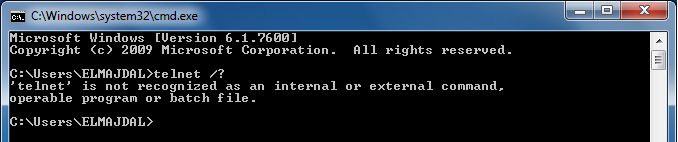
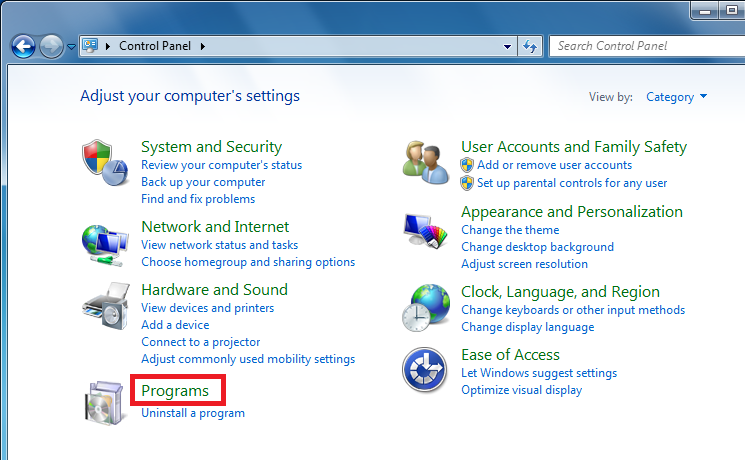
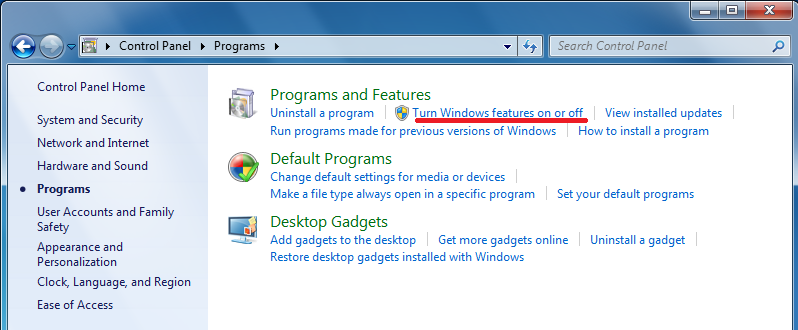
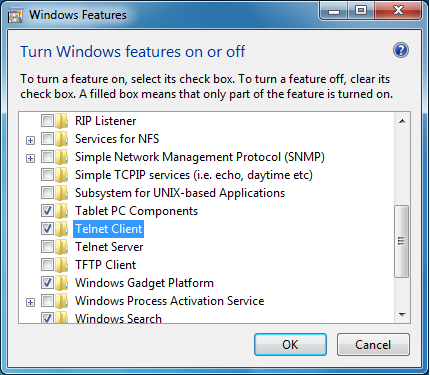
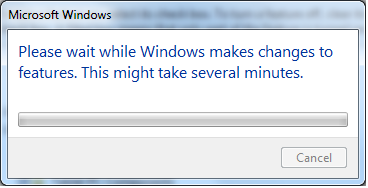
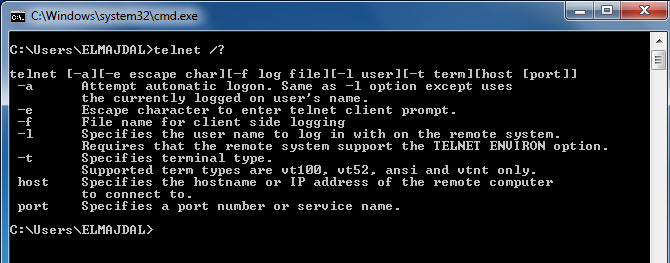
在Windows7下默认不开启telnet客户端,可以参考这个链接来开启: https://social.technet.microsoft.com/wiki/contents/articles/910.windows-7-enabling-telnet-client.aspx ,拷贝内容如下:
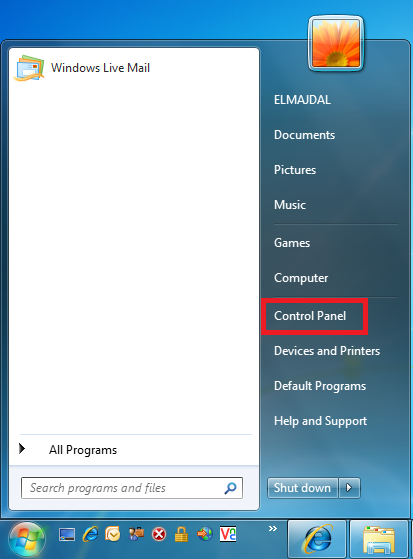
 then left (right click if you have reversed your mouse buttons) click once on Control Panel.
用Telnet测试服务器的端口是否开通的更多相关文章
- telnet不通11211端口,防火墙
问题描述: 按照官网步骤,虚拟机里安装并启动memcached, 虚拟机里自己telnet11211端口可以连接, 使用Xmanager22端口可以连接到虚拟机,但是始终telnet不同11211端口 ...
- windows 2012 服务器打开ping端口,开通远程连接
windows 2012 服务器打开ping端口,开通远程桌面连接 控制面板->系统与安全->高级防火墙->入站规则 找到:windows 远程桌面 (http in ) 右键启用 ...
- Win10系统Ping端口及利用telnet命令Ping 端口
启用 telnet 客户端组件为 Ping 端口做准备 在程序界面下,选择“打开或关闭Windows功能”,如下图所示: 在打开的对话框中,找到“Telnet客户端”并勾选.最后点击“确定”,等待几分 ...
- telnet命令测试端口连接是否正常, telnet不是内部或外部命令的方案
telnet ip地址 端口 1.点击开始 → 运行 → 输入CMD,回车.2.在DOS界面里,输入telnet测试端口命令: telnet IP 端口 或 telnet 域名 端口,回车. ...
- 使用telnet测试指定端口的连通性
大家好,我是良许. 大家知道,telnet 是一个阉割版的 ssh ,它数据不加密,数据容易被盗窃,也容易受中间人攻击,所以默认情况下 telnet 端口是必须要被关闭的. telnet为用户提供了在 ...
- 使用Telnet服务测试端口时,提示没有Telnet服务
1.win7系统是默认不开启Telnet服务的,所以我们第一次使用时要手动开启Telnet服务 1)打开 控制面板 > 程序 > 程序功能 > 打开或关闭Windows功能,勾选上T ...
- linux telnet检测与某个端口是否开通
转自:http://blog.51cto.com/meiling/1982402 一:telnet此法常被用来检测是个远端端口是否通畅. 测试域名: # telnet baidu.com 80 Try ...
- telnet命令判断端口是否通不通
以上得出结论80端口不通 如果连接成功,想要退出telnet的话,ctrl+],然后输入quit 查看iptables vi /etc/sysconfig/iptables #编辑防火墙配置文件 ...
- telnet ip/域名 端口 是否成功
有时候会ping ip 通,但是telnet不通,可能端口未开. telnet不成功,则显示不能打开到主机的链接,链接失败 . telnet成功,则进入telnet页面(全黑的),证明端口可用.
随机推荐
- github入门教程:第一步
[git教程] 以前在网上找过一些,见 http://www.wojilu.com/Forum1/Topic/702 我自己会一边学,一边写教程,过程中有不明白的,会跟大家请教交流. ----- ...
- STM32F4 Timer simplified block diagram
Timers TIM1 and TIM8 use 16-bit counters and are the most complex timers of all timers included in t ...
- 【stanford C++】容器III——Vector类
主要介绍如下5个容器类——Vector, Stack,Queue,Map和Set,各个都表示一重要的抽象数据类型.另外,各个类都是一些简单类型的值的集合,所以称它们为容器类. 暂且我们先不需要知道它们 ...
- MyEclipse使用总结——MyEclipse中配置WebLogic12c服务器
MyEclipse中配置WebLogic12c服务器的步骤如下: [Window]→[Preferences],如下图所示: 找到WebLogic的配置,如下图所示:
- 给第三方dll强签名
假若我们要对第三方控件或者是其他的没有源代码的DLL文件想做类似的处理,增加强名称签名,怎么处理,是很多人都会面对的问题. 步骤: 1.首先采用反汇编工具ildasm生成中间语言. ildas ...
- 在ASP.NET MVC控制器中获取链接中的路由数据
在ASP.NET MVC中,在链接中附加路由数据有2种方式.一种是把路由数据放在匿名对象中传递: <a href="@Url.Action("GetRouteData&quo ...
- 从零开始,运行一个android例子程序
电脑上连个eclipse都没装,怎么玩android?一穷二白的你, 下面就跟随我,从零开始,一步一步操作,运行我们的第一个android应用程序.我一直相信,学习开发,只有在调试过程中学的是最快的. ...
- 【JVM】linux上tomcat中部署的web服务,时好时坏,莫名其妙宕机,报错:There is insufficient memory for the Java Runtime Environment to continue.
=========================================================================================== 环境: linu ...
- Linux学习12-CentOS设置多个tomcat开机自启动
前言 一台服务器上有多个tomcat环境,重启服务器后,每次需要手动一个个启动服务,非常麻烦,于是可以设置tomcat开机自启动. tomcat开机自启动非常慢,可以修改jvm下配置解决tomcat开 ...
- 基于jQuery的判断iPad、iPhone、Android是横屏还是竖屏的代码
在ipad.iphone网页开发中,我们很可能需要判断是横屏或者竖屏.下面就来介绍如何用 jQuery 判断iPad.iPhone.Android是横屏还是竖屏的方法 其实主要是通过window.or ...