
Maven学习--- 搭建多模块企业级项目
我们先在eclipse中新建一个maven项目,pom.xml的文件如下:

搭建多模块项目,必须要有一个packaging为pom的根目录。创建好这个maven项目后,我们对着项目右键-->new
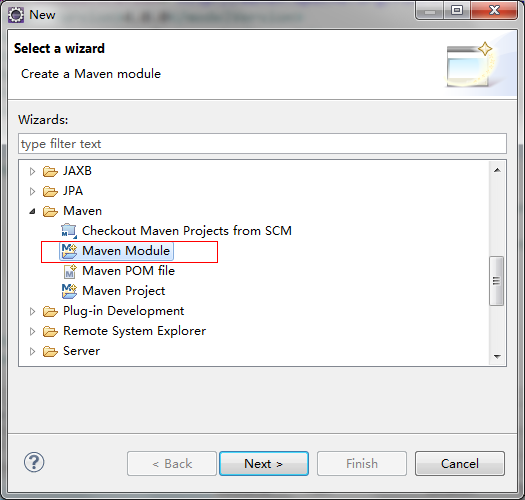
输入你的项目名称
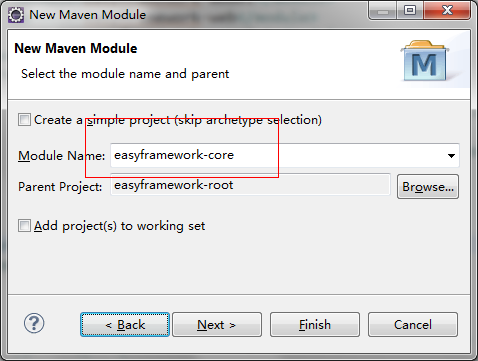
这里就不重复说创建项目了,创建好的目录结构在eclipse中如下:

说明一下这些项目具体都是干嘛的:
easyframework-model:数据模型,与数据库表字段对应的实体类
easyframework-core:核心业务项目。主要是Service处理业务逻辑
easyframework-persist:数据持久层,操作低层数据库。
easyframework-utils:工具类,所有工具类都提取出来写在这个项目中。
easyframework-web :这个就是整个项目的web层了,页面的显示以及控制层
备注:创建这些项目的时候,只有easyframework-web是web项目即maven的:maven-archetype-webapp,其他的都是java项目:maven-archetype-quicktart
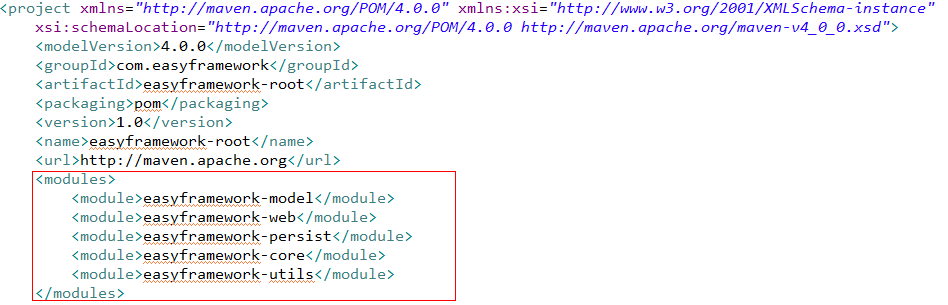
打开easyframework-root的pom.xml文件,你会看到模块化是这样的:
接下来是配置各个模块的依赖关系,我个人认为的项目是这样依赖的,不知道对不对,呵呵....
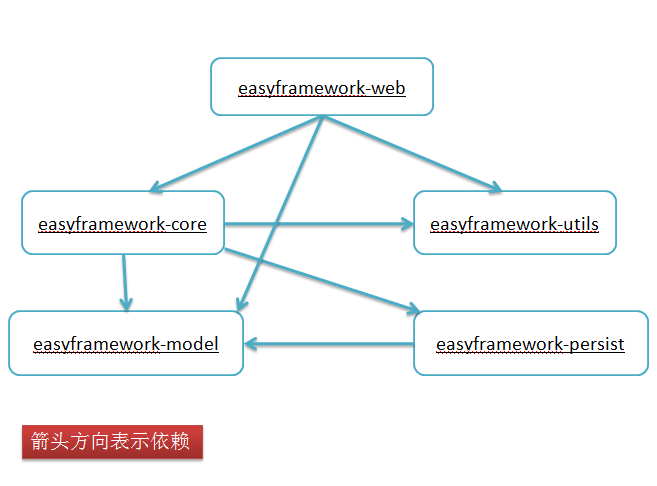
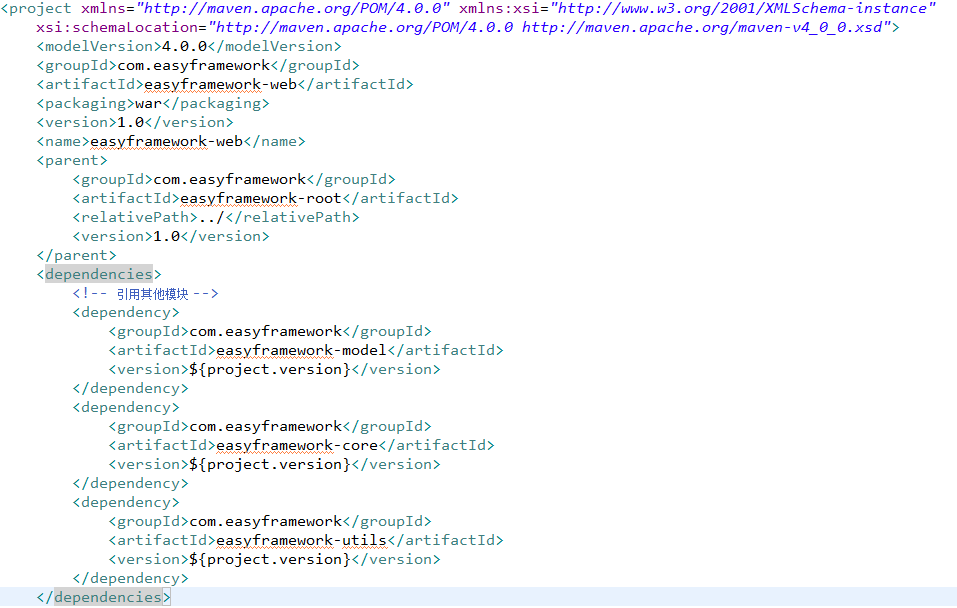
举个例子easyframework-web这个项目依赖easyframework-core(业务核心)和easyframework-model(实体类),easyframework-utils(公共的工具类)这个三个模块。
那么在怎么在easyframework-web的pom.xml中体现呢,具体如下:
打开项目的maven依赖你会发现,已经依赖了这三个项目
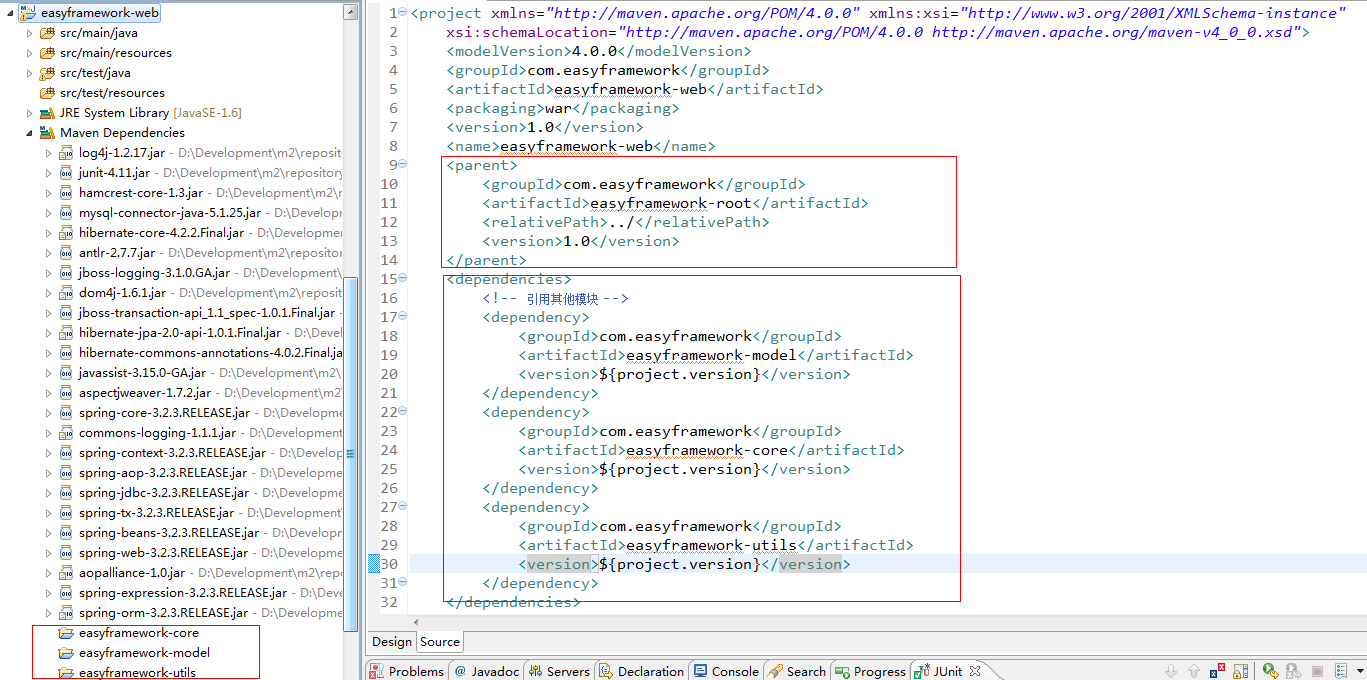
但是你应该会感觉到奇怪,为什么会有那么jar包,明明只引用了这三个项目,哪来的那么多jar包。
你会发现,我再pom.xml文件中,有个parent节点,继承了根节点的pom,这就是maven的项目继承依赖,会从父POM中继承一些值。这对构建一个大型的系统来说很有必要
这样的话你就不需要一遍又一遍的重复添加同样的依赖元素,当然,如果你在子项目中也有同样的依赖,则会覆盖父POM中的值。
父POM的的依赖如下:
<project xmlns="http://maven.apache.org/POM/4.0.0" xmlns:xsi="http://www.w3.org/2001/XMLSchema-instance"

    xsi:schemaLocation="http://maven.apache.org/POM/4.0.0 http://maven.apache.org/maven-v4_0_0.xsd">

    <modelVersion>4.0.0</modelVersion>

    <groupId>com.easyframework</groupId>

    <artifactId>easyframework-root</artifactId>

    <packaging>pom</packaging>

    <version>1.0</version>

    <name>easyframework-root</name>

    <url>http://maven.apache.org</url>

    <modules>

        <module>easyframework-web</module>

        <module>easyframework-persist</module>

        <module>easyframework-core</module>

        <module>easyframework-utils</module>

        <module>easyframework-model</module>

    </modules>

    <properties>

        <!--指定Maven用什么编码来读取源码及文档 -->

        <project.build.sourceEncoding>UTF-8</project.build.sourceEncoding>

        <!--指定Maven用什么编码来呈现站点的HTML文件 -->

        <project.reporting.outputEncoding>UTF-8</project.reporting.outputEncoding>

        <mysql.version>5.1.25</mysql.version>

        <hibernate.version>4.2.2.Final</hibernate.version>

        <spring.version>3.2.3.RELEASE</spring.version>

        <aspectj.version>1.7.2</aspectj.version>

    </properties>

    <repositories>

        <repository>

            <id>springsource-repo</id>

            <name>SpringSource Repository</name>

            <url>http://repo.springsource.org/release</url>

        </repository>

    </repositories>

    <dependencies>

        <!-- log4j -->

        <dependency>

            <groupId>log4j</groupId>

            <artifactId>log4j</artifactId>

            <version>1.2.17</version>

        </dependency>

        <!-- junit -->

        <dependency>

            <groupId>junit</groupId>

            <artifactId>junit</artifactId>

            <version>4.11</version>

            <scope>test</scope>

        </dependency>

        <!-- mysql数据库驱动 -->

        <dependency>

            <groupId>mysql</groupId>

            <artifactId>mysql-connector-java</artifactId>

            <version>${mysql.version}</version>

        </dependency>

        <!-- hibernate4 -->

        <dependency>

            <groupId>org.hibernate</groupId>

            <artifactId>hibernate-core</artifactId>

            <version>${hibernate.version}</version>

        </dependency>

        <!-- aspectjweaver -->

        <dependency>

            <groupId>org.aspectj</groupId>

            <artifactId>aspectjweaver</artifactId>

            <version>${aspectj.version}</version>

        </dependency>

        <!-- spring3 -->

        <dependency>

            <groupId>org.springframework</groupId>

            <artifactId>spring-core</artifactId>

            <version>${spring.version}</version>

        </dependency>

        <dependency>

            <groupId>org.springframework</groupId>

            <artifactId>spring-context</artifactId>

            <version>${spring.version}</version>

        </dependency>

        <dependency>

            <groupId>org.springframework</groupId>

            <artifactId>spring-jdbc</artifactId>

            <version>${spring.version}</version>

        </dependency>

        <dependency>

            <groupId>org.springframework</groupId>

            <artifactId>spring-beans</artifactId>

            <version>${spring.version}</version>

        </dependency>

        <dependency>

            <groupId>org.springframework</groupId>

            <artifactId>spring-web</artifactId>

            <version>${spring.version}</version>

        </dependency>

        <dependency>

            <groupId>org.springframework</groupId>

            <artifactId>spring-expression</artifactId>

            <version>${spring.version}</version>

        </dependency>

        <dependency>

            <groupId>org.springframework</groupId>

            <artifactId>spring-orm</artifactId>

            <version>${spring.version}</version>

        </dependency>

    </dependencies>

    <build>

        <finalName>easyframework-root</finalName>

        <plugins>

            <plugin>

                <artifactId>maven-compiler-plugin</artifactId>

                <configuration>

                    <source>1.6</source>

                    <target>1.6</target>

                </configuration>

            </plugin>

        </plugins>

    </build>

</project>
当然这个父POM只是一个例子,你可以根据自己的配置添加相关的依赖,这里给一个我认为是最好用的仓库:
http://mvnrepository.com/ 相信地球人都知道这个!哈哈.....
到此就搭建好了企业级多模块的项目环境了。
Maven学习--- 搭建多模块企业级项目的更多相关文章
- 使用maven命令搭建多模块企业级项目
http://www.cnblogs.com/xdp-gacl/p/4242221.html
- Maven学习 (六) 搭建多模块企业级项目
首先,前面几次学习已经学会了安装maven,如何创建maven项目等,最近的学习,终于有点进展了,搭建一下企业级多模块项目. 好了,废话不多说,具体如下: 首先新建一个maven项目,pom.xml的 ...
- [转] 用Maven搭建多模块企业级项目
转自:http://www.cnblogs.com/quanyongan/archive/2013/05/28/3103243.html 首先,前面几次学习已经学会了安装maven,如何创建maven ...
- maven搭建多模块企业级项目
首先,前面几次学习已经学会了安装maven,如何创建maven项目等,最近的学习,终于有点进展了,搭建一下企业级多模块项目. 好了,废话不多说,具体如下: 首先新建一个maven项目,pom.xml的 ...
- [maven] 搭建多模块企业级项目
知识点:聚合.继承.工程依赖.单元测试.多war聚合.cargo发布 ① 准备工作 参考资料 http://www.cnblogs.com/quanyongan/archive/2013/05/28/ ...
- maven(多个模块)项目 部署 开发环境 问题处理历程【异常Name jdbc is not bound in this Context 异常java.lang.NoSuchMethodE】
maven(多个模块)项目 部署 开发环境 问题处理历程[异常Name jdbc is not bound in this Context 异常java.lang.NoSuchMethodE] 201 ...
- maven学习-搭建环境
1.Maven是基于项目对象模型(POM),可以通过一小段描述信息来管理项目的构建,报告和文档的软件项目管理工具. 2.下载: maven.apache.org 3.bin目录包含mvn的运行脚本: ...
- Maven 学习笔记——将普通的Java项目转换成Maven项目(3)
将一个普通的java项目转换成Maven项目并不是一个很大的任务,仅仅只需要下面的几步就能将转换成功.下面我是用一个简单的Selenium测试小demon作为例子来说的. 移调项目中所有关联的Libr ...
- Spring框架学习-搭建第一个Spring项目
步骤一:下载Spring开发包. 官网:https://spring.io/ 下载地址:https://repo.spring.io/libs-release-local/org/ ...
随机推荐
- jquery validation对隐藏的元素不进行验证
validation默认不会对Hidden元素进行验证的,但最近使用了thinkcmf开发了一个系统后台,在验证时发现隐藏的元素也进行了验证 刚开始以为是 validation版本问题(当前版本取消了 ...
- Jquery中的高度
$('.someElement').height(); // returns the calculated pixel height of the element(s) $(window).heigh ...
- Idea不能新建package的解决
右键–>new –> Mark Directory As –> Sources Root (idea需要修改一下目录的性质,改为源文件 )
- ElasticSearch5.X—模糊查询和获取所有索引字段
最近在做一个分布式数据存储的项目,需要用到ElastciSearch加速数据查询,其中部分功能需要进行模糊查询和统计索引库中已经建立的索引字段,网上查阅了很多资料,最终把这两个问题解决了,不容易!下面 ...
- window.btoa
概述 将ascii字符串或二进制数据转换成一个base64编码过的字符串,该方法不能直接作用于Unicode字符串. 语法 var encodedData = window.btoa(stringTo ...
- Discuz! X3安装第三方主题出现:对不起,您安装的不是正版应用..的解决方法
discuz 社区在更新到3.0以上后,增加了对插件的版本检测,在安装时,可能会出现:“对不起,您安装的不是正版应用,安装程序无法继续执行”的提示,要解决这个其实挺容易的,找到以下文件: /sourc ...
- 解析Linux操作系统文件目录
解析Linux操作系统文件目录 随着Linux的不断发展,越来越多的人开始使用Linux,对于那些刚刚接触的人来说,恐怕最先感到困惑的就是那些“不明不白”的目录了.如果想熟练使用Linux,让Linu ...
- Office办公 如何设置WPS的默认背景大小
设计-页面设置,然后修改宽度和高度 因为我们只是需要背景跟平面差不多大(不同屏幕比如宽屏的就比较长),修改宽度和高度的时候注意文字之类的也会被拉伸缩放,所以自己改了之后看效果,比如我100,50的 ...
- 坑人无数的Redis面试题
https://baijiahao.baidu.com/s?id=1588454565071211950&wfr=spider&for=pc 坑人无数的Redis面试题
- MySql 错误代码 1045
错误代码 1045Access denied for user 'root'@'localhost' (using password:YES)解决办法是重新设置root用户密码,在Windows平台下 ...