
[CoentOS] MySQL删除和安装
删除 MySQL
yum remove  mysql mysql-server mysql-libs mysql-server;

find / -name mysql  将找到的相关东西delete掉(rm -rf /var/lib/mysql)

rpm -qa|grep mysql(查询出来的东东yum remove掉)

rm /etc/my.cnf
查看是否还有mysql软件:
rpm -qa|grep mysql
如果存在的话,继续删除即可。
[root@localhost opt]# rpm -qa | grep -i mysql

MySQL-server-5.6.17-1.el6.i686

MySQL-client-5.6.17-1.el6.i686
卸载mysql

[root@localhost local]# rpm -e MySQL-server-5.6.17-1.el6.i686

[root@localhost local]# rpm -e MySQL-client-5.6.17-1.el6.i686
删除mysql服务

[root@localhost local]# chkconfig --list | grep -i mysql

[root@localhost local]# chkconfig --del mysql
删除分散mysql文件夹

[root@localhost local]# whereis mysql 或者 find / -name mysql

mysql: /usr/lib/mysql /usr/share/mysql
清空相关mysql的所有目录以及文件
rm -rf /usr/lib/mysql
rm -rf /usr/share/mysql
rm -rf /usr/my.cnf
通过以上几步,mysql应该已经完全卸载干净了.
安装MySQL
1、配置YUM源
在MySQL官网中下载YUM源rpm安装包:http://dev.mysql.com/downloads/repo/yum/
# 下载mysql源安装包

wget http://dev.mysql.com/get/mysql57-community-release-el7-8.noarch.rpm

# 安装mysql源

yum localinstall mysql57-community-release-el7-8.noarch.rpm
2. 检查mysql源是否安装成功
shell> yum repolist enabled | grep "mysql.*-community.*"
3. 安装服务
yum install mysql-server

yum install mysql-devel
4. 打开服务
systemctl start mysqld //打开MySQL服务
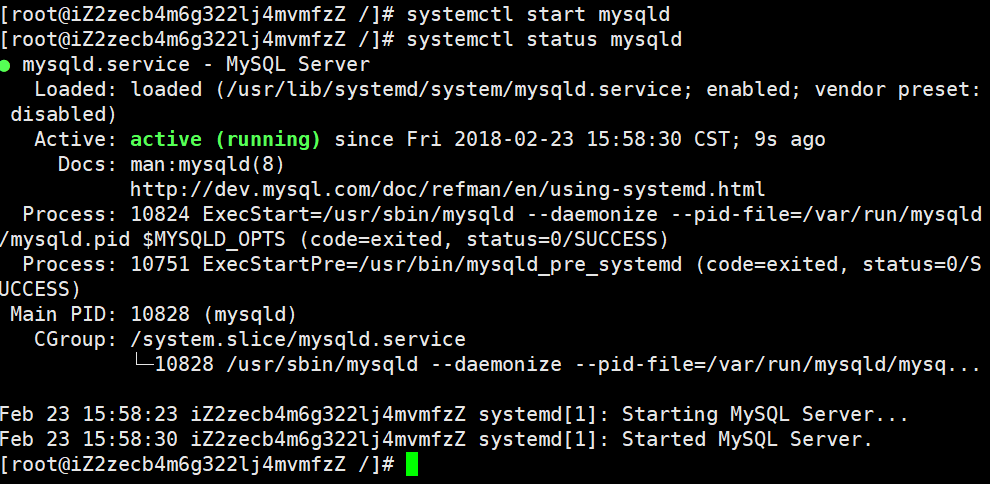
5. 检测服务状态(可省略)
systemctl status mysqld //可以查看MySQL服务是否正常打开(可省略)
6. 查看安装时自动设置的随机密码
grep "temporary password" /var/log/mysqld.log
CentOS系统用yum安装MySQL的朋友,请使用 grep "temporary password" /var/log/mysqld.log 命令,返回结果最后引号后面的字符串就是root的默认密码。

如图可以看出,我这次安装的MySQL的初始密码是【S+NwpxfZt0o;】
7. 相关配置
#######安装成功后,将其加入开机启动

[root@typecodes ~]# systemctl enable mysqld

#######启动mysql服务进程

[root@typecodes ~]# systemctl start mysqld

#######配置mysql(设置密码等)

[root@typecodes ~]# mysql_secure_installation
NOTE: RUNNING ALL PARTS OF THIS SCRIPT IS RECOMMENDED FOR ALL MySQL

  SERVERS IN PRODUCTION USE! PLEASE READ EACH STEP CAREFULLY!

In order to log into MySQL to secure it, we'll need the current

password for the root user. If you've just installed MySQL, and

you haven't set the root password yet, the password will be blank,

so you should just press enter here.

Enter current password for root (enter for none):

OK, successfully used password, moving on...

Setting the root password ensures that nobody can log into the MySQL

root user without the proper authorisation.
Set root password? [Y/n] y     [设置root用户密码]

New password:

Re-enter new password:

Password updated successfully!

Reloading privilege tables..

 ... Success!

By default, a MySQL installation has an anonymous user, allowing anyone

to log into MySQL without having to have a user account created for

them. This is intended only for testing, and to make the installation

go a bit smoother. You should remove them before moving into a

production environment.

Remove anonymous users? [Y/n] y     [删除匿名用户]

 ... Success!

Normally, root should only be allowed to connect from 'localhost'. This

ensures that someone cannot guess at the root password from the network.

Disallow root login remotely? [Y/n] y  [禁止root远程登录]

 ... Success!

By default, MySQL comes with a database named 'test' that anyone can

access. This is also intended only for testing, and should be removed

before moving into a production environment.

Remove test database and access to it? [Y/n] y   [删除test数据库]

 - Dropping test database...

ERROR 1008 (HY000) at line 1: Can't drop database 'test'; database doesn't exist

 ... Failed! Not critical, keep moving...

 - Removing privileges on test database...

 ... Success!

Reloading the privilege tables will ensure that all changes made so far

will take effect immediately.

Reload privilege tables now? [Y/n] y   [刷新权限]

 ... Success!

All done! If you've completed all of the above steps, your MySQL

installation should now be secure.

Thanks for using MySQL!

Cleaning up...
8. 可能有效的MySQL配置优化
在原始配置文件 /etc/my.cnf 基础上,在 [mysqld] 节内增加配置参数。实际应用中,请按硬件及负载酌情修改。
#add by feng 120418 --------------------------

#skip-locking

skip-name-resolve

skip-external-locking

key_buffer_size = 256M

#table_cache = 3072

table_open_cache = 3072

read_buffer_size = 2M

read_rnd_buffer_size = 2M

sort_buffer_size = 2M

myisam_sort_buffer_size = 256M

thread_cache_size = 8

query_cache_size= 512M

query_cache_limit= 5M

tmp_table_size=1024M

max_heap_table_size=3000M

max_allowed_packet = 16M

innodb_buffer_pool_size = 512M

innodb_log_file_size = 512M

innodb_additional_mem_pool_size=512M

innodb_log_buffer_size=64M

max_connections=2000

max_user_connections=800

join_buffer_size = 8M

open_files_limit = 65535

#tmpdir=/dev/shm

max_connect_errors=1000

#add by feng 120418 end ---------------------
9. 其它命令
1:安装完成路径:

    1、数据库目录

    /var/lib/mysql/

    2、配置文件

    /usr/share/mysql(mysql.server命令及配置文件)

    3、启动脚本

    /etc/rc.d/init.d/(启动脚本文件mysql的目录)

    4、相关命令

    /usr/bin(mysqladmin mysqldump等命令)

    注:1~3安装server安装后存在,4mysqladmin mysqldump在client安装后存在

b、停止

service mysqld stop

c、重启

service mysqld restart

y

d, 启动

service mysqld start

e, 强行关闭MySQL

killall mysqld

f, 查看是否启动成功,进程mysql启动,网络端口3306开启为ok.

ps aux | grep mysql

g, 登录

mysql -u root -p

f, 查看MySQL中all user

SELECT DISTINCT CONCAT('User: ''',user,'''@''',host,''';') AS query FROM mysql.user;

h, 允许远程机器用root用户连接MySQL服务器数据库

GRANT ALL PRIVILEGES ON *.* TO 'root'@'%' IDENTIFIED BY 'youpassword' WITH GRANT OPTION;

FLUSH PRIVILEGES;
或

UPDATE USER SET HOST = '%' WHERE HOST='127.0.0.1' AND USER='root'
参考文章:
https://blog.csdn.net/zleiw/article/details/78242912
[CoentOS] MySQL删除和安装的更多相关文章
- 安装linux版qq,安装二进制包编译器,安装mysql-5.6.11,删除已安装或安装失败的mysql-5.6.11,简单mysql练习题
上午[root@localhost ~]# ./test3.sh dev1^C[root@localhost ~]# groupadd dev1[root@localhost ~]# vim /etc ...
- 彻底删除与安装MySQL
一.下载msi安装版:https://dev.mysql.com/downloads/mysql/ 二.安装前一定要彻底删除已有的MySQL:(从未安装过,忽略此步) 1.计算机处右键快捷菜单,管理, ...
- 关于mysql的删除和安装
mysql删除不干净大概有两点1.文件残留 2.注册表 删除:https://www.cnblogs.com/solargen/p/6838657.html 安装:https://www.cnblog ...
- mysql安装和mysql图形界面安装以及文本文件导入mysql
本人大一大二一直使用windows系统,被微软爸爸给惯坏了,一看到cmd命令行就吓尿.现在用ubuntu,每一个操作都是语句,也是得到锻炼(个jb). ubuntu安装mysql和python代码 s ...
- [转] Linux学习之CentOS(十三)--CentOS6.4下Mysql数据库的安装与配置
from: http://www.cnblogs.com/xiaoluo501395377/archive/2013/04/07/3003278.html 如果要在Linux上做j2ee开发,首先得 ...
- Linux学习之CentOS--CentOS6.4下Mysql数据库的安装与配置【转】
如果要在Linux上做j2ee开发,首先得搭建好j2ee的开发环境,包括了jdk.tomcat.eclipse的安装(这个在之前的一篇随笔中已经有详细讲解了Linux学习之CentOS(七)--C ...
- Linux学习之CentOS(十三)--CentOS6.4下Mysql数据库的安装与配置
原文:http://www.cnblogs.com/xiaoluo501395377/archive/2013/04/07/3003278.html 如果要在Linux上做j2ee开发,首先得搭建好j ...
- mysql 的rmp安装
新文档/* GitHub stylesheet for MarkdownPad (http://markdownpad.com) *//* Author: Nicolas Hery - http:// ...
- Linux学习之CentOS6下Mysql数据库的安装与配置
转自:http://www.cnblogs.com/xiaoluo501395377/archive/2013/04/07/3003278.html 如果要在Linux上做j2ee开发,首先得搭建好j ...
随机推荐
- UVA 156:Ananagrams (vector+map+sort)
题意:一大堆单词中间有空格隔开,以'#'结束输出,问只出现一次的的单词有哪些(如果两个具有相同的长度,相同的字母也算是相同的,不区分大小写,如:noel和lone属于一个单词出现两次).最后按照字典序 ...
- sublime text 3 实用的快捷键
Ctrl+Shift+P:打开命令面板Ctrl+P:搜索项目中的文件Ctrl+G:跳转到第几行Ctrl+W:关闭当前打开文件Ctrl+Shift+W:关闭所有打开文件Ctrl+Shift+V:粘贴并格 ...
- 注解JAVA对象(基于Hibernate4.3)
package com.chauvet.po; import java.util.Date; import javax.persistence.Column; import javax.persist ...
- @ModelAttribute的用法
- $data[$i++]+=2;不等于$data[$i++]=$data[$i++]+2;
$data=array(1,2,3,4); $i=1; $data[$i++]+=2; var_dump($data); echo $i; //输出:array(1,4,3,4) 和 2 $data= ...
- Linux内核电源管理综述
资料:http://blog.csdn.net/bingqingsuimeng/article/category/1228414http://os.chinaunix.net/a2006/0519/1 ...
- stenciljs 学习十一 pwa 支持
stenciljs 对于pwa 的支持是自动注入的,我们只需要简单的配置,stenciljs使用workbox 配置 默认配置 { skipWaiting: true, clientsClaim: t ...
- Oracle C#处理时间类型的Insert
首先如果直接 parm.Value=DateTime.Now; insert into table (TheTime)Value(@parm); 执行sql就会报错 ----------- ...
- java中使用MD5加密的算法
MD5,全名Message Digest Algorithm 5,中文名为消息摘要算法第五版,为计算机安全领域广泛使用的一种散列函数,用以提供消息的完整性保护.以下是JAVA语言中使用MD5加密的工具 ...
- 【转】每天一个linux命令(27):linux chmod命令
原文网址:http://www.cnblogs.com/peida/archive/2012/11/29/2794010.html chmod命令用于改变linux系统文件或目录的访问权限.用它控制文 ...