
Android -- EventBus解析
EventBus
EventBus 是一个 Android 事件发布/订阅框架,通过解耦发布者和订阅者简化 Android 事件传递。传统的事件传递方式包括:Handler、BroadCastReceiver、Interface 回调,相比之下 EventBus 的优点是代码简洁,使用简单,并将事件发布和订阅充分解耦。
事件(Event):又可称为消息。其实就是一个对象,可以是网络请求返回的字符串,也可以是某个开关状态等等。事件类型(EventType)指事件所属的 Class。事件分为一般事件和 Sticky 事件,相对于一般事件,Sticky 事件不同之处在于,当事件发布后,再有订阅者开始订阅该类型事件,依然能收到该类型事件最近一个 Sticky 事件。
订阅者(Subscriber):订阅某种事件类型的对象。当有发布者发布这类事件后,EventBus 会执行订阅者的 onEvent 函数,这个函数叫事件响应函数。订阅者通过 register 接口订阅某个事件类型,unregister 接口退订。订阅者存在优先级,优先级高的订阅者可以取消事件继续向优先级低的订阅者分发,默认所有订阅者优先级都为 0。
发布者(Publisher):发布某事件的对象,通过 post 接口发布事件。
类关系

流程
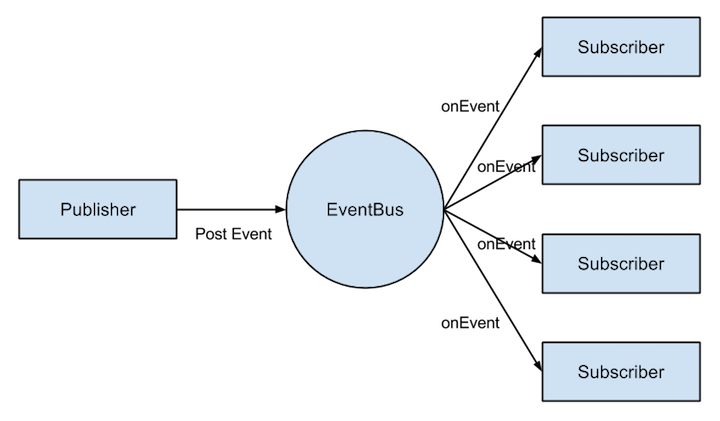
EventBus 负责存储订阅者、事件相关信息,订阅者和发布者都只和 EventBus 关联。

订阅者首先调用 EventBus 的 register 接口订阅某种类型的事件,当发布者通过 post 接口发布该类型的事件时,EventBus 执行调用者的事件响应函数。
解析
EventBus 类负责所有对外暴露的 API,其中的 register()、post()、unregister() 函数配合上自定义的 EventType 及事件响应函数即可完成核心功能。
EventBus 默认可通过静态函数 getDefault() 获取单例,当然有需要也可以通过 EventBusBuilder 或 构造函数新建一个 EventBus,每个新建的 EventBus 发布和订阅事件都是相互隔离的,即一个 EventBus 对象中的发布者发布事件,另一个 EventBus 对象中的订阅者不会收到该订阅。
EventBus.getDefault().register(this);
register()方法解析:
    public void register(Object subscriber) {

        Class<?> subscriberClass = subscriber.getClass();

        // @Subscribe in anonymous classes is invisible to annotation processing, always fall back to reflection

        boolean forceReflection = subscriberClass.isAnonymousClass();

        List<SubscriberMethod> subscriberMethods =

                subscriberMethodFinder.findSubscriberMethods(subscriberClass, forceReflection);//主要查找又什么方法是在这个函数里面

        for (SubscriberMethod subscriberMethod : subscriberMethods) {

            subscribe(subscriber, subscriberMethod);

        }

    }
通过一个findSubscriberMethods方法找到了一个订阅者中的所有订阅方法,返回一个 List。
List<SubscriberMethod> findSubscriberMethods(Class<?> subscriberClass, boolean forceReflection) {

  		//类名

        String key = subscriberClass.getName();

        List<SubscriberMethod> subscriberMethods;

        synchronized (METHOD_CACHE) {

          	//判断是否有缓存,有缓存直接返回缓存

            subscriberMethods = METHOD_CACHE.get(key);

        }

  		//第一次进来subscriberMethods肯定是Null

        if (subscriberMethods != null) {

            return subscriberMethods;

        }

  		//INDEX是GeneratedSubscriberIndex

        if (INDEX != null && !forceReflection) {

            subscriberMethods = findSubscriberMethodsWithIndex(subscriberClass);//后面再来看这个函数

            if (subscriberMethods.isEmpty()) {

                subscriberMethods = findSubscriberMethodsWithReflection(subscriberClass);//通过反射来找到方法

            }

        } else {

            subscriberMethods = findSubscriberMethodsWithReflection(subscriberClass);//通过反射来找到方法

        }

        if (subscriberMethods.isEmpty()) {

            throw new EventBusException("Subscriber " + subscriberClass

                    + " and its super classes have no public methods with the @Subscribe annotation");

        } else {

            synchronized (METHOD_CACHE) {

                METHOD_CACHE.put(key, subscriberMethods);//放入缓存

            }

            return subscriberMethods;

        }

    }
findSubscriberMethodsWithReflection:
private List<SubscriberMethod> findSubscriberMethodsWithReflection(Class<?> subscriberClass) {

        List<SubscriberMethod> subscriberMethods = new ArrayList<SubscriberMethod>();

        Class<?> clazz = subscriberClass;

        HashSet<String> eventTypesFound = new HashSet<String>();

        StringBuilder methodKeyBuilder = new StringBuilder();

        while (clazz != null) {

            String name = clazz.getName();

          	//过滤掉系统类

            if (name.startsWith("java.") || name.startsWith("javax.") || name.startsWith("android.")) {

                // Skip system classes, this just degrades performance

                break;

            }

            // Starting with EventBus 2.2 we enforced methods to be public (might change with annotations again)

         	 //通过反射,获取到订阅者的所有方法

            Method[] methods = clazz.getDeclaredMethods();

            for (Method method : methods) {

                int modifiers = method.getModifiers();

              	//判断是否是public,是否有修饰符

                if ((modifiers & Modifier.PUBLIC) != 0 && (modifiers & MODIFIERS_IGNORE) == 0) {

                  	//获得订阅函数的参数

                    Class<?>[] parameterTypes = method.getParameterTypes();

                  	//参数只能是1个

                    if (parameterTypes.length == 1) {

                      	//通过Annotation去拿一些数据

                        Subscribe subscribeAnnotation = method.getAnnotation(Subscribe.class);

                        if (subscribeAnnotation != null) {

                            String methodName = method.getName();//方法名字

                            Class<?> eventType = parameterTypes[0];//类型

                          	//获取参数类型,其实就是接收事件的类型

                            methodKeyBuilder.setLength(0);

                            methodKeyBuilder.append(methodName);

                            methodKeyBuilder.append('>').append(eventType.getName());

                            String methodKey = methodKeyBuilder.toString();

                            if (eventTypesFound.add(methodKey)) {

                                // Only add if not already found in a sub class

                                ThreadMode threadMode = subscribeAnnotation.threadMode();

                              	//封装一个订阅方法对象,这个对象包含Method对象,threadMode对象,eventType对象,优先级prority,sticky

                                subscriberMethods.add(new SubscriberMethod(method, eventType, threadMode,

                                        subscribeAnnotation.priority(), subscribeAnnotation.sticky()));

                            }

                        }

                    } else if (strictMethodVerification) {

                        if (method.isAnnotationPresent(Subscribe.class)) {

                            String methodName = name + "." + method.getName();

                            throw new EventBusException("@Subscribe method " + methodName +

                                    "must have exactly 1 parameter but has " + parameterTypes.length);

                        }

                    }

                } else if (strictMethodVerification) {

                    if (method.isAnnotationPresent(Subscribe.class)) {

                        String methodName = name + "." + method.getName();

                        throw new EventBusException(methodName +

                                " is a illegal @Subscribe method: must be public, non-static, and non-abstract");

                    }

                }

            }

			//再去查找父类

            clazz = clazz.getSuperclass();

        }

        return subscriberMethods;

    }
方法的讲解都在注释里面。
for (SubscriberMethod subscriberMethod : subscriberMethods) {

            subscribe(subscriber, subscriberMethod);

        }
每个订阅方法都调用subscribe方法:
private void subscribe(Object subscriber, SubscriberMethod subscriberMethod) {

  		//从订阅方法中拿到订阅事件的类型

        Class<?> eventType = subscriberMethod.eventType;

  		//通过订阅事件类型,找到所有的订阅(Subscription),订阅中包含了订阅者,订阅方法

        CopyOnWriteArrayList<Subscription> subscriptions = subscriptionsByEventType.get(eventType);

  		//创建一个新的订阅

        Subscription newSubscription = new Subscription(subscriber, subscriberMethod);

  		//将新建的订阅加入到这个事件类型对应的所有订阅列表

        if (subscriptions == null) {

          	//如果该事件目前没有订阅列表,那么创建并加入该订阅

            subscriptions = new CopyOnWriteArrayList<Subscription>();

            subscriptionsByEventType.put(eventType, subscriptions);

        } else {

          	//如果有订阅列表,检查是否已经加入过

            if (subscriptions.contains(newSubscription)) {

                throw new EventBusException("Subscriber " + subscriber.getClass() + " already registered to event "

                        + eventType);

            }

        }

        // Starting with EventBus 2.2 we enforced methods to be public (might change with annotations again)

        // subscriberMethod.method.setAccessible(true);

        // Got to synchronize to avoid shifted positions when adding/removing concurrently

  		//根据优先级插入订阅

        synchronized (subscriptions) {

            int size = subscriptions.size();

            for (int i = 0; i <= size; i++) {

                if (i == size || subscriberMethod.priority > subscriptions.get(i).subscriberMethod.priority) {

                    subscriptions.add(i, newSubscription);

                    break;

                }

            }

        }

		//将这个订阅事件加入到订阅者的订阅事件列表中

        List<Class<?>> subscribedEvents = typesBySubscriber.get(subscriber);

        if (subscribedEvents == null) {

            subscribedEvents = new ArrayList<Class<?>>();

            typesBySubscriber.put(subscriber, subscribedEvents);

        }

        subscribedEvents.add(eventType);

        if (subscriberMethod.sticky) {

            if (eventInheritance) {

                // Existing sticky events of all subclasses of eventType have to be considered.

                // Note: Iterating over all events may be inefficient with lots of sticky events,

                // thus data structure should be changed to allow a more efficient lookup

                // (e.g. an additional map storing sub classes of super classes: Class -> List<Class>).

                Set<Map.Entry<Class<?>, Object>> entries = stickyEvents.entrySet();

                for (Map.Entry<Class<?>, Object> entry : entries) {

                    Class<?> candidateEventType = entry.getKey();

                    if (eventType.isAssignableFrom(candidateEventType)) {

                        Object stickyEvent = entry.getValue();

                        checkPostStickyEventToSubscription(newSubscription, stickyEvent);

                    }

                }

            } else {

                Object stickyEvent = stickyEvents.get(eventType);

                checkPostStickyEventToSubscription(newSubscription, stickyEvent);

            }

        }

    }
第一步:通过subscriptionsByEventType得到该事件类型所有订阅者信息队列,根据优先级将当前订阅者信息插入到订阅者队列subscriptionsByEventType中;
第二步:在typesBySubscriber中得到当前订阅者订阅的所有事件队列,将此事件保存到队列typesBySubscriber中,用于后续取消订阅;
第三步:检查这个事件是否是 Sticky 事件,如果是则从stickyEvents事件保存队列中取出该事件类型最后一个事件发送给当前订阅者
private void checkPostStickyEventToSubscription(Subscription newSubscription, Object stickyEvent) {

        if (stickyEvent != null) {

            // If the subscriber is trying to abort the event, it will fail (event is not tracked in posting state)

            // --> Strange corner case, which we don't take care of here.

            postToSubscription(newSubscription, stickyEvent, Looper.getMainLooper() == Looper.myLooper());

        }

    }
private void postToSubscription(Subscription subscription, Object event, boolean isMainThread) {

        switch (subscription.subscriberMethod.threadMode) {

            case PostThread:

                invokeSubscriber(subscription, event);

                break;

            case MainThread:

                if (isMainThread) {

                    invokeSubscriber(subscription, event);

                } else {

                    mainThreadPoster.enqueue(subscription, event);

                }

                break;

            case BackgroundThread:

                if (isMainThread) {

                    backgroundPoster.enqueue(subscription, event);

                } else {

                    invokeSubscriber(subscription, event);

                }

                break;

            case Async:

                asyncPoster.enqueue(subscription, event);

                break;

            default:

                throw new IllegalStateException("Unknown thread mode: " + subscription.subscriberMethod.threadMode);

        }

    }
过程:
- 找到被注册者中所有的订阅方法。
- 依次遍历订阅方法,找到EventBus中eventType对应的订阅列表,然后根据当前订阅者和订阅方法创建一个新的订阅加入到订阅列表。
- 找到EvnetBus中subscriber订阅的事件列表,将eventType加入到这个事件列表。
public void post(Object event) {

  		//拿到PostingThreadState

        PostingThreadState postingState = currentPostingThreadState.get();

        List<Object> eventQueue = postingState.eventQueue;

  		//将事件放入队列

        eventQueue.add(event);

        if (!postingState.isPosting) {

            postingState.isMainThread = Looper.getMainLooper() == Looper.myLooper();

            postingState.isPosting = true;//设置为正在post

            if (postingState.canceled) {

                throw new EventBusException("Internal error. Abort state was not reset");

            }

            try {

                while (!eventQueue.isEmpty()) {

                  	//分发事件

                    postSingleEvent(eventQueue.remove(0), postingState);

                }

            } finally {

                postingState.isPosting = false;

                postingState.isMainThread = false;

            }

        }

    }
private void postSingleEvent(Object event, PostingThreadState postingState) throws Error {

        Class<?> eventClass = event.getClass();

        boolean subscriptionFound = false;

        if (eventInheritance) {

          	//找到eventClass对应的事件,包含父类对应的事件和接口对应的事件

            List<Class<?>> eventTypes = lookupAllEventTypes(eventClass);

            int countTypes = eventTypes.size();

            for (int h = 0; h < countTypes; h++) {

                Class<?> clazz = eventTypes.get(h);

              	//postSingleEventForEventType去查找,其中里面的数据都是通过subscribe()缓存进去的

                subscriptionFound |= postSingleEventForEventType(event, postingState, clazz);

            }

        } else {

            subscriptionFound = postSingleEventForEventType(event, postingState, eventClass);

        }

        if (!subscriptionFound) {

            if (logNoSubscriberMessages) {

                Log.d(TAG, "No subscribers registered for event " + eventClass);

            }

            if (sendNoSubscriberEvent && eventClass != NoSubscriberEvent.class &&

                    eventClass != SubscriberExceptionEvent.class) {

              	//如果没有订阅发现,那么会Post一个NoSubscriberEvent事件

                post(new NoSubscriberEvent(this, event));

            }

        }

    }
private boolean postSingleEventForEventType(Object event, PostingThreadState postingState, Class<?> eventClass) {

        CopyOnWriteArrayList<Subscription> subscriptions;

        synchronized (this) {

          	//subscriptionsByEventType是从subscribe()缓存进去的

            subscriptions = subscriptionsByEventType.get(eventClass);

        }

        if (subscriptions != null && !subscriptions.isEmpty()) {

            for (Subscription subscription : subscriptions) {

                postingState.event = event;

                postingState.subscription = subscription;

                boolean aborted = false;

                try {

                  	//对每个订阅调用该方法

                    postToSubscription(subscription, event, postingState.isMainThread);

                    aborted = postingState.canceled;

                } finally {

                    postingState.event = null;

                    postingState.subscription = null;

                    postingState.canceled = false;

                }

                if (aborted) {

                    break;

                }

            }

            return true;

        }

        return false;

    }
post 函数会首先得到当前线程的 post 信息PostingThreadState,其中包含事件队列,将当前事件添加到其事件队列中,然后循环调用 postSingleEvent 函数发布队列中的每个事件。
postSingleEvent 函数会先去eventTypesCache得到该事件对应类型的的父类及接口类型,没有缓存则查找并插入缓存。循环得到的每个类型和接口,调用 postSingleEventForEventType 函数发布每个事件到每个订阅者。
postSingleEventForEventType 函数在subscriptionsByEventType查找该事件订阅者订阅者队列,调用 postToSubscription 函数向每个订阅者发布事件。
postToSubscription 函数中会判断订阅者的 ThreadMode,从而决定在什么 Mode 下执行事件响应函数。
ThreadMode
PostThread:默认的 ThreadMode,表示在执行 Post 操作的线程直接调用订阅者的事件响应方法,不论该线程是否为主线程(UI 线程)。当该线程为主线程时,响应方法中不能有耗时操作,否则有卡主线程的风险。适用场景:对于是否在主线程执行无要求,但若 Post 线程为主线程,不能耗时的操作;MainThread:在主线程中执行响应方法。如果发布线程就是主线程,则直接调用订阅者的事件响应方法,否则通过主线程的 Handler 发送消息在主线程中处理——调用订阅者的事件响应函数。显然,MainThread类的方法也不能有耗时操作,以避免卡主线程。适用场景:必须在主线程执行的操作;BackgroundThread:在后台线程中执行响应方法。如果发布线程不是主线程,则直接调用订阅者的事件响应函数,否则启动唯一的后台线程去处理。由于后台线程是唯一的,当事件超过一个的时候,它们会被放在队列中依次执行,因此该类响应方法虽然没有PostThread类和MainThread类方法对性能敏感,但最好不要有重度耗时的操作或太频繁的轻度耗时操作,以造成其他操作等待。适用场景:操作轻微耗时且不会过于频繁,即一般的耗时操作都可以放在这里;Async:不论发布线程是否为主线程,都使用一个空闲线程来处理。和BackgroundThread不同的是,Async类的所有线程是相互独立的,因此不会出现卡线程的问题。适用场景:长耗时操作,例如网络访问。
我是天王盖地虎的分割线
dependencies {

    compile fileTree(include: ['*.jar'], dir: 'libs')

    compile 'de.greenrobot:eventbus:3.0.0-beta1'

}
Android -- EventBus使用: http://www.cnblogs.com/yydcdut/p/4290846.html
Android -- EventBus解析的更多相关文章
- Android EventBus源码解析 带你深入理解EventBus
转载请标明出处:http://blog.csdn.net/lmj623565791/article/details/40920453,本文出自:[张鸿洋的博客] 上一篇带大家初步了解了EventBus ...
- Android EventBus源代码解析 带你深入理解EventBus
转载请标明出处:http://blog.csdn.net/lmj623565791/article/details/40920453,本文出自:[张鸿洋的博客] 上一篇带大家初步了解了EventBus ...
- Android EventBus实战 没听过你就out了
转载请表明出处:http://blog.csdn.net/lmj623565791/article/details/40794879,本文出自:[张鸿洋的博客] 1.概述 最近大家面试说经常被问到Ev ...
- Android EventBus现实 听说你out该
转载请注明出处:http://blog.csdn.net/lmj623565791/article/details/40794879.本文出自:[张鸿洋的博客] 1.概述 近期大家面试说常常被问到Ev ...
- Android EventBus 3.0 实例使用详解
EventBus的使用和原理在网上有很多的博客了,其中泓洋大哥和启舰写的非常非常棒,我也是跟着他们的博客学会的EventBus,因为是第一次接触并使用EventBus,所以我写的更多是如何使用,源码解 ...
- 【转】Android EventBus初探
出处:http://blog.csdn.net/lmj623565791/article/details/40794879 1.概述 最近大家面试说经常被问到EventBus,github上果断dow ...
- android XMl 解析神奇xstream 六: 把集合list 转化为 XML文档
前言:对xstream不理解的请看: android XMl 解析神奇xstream 一: 解析android项目中 asset 文件夹 下的 aa.xml 文件 android XMl 解析神奇xs ...
- android XMl 解析神奇xstream 五: 把复杂对象转换成 xml ,并写入SD卡中的xml文件
前言:对xstream不理解的请看: android XMl 解析神奇xstream 一: 解析android项目中 asset 文件夹 下的 aa.xml 文件 android XMl 解析神奇xs ...
- android XMl 解析神奇xstream 四: 将复杂的xml文件解析为对象
前言:对xstream不理解的请看: android XMl 解析神奇xstream 一: 解析android项目中 asset 文件夹 下的 aa.xml 文件 android XMl 解析神奇xs ...
随机推荐
- 垂直居中Demo
换行文字垂直居中1 换行文字垂直居中,兼容所有浏览器 换行文字垂直居中2 换行文字垂直居中,兼容所有浏览器 固定宽高图片垂直居中1 固定宽高图片垂直居中2 图片自适应容器宽高垂直居中 CSS3垂直居中 ...
- CentOS 7 yum 安装mysql5.6
到mysql社区安装当前可用包 Centos 7 命令 # rpm -Uvh http://dev.mysql.com/get/mysql-community-release-el7-5.noar ...
- Ural 2045. Richness of words 打表找规律
2045. Richness of words 题目连接: http://acm.timus.ru/problem.aspx?space=1&num=2045 Description For ...
- mysql导入csv文件
今天尝试将Oracle中的数据导入到mysql中,在SQLyog工具其中看到一些sql语句,拿来记录一下,说不定以后就用的着呐! -----查看ydtf数据库中的基础表,就是用户创建了哪些表 SHOW ...
- ios手机填坑总结
1. 日期格式 ios系统.safari只能识别"2018/10/15 00:00:00",不能识别"2018-10-15 00:00:00",所以需要转换格式 ...
- spring-boot 速成(5) profile区分环境
maven中的profile概念,在spring-boot中一样适合,只要约定以下几个规则即可: 一.不同环境的配置文件以"application-环境名.yml"命名 举个粟子: ...
- Windows Phone本地数据库(SQLCE):1、介绍(翻译)(转)
一只大菜鸟,最近要学习windows phone数据库相关的知识,找到了一些比较简短的教程进行学习,由于是英文的,顺便给翻译了.本身英语水平就不好,估计文中有不少错误,如果有不幸读到的童鞋请保持对翻译 ...
- sql语句中having的作用是?
HAVING对由sum或其它集合函数运算结果的输出进行限制.比如,我们可能只希望看到Store_Information数据表中销售总额超过1500美圆的商店的信息,这时我们就需要使用HAVING从句. ...
- 关于toString方法的重写工具ToStringBuilder
原文:https://blog.csdn.net/zhaowen25/article/details/39521899# apache的commons-lang3的工具包里有一个ToStringBui ...
- 【CentOS】centos7 稳定使用版本,centos镜像的下载
命令: cat /etc/redhat-release 下载地址: https://wiki.centos.org/Download 下载版本: