
kafka0.10
整理kafka相关的常用命令
创建主题(4个分区,2个副本)
bin/kafka-topics.sh --create --zookeeper localhost:2181 --replication-factor 2 --partitions 4 --topic test
查询集群描述
bin/kafka-topics.sh --describe --zookeeper
生产者
bin/kafka-console-producer.sh --broker-list localhost:9092 --topic test
消费者
bin/kafka-console-consumer.sh --zookeeper localhost:2181 --topic test
新生产者(支持0.9版本+)
bin/kafka-console-producer.sh --broker-list localhost:9092 --topic test --producer.config config/producer.properties
新消费者(支持0.9版本+)
bin/kafka-console-consumer.sh --bootstrap-server localhost:9092 --topic test --new-consumer --from-beginning --consumer.config config/consumer.properties
新消费者列表查询(支持0.9版本+)
bin/kafka-consumer-groups.sh --new-consumer --bootstrap-server localhost:9092 --list
显示某个消费组的消费详情(仅支持offset存储在zookeeper上的)
bin/kafka-run-class.sh kafka.tools.ConsumerOffsetChecker --zkconnect localhost:2181 --group test
显示某个消费组的消费详情(支持0.9版本+)
bin/kafka-consumer-groups.sh --new-consumer --bootstrap-server localhost:9092 --describe --group test-consumer-group
平衡leader
bin/kafka-preferred-replica-election.sh --zookeeper zk_host:port/chroot
kafka自带压测命令
bin/kafka-producer-perf-test.sh --topic test --num-records 100 --record-size 1 --throughput 100 --producer-props bootstrap.servers=localhost:9092
kafka检查消费者位置
http://orchome.com/35
kafka检查消费者位置
有时候需要去查看你的消费者的位置。我们有一个显示【消费者组中】所有消费者的位置的工具。显示日志其落后多远。消费者组名为my-group,消费者topic名为my-topic,如下:
 > bin/kafka-run-class.sh kafka.tools.ConsumerOffsetChecker --zkconnect localhost:2181 --group test

Group           Topic                          Pid Offset          logSize         Lag             Owner

my-group        my-topic                       0   0               0               0               test_jkreps-mn-1394154511599-60744496-0

my-group        my-topic                       1   0               0               0               test_jkreps-mn-1394154521217-1a0be913-0
NOTE: Since 0.9.0.0, the kafka.tools.ConsumerOffsetChecker tool has been deprecated. You should use the kafka.admin.ConsumerGroupCommand (or the bin/kafka-consumer-groups.sh script) to manage consumer groups, including consumers created with the new consumer API.
注意:在0.9.0.0,kafka.tools.ConsumerOffsetChecker已经不支持了。你应该使用kafka.admin.ConsumerGroupCommand(或bin/kafka-consumer-groups.sh脚本)来管理消费者组,包括用新消费者API创建的消费者。
bin/kafka-consumer-groups.sh --new-consumer --bootstrap-server localhost:9092 --describe --group test-consumer-group
Managing Consumer Groups
管理消费者组
With the ConsumerGroupCommand tool, we can list, describe, or delete consumer groups. Note that deletion is only available when the group metadata is stored in ZooKeeper. When using the new consumer API (where the broker handles coordination of partition handling and rebalance), the group is deleted when the last committed offset for that group expires. For example, to list all consumer groups across all topics:
用ConsumerGroupCommand工具,我们可以使用list,describe,或delete消费者组(注意,删除只有在分组元数据存储在zookeeper的才可用)。当使用新消费者API(broker协调处理分区和重新平衡),当该组的最后一个提交的偏移到期时,该组被删除。 例如,要列出所有主题中的所有用户组:
 > bin/kafka-consumer-groups.sh --bootstrap-server broker1:9092 --list

  test-consumer-group
To view offsets as in the previous example with the ConsumerOffsetChecker, we "describe" the consumer group like this:
要使用ConsumerOffsetChecker查看上一个示例中消费者组的偏移量,我们按如下所示“describe”消费者组:
  > bin/kafka-consumer-groups.sh --bootstrap-server broker1:9092 --describe --group test-consumer-group

  GROUP                          TOPIC                          PARTITION  CURRENT-OFFSET  LOG-END-OFFSET  LAG             OWNER

  test-consumer-group            test-foo                       0          1               3               2               consumer-1_/127.0.0.1
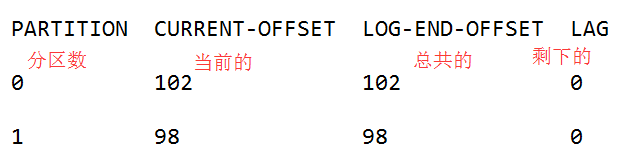
If you are using the old high-level consumer and storing the group metadata in ZooKeeper (i.e. offsets.storage=zookeeper), pass --zookeeper instead of bootstrap-server:
如果你使用老的高级消费者并存储分组元数据在zookeeper(即。offsets.storage=zookeeper)通过--zookeeper,而不是bootstrap-server:
  > bin/kafka-consumer-groups.sh --zookeeper localhost:2181 --list

./kafka-consumer-offset-checker.sh 这个命令也是过时的
作者:半兽人
链接:http://orchome.com/454
来源:OrcHome
著作权归作者所有。商业转载请联系作者获得授权,非商业转载请注明出处。
PS:学了kafka0.8 和kafka0.10 结果用新版的时候把命令搞混了
kafka0.10的更多相关文章
- 实战录 | Kafka-0.10 Consumer源码解析
<实战录>导语 前方高能!请注意本期攻城狮幽默细胞爆表,坐地铁的拉好把手,喝水的就建议暂时先别喝了:)本期分享人为云端卫士大数据工程师韩宝君,将带来Kafka-0.10 Consumer源 ...
- Flink1.4.0连接Kafka0.10.2时遇到的问题
Flink1.4.0连接部署在Linux上的Kafka0.10.2时,报如下异常: org.apache.flink.streaming.connectors.kafka.FlinkKafkaCons ...
- Kafka0.10的新特性一览
原文链接:http://kane-xie.iteye.com/blog/2301197 2016年5月Confluent官方宣布Apache Kafka 0.10正式发布.该版本包含了很多新功能和优化 ...
- Confluent Platform 3.0支持使用Kafka Streams实现实时的数据处理(最新版已经是3.1了,支持kafka0.10了)
来自 Confluent 的 Confluent Platform 3.0 消息系统支持使用 Kafka Streams 实现实时的数据处理,这家公司也是在背后支撑 Apache Kafka 消息框架 ...
- Kafka-0.10.0.0入门
搭建环境略(伪集群即可以),但要注意Kafka的配置必须配置的,少配了也一样可以用,但是只能单机使用,外部机器无法连接,网上也有说. host.name=192.168.1.30 advertised ...
- Kafka0.10.2.0分布式集群安装
一.依赖文件安装 1.1 JDK 参见博文:http://www.cnblogs.com/liugh/p/6623530.html 1.2 Scala 参见博文:http://www.cnblogs. ...
- Kafka0.10.0安装配置
1 解压文件 tar -zvxf kafka_2.11-0.10.0.0.tgz 2 修改配置server.properties vim server.properties broker.id=1 z ...
- Kafka:ZK+Kafka+Spark Streaming集群环境搭建(二十八):kafka0.10.1 内置性能测试API用法示例
消费者测试: ./kafka-consumer-perf-test..com.cn:,vm10..com.cn:,vm10..com.cn: --group test-teg1 --messages ...
- kafka-0.10.2.1:Producer生产时无法自动创建Topic
集群环境: CenterOS 1台 Kafka:0.10.2.1版本. 今天在测试环境下,我们的Kafka集群工作不正常,具体现象为,使用confulentkafka向kafka集群生产消息失败,且并 ...
随机推荐
- 基于matplotlib的数据可视化 - 笔记
1 基本绘图 在plot()函数中只有x,y两个量时. import numpy as np import matplotlib.pyplot as plt # 生成曲线上各个点的x,y坐标,然后用一 ...
- 面试必备:HashMap源码解析(JDK8)
1 概述 本文将从几个常用方法下手,来阅读HashMap的源码. 按照从构造方法->常用API(增.删.改.查)的顺序来阅读源码,并会讲解阅读方法中涉及的一些变量的意义.了解HashMap的特点 ...
- iOS自己主动化測试的那些干货
前言 假设有測试大佬发现内容不正确.欢迎指正,我会及时改动. 大多数的iOS App(没有持续集成)迭代流程是这种 也就是说.測试是公布之前的最后一道关卡.假设bug不能在測试中发现,那么bug 就会 ...
- redis cluster 集群重新启动关闭
找遍了redis cluster官方文档,没发现有关集群重新启动和关闭的方法.为啥会没有呢,推測redis cluster至少要三个节点才干执行,三台同一时候挂掉的可能性比較小,仅仅要不同一时候挂掉. ...
- memcache 与 redis 为web app 带来的性能提升
memcache 与 redis 为web app 带来的性能提升 参考: 1. http://www.cnblogs.com/ToDoToTry/p/3513688.html
- Openssl aes加解密例程 更进一步
原文链接: http://blog.csdn.net/itmes/article/details/7718427 前面我们用openssl的aes256对称加密算法对16个字节的内存块进行了的加解密运 ...
- stm8 时钟输出引脚
CLK_CCO引脚是STM8的时钟输出引脚,若设置该脚输出主时钟Fmaster,时钟输出寄存器可以进行如下操作 CLK->CCOR=0X19;
- Spring-MVC配置Gson做为Message Converter解析Json
Spring-MVC配置Gson做为Message Converter解析Json 在学习Spring的时候看到可以使用@RequestBody 和@ResponseBody注解来是的Spring自动 ...
- http 状态码 码表
HTTP状态码详解 - 查询资料 1xx消息 这一类型的状态码,代表请求已被接受,需要继续处理.这类响应是临时响应,只包含状态行和某些可选的响应头信息,并以空行结束.由于HTTP/1.0协议中没有定义 ...
- pycharm + selenium + python 提示 Unresolved reference 'webdriver' 解决办法
尝试使用python + selenium + pycharm 做自动化测试, 命令行pip install selenium 安装了selenium.但是使用pycharm 新建一个测试项目后并新建 ...