
Ansible的Playbook的编写
在Ansible中,将各个模块组合起来成为一个YAML格式的配置文件,这个配置文件叫做Playbook,
Playbook和模块的关系类似于shell脚本和Linux命令之间的关系。
Playbook的定义
一个Playbook可以包含多个Play,一个Play必须包含:
- hosts 定义在哪些服务器上执行
- tasks 定义执行列表,task的语法:module: options
当options较长时可以采用缩进子块的形式。
- name: install apache
yum:
name: apache2
state: present
一个Playbook可以使用导入其它的Playbook
---
- inclued: db.yml
- include: web.yml
使用ansible-playbook执行Playbook
ansible的命令行参数:
- -T TIMEOUT, --timeout=TIMEOUT 建立SSH的超时时间
- --private-key=PRIVATE_KEY_FILE SSH的私钥文件
- -i INVENTORY, --inventory=INVENTORY 指定inventoey文件
- -f FORKS, --forks=FORKS 并发的进程数,默认是5
- --list-hosts 匹配到的服务器列表
- --list-tasks task列表
- --step 每执行一个tasks暂停,等待用户确认
- --syntax-check 检查palybook的语法
- -C, --check 检查是否会修改远程服务器,相当于预测执行结果
Playbook定义变量
Ansible有多种定义变量的方法,对于playbook,最简单的就是定义在Playbook的vars项中;
- hosts

  vars:

    mysql_port: 80
当变量多时,可以保存在一个独立的文件中
---

- hosts: all

 vars:

   mysql_prot: 80

 vars_file:

   - /vars/external_vars.yml
变量文件的格式:
---

process: 2000

username: scott
注册变量
通过register获取上条命令的执行结果。并在下一个task中引用该变量
- hosts: webservers

  tasks:

     - shell: /usr/bin/foo

       register: foo_result

       ignore_errors: True

     - shell: /usr/bin/bar

       when: foo_result.rc == 5
Facts变量:
在Ansible中有些变量不需要进行任何设置就能直接使用,这些变量叫做Facts变量。
这些变量是Ansible从远程服务器上获取的系统信息。
可以通过setup模块查看。
ansible webservers -m setup
在Playbook中默认是收集远程机器信息的,可以设置为no,提高Ansible的执行效率。
-- hosts: dbservers
gather_facts: no
循环:
---

- name: Install Mysql package

  yum: name={{ item }} state=installed

  with_items:

    - mysql-server

    - Mysql-python
条件:
---

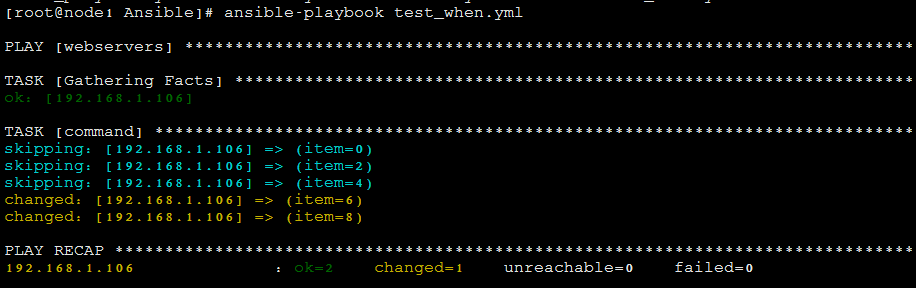
- hosts: webservers

  tasks:

    - command: echo {{ item }}

      with_items: [ 0,2,4,6,8]

      when: item > 5
执行结果;
实例:
使用Playbook部署nginx
---

- hosts: webservers

  become: yes

  become_method: sudo

  vars:

    worker_connections: 1024

    worker_processes: 4

    max_open_files: 65506

  tasks:

    - name: install nginx

      yum: name=nginx update_cache=yes state=present

    - name: copy nginx config file

      template: src=/root/study/Ansible/nginx.conf.j2 dest=/etc/nginx/nginx.conf

      notify: restart nginx

    - name: copy index.html

      template:

        src: /root/study/Ansible/index.html.j2

        dest: /usr/share/nginx/www/index.html

        mode: 0644

      notify: restart nginx

  handlers:

    - name: restart nginx

      service: name=nginx state=restarted
jinjia2模板文件:
nginx.conf.j2
worker_processes  {{ worker_processes }};

worker_rlimit_nofile {{ max_open_files }};

events {

    worker_connections {{ worker_connections }};

}

http {

    server {

            listen 80 default_server;

            listen [::]:80 default_server ipv6only=on;

            listen 443 ssl;

            root /usr/share/nginx/html;

            index index.html index.htm;

            server_name localhost;

            location / {

                    try_files $uri $uri/ =404;

            }

    }

}
index.html.j2
<html>

  <head>

    <title>Welcome to ansible</title>

  </head>

  <body>

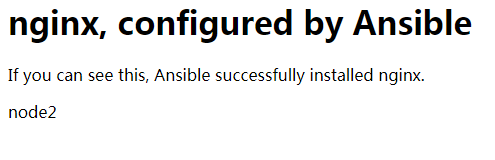
  <h1>nginx, configured by Ansible</h1>

  <p>If you can see this, Ansible successfully installed nginx.</p>

  <p>{{ ansible_hostname }}</p>

  </body>

</html>
访问主页;
部署MongoDB
---

- hosts: dbservers

  become: yes

  become_method: sudo

  vars:

    mongodb_datadir_prefix: /data

    mongod_port: 27018

  tasks:

    - name: Create the mongodb user

      user: name=mongodb comment="MongoDB"

    - name: Create the data directory for the namenode metadata

      file: path={{ mongodb_datadir_prefix }} owner=mongodb group=mongodb state=directory

    - name: Install the mongodb package

      apt: name={{ item }} state=installed

      with_items:

        - mongodb-server

        - mongodb-clients

        - rsyslog-mongodb

    - name: create data directory for mongodb

      file:

        path: "{{ mongodb_datadir_prefix }}/mongo-{{ ansible_hostname }}"

        state: directory

        owner: mongodb

        group: mongodb

    - name: create log directory for mongodb

      file: path=/var/log/mongo state=directory owner=mongodb group=mongodb

    - name: Create the mongodb startup file

      template: src=mongod.j2 dest=/etc/init.d/mongod-{{ ansible_hostname }} mode=0655

    - name: Create the mongodb configuration file

      template: src=mongod.conf.j2 dest=/etc/mongod-{{ ansible_hostname }}.conf

    - name: Copy the keyfile for authentication

      copy: src=secret dest={{ mongodb_datadir_prefix }}/secret owner=mongodb group=mongodb mode=0400

    - name: Start the mongodb service

      command: creates=/var/lock/subsys/mongod-{{ ansible_hostname }} /etc/init.d/mongod-{{ ansible_hostname }} start
配置文件:mongod.conf.j2
# mongo.conf

smallfiles=true

#where to log

logpath=/var/log/mongo/mongod-{{ ansible_hostname }}.log

logappend=true

# fork and run in background

fork = true

port = {{ mongod_port }}

dbpath={{ mongodb_datadir_prefix }}mongo-{{ ansible_hostname }}

keyFile={{ mongodb_datadir_prefix }}/secret

# location of pidfile

pidfilepath=/var/run/mongod-{{ ansible_hostname }}.pid
另外还可以将Playbook抽象成role。
可以参考https://galaxy.ansible.com,下载别人写好的role
初始化role
ansible-galaxy init /etc/ansible/roles/websrvs
安装别人写好的role
ansible-galaxy install -p /etc/ansible/roles bennojoy.mysql
Ansible的Playbook的编写的更多相关文章
- Ansible进阶--playbook的使用
一.什么是playbooksplaybooks是ansible的脚本.如同shell脚本一样,它是控制远程主机的一系列命令的集合,通过YAML语言编写.执行一些简单的任务,我们可以使用ad-hoc命令 ...
- ansible基础-playbook剧本的使用
ansible基础-playbook剧本的使用 作者:尹正杰 版权声明:原创作品,谢绝转载!否则将追究法律责任. 一.YAML概述 1>.YAML的诞生 YAML是一个可读性高,用来表达数据序 ...
- Ansible之playbook的使用总结 - 运维笔记
之前详细介绍了Ansible的安装, 配置, 以及Ansible常用模块的使用. 下面对Ansible的playbook用法做一小结. 为什么引入playbook?一般运维人员完成一个任务, 比如安装 ...
- 自动化运维工具——ansible剧本playbook(三)
一.Playbook--Ansible剧本 playbook是由一个或多个 "play"组成的列表 play的主要功能在于将事先归并为一组的主机装扮成事先通过ansible中的ta ...
- Ansible基于playbook批量修改主机名实战
Ansible基于playbook批量修改主机名 安装Ansible,相信这里也不用多说,大家都知道 说一下环境:这里的主机名是修改之后的,我先把其他两台的主机名改为别的 192.168.30.21 ...
- ansible使用playbook的简单例子(ansible2.9.7)
一,ansible使用playbook的优点 1,用ansible执行一些简单的任务,使用ad-hoc命令就可以解决问题 如果执行复杂的功能,需要大量的操作,执行的ad-hoc命令会不够方便,这时我们 ...
- Ansible之playbook剧本
Ansible之playbook剧本 目录 Ansible之playbook剧本 1. playbook的组成 2. 剧本示例test1 2.1 剧本制作 2.2 准备http.conf 2.3 运行 ...
- ansible学习-playbook的YAML语法
[一篇非常好的ansible参考博文] 初识Ansible http://liumissyou.blog.51cto.com/4828343/1616462 --------------------- ...
- 利用ansible书写playbook在华为云上批量配置管理工具自动化安装ceph集群
首先在华为云上购买搭建ceph集群所需云主机: 然后购买ceph所需存储磁盘 将购买的磁盘挂载到用来搭建ceph的云主机上 在跳板机上安装ansible 查看ansible版本,检验ansible是否 ...
随机推荐
- FileOutPutStream in 创新实训 自然语言交流系统
FileOutPutStream在c盘等一级目录下是可以创建文件的,如: new FileOutputStream("c:\\kk.txt");但是在c\\test等就创建不了,F ...
- SAP 物料移动类型查询表
Goods movement w/o referenceB Goods movement for purchase orderF Goods movement for production order ...
- 某软件大赛C#版考题整理——【编程题】
三.编程题(4小题共40.0分)程序及结果写入对应文框内 1. 孪生素数查找程序. 所谓孪生素数指的是间隔为2 的相邻素数,就像孪生兄弟.最小的孪生素数是(3, 5),在100 以内的孪生素数还有 ( ...
- 本地没问题 服务器 提示 Server Error in '/' Application
一. 先用本机的 IIS 测试,不要用 VS 内附的 Web server,並配置 <customErrors mode="Off"/>,以將真實的錯誤原因顯示出來,看 ...
- C# 获取文件大小
当然了都需要引入System.IO这个命名空间 第一个: public static long GetDirectoryLength(string dirPath){//判断给定的路径是否存在,如果不 ...
- JavaScript高速掌握
.document.write(""); 输出语句 .JS中的凝视为//或/* */ .传统的HTML文档顺序是:document->html->(head,body) ...
- Scripting.FileSystemObject对象的详细技巧指南
Scripting.FileSystemObject对象的详细技巧指南 FileSystemObject对象提供对计算机文件系统的访问: powered by 25175.net 在代码内操作文本文件 ...
- ColorSense颜色检测器
下载地址:https://github.com/omz/ColorSense-for-Xcode 修改OMColorSense.xcodeproj工程里的OMColorHelper.m文件的内容,实现 ...
- swift闭包的另一种用法
这不是教程. 当你碰到函数参数需要传递一个闭包(closure)时,一般是可以直接这么传递的(假定无返回): // 教程一般教你在参数位置传递closure: someMethod(arg1, arg ...
- vue-router 2 跳转失败原因
axios.post('/internal/user/login_from_mobile ',{ mobile: this.logPrefix+this.formInline1.mobile, pas ...