
[React Native] Using the Image component and reusable styles
Let's take a look at the basics of using React Native's Image component, as well as adding some reusable styling to our Dashboard component buttons.
We are going to build Dashboard Component, it will looks like this:
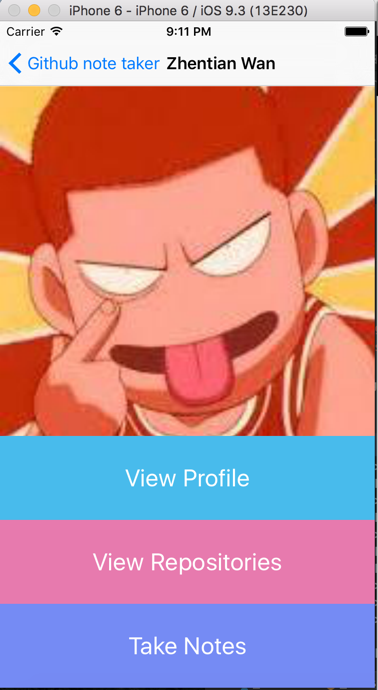
Basicly have one image component and three TouchableHighlight components.
import React, { Component } from 'react';

import {Text, View, StyleSheet, Image, TouchableHighlight} from 'react-native';

var styles = StyleSheet.create({

    container: {

        marginTop: ,

        flex:

    },

    image: {

        height: ,

    },

    buttonText: {

        fontSize: ,

        color: 'white',

        alignSelf: 'center'

    }

});

class Dashboard extends React.Component{

    makeBackground(btn){

        var obj = {

            flexDirection: 'row',

            alignSelf: 'stretch',

            justifyContent: 'center',

            flex:

        }

        if(btn === ){

            obj.backgroundColor = '#48BBEC';

        } else if (btn === ){

            obj.backgroundColor = '#E77AAE';

        } else {

            obj.backgroundColor = '#758BF4';

        }

        return obj;

    }

    goToProfile(){

        console.log('Going to Profile Page');

    }

    goToRepos(){

        console.log('Going to Repos');

    }

    goToNotes(){

        console.log('Going to Notes');

    }

    render(){

        return (

            <View style={styles.container}>

                <Image source={{uri: this.props.userInfo.avatar_url}} style={styles.image}/>

                <TouchableHighlight

                    style={this.makeBackground()}

                    onPress={this.goToProfile.bind(this)}

                    underlayColor="#88D4F5">

                    <Text style={styles.buttonText}>View Profile</Text>

                </TouchableHighlight>

                <TouchableHighlight

                    style={this.makeBackground()}

                    onPress={this.goToRepos.bind(this)}

                    underlayColor="#E39EBF">

                    <Text style={styles.buttonText}>View Repositories</Text>

                </TouchableHighlight>

                <TouchableHighlight

                    style={this.makeBackground()}

                    onPress={this.goToNotes.bind(this)}

                    underlayColor="#9BAAF3">

                    <Text style={styles.buttonText}>Take Notes</Text>

                </TouchableHighlight>

            </View>

        )

    }

};

module.exports = Dashboard;
The data 'this.props.userInfo' was passed from 'navigator' in main.js:
    handleSubmit(event){

        //update our indicatorIOS spinner

        this.setState({

            isLoading: true

        });

        //fetch data from github

        api.getBio(this.state.username)

            .then( (res) => {

                if(res.message === "Not Found"){

                    this.setState({

                        error: 'User not found',

                        isLoading: false

                    })

                }else{

                    //Pass in a new router component

                    this.props.navigator.push({

                        title: res.name || 'Selet an Option',

                        component: Dashboard,

                        passProps: {userInfo: res}

                    });

                    //Clean the search input and loading

                    this.setState({

                        isLoading: false,

                        error: false,

                        username: ''

                    });

                }

            })

    }
[React Native] Using the Image component and reusable styles的更多相关文章
- [React Native] Using the WebView component
We can access web pages in our React Native application using the WebView component. We will connect ...
- React Native(六)——PureComponent VS Component
先看两段代码: export class ywg extends PureComponent { …… render() { return ( …… ); } } export class ywg e ...
- [React Native] Use the SafeAreaView Component in React Native for iPhone X Compatibility
In this lesson, you will learn how to use the SafeAreaView component to avoid the sensor cluster (th ...
- [react native] react-native-tab-navigator在子Component中隐藏
因为文档只列出了TabBarIOS, 不支持Android,所以github上找到这个组件. 先说下我的页面构造: 入口文件 —> 注册组件(包含Navigator, 跳转到欢迎页)—> ...
- React Native 系列(二) -- React入门知识
前言 本系列是基于React Native版本号0.44.3写的,最初学习React Native的时候,完全没有接触过React和JS,本文的目的是为了给那些JS和React小白提供一个快速入门,让 ...
- React Native移植原生Android
(一)前言 之前已经写过了有关React Native移植原生Android项目的文章,不过因为RN版本更新的原因吧,跟着以前的文章可能会出现一些问题,对于初学者来讲还是会有很多疑难的困惑的,而且官方 ...
- React Native开发 - 搭建React Native开发环境
移动开发以前一般都是原生的语言来开发,Android开发是用Java语言,IOS的开发是Object-C或者Swift.那么对于开发一个App,至少需要两套代码.两个团队.对于公司来说,成本还是有的. ...
- React Native 系列(二)
前言 本系列是基于React Native版本号0.44.3写的,最初学习React Native的时候,完全没有接触过React和JS,本文的目的是为了给那些JS和React小白提供一个快速入门,让 ...
- React Native入门 开发第一个React Native应用
1. 首先创建一个目录(比如ReactNativeDir),用于存放各个ReactNative工程的代码 2.使用React Native命令工具来创建(初始化)一个ReactNative项目(tes ...
随机推荐
- C语言中的位拷贝与值拷贝浅谈(转载)
注:C语言实现的PHP变量的赋值过程中,就涉及到了 深拷贝和浅拷贝 位拷贝拷贝的是地址(也叫浅拷贝),而值拷贝则拷贝的是内容(深拷贝).深拷贝和浅拷贝可以简单理解为:如果一个类拥有资源,当这个类的对象 ...
- HDU 4571 Travel in time ★(2013 ACM/ICPC长沙邀请赛)
[题意]给定N个点,每个点有一个停留所需的时间Ci,和停留能够获得的满意度Si,有M条边,每条边代表着两个点走动所需的时间ti,现在问在规定的T时间内从指定的一点S到E能够获得的最大的满意度是多少?要 ...
- IE下设置unselectable与onselectstart属性的bug,Firefox与Chrome下的解决方案
在IE下给DIV设置unselectable与onselectstart属性,可以让div的内容不能选中,这个功能在很多情况下,非常有用,但是他的bug太明显, 直接使用一个DIV是可以的,比如: & ...
- 根据IP地址查询所在地
using System; using System.Collections.Generic; using System.Text; using System.IO; using System.Tex ...
- NGINX(四)配置解析
前言 nginx配置解析是在初始化ngx_cycle_t数据结构时,首先解析core模块,然后core模块依次解析自己的子模块. 配置解析过程 nginx调用ngx_conf_parse函数进行配置文 ...
- Java:基础
Hello World //HelloWorld.java文件 public class HelloWorld { public static void main(String[] args) { S ...
- DP——最优三角形剖分
[动态规划]凸多边形最优三角剖分 枚举三角行,再递归三角形旁边的两个多边形.
- mysql的group_concat的用法
1.语法:group_concat([DISTINCT] 要连接的字段 [Order BY ASC/DESC 排序字段] [Separator '分隔符']) eg. SELECT ID, GROUP ...
- 【转载】sed命令详解
[转载自]http://www.cnblogs.com/edwardlost/archive/2010/09/17/1829145.html sed -i 把后面的操作后的文本输出回原文本 ...
- Objective-C Autorelease Pool 的实现原理
内存管理一直是学习 Objective-C 的重点和难点之一,尽管现在已经是 ARC 时代了,但是了解 Objective-C 的内存管理机制仍然是十分必要的.其中,弄清楚 autorelease 的 ...