
[转载]深入理解ASP.NET MVC之ActionResult
Action全局观
在上一篇最后,我们进行到了Action调用的“门口”:
|
1
|
if (!ActionInvoker.InvokeAction(ControllerContext, actionName)) |
在深入研究调用过程的细节前,先有一个总体的认识是很有帮助的。InvokeAction方法大致是按照这样的顺序进行的:

查找action:MVC内部查找action的方法似乎有点复杂,涉及到一个ActionDescriptor的东西,但是原理上是通过反射,在以后的文章中会有所涉及。
验证和过滤:众所周知的IActionFilter和IAuthorizationFilter在这部分生效,它们在真正执行action之前,事实上对于IResultFilter或IExceptionFilter这样的过滤器是在action执行之后执行的,图中对于这个没有画出。
执行action:真正进入用户代码执行,通过反射调用,调用之前还涉及到复杂的参数提供和绑定,在以后的文章中会涉及。
执行结果:ActionResult在这部起到了关键的作用,ActionResult有多个派生,其中最为常见的就是ViewResult。ActionResult是前面步骤执行的最终“果实”,通过执行ActionResult的ExecuteResult抽象方法,一个HttpRespose被正确的构造好,准备传回客户端。
从ActionResult开始说起
就像上一篇讲到的,我们可以在Controller的Execute方法中直接对HttpContext.Response操作,绕过action;即便我们走了action这一路,仍然可以在action中像下面这样直接操作Response:
|
1
2
3
4
5
6
7
8
9
10
11
|
public class SimpleController : Controller { public void MyActionMethod() { Response.Write("I'll never stop using the <blink>blink</blink> tag"); // ... or ... Response.Redirect("/Some/Other/Url"); // ... or ... Response.TransmitFile(@"c:\files\somefile.zip"); } } |
然而这种方式难以维护,而且难以单元测试,于是MVC框架建议action返回ActionResult,并由框架调用ActionResult的ExecuteResult方法,这类似于设计模式中的command模式。你会看到这种设计模式在这里的运用实在是十分精辟的。
ActionResult是一个十足的抽象类,抽象到不能再抽象了,它定义了唯一的ExecuteResult方法,参数为一个ControllerContext,其中封装了包括HttpContext在内的许多对象,也是重写这个方法唯一的上下文信息:
|
1
2
3
4
5
6
7
8
9
|
namespace System.Web.Mvc { public abstract class ActionResult { public abstract void ExecuteResult(ControllerContext context); }} |
MVC内置了很多实用的ActionResult,如下图:
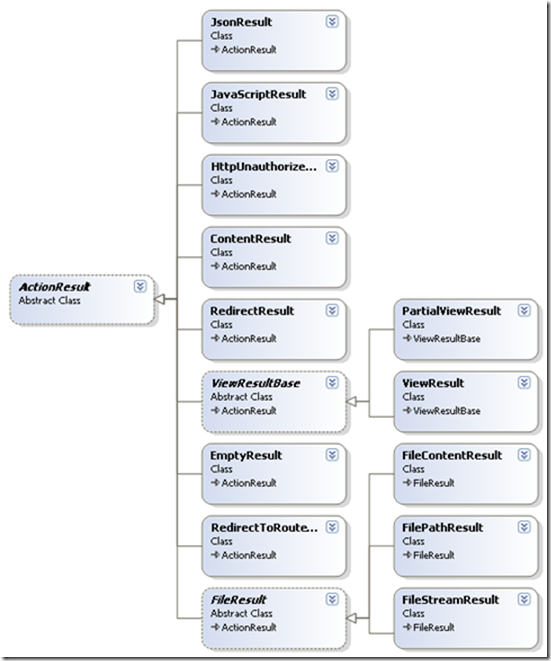
我们可以看个简单的实现类RedirectResult是如何实现ExecuteResult的。在这里我发现了我曾经遇到过的一个异常的原因:Child actions are not allowed to perform redirect actions,意思是在子action不允许重定向。
|
1
2
3
4
5
6
7
8
9
10
11
12
|
public override void ExecuteResult(ControllerContext context) { if (context == null) { throw new ArgumentNullException("context"); } if (context.IsChildAction) { throw new InvalidOperationException(MvcResources.RedirectAction_CannotRedirectInChildAction); } string destinationUrl = UrlHelper.GenerateContentUrl(Url, context.HttpContext); context.Controller.TempData.Keep(); context.HttpContext.Response.Redirect(destinationUrl, false /* endResponse */);} |
在这段代码中ExecuteResult的实现相对简单的多,事实上像ViewResult的实现就复杂很多,关于ViewResult将在视图中涉及到。
在Controller中有很多辅助方法便于我们在action中返回需要的ActionResult,下面列出:
Content():返回ContentResult
大家都很少用到这个ActionResult,因为它的基本用法是返回文本,也许下面这段代码可以说服你
|
1
2
3
4
5
6
7
8
9
10
11
12
13
14
15
16
17
18
19
20
|
public ContentResult RSSFeed() { Story[] stories = GetAllStories(); // Fetch them from the database or wherever // Build the RSS feed document string encoding = Response.ContentEncoding.WebName; XDocument rss = new XDocument(new XDeclaration("1.0", encoding, "yes"), new XElement("rss", new XAttribute("version", "2.0"), new XElement("channel", new XElement("title", "Example RSS 2.0 feed"), from story in stories select new XElement("item", new XElement("title", story.Title), new XElement("description", story.Description), new XElement("link", story.Url) ) ) ) ); return Content(rss.ToString(), "application/rss+xml"); } |
上面的代码返回了一个RSS。值得注意的是,Content的第二个参数是个contentType(MIME类型,参见www.iana.org/assignments/media-types),如果不指定这个参数将使用text/html的contentType。
事实上我们的action可以返回一个非ActionResult,MVC在执行action的返回结果前,会确保将返回值转换成一个ActionResult,其中一步,就是对非空和非ActionResult的结果转换成string,并包装成ContentResult:
|
1
2
3
4
5
6
7
8
9
|
protected virtual ActionResult CreateActionResult(ControllerContext controllerContext, ActionDescriptor actionDescriptor, object actionReturnValue) { if (actionReturnValue == null) { return new EmptyResult(); } ActionResult actionResult = (actionReturnValue as ActionResult) ?? new ContentResult { Content = Convert.ToString(actionReturnValue, CultureInfo.InvariantCulture) }; return actionResult;} |
Json():返回JsonResult
Controller的Json方法能返回一个JsonResult,出于安全性的考虑JsonResult只支持POST方式,设置response.ContentType = "application/json";并利用JavaScriptSerializer序列化对象,并返回给客户端。像下面这样使用JsonResult:
|
1
2
3
4
5
6
7
8
9
10
11
12
|
class CityData { public string city; public int temperature; } [HttpPost] public JsonResult WeatherData() { var citiesArray = new[] { new CityData { city = "London", temperature = 68 }, new CityData { city = "Hong Kong", temperature = 84 } }; return Json(citiesArray); } |
JavaScript():返回JavaScriptResult
JavaScript方法实例化一个JavaScriptResult,JavaScriptResult只是简单的设置response.ContentType = "application/x-javascript";
File():返回二进制数据或文件
FileResult是个抽象类,File方法的多个重载返回不同的FileResult:
FilePathResult:直接将一个文件发送给客户端
|
1
2
3
4
5
|
public FilePathResult DownloadReport() { string filename = @"c:\files\somefile.pdf"; return File(filename, "application/pdf", "AnnualReport.pdf"); } |
FileContentResult:返回byte字节给客户端比如图片
|
1
2
3
4
5
|
public FileContentResult GetImage(int productId) { var product = productsRepository.Products.First(x => x.ProductID == productId); return File(product.ImageData, product.ImageMimeType); } |
<img src="<%: Url.Action("GetImage", "Products", new { Model.ProductID }) %>" />
FileStreamResult:返回流
public FileStreamResult ProxyExampleDotCom()

{

    WebClient wc = new WebClient();

    Stream stream = wc.OpenRead("http://www.example.com/");

    return File(stream, "text/html");

}
PartialView()和View():分别返回PartialViewResult和ViewResult
PartialViewResult和ViewResult十分复杂,涉及到视图,将在以后详细讨论。
Redirect():返回RedirectResult
产生重定向结果,上面已经展示了RedirectResult的实现了。
RedirectToAction(),RedirectToRoute():返回RedirectToRouteResult
RedirectToRouteResult同样是产生跳转的结果,但是它具有“路由表遍历能力”,也就是具有Url outbound的特点,参见深入理解ASP.NET MVC(3)
原文地址:http://www.cnblogs.com/P_Chou/archive/2010/11/26/details-asp-net-mvc-06.html
[转载]深入理解ASP.NET MVC之ActionResult的更多相关文章
- [转载] ASP.NET MVC (一)——深入理解ASP.NET MVC
个人认为写得比较透彻得Asp.net mvc 文章,所以转载过来,原文链接在最后: ASP.NET vs MVC vs WebForms 许多ASP.NET开发人员开始接触MVC认为MVC与ASP.N ...
- 深入理解ASP.NET MVC(6)
系列目录 Action全局观 在上一篇最后,我们进行到了Action调用的“门口”: 1 if (!ActionInvoker.InvokeAction(ControllerContext, acti ...
- 深入理解ASP.NET MVC(目录)
学ASP.NET MVC2有一段时间了,也针对性的做了个练习.感觉这个框架还是不错的,所以决定要深入系统的学习一下.看到这样一本书: 作者博客:http://blog.stevensanderson. ...
- 七天学会ASP.NET MVC (一)——深入理解ASP.NET MVC
系列文章 七天学会ASP.NET MVC (一)——深入理解ASP.NET MVC 七天学会ASP.NET MVC (二)——ASP.NET MVC 数据传递 七天学会ASP.NET MVC (三)— ...
- 深入理解ASP.NET MVC Day1
深入理解ASP.NET MVC ASP.NET vs MVC vs WebForms 许多ASP.NET开发人员开始接触MVC认为MVC与ASP.NET完全没有关系,是一个全新的Web开发,事实上 ...
- 七天学会ASP.NET MVC ——深入理解ASP.NET MVC
七天学会ASP.NET MVC (一)——深入理解ASP.NET MVC 系列文章 七天学会ASP.NET MVC (一)——深入理解ASP.NET MVC 七天学会ASP.NET MVC (二) ...
- 深入理解ASP.NET MVC(5)
系列目录 回顾 系列的前4节深入剖析了ASP.NET URL路由机制,以及MVC在此基础上是如何实现Areas机制的,同时涉及到inbound和outbound很多细节部分.第2节中提到MvcRout ...
- 七天学会ASP.NET MVC (一)——深入理解ASP.NET MVC 【转】
http://www.cnblogs.com/powertoolsteam/p/MVC_one.html 系列文章 七天学会ASP.NET MVC (一)——深入理解ASP.NET MVC 七天学会A ...
- 理解ASP.NET MVC中的ActionResult
通常我们在一个ASP.NET MVC项目中创建一个Controller的时候,Index()方法默认的返回类型都是ActionResult,通过查看UML图,ActionResult实际上是一个抽象类 ...
随机推荐
- 【AngularJs】---Error: [$injector:modulerr] Failed to instantiate module starter.services
[遇到问题解决问题,原谅我这个菜鸟] 加了services angular.module('starter', ['ionic', 'starter.controllers', 'starter.se ...
- 【转】Android开发中Handler的使用
在Android开发中,我们经常会遇到这样一种情况:在UI界面上进行某项操作后要执行一段很耗时的代码,比如我们在界面上点击了一个”下载“按钮,那么我们需要执行网络请求,这是一个耗时操作,因为不知道什么 ...
- js和jQuery创建元素和把元素插入到文档中所用的方法
js创建元素: document.createElement(" 创建的元素"); //“创建的元素”指:p ,h1,div,span........ js插入元素: docu ...
- C#中的 ref 传进出的到底是什么 解惑篇
今天在浏览博文时,看到这篇文章:C#中的ref 传进出的到底是什么 ? 在传对象时使用ref的疑问 另附言: 本文写于早上,就在想发布的那瞬间,靠,公司断网了,原来修改的部分丢失了. 网一断就是一天了 ...
- HTML+CSS学习笔记(4) - 认识标签(3)
HTML+CSS学习笔记(4) - 认识标签(3) 1.使用<a>标签,链接到另一个页面 使用<a>标签可实现超链接,它在网页制作中可以说是无处不在,只要有链接的地方,就会有这 ...
- 使用C#通过调用minitab的COM库自动化生成报表
本文介绍通过C#调用minitab com组建自动化生成报表的方法. 首先需要在minitab中通过手动配置的方式生成报表来得到该报表的命令行,过程如下 选择菜单“编辑器”->“启用命令”启用命 ...
- (POJ 3694) Network 求桥个数
题目链接:http://poj.org/problem?id=3694Description A network administrator manages a large network. The ...
- Open Live Writer增加代码插件
作为一名程序员,免不了和代码打交道,自然在写博客的时候,也会用到代码的展示,Open Live Writer确实是一个不错的工具,不用再去登录博客的后台,就可以在本地进行文章的编写,但是致 ...
- gulp 不是内部或者外部命令 或者 webpack 不是内部或者外部命令
gulp安装也正常,但是就是查看gulp -v的时候报错,原因:缺少系统变量PATH或者PATH变量错误 提示:这个系统变量PATH,直接追加就好(多个变量值用分号;隔开),不要删除已经有的系统变量P ...
- js判断选择时间不能小于当前时间的代码
判断选择时间不能小于当前时间的方法有很多,在本文为大家详细介绍下使用js是如何实现的,感兴趣的朋友可以尝试操作下 复制代码代码如下: var controldate; function checkD ...