
[转载]深入理解ASP.NET MVC之ActionResult
Action全局观
在上一篇最后,我们进行到了Action调用的“门口”:
|
1
|
if (!ActionInvoker.InvokeAction(ControllerContext, actionName)) |
在深入研究调用过程的细节前,先有一个总体的认识是很有帮助的。InvokeAction方法大致是按照这样的顺序进行的:

查找action:MVC内部查找action的方法似乎有点复杂,涉及到一个ActionDescriptor的东西,但是原理上是通过反射,在以后的文章中会有所涉及。
验证和过滤:众所周知的IActionFilter和IAuthorizationFilter在这部分生效,它们在真正执行action之前,事实上对于IResultFilter或IExceptionFilter这样的过滤器是在action执行之后执行的,图中对于这个没有画出。
执行action:真正进入用户代码执行,通过反射调用,调用之前还涉及到复杂的参数提供和绑定,在以后的文章中会涉及。
执行结果:ActionResult在这部起到了关键的作用,ActionResult有多个派生,其中最为常见的就是ViewResult。ActionResult是前面步骤执行的最终“果实”,通过执行ActionResult的ExecuteResult抽象方法,一个HttpRespose被正确的构造好,准备传回客户端。
从ActionResult开始说起
就像上一篇讲到的,我们可以在Controller的Execute方法中直接对HttpContext.Response操作,绕过action;即便我们走了action这一路,仍然可以在action中像下面这样直接操作Response:
|
1
2
3
4
5
6
7
8
9
10
11
|
public class SimpleController : Controller { public void MyActionMethod() { Response.Write("I'll never stop using the <blink>blink</blink> tag"); // ... or ... Response.Redirect("/Some/Other/Url"); // ... or ... Response.TransmitFile(@"c:\files\somefile.zip"); } } |
然而这种方式难以维护,而且难以单元测试,于是MVC框架建议action返回ActionResult,并由框架调用ActionResult的ExecuteResult方法,这类似于设计模式中的command模式。你会看到这种设计模式在这里的运用实在是十分精辟的。
ActionResult是一个十足的抽象类,抽象到不能再抽象了,它定义了唯一的ExecuteResult方法,参数为一个ControllerContext,其中封装了包括HttpContext在内的许多对象,也是重写这个方法唯一的上下文信息:
|
1
2
3
4
5
6
7
8
9
|
namespace System.Web.Mvc { public abstract class ActionResult { public abstract void ExecuteResult(ControllerContext context); }} |
MVC内置了很多实用的ActionResult,如下图:
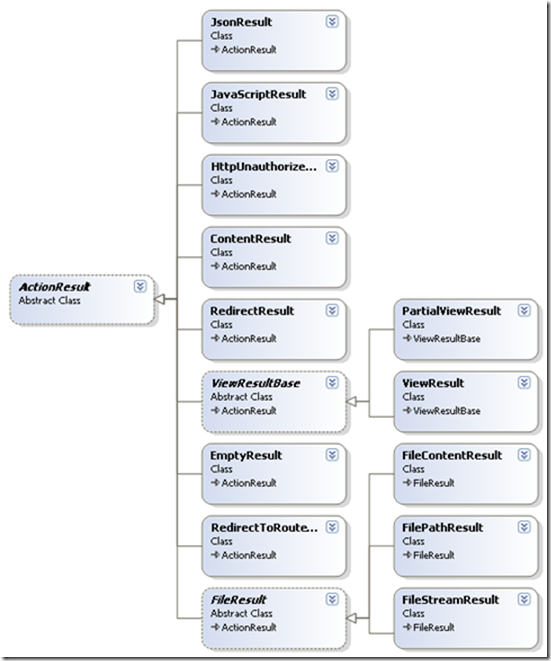
我们可以看个简单的实现类RedirectResult是如何实现ExecuteResult的。在这里我发现了我曾经遇到过的一个异常的原因:Child actions are not allowed to perform redirect actions,意思是在子action不允许重定向。
|
1
2
3
4
5
6
7
8
9
10
11
12
|
public override void ExecuteResult(ControllerContext context) { if (context == null) { throw new ArgumentNullException("context"); } if (context.IsChildAction) { throw new InvalidOperationException(MvcResources.RedirectAction_CannotRedirectInChildAction); } string destinationUrl = UrlHelper.GenerateContentUrl(Url, context.HttpContext); context.Controller.TempData.Keep(); context.HttpContext.Response.Redirect(destinationUrl, false /* endResponse */);} |
在这段代码中ExecuteResult的实现相对简单的多,事实上像ViewResult的实现就复杂很多,关于ViewResult将在视图中涉及到。
在Controller中有很多辅助方法便于我们在action中返回需要的ActionResult,下面列出:
Content():返回ContentResult
大家都很少用到这个ActionResult,因为它的基本用法是返回文本,也许下面这段代码可以说服你
|
1
2
3
4
5
6
7
8
9
10
11
12
13
14
15
16
17
18
19
20
|
public ContentResult RSSFeed() { Story[] stories = GetAllStories(); // Fetch them from the database or wherever // Build the RSS feed document string encoding = Response.ContentEncoding.WebName; XDocument rss = new XDocument(new XDeclaration("1.0", encoding, "yes"), new XElement("rss", new XAttribute("version", "2.0"), new XElement("channel", new XElement("title", "Example RSS 2.0 feed"), from story in stories select new XElement("item", new XElement("title", story.Title), new XElement("description", story.Description), new XElement("link", story.Url) ) ) ) ); return Content(rss.ToString(), "application/rss+xml"); } |
上面的代码返回了一个RSS。值得注意的是,Content的第二个参数是个contentType(MIME类型,参见www.iana.org/assignments/media-types),如果不指定这个参数将使用text/html的contentType。
事实上我们的action可以返回一个非ActionResult,MVC在执行action的返回结果前,会确保将返回值转换成一个ActionResult,其中一步,就是对非空和非ActionResult的结果转换成string,并包装成ContentResult:
|
1
2
3
4
5
6
7
8
9
|
protected virtual ActionResult CreateActionResult(ControllerContext controllerContext, ActionDescriptor actionDescriptor, object actionReturnValue) { if (actionReturnValue == null) { return new EmptyResult(); } ActionResult actionResult = (actionReturnValue as ActionResult) ?? new ContentResult { Content = Convert.ToString(actionReturnValue, CultureInfo.InvariantCulture) }; return actionResult;} |
Json():返回JsonResult
Controller的Json方法能返回一个JsonResult,出于安全性的考虑JsonResult只支持POST方式,设置response.ContentType = "application/json";并利用JavaScriptSerializer序列化对象,并返回给客户端。像下面这样使用JsonResult:
|
1
2
3
4
5
6
7
8
9
10
11
12
|
class CityData { public string city; public int temperature; } [HttpPost] public JsonResult WeatherData() { var citiesArray = new[] { new CityData { city = "London", temperature = 68 }, new CityData { city = "Hong Kong", temperature = 84 } }; return Json(citiesArray); } |
JavaScript():返回JavaScriptResult
JavaScript方法实例化一个JavaScriptResult,JavaScriptResult只是简单的设置response.ContentType = "application/x-javascript";
File():返回二进制数据或文件
FileResult是个抽象类,File方法的多个重载返回不同的FileResult:
FilePathResult:直接将一个文件发送给客户端
|
1
2
3
4
5
|
public FilePathResult DownloadReport() { string filename = @"c:\files\somefile.pdf"; return File(filename, "application/pdf", "AnnualReport.pdf"); } |
FileContentResult:返回byte字节给客户端比如图片
|
1
2
3
4
5
|
public FileContentResult GetImage(int productId) { var product = productsRepository.Products.First(x => x.ProductID == productId); return File(product.ImageData, product.ImageMimeType); } |
<img src="<%: Url.Action("GetImage", "Products", new { Model.ProductID }) %>" />
FileStreamResult:返回流
public FileStreamResult ProxyExampleDotCom()

{

    WebClient wc = new WebClient();

    Stream stream = wc.OpenRead("http://www.example.com/");

    return File(stream, "text/html");

}
PartialView()和View():分别返回PartialViewResult和ViewResult
PartialViewResult和ViewResult十分复杂,涉及到视图,将在以后详细讨论。
Redirect():返回RedirectResult
产生重定向结果,上面已经展示了RedirectResult的实现了。
RedirectToAction(),RedirectToRoute():返回RedirectToRouteResult
RedirectToRouteResult同样是产生跳转的结果,但是它具有“路由表遍历能力”,也就是具有Url outbound的特点,参见深入理解ASP.NET MVC(3)
原文地址:http://www.cnblogs.com/P_Chou/archive/2010/11/26/details-asp-net-mvc-06.html
[转载]深入理解ASP.NET MVC之ActionResult的更多相关文章
- [转载] ASP.NET MVC (一)——深入理解ASP.NET MVC
个人认为写得比较透彻得Asp.net mvc 文章,所以转载过来,原文链接在最后: ASP.NET vs MVC vs WebForms 许多ASP.NET开发人员开始接触MVC认为MVC与ASP.N ...
- 深入理解ASP.NET MVC(6)
系列目录 Action全局观 在上一篇最后,我们进行到了Action调用的“门口”: 1 if (!ActionInvoker.InvokeAction(ControllerContext, acti ...
- 深入理解ASP.NET MVC(目录)
学ASP.NET MVC2有一段时间了,也针对性的做了个练习.感觉这个框架还是不错的,所以决定要深入系统的学习一下.看到这样一本书: 作者博客:http://blog.stevensanderson. ...
- 七天学会ASP.NET MVC (一)——深入理解ASP.NET MVC
系列文章 七天学会ASP.NET MVC (一)——深入理解ASP.NET MVC 七天学会ASP.NET MVC (二)——ASP.NET MVC 数据传递 七天学会ASP.NET MVC (三)— ...
- 深入理解ASP.NET MVC Day1
深入理解ASP.NET MVC ASP.NET vs MVC vs WebForms 许多ASP.NET开发人员开始接触MVC认为MVC与ASP.NET完全没有关系,是一个全新的Web开发,事实上 ...
- 七天学会ASP.NET MVC ——深入理解ASP.NET MVC
七天学会ASP.NET MVC (一)——深入理解ASP.NET MVC 系列文章 七天学会ASP.NET MVC (一)——深入理解ASP.NET MVC 七天学会ASP.NET MVC (二) ...
- 深入理解ASP.NET MVC(5)
系列目录 回顾 系列的前4节深入剖析了ASP.NET URL路由机制,以及MVC在此基础上是如何实现Areas机制的,同时涉及到inbound和outbound很多细节部分.第2节中提到MvcRout ...
- 七天学会ASP.NET MVC (一)——深入理解ASP.NET MVC 【转】
http://www.cnblogs.com/powertoolsteam/p/MVC_one.html 系列文章 七天学会ASP.NET MVC (一)——深入理解ASP.NET MVC 七天学会A ...
- 理解ASP.NET MVC中的ActionResult
通常我们在一个ASP.NET MVC项目中创建一个Controller的时候,Index()方法默认的返回类型都是ActionResult,通过查看UML图,ActionResult实际上是一个抽象类 ...
随机推荐
- Ubuntu 14.0操作系统,修改默认打开方式的方法
Ubuntu 14.0 有内置的视频播放器 Totem,但是使用起来不太习惯,所以在系统的软件中心 下载了gnome Mplayer和s Mplayer,都有打开上次播放的忆功能,只是gnome Mp ...
- 解释清楚c++的重载操作符【用自己的话,解释清楚】
C++中对于内置的变量及标准库中常见的类定义类常见的操作符含义,对于自定义的类也可以通过关键字operate 重载操作符的含义. C++中支持重载的目的 诚然操作符的重载可以通过使用函数实现同样的功能 ...
- C#对象XML序列化
1.Xml序列化操作类 .Net Framework提供了对应的System.Xml.Seriazliation.XmlSerializer负责把对象序列化到XML,和从XML中反序列化为对象. 以下 ...
- C#全屏随机位置显示图片的小程序
想法:将屏幕截图作为程序背景图,在之上弹出提示窗口,选择确定后进行定时图片随机位置显示.(支持ESC键退出) 需要添加的控件:Timer 需要修改的Form1属性为下图红色区域: 资源文件的添加:添加 ...
- easyloader [easyui_1.4.2] 分析源码,妙手偶得之
用easyui很久了,但是很少去看源码. 有解决不了的问题就去百度... 今日发现,easyui的源码不难懂. 而且结合 easyloader 可以非常方便的逐个研究easyui的组件. 但是, ea ...
- Linux 内核 链表 的简单模拟(1)
第零章:扯扯淡 出一个有意思的题目:用一个宏定义FIND求一个结构体struct里某个变量相对struc的编移量,如 struct student { int a; //FIND(struct stu ...
- android源码-安卓源码-Android源码下载-安卓游戏源码
android源码 高仿精仿金山手机卫士应用源码V1.2 高仿精仿金山手机卫士应用源码,该应用的级别实现了金山卫士的级别功能了,可以说跟现实中我们使用的金山卫士应用的功能几乎差不 人气:9286 ...
- DEDECMS中,常见全局变量
全局变量 {dede:global.cfg_cmspath/} 是dedecms 的安装目录,一般就是网站的根目录. {dede:global.cfg_cmsurl/}是当前目录 注意加一根斜线{de ...
- JQ跑马灯
<!DOCTYPE html> <html> <head> <meta charset="utf-8" /> <title&g ...
- 如何实现zs无限期试用
要删除的文件有两个,分别是.zs与10_0..zs保存的是版本号,10_0保存的是注册码,这两个文件存在的原理是:zend studio 每次启动的会检查这两个文件的创建时间,和当前日期对比,超过30 ...