
SSH Tunneling Explained
March 21, 2012 by Buddhika Chamith
Recently I wanted to set up a remote desktop sharing session from home pc to my laptop. While going through the set up guide I came across ssh tunneling. Even though there are many articles on the subject still it took me a considerable amount of googling, some experimenting and couple of Wireshark sessions to grasp what’s going under the hood. Most of the guides were incomplete in terms of explaining the concept which left me desiring for a good article on the subject with some explanatory illustrations. So I decided to write it my self. So here goes…
Introduction
A SSH tunnel consists of an encrypted tunnel created through a SSH protocol
connection. A SSH tunnel can be used to transfer unencrypted traffic over a
network through an encrypted channel. For example we can use a ssh tunnel to
securely transfer files between a FTP server and a client even though the FTP
protocol itself is not encrypted. SSH tunnels also provide a means to bypass firewalls that prohibits or filter certain internet services. For example an organization will block certain sites using their proxy filter. But users may not wish to have their web traffic
monitored or blocked by the organization proxy filter. If users can connect to
an external SSH server, they can create a SSH tunnel to forward a given port on
their local machine to port 80 on remote web-server via the external SSH
server. I will describe this scenario in detail in a little while.
To set up a SSH tunnel a given port of one machine needs to be forwarded (of
which I am going to talk about in a little while) to a port in the other
machine which will be the other end of the tunnel. Once the SSH tunnel has been
established, the user can connect to earlier specified port at first machine to
access the network service.
Port Forwarding
SSH tunnels can be created in several ways using different kinds of port forwarding
mechanisms. Ports can be forwarded in three ways.
- Local port forwarding
- Remote port forwarding
- Dynamic port forwarding
I didn’t explain what port forwarding is. I found Wikipedia’s definition more explanatory.
Port forwarding or port mapping is a name given to the combined technique of
- translating the address and/or port number of a packet to a new destination
- possibly accepting such packet(s) in a packet filter(firewall)
- forwarding the packet according to the routing table.
Here the first technique will be used in creating an SSH tunnel. When a client application connects to the local port (local endpoint) of the SSH tunnel and transfer data these data will be forwarded to the remote end by translating the host and port values to that of the remote end of the channel.
So with that let’s see how SSH tunnels can be created using forwarded ports with an examples.
Tunnelling with Local port forwarding
Let’s say that yahoo.com is being blocked using a proxy filter in the University.
(For the sake of this example. :). Cannot think any valid reason why yahoo would be blocked). A SSH tunnel can be used to bypass this restriction. Let’s name my machine at the university as ‘work’ and my home machine as ‘home’. ‘home’ needs to have a public IP for this to work. And I am running a SSH server on my home machine. Following diagram illustrates the scenario.

To create the SSH tunnel execute following from ‘work’ machine.
|
1
|
ssh -L 9001:yahoo.com:80 home |
The ‘L’ switch indicates that a local port forward is need to be created. The switch syntax is as follows.
|
1
|
-L <local-port-to-listen>:<remote-host>:<remote-port> |
Now the SSH client at ‘work’ will connect to SSH server running at ‘home’ (usually running at port 22) binding port 9001 of ‘work’ to listen for local requests thus creating a SSH tunnel between ‘home’ and ’work’. At the ‘home’ end it will create a connection to ‘yahoo.com’ at port 80. So ‘work’ doesn’t need to know how to connect to yahoo.com. Only ‘home’ needs to worry about that. The channel between ‘work’ and ‘home’ will be encrypted while the connection between ‘home’ and ‘yahoo.com’ will be unencrypted.
Now it is possible to browse yahoo.com by visiting http://localhost:9001 in the web browser at ‘work’ computer. The ‘home’ computer will act as a gateway which would accept requests from ‘work’ machine and fetch data and tunnelling it back. So the syntax of the full command would be as follows.
|
1
|
ssh -L <local-port-to-listen>:<remote-host>:<remote-port> <gateway> |
The image below describes the scenario.

Here the ‘host’ to ‘yahoo.com’ connection is only made when browser makes the
request not at the tunnel setup time.
It is also possible to specify a port in the ‘home’ computer itself instead of
connecting to an external host. This is useful if I were to set up a VNC session
between ‘work’ and ‘home’. Then the command line would be as follows.
|
1
|
ssh -L 5900:localhost:5900 home (Executed from 'work') |
So here what does localhost refer to? Is it the ‘work’ since the command line is executed from ‘work’? Turns out that it is not. As explained earlier is relative to the gateway (‘home’ in this case) , not the machine from where the tunnel is initiated. So this will make a connection to port 5900 of the ‘home’ computer where the VNC client would be listening in.
The created tunnel can be used to transfer all kinds of data not limited to web browsing sessions. We can also tunnel SSH sessions from this as well. Let’s assume there is another computer (‘banned’) to which we need to SSH from within University but the SSH access is being blocked. It is possible to tunnel a SSH session to this host using a local port forward. The setup would look like this.

As can be seen now the transferred data between ‘work’ and ‘banned’ are encrypted end to end. For this we need to create a local port forward as follows.
|
1
|
ssh -L 9001:banned:22 home |
Now we need to create a SSH session to local port 9001 from where the session
will get tunneled to ‘banned’ via ‘home’ computer.
|
1
|
ssh -p 9001 localhost |
With that let’s move on to next type of SSH tunnelling method, reverse tunnelling.
Reverse Tunnelling with remote port forwarding
Let’s say it is required to connect to an internal university website from home.
The university firewall is blocking all incoming traffic. How can we connect from ‘home’ to internal network so that we can browse the internal site? A VPN setup is a good candidate here. However for this example let’s assume we don’t have this facility. Enter SSH reverse tunnelling..
As in the earlier case we will initiate the tunnel from ‘work’ computer behind the firewall. This is possible since only incoming traffic is blocking and outgoing traffic is allowed. However instead of the earlier case the client will now be at the ‘home’ computer. Instead of -L option we now define -R which specifies
a reverse tunnel need to be created.
|
1
|
ssh -R 9001:intra-site.com:80 home (Executed from 'work') |
Once executed the SSH client at ‘work’ will connect to SSH server running at home creating a SSH channel. Then the server will bind port 9001 on ‘home’ machine to listen for incoming requests which would subsequently be routed through the created SSH channel between ‘home’ and ‘work’. Now it’s possible to browse the internal site
by visiting http://localhost:9001 in ‘home’ web browser. The ‘work’ will then create a connection to intra-site and relay back the response to ‘home’ via the created SSH channel.

As nice all of these would be still you need to create another tunnel if you need to connect to another site in both cases. Wouldn’t it be nice if it is possible to proxy traffic to any site using the SSH channel created? That’s what dynamic port forwarding is all about.
Dynamic Port Forwarding
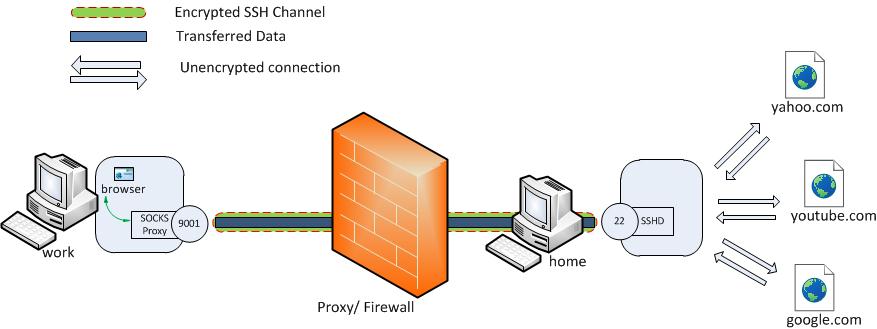
Dynamic port forwarding allows to configure one local port for tunnelling data to all remote destinations. However to utilize this the client application connecting to local port should send their traffic using the SOCKS protocol. At the client side of the tunnel a SOCKS proxy would be created and the application (eg. browser) uses the SOCKS protocol to specify where the traffic should be sent when it leaves the other end of the ssh tunnel.
|
1
|
ssh -D 9001 home (Executed from 'work') |
Here SSH will create a SOCKS proxy listening in for connections at local port
9001 and upon receiving a request would route the traffic via SSH channel
created between ‘work’ and ‘home’. For this it is required to configure the
browser to point to the SOCKS proxy at port 9001 at localhost.
SSH Tunneling Explained的更多相关文章
- How to do SSH Tunneling (Port Forwarding)
How to do SSH Tunneling (Port Forwarding) In this post we will see how ssh works?, what is SSH tunne ...
- SSH Tunneling
把本地端口 local_port 转发到服务器 server2 的 remote_port 端口上, server1 和 server2可以是同一ip或者不同ip. ssh user@server1 ...
- ssh tunneling应用案例-AWS EC2 vnc图形化桌面的支持
一般地,无论是AWS EC2还是阿里云的云主机,linux系统默认都只提供ssh登录方式.如果你是一个技术控,非常希望把图形化界面给折腾出来,这其中就不需有vnc server的支持,除此之外,还涉及 ...
- Dreamweaver SSH Tunneling
- [转] SSH原理与运用(2):远程操作与端口转发
英文:阮一峰 链接:http://www.ruanyifeng.com/blog/2011/12/ssh_port_forwarding.html 接着前一次的文章,继续介绍SSH的用法. (Imag ...
- SSH原理与运用
SSH是每一台Linux电脑的标准配置. 随着Linux设备从电脑逐渐扩展到手机.外设和家用电器,SSH的使用范围也越来越广.不仅程序员离不开它,很多普通用户也每天使用. SSH具备多种功能,可以用于 ...
- SSH协议及其应用
SSH协议及其应用 原文作者:阮一峰 链接: http://www.ruanyifeng.com/blog/2011/12/ssh_remote_login.html http://www.ruany ...
- ssh用法及命令
http://blog.csdn.net/pipisorry/article/details/52269785 什么是SSH? 简单说,SSH是一种网络协议,用于计算机之间的加密登录.如果一个用户从本 ...
- 三种不同类型的ssh隧道
何谓SSH隧道 隧道是一种把一种网络协议封装进另外一种网络协议进行传输的技术.这里我们研究ssh隧道,所以所有的网络通讯都是加密的.又被称作端口转发,因为ssh隧道通常会绑定一个本地端口,所有发向这个 ...
随机推荐
- 向CodeBlocks的Project中添加calss文件时,出现No such file or directory错误的解决方案
我们在CodeBlocks中编写程序时,一般要建立工程.现在建立工程first,然后建立类文件Person,并将其添加到first中, int main() { Person p; p.display ...
- python+selenium环境配置(windows7环境)
下载python[python开发环境] http://python.org/getit/ 下载setuptools[python的基础包工具] http://pypi.python.org/pypi ...
- Spring MVC与easyui国际化
1.建立资源文件 在webapp下建立文件夹language,在其中再添加file,命名分别为language.properties,language_en.properties,language_z ...
- php下载文件的代码示例
php下载文件的代码示例,需要的朋友可以参考下 <?php $file = 'monkey.gif'; if (file_exists($file)) { header('Content- ...
- 如何使用js捕获css3动画
如何使用js捕获css3动画 css3动画功能强大,但是不像js,没有逐帧控制,但是可以通过js事件来确定任何动画的状态. 下面是一段css3动画代码: #anim.enable{ -webkit-a ...
- C# 缓存学习总结
昨天整理了一下缓存的基本用法,和缓存依赖类 CacheDependency类的使用,今天整理一下缓存的数据库依赖类SqlCacheDependency 1.数据库依赖类SqlCacheDependen ...
- hdu 5755 2016 Multi-University Training Contest 3 Gambler Bo 高斯消元模3同余方程
http://acm.hdu.edu.cn/showproblem.php?pid=5755 题意:一个N*M的矩阵,改变一个格子,本身+2,四周+1.同时mod 3;问操作多少次,矩阵变为全0.输出 ...
- 第六周 N题
Description As Harry Potter series is over, Harry has no job. Since he wants to make quick money, (h ...
- php微型mvc框架创建步骤
创建数据库和表结构,并且添加模拟数据: 新建models.views.controllers.utilities和include五个文件夹:models:模型层 model.php:模型基类 ...
- Android修改system只读权限
在Root后的真机上使用adb remount命令不知道为什么不行. 但有些时候还是想向system文件夹下面写文件,例如把tcpdump工具放到/system/bin 下面,然后就可以直接使用tcp ...