
sencha touch tabsidebar 源码扩展
先上图看效果

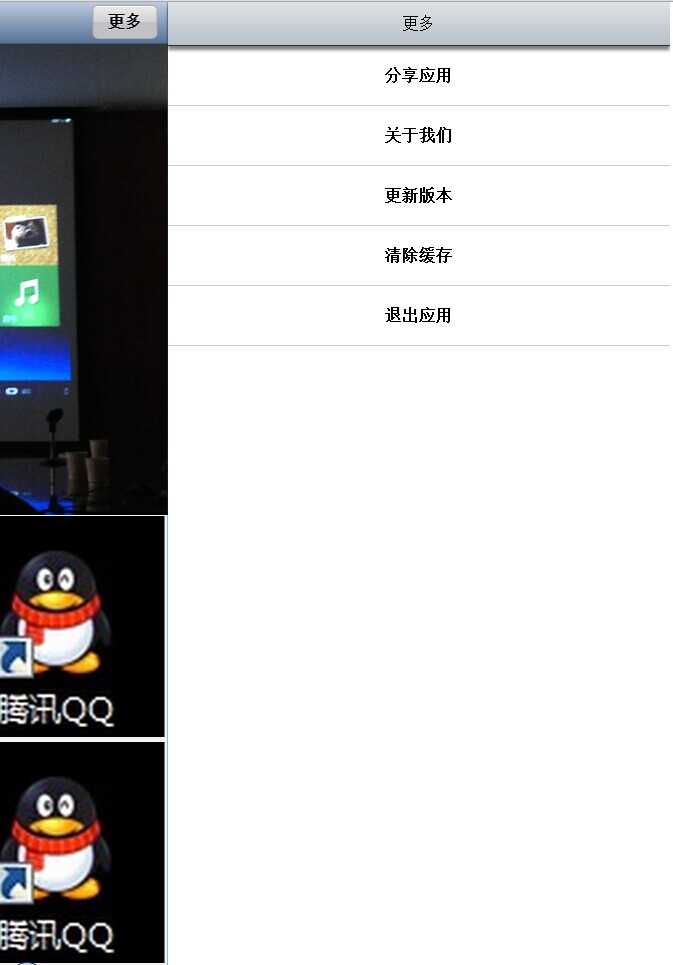
没错,这是一个sencha touch 项目,而这里的右边推出效果(下文叫做tabsiderbar),使用插件tabsiderbar来扩展的.
插件js下载地址:http://www.m-gd.com/sencha-touch-sidebar-component/
这里的插件实现的效果为:工具栏点击,从左边open半个页面出来
而我们如果我们要使这个页面从邮编出来怎么办呢?
这里我将Siderbar.js中扩展了一下,具体如下(这里只贴扩展后的代码和主要思路):
1,给indicator对象添加自定义属性startBy
        /**

         * @cfg {Object || Boolean} indicator

         * if false, no idicator is shown, otherwise this defines the indicator

         */

        indicator: {

            itemId: 'mgd-tab-sidebar-button',

            /**

             * @cfg {String} text

             * the button text

             */

            text: '',

            /**

             * @cfg {String} #closeStateCls

             * add additional classes to the button

             */

            openCls: '',

            /**

             * @cfg {String} #openStateCls

             * add additional classes to the button

             */

            cls: 'mgd-tab-sidebar-button',

            /**

             * @cfg {String} btnPressedCls

             * add additional classes to the pressed button state

             */

            pressedCls: 'mgd-tab-sidebar-button-pressing',

            /**

             * @cfg {Number} [left=0]

             * The absolute left position of this Component

             */

//            left: 0,

            /**

             * @cfg {Number} top

             * The absolute top position of this Component

             */

            top: 3,

            /**

             * @cfg {Number} zIndex

             * The z-index to give this Component when it is rendered

             */

            zIndex: 5,

            //添加自定义属性startBy(名称自取)

            startBy:"left"

        }
2,扩展toggle函数为两个:toggleByLeft(默认就是这个方法)和toggleByRight
/* ---------------------------------------扩展 Show By Right ACTION --------------------------------------- */

    toggleByRight: function (button) {

        config.showToast();

        console.log('[tab.Sidebar][toggle] tapped the button');

        console.log("扩展注释:---toggleByRight");

        button = button || this.getIndicator();

        var activeView = Ext.Viewport.getActiveItem(),

            sidebar = button ? button.config.sidebar : this;

        var width = sidebar.getWidth();

        var windowWidth=window.innerWidth; //初始位置从浏览器窗口的最右端开始

        if (sidebar.getState() === 'closed') {

            // set State

            sidebar.setState('open');

            sidebar.setHidden(false);

            // run the opening animation

            Ext.Anim.run(sidebar, 'tabsidebar', {duration: sidebar.getDuration(),fromX: windowWidth});

           if(sidebar.getMoveActiveView())

                Ext.Anim.run(activeView, 'tabsidebar', {duration: sidebar.getDuration(),toX:-width});

            if (button){

                Ext.Anim.run(button, 'tabsidebar', {duration: sidebar.getDuration(),toX:-width});

                // show a different symbol in the button

                button.addCls(button.config.openCls);

            }

        } else {

            // set State

            sidebar.setState('closed');

            // run the closing animation

            Ext.Anim.run(sidebar, 'tabsidebar', {out: true,duration: sidebar.getDuration(),toX: windowWidth});

            if(sidebar.getMoveActiveView())

                Ext.Anim.run(activeView, 'tabsidebar', {out: true,duration: sidebar.getDuration(),fromX: -width});

            if (button){

                Ext.Anim.run(button, 'tabsidebar', {out: true,duration: sidebar.getDuration(),fromX: -width});

                // revert to original symbol in the button

                button.removeCls(button.config.openCls);

            }

        }

        config.hideToast();

    },
3,toggleByRight代码
    /* --------------------------------------- BUTTON --------------------------------------- */

    /**

     * create the indicator

     */

    createIndicator: function () {

        if (this.getIndicator() !== false) {

            // Set the text on the button

            var button = this.getIndicator();

            button.xtype = 'button';

            //button.handler = this.toggle;

            /************扩展代码开始************/

            if(this.getIndicator().startBy=='left'){

                this.getIndicator().left=10;//设置按钮位置靠左

                this.setLeft(0);//从左边open,将siderBar靠左浮动(left=0),保持层靠边不重叠

                button.handler = this.toggleByLeft;

            }else{

                this.getIndicator().right=10; //设置按钮位置靠右

                this.setRight(0);//从右边show,将siderBar靠左浮动(right=0),保持层靠边不重叠

                button.handler = this.toggleByRight;

            }

            /************扩展代码结束************/

            button.sidebar = this;

            Ext.Viewport.add(button);

            this.setIndicator(Ext.Viewport.down('#' + button.itemId));

            // Set the handler on the button to listen for opening/closing and the pressed state.

//            createdButton.on('touchstart', 'addPressedCls', this);

            Ext.Viewport.on('orientationchange', this.orientationchange, this.getIndicator());

        }

    }
4,需要注意的地方:
①open这个tabsiderbar的时候,注意tabsiderbar的浮动方向(代码2中说明)
②使用方式只需要配置startBy属性
Ext.Viewport.add(

                    {

                        xtype: 'tabsidebar',

                        id: 'tabsb',

                        scrollable: null,

                        indicator: {

                            text: '更多',

                            iconMask: false,

                            width: '65px',

                            startBy: "right"  //使用自定义属性,使得该tabsiderbar从左边出来还是右边

                        },

                        header: '更多',

                        items:[

                            {

                                xtype: "list",

                                scrollable: null,

                                id:"moreList_id",

                                height:"600px",

                                store: {

                                    fields: ['mid','text'],

                                    data: [

                                        {mid:'1',text: '分享应用'},

                                        {mid:'1',text: '关于我们'},

                                        {mid:'1',text: '更新版本'},

                                        {mid:'1',text: '清除缓存'},

                                        {mid:'1',text: '退出应用'}

                                    ]

                                },

                                itemTpl: "<div>{text}</div>",

                                listeners:{

                                    painted:function(sb){

                                        sb.setCls("moreList_cls");

                                    }

                                }

                            }

                        ]

                    }

                );
至此,欢迎大家拍砖;
这里又做了一个手指跟随的扩展
            //手指滑动事件

                main.on("swipe", function(e, target, options, eOpts) {

                        if (e.direction === 'left' && e.distance >= 20) {

                            if(Ext.getCmp("tabsb").getState()=="closed"){

                                Ext.getCmp("tabsb").toggleByRight();

                            }

                        } else if (e.direction === 'right' && e.distance >= 20) {

                            if(Ext.getCmp("tabsb").getState()=="open"){

                                Ext.getCmp("tabsb").toggleByRight();

                            }

                        }

                },this);
sencha touch tabsidebar 源码扩展的更多相关文章
- sencha touch NavigationView 源码详解(注释)
Ext.define('Ext.navigation.View', { extend: 'Ext.Container', alternateClassName: 'Ext.NavigationView ...
- ubuntu phone/touch的源码从哪里下载?
这里有人在问ubuntu phone的源码从哪里下载? http://askubuntu.com/questions/237321/where-can-i-get-the-source-code-fo ...
- Linux下利用phpize安装memcashe的php源码扩展包
phpize是php的一种构建工具,为PHP扩展准备构建环境,通过phpize可以编译php的扩展源码文件为php扩展模块. 一.安装 phpize工具可以通过安装php-dev包自动集成安装.安装完 ...
- 记录一次源码扩展案列——FastJson自定义反序列化ValueMutator
背景:曾经遇到一个很麻烦的事情,就是一个json串中有很多占位符,需要替换成特定文案.如果将json转换成对象后,在一个一个属性去转换的话就出出现很多冗余代码,不美观也不是很实用. 而且也不能提前在j ...
- 四:WEB源码扩展
前言:WEB源码在安全测试中是非常重要的信息来源,可以用来进行代码审计漏洞也可以用来做信息突破口,其中WEB源码有很多技术需要简明分析,获取某ASP源码后就可以采用默认数据库下载为突破,获取某其他脚本 ...
- sencha touch 分享到微博扩展
扩展代码: /* *分享到微博 */ Ext.define('ux.WeiboPicker', { extend: 'Ext.Picker', xtype: 'weiboPicker', config ...
- sencha touch list 批量选择扩展(2013-7-29)
扩展js代码 /* *list多选扩展 */ Ext.define('ux.SimpleList', { alternateClassName: 'simpleList', extend: 'Ext. ...
- PHP扩展编写、PHP扩展调试、VLD源码分析、基于嵌入式Embed SAPI实现opcode查看
catalogue . 编译PHP源码 . 扩展结构.优缺点 . 使用PHP原生扩展框架wizard ext_skel编写扩展 . 编译安装VLD . Debug调试VLD . VLD源码分析 . 嵌 ...
- 读Zepto源码之Touch模块
大家都知道,因为历史原因,移动端上的点击事件会有 300ms 左右的延迟,Zepto 的 touch 模块解决的就是移动端点击延迟的问题,同时也提供了滑动的 swipe 事件. 读 Zepto 源码系 ...
随机推荐
- window2003安全设置
1. 网上邻居->右键 属性->本地连接 右键属性->Microsoft网络的文件和打印机共享去掉选中 (影响端口: 139,445) 2. 禁止ADMIN$缺省共享 ...
- Android UI效果实现——滑动模糊渐变效果实现
前言: 大家应该都看到过iOS7解锁屏幕的滑动模糊渐变效果,好了,现在可以把手纸收起来了,今天黄老师就给大家讲一下如何在Android平台上 实现类似的滑动模糊渐变效果,其实方式远比你想像的简单. 目 ...
- mySQL时间
" and day='".date('Y-m-d',strtotime($day_g)). "'"; 时间如: 2014-09-09 and day>= ...
- FPGA串口波特率简析
以前用单片机,一直都是直接用就行,设置波特率时,直接写9600就行,一直没有仔细考虑过,今天打算用FPGA写个串口程序时才知道,原来根本就是没弄明白.一下是我的一些见解.如果诸位看官觉得不对,欢迎指正 ...
- PHP微信开发代码
1,SAE上申请服务器 2,绑定测试账号 3,Token验证 <?php /* http://www.cnblogs.com/xrhou12326/ CopyRight 2014 All Rig ...
- iOS中的固定 高度
iOS键盘高度 英文 216(不带联想功能) 英文 252(带联想功能) 中文 252 系统自带表情键盘的高度是 253 在使用系统键盘的时候,如果遇到输入框被键盘挡住的情况 就要用通知中心 ...
- Contest2037 - CSU Monthly 2013 Oct (Problem J: Scholarship)
http://acm.csu.edu.cn/OnlineJudge/problem.php?cid=2037&pid=9 [题解]: 这题卡了一下,卡在负数的情况,负数输出 0 这题主要找到一 ...
- 带括号的四则混合运算的算符优先算法-----java实现
1:主方法 package com.baidu; import java.text.NumberFormat;import java.util.ArrayList;import java.util.S ...
- 1020: [SHOI2008]安全的航线flight - BZOJ
Description在设计航线的时候,安全是一个很重要的问题.首先,最重要的是应采取一切措施确保飞行不会发生任何事故,但同时也需要做好最坏的打算,一旦事故发生,就要确保乘客有尽量高的生还几率.当飞机 ...
- 1197: [HNOI2006]花仙子的魔法 - BZOJ
Description Input 包含两个整数,并用一个空格隔开,第一个整数表示实施魔法的次数m,第二个整数表示空间的维数n.其中,1≤m≤100,1≤n≤15. Output 仅包含一个整数,表示 ...