
C#开发COM+组件和ActiveX控件
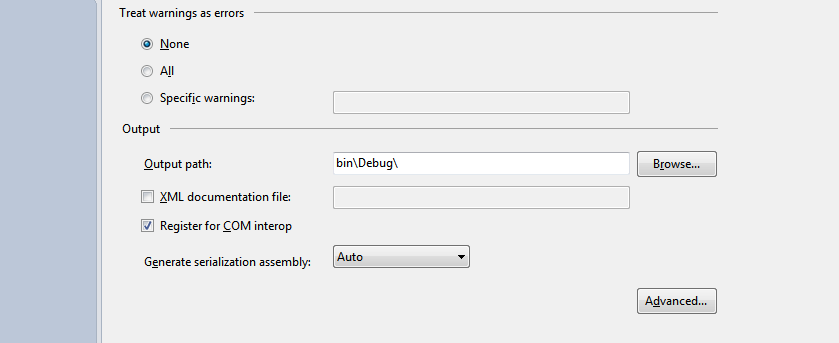
using System.Reflection;

using System.Runtime.CompilerServices;

using System.Runtime.InteropServices;

using System.Security;

using System.Resources;

// General Information about an assembly is controlled through the following

// set of attributes. Change these attribute values to modify the information

// associated with an assembly.

[assembly: AssemblyTitle("SecurePassword")]

[assembly: AssemblyDescription("")]

[assembly: AssemblyConfiguration("")]

[assembly: AssemblyCompany("")]

[assembly: AssemblyProduct("SecurePassword")]

[assembly: AssemblyCopyright("Copyright ©  2013")]

[assembly: AssemblyTrademark("")]

[assembly: AssemblyCulture("")]

[assembly: AllowPartiallyTrustedCallers()]

// Setting ComVisible to false makes the types in this assembly not visible

// to COM components.  If you need to access a type in this assembly from

// COM, set the ComVisible attribute to true on that type.

[assembly: ComVisible(true)]

// The following GUID is for the ID of the typelib if this project is exposed to COM

[assembly: Guid("A49D98D5-354D-42E1-99A3-0361781B1DAA")]

// Version information for an assembly consists of the following four values:

//

//      Major Version

//      Minor Version

//      Build Number

//      Revision

//

// You can specify all the values or you can default the Build and Revision Numbers

// by using the '*' as shown below:

// [assembly: AssemblyVersion("1.0.*")]

[assembly: AssemblyVersion("1.0.0.0")]

[assembly: AssemblyFileVersion("1.0.0.0")]

[assembly: NeutralResourcesLanguageAttribute("en-US")]
AssemblyInfo.cs
using System;

using System.Collections.Generic;

using System.Linq;

using System.Text;

using System.Runtime.InteropServices;

using System.Windows.Forms;

namespace SecurePassword

{

    [Guid("C9BC5F05-9A41-4B45-94A6-CCFDD033CA9D")]

    public class SecurePasswordInput : TextBox, IObjectSafety

    {

        public void GetInterfacceSafyOptions(int riid, out int pdwSupportedOptions, out int pdwEnabledOptions)

        {

            pdwSupportedOptions = ;

            pdwEnabledOptions = ;

        }

        public void SetInterfaceSafetyOptions(int riid, int dwOptionsSetMask, int dwEnabledOptions)

        {

            throw new NotImplementedException();

        }

    }

}
SecurePasswordInput.cs
<!DOCTYPE html PUBLIC "-//W3C//DTD XHTML 1.0 Transitional//EN" "http://www.w3.org/TR/xhtml1/DTD/xhtml1-transitional.dtd">

<html xmlns="http://www.w3.org/1999/xhtml">

<head>

    <title></title>

    <script type="text/javascript" language="javascript">

        function showPassword() {

            window.alert(form1.SecurePasswordInput.Text());

        }

    </script>

</head>

<body>

    <form id="form1" action="Test.htm" method="post">

    <object id="SecurePasswordInput" classid="clsid:{A49D98D5-354D-42E1-99A3-0361781B1DAA}">

        <param name="PasswordChar" value="*" />

    </object>

    <input id="showInput" type="button" value="Click Me" onclick="showPassword();" /></form>

</body>

</html>
全部技术和代码出自 http://www.cnblogs.com/RCFans/archive/2008/11/15/1333982.html
签名的ActiveX控件还没搞出来在继续尝试
C#开发COM+组件和ActiveX控件的更多相关文章
- {VS2010C#}{WinForm}{ActiveX}VS2010C#开发基于WinForm的ActiveX控件
在VS2010中使用C#开发基于WinForm的ActiveX控件 常见的一些ActiveX大部分是使用VB.Delphi.C++开发,使用C#开发ActiveX要解决下面三个问题: 使.NET组件可 ...
- 【VS开发】windows注册ActiveX控件
ActiveX控件是一个动态链接库,是作为基于COM服务器进行操作的,并且可以嵌入在包容器宿主应用程序中,ActiveX控件的前身就是OLE控件.由于ActiveX控件与开发平台无关,因此,在一种编程 ...
- vs2012开发基于MFC的ActiveX控件
1.新建工程 2.一直点击下一步,直到出现一下界面,注意红色标注选项,点击完成. 3.进入工程的属性界面,设置工程属性 4.添加对话框资源及其他控件,添加对话框类, 5.设置对话框属性 6.设置Dia ...
- 【VS开发】动态创建ActiveX控件
bool CCollectDataDlgDlg::CreateMyCtrl(LPRECT lpRect, UINT nID, CWnd *pParent) { CLSID clsid; wstri ...
- 使用C#开发ActiveX控件(新)
前言 ActiveX控件以前也叫做OLE控件,它是微软IE支持的一种软件组件或对象,可以将其插入到Web页面中,实现在浏览器端执行动态程序功能,以增强浏览器端的动态处理能力.通常ActiveX控件都是 ...
- 使用C#开发ActiveX控件(新) 转 http://www.cnblogs.com/yilin/p/csharp-activex.html
前言 ActiveX控件以前也叫做OLE控件,它是微软IE支持的一种软件组件或对象,可以将其插入到Web页面中,实现在浏览器端执行动态程序功能,以增强浏览器端的动态处理能力.通常ActiveX控件都是 ...
- 使用C#开发ActiveX控件
使用C#开发ActiveX控件(新) 前言 ActiveX控件以前也叫做OLE控件,它是微软IE支持的一种软件组件或对象,可以将其插入到Web页面中,实现在浏览器端执行动态程序功能,以增强浏览器端的动 ...
- ActiveX控件开发
VC2005从开发MFC ActiveX ocx控件到发布到.net网站的全部过程 开篇语:最近在弄ocx控件发布到asp.net网站上使用,就是用户在使用过程中,自动下载安装ocx控件.(此文章也是 ...
- 使用C#开发ActiveX控件[new]
文章出处:http://www.cnblogs.com/yilin/p/csharp-activex.html 前言 ActiveX控件以前也叫做OLE控件,它是微软IE支持的一种软件组件或对象,可以 ...
随机推荐
- 【BZOJ】【1272】【BeiJingWC2008】Gate of Babylon
组合数学+容斥原理 Orz zyf-zyf 多重集组合数0.0还带个数限制? ——> <组合数学>第6章 6.2带重复的组合 组合数还要模P 0.0? ——> Lucas ...
- GhostDoc:生成.NET API文档的工具 (帮忙文档)
在 Sandcastle:生成.NET API文档的工具 (帮忙文档) 后提供另一个生成API文档的工具. 1) 准备工作 安装GhostDoc Proc. 收费的哦.... 这个工具的优势是不像 ...
- C# Lambda Expressions 简介
C# Lambda Expressions 简介 原文http://msdn2.microsoft.com/en-us/library/bb397687.aspx 翻译:朱之光 (larry1zhu@ ...
- HDU4758 Walk Through Squares AC自动机&&dp
这道题当时做的时候觉得是数论题,包含两个01串什么的,但是算重复的时候又很蛋疼,赛后听说是字符串,然后就觉得很有可能.昨天队友问到这一题,在学了AC自动机之后就觉得简单了许多.那个时候不懂AC自动机, ...
- 一些linux的问题
本文罗列的是我在学习linux与shell编程时所遇到的一些问题.我相信既然存在问题那么就会有需求,记录于此,希望可以快速帮助到大家. 1.在vim中用“/word"查找后,vim会以棕色背 ...
- C# 面向对象之概念理解
什么是对象? <韦氏大词典>中对对象定义: (1)某种可为人所感知的物质. (2)思维.感受或动作所作用的物质或精神体. ----说白了万物皆对象 熟悉的对象描述: 对象就是客观世界中的物 ...
- Android Activity生命周期 onSaveInstanceState和onRestoreInstanceState
当某个activity变得“容易”被系统销毁时,该activity的onSaveInstanceState就会被执行,除非该activity是被用户主动销毁的,例如当用户按BACK键的时候. 注意上面 ...
- 此版本的 SQL Server 不支持用户实例登录标志。该连接将关闭“的解决
此版本的 SQL Server 不支持用户实例登录标志.该连接将关闭“的解决(转) 2008-10-04 13:31 错误提示:说明: 执行当前 Web 请求期间,出现未处理的异常.请检查堆栈跟踪信息 ...
- POJ1470 Closest Common Ancestors
LCA问题,用了离线的tarjan算法.输入输出参考了博客http://www.cnblogs.com/rainydays/archive/2011/06/20/2085503.htmltarjan算 ...
- Debug过程中的mock (及display窗口的使用)
转载:http://m.blog.csdn.net/blog/u012516903/18004965 在debug的时候,有3个地方可以进行mock测试 测试代码如下: 1.使用display窗口 W ...