
C#开发COM+组件和ActiveX控件
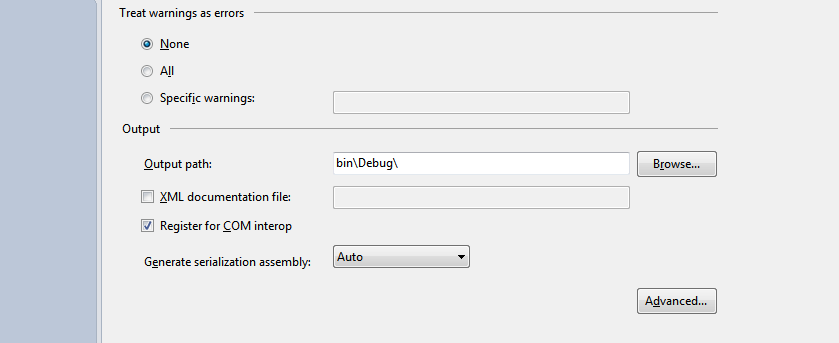
using System.Reflection;

using System.Runtime.CompilerServices;

using System.Runtime.InteropServices;

using System.Security;

using System.Resources;

// General Information about an assembly is controlled through the following

// set of attributes. Change these attribute values to modify the information

// associated with an assembly.

[assembly: AssemblyTitle("SecurePassword")]

[assembly: AssemblyDescription("")]

[assembly: AssemblyConfiguration("")]

[assembly: AssemblyCompany("")]

[assembly: AssemblyProduct("SecurePassword")]

[assembly: AssemblyCopyright("Copyright ©  2013")]

[assembly: AssemblyTrademark("")]

[assembly: AssemblyCulture("")]

[assembly: AllowPartiallyTrustedCallers()]

// Setting ComVisible to false makes the types in this assembly not visible

// to COM components.  If you need to access a type in this assembly from

// COM, set the ComVisible attribute to true on that type.

[assembly: ComVisible(true)]

// The following GUID is for the ID of the typelib if this project is exposed to COM

[assembly: Guid("A49D98D5-354D-42E1-99A3-0361781B1DAA")]

// Version information for an assembly consists of the following four values:

//

//      Major Version

//      Minor Version

//      Build Number

//      Revision

//

// You can specify all the values or you can default the Build and Revision Numbers

// by using the '*' as shown below:

// [assembly: AssemblyVersion("1.0.*")]

[assembly: AssemblyVersion("1.0.0.0")]

[assembly: AssemblyFileVersion("1.0.0.0")]

[assembly: NeutralResourcesLanguageAttribute("en-US")]
AssemblyInfo.cs
using System;

using System.Collections.Generic;

using System.Linq;

using System.Text;

using System.Runtime.InteropServices;

using System.Windows.Forms;

namespace SecurePassword

{

    [Guid("C9BC5F05-9A41-4B45-94A6-CCFDD033CA9D")]

    public class SecurePasswordInput : TextBox, IObjectSafety

    {

        public void GetInterfacceSafyOptions(int riid, out int pdwSupportedOptions, out int pdwEnabledOptions)

        {

            pdwSupportedOptions = ;

            pdwEnabledOptions = ;

        }

        public void SetInterfaceSafetyOptions(int riid, int dwOptionsSetMask, int dwEnabledOptions)

        {

            throw new NotImplementedException();

        }

    }

}
SecurePasswordInput.cs
<!DOCTYPE html PUBLIC "-//W3C//DTD XHTML 1.0 Transitional//EN" "http://www.w3.org/TR/xhtml1/DTD/xhtml1-transitional.dtd">

<html xmlns="http://www.w3.org/1999/xhtml">

<head>

    <title></title>

    <script type="text/javascript" language="javascript">

        function showPassword() {

            window.alert(form1.SecurePasswordInput.Text());

        }

    </script>

</head>

<body>

    <form id="form1" action="Test.htm" method="post">

    <object id="SecurePasswordInput" classid="clsid:{A49D98D5-354D-42E1-99A3-0361781B1DAA}">

        <param name="PasswordChar" value="*" />

    </object>

    <input id="showInput" type="button" value="Click Me" onclick="showPassword();" /></form>

</body>

</html>
全部技术和代码出自 http://www.cnblogs.com/RCFans/archive/2008/11/15/1333982.html
签名的ActiveX控件还没搞出来在继续尝试
C#开发COM+组件和ActiveX控件的更多相关文章
- {VS2010C#}{WinForm}{ActiveX}VS2010C#开发基于WinForm的ActiveX控件
在VS2010中使用C#开发基于WinForm的ActiveX控件 常见的一些ActiveX大部分是使用VB.Delphi.C++开发,使用C#开发ActiveX要解决下面三个问题: 使.NET组件可 ...
- 【VS开发】windows注册ActiveX控件
ActiveX控件是一个动态链接库,是作为基于COM服务器进行操作的,并且可以嵌入在包容器宿主应用程序中,ActiveX控件的前身就是OLE控件.由于ActiveX控件与开发平台无关,因此,在一种编程 ...
- vs2012开发基于MFC的ActiveX控件
1.新建工程 2.一直点击下一步,直到出现一下界面,注意红色标注选项,点击完成. 3.进入工程的属性界面,设置工程属性 4.添加对话框资源及其他控件,添加对话框类, 5.设置对话框属性 6.设置Dia ...
- 【VS开发】动态创建ActiveX控件
bool CCollectDataDlgDlg::CreateMyCtrl(LPRECT lpRect, UINT nID, CWnd *pParent) { CLSID clsid; wstri ...
- 使用C#开发ActiveX控件(新)
前言 ActiveX控件以前也叫做OLE控件,它是微软IE支持的一种软件组件或对象,可以将其插入到Web页面中,实现在浏览器端执行动态程序功能,以增强浏览器端的动态处理能力.通常ActiveX控件都是 ...
- 使用C#开发ActiveX控件(新) 转 http://www.cnblogs.com/yilin/p/csharp-activex.html
前言 ActiveX控件以前也叫做OLE控件,它是微软IE支持的一种软件组件或对象,可以将其插入到Web页面中,实现在浏览器端执行动态程序功能,以增强浏览器端的动态处理能力.通常ActiveX控件都是 ...
- 使用C#开发ActiveX控件
使用C#开发ActiveX控件(新) 前言 ActiveX控件以前也叫做OLE控件,它是微软IE支持的一种软件组件或对象,可以将其插入到Web页面中,实现在浏览器端执行动态程序功能,以增强浏览器端的动 ...
- ActiveX控件开发
VC2005从开发MFC ActiveX ocx控件到发布到.net网站的全部过程 开篇语:最近在弄ocx控件发布到asp.net网站上使用,就是用户在使用过程中,自动下载安装ocx控件.(此文章也是 ...
- 使用C#开发ActiveX控件[new]
文章出处:http://www.cnblogs.com/yilin/p/csharp-activex.html 前言 ActiveX控件以前也叫做OLE控件,它是微软IE支持的一种软件组件或对象,可以 ...
随机推荐
- java多线程为什么要用while而不是if
对于java多线程的wait()方法,我们在jdk1.6的说明文档里可以看到这样一段话 从上面的截图,我们可以看出,在使用wait方法时,需要使用while循环来判断条件十分满足,而不是if,那么我们 ...
- MVC3 Model Binding验证方式
1.使用ModelState在Action中进行验证 [HttpPost] public ViewResult MakeBooking(Appointment appt) { if (string.I ...
- 【QT】OpenCV配置
很郁闷的表示我的opencv放在 D:\\program files 里面路径有个空格,导致我不得不把整个opencv又拷贝到了一个没有空格的路径下面命名为opencvForQt 网上有各种用CMa ...
- 【hadoop2.6.0】用C++ 编写mapreduce
hadoop通过hadoop streaming 来实现用非Java语言写的mapreduce代码. 对于一个一点Java都不会的我来说,这真是个天大的好消息. 官网上hadoop streaming ...
- 深入浅出ES6(五):不定参数和默认参数
作者 Jason Orendorff github主页 https://github.com/jorendorff 不定参数 我们通常使用可变参函数来构造API,可变参函数可接受任意数量的参数.例 ...
- POJ 1026 Cipher(置换群)
题目链接 题意 :由n个数字组成的密钥,每个数字都不相同,都在1-n之间,有一份长度小于等于n的信息,要求将信息放到密钥下边,一一对应,信息不足n的时候补空格,然后将位置重新排列,将此过程重复k次,求 ...
- 天灵灵,地灵灵,但愿这个一定灵!!!python调用win32api,启动应用程序窗口
这个是逼到没办法,C#那一套,一点基本没有. 还好,网上找到例程,可以指定帐户启动进程,但愿可以摆脱WIN SERVICE启动产生的SESSION 0 隔离问题. 因为这个问题,以SERVICE启动的 ...
- http://www.cnblogs.com/xia520pi/archive/2012/05/16/2504205.html
http://www.cnblogs.com/xia520pi/archive/2012/05/16/2504205.html http://www.cnblogs.com/madyina/p/370 ...
- @Override在JDK1.5和JDK1.6中用法区别
@Override 注解在jdk1.5环境下,只能用于对基类(父类)的方法的重写.而不能用于对实现的接口的方法的实现.而在jdk1.6环境下,两者都适用.
- java 泛型类
Java泛型中的标记符含义: E - Element (在集合中使用,因为集合中存放的是元素) T - Type(Java 类) K - Key(键) V - Value(值) N - Numbe ...