
基于tiny4412的Linux内核移植 -- MMA7660驱动移植(九)
作者信息
作者: 彭东林
QQ:405728433
平台简介
开发板:tiny4412ADK + S700 + 4GB Flash
要移植的内核版本:Linux-4.4.0 (支持device tree)
u-boot版本:友善之臂自带的 U-Boot 2010.12 (为支持uImage启动,做了少许改动)
busybox版本:busybox 1.25
交叉编译工具链: arm-none-linux-gnueabi-gcc
(gcc version 4.8.3 20140320 (prerelease) (Sourcery CodeBench Lite 2014.05-29))
摘要
MMA7660是一个三轴加速度传感器,跟exynos4412之间使用I2C接口进行通信,同时MMA7660可以向exynos4412发起外部中断。
移植MMA7660驱动会涉及到device tree、I2C驱动、中断、输入子系统等几个部分,tiny4412自带的MMA7660驱动程序是不支持设备树的,同时I2C驱动也没有采用设备树,所以主要的工作量就是将MMA7660和I2C驱动程序从非设备树形式转变为设备树的形式。同时借此机会,学习一下有设备树的情况下的设备驱动(MMA7660和I2C)和中断。
移植
一、原理图
下面是MMA7660的在底板原理图:
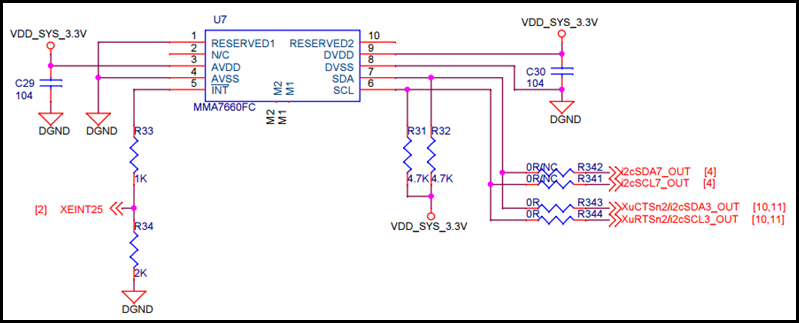
可以看到,使用的是第3个I2C控制器。
下面是核心板:
I2C:

XEINT25:

二、tiny4412自带的驱动
tiny4412自带的mma7660驱动并不是采用设备树,但是可以作为我们的参考,在arch/arm/mach-exynos/mach-tiny4412.c中包含了mma7660的板级信息。
MMA7660的板级信息:
1: #include <linux/mma7660.h>
2: static struct mma7660_platform_data mma7660_pdata = {
3: .irq = IRQ_EINT(25),
4: .poll_interval = 100,
5: .input_fuzz = 4,
6: .input_flat = 4,
7: };
8:
9: static struct s3c2410_platform_i2c tiny4412_i2c3_data __initdata = {
10: .flags = 0,
11: .bus_num = 3,
12: .slave_addr = 0x10,
13: .frequency = 200*1000,
14: .sda_delay = 100,
15: };
16:
17: static struct i2c_board_info i2c_devs3[] __initdata = {
18: {
19: I2C_BOARD_INFO("mma7660", 0x4c),
20: .platform_data = &mma7660_pdata,
21: },
22: };
23:
24: static void __init smdk4x12_machine_init(void)
25: {
26: ... ...
27: s3c_i2c3_set_platdata(&tiny4412_i2c3_data);
28: i2c_register_board_info(3, i2c_devs3, ARRAY_SIZE(i2c_devs3)); // 注册板级信息
29: ... ...
30: }
其中,
从上面的信息我们可以知道:
MMA7660的器件地址是0x4c,I2C3的CLK信号新的频率为200KHz。这两个信息比较重要。MMA7660的驱动程序是linux-3.0.86/drivers/hwmon/mma7660.c。
I2C的板级信息:
在arch/arm/plat-samsung/dev-i2c3.c中:
1: /* linux/arch/arm/plat-samsung/dev-i2c3.c
2: *
3: * Copyright (c) 2010 Samsung Electronics Co., Ltd.
4: * http://www.samsung.com/
5: *
6: * S5P series device definition for i2c device 3
7: *
8: * This program is free software; you can redistribute it and/or modify
9: * it under the terms of the GNU General Public License version 2 as
10: * published by the Free Software Foundation.
11: */
12:
13: #include <linux/gfp.h>
14: #include <linux/kernel.h>
15: #include <linux/string.h>
16: #include <linux/platform_device.h>
17:
18: #include <mach/irqs.h>
19: #include <mach/map.h>
20:
21: #include <plat/regs-iic.h>
22: #include <plat/iic.h>
23: #include <plat/devs.h>
24: #include <plat/cpu.h>
25:
26: static struct resource s3c_i2c_resource[] = {
27: [0] = {
28: .start = S3C_PA_IIC3,
29: .end = S3C_PA_IIC3 + SZ_4K - 1,
30: .flags = IORESOURCE_MEM,
31: },
32: [1] = {
33: .start = IRQ_IIC3,
34: .end = IRQ_IIC3,
35: .flags = IORESOURCE_IRQ,
36: },
37: };
38:
39: struct platform_device s3c_device_i2c3 = {
40: .name = "s3c2440-i2c",
41: .id = 3,
42: .num_resources = ARRAY_SIZE(s3c_i2c_resource),
43: .resource = s3c_i2c_resource,
44: };
45:
46: void __init s3c_i2c3_set_platdata(struct s3c2410_platform_i2c *pd)
47: {
48: struct s3c2410_platform_i2c *npd;
49:
50: if (!pd) {
51: pd = &default_i2c_data;
52: pd->bus_num = 3;
53: }
54:
55: npd = s3c_set_platdata(pd, sizeof(struct s3c2410_platform_i2c),
56: &s3c_device_i2c3);
57:
58: if (!npd->cfg_gpio)
59: npd->cfg_gpio = s3c_i2c3_cfg_gpio;
60: }
然后会在arch/arm/mach-exynos/mach-tiny4412.c中注册:
1: static struct platform_device *smdk4x12_devices[] __initdata = {
2: ... ...
3: &s3c_device_i2c3,
4: ... ...
5: }
6:
7: static void __init smdk4x12_machine_init(void)
8: {
9: ... ...
10: platform_add_devices(smdk4x12_devices, ARRAY_SIZE(smdk4x12_devices));
11: ... ...
12: }
I2C控制器对应的驱动是linux-3.0.86/drivers/i2c/busses/i2c-s3c2410.c。
三、移植
1、首先把MMA7660和I2C控制器的板级信息转化为设备树的形式,修改arch/arm/boot/dts/exynos4412-tiny4412.dts,添加MMA7660和I2C的硬件信息,可以参考内核文档:Documentation/devicetree/bindings/i2c/i2c.txt和Documentation/devicetree/bindings/i2c/i2c-s3c2410.txt,中断资源的填写可以参考内核文档Documentation/devicetree/bindings/pinctrl/samsung-pinctrl.txt。
1: /* MMA7660FC */
2: &i2c_3 {
3: samsung,i2c-sda-delay = <100>;
4: samsung,i2c-slave-addr = <0x10>;
5: samsung,i2c-max-bus-freq = <200000>;
6: pinctrl-0 = <&i2c3_bus>;
7: pinctrl-names = "default";
8: status = "okay";
9:
10: mma7660@4c {
11: compatible = "freescale,mma7660";
12: reg = <0x4c>;
13: interrupt-parent = <&gpx3>;
14: interrupts = <1 2>;
15: poll_interval = <100>;
16: input_fuzz = <4>;
17: input_flat = <4>;
18: status = "okay";
19: };
20: };
上面的信息基本上是把原来的板级信息搬过来。
第13行和第14行是设置中断资源,参考Documentation/devicetree/bindings/pinctrl/samsung-pinctrl.txt:
External GPIO and Wakeup Interrupts:
The controller supports two types of external interrupts over gpio. The first
is the external gpio interrupt and second is the external wakeup interrupts.
The difference between the two is that the external wakeup interrupts can be
used as system wakeup events.
A. External GPIO Interrupts: For supporting external gpio interrupts, the
following properties should be specified in the pin-controller device node.
- interrupt-parent: phandle of the interrupt parent to which the external
GPIO interrupts are forwarded to.
- interrupts: interrupt specifier for the controller. The format and value of
the interrupt specifier depends on the interrupt parent for the controller.
In addition, following properties must be present in node of every bank
of pins supporting GPIO interrupts:
- interrupt-controller: identifies the controller node as interrupt-parent.
- #interrupt-cells: the value of this property should be 2.
- First Cell: represents the external gpio interrupt number local to the
external gpio interrupt space of the controller.
- Second Cell: flags to identify the type of the interrupt
- 1 = rising edge triggered
- 2 = falling edge triggered
- 3 = rising and falling edge triggered
- 4 = high level triggered
- 8 = low level triggered
对于interrupts = <1 2>,其中1表示GPX3_1,2表示的是下降沿触发。
第2行的i2c_3是一个标号,i2c3的其他信息是在arch/arm/boot/dts/exynos4.dtsi中:
1: i2c_3: i2c@13890000 {
2: #address-cells = <1>;
3: #size-cells = <0>;
4: compatible = "samsung,s3c2440-i2c";
5: reg = <0x13890000 0x100>;
6: interrupts = <0 61 0>;
7: clocks = <&clock CLK_I2C3>;
8: clock-names = "i2c";
9: pinctrl-names = "default";
10: pinctrl-0 = <&i2c3_bus>;
11: status = "disabled";
12: };
第10行是设置GPIO的功能复用,i2c3_bus是在文件arch/arm/boot/dts/exynos4x12-pinctrl.dtsi中:
1: i2c3_bus: i2c3-bus {
2: samsung,pins = "gpa1-2", "gpa1-3";
3: samsung,pin-function = <3>;
4: samsung,pin-pud = <3>;
5: samsung,pin-drv = <0>;
6: };
那么是在什么时候解析这部分,然后设置功能复用的呢?这个以后再说。
2、填写完板级信息,接下来就要移植驱动程序了,其中I2C控制器的驱动程序Linux内核已经写好了,就是drivers/i2c/busses/i2c-s3c2410.c。MMA7660的驱动程序就需要我们自己移植了。
- 注册
1: static const struct i2c_device_id mma7660_ids[] = {
2: { "mma7660", 0 },
3: { },
4: };
5: MODULE_DEVICE_TABLE(i2c, mma7660_ids);
6:
7: #ifdef CONFIG_OF
8: static const struct of_device_id mma7660_dt_match[] = {
9: { .compatible = "freescale,mma7660" },
10: { }
11: };
12: MODULE_DEVICE_TABLE(of, mma7660_dt_match);
13: #endif
14:
15: static struct i2c_driver mma7660_driver = {
16: .driver = {
17: .name = MMA7660_NAME,
18: .pm = &mma7660_pm_ops,
19: .of_match_table = of_match_ptr(mma7660_dt_match),
20: },
21: .probe = mma7660_probe,
22: .remove = mma7660_remove,
23: .id_table = mma7660_ids,
24: };
25:
26: module_i2c_driver(mma7660_driver);
- 解析设备树
1: static struct mma7660_platform_data *mma7660_parse_dt(struct device *dev)
2: {
3: struct mma7660_platform_data *pdata;
4: struct device_node *np = dev->of_node;
5:
6: if (!np)
7: return NULL;
8:
9: pdata = devm_kzalloc(dev, sizeof(*pdata), GFP_KERNEL);
10: if (!pdata) {
11: dev_err(dev, "failed to allocate platform data\n");
12: return NULL;
13: }
14:
15: if (of_property_read_u32(np, "poll_interval", &pdata->poll_interval)) {
16: dev_err(dev, "failed to get poll_interval property\n");
17: return NULL;
18: }
19:
20: if (of_property_read_u32(np, "input_fuzz", &pdata->input_fuzz)) {
21: dev_err(dev, "failed to get input_fuzz property\n");
22: return NULL;
23: }
24:
25: if (of_property_read_u32(np, "input_flat", &pdata->input_flat)) {
26: dev_err(dev, "failed to get input_flat property\n");
27: return NULL;
28: }
29:
30: return pdata;
31: }
关于这部分我已经把代码上传到github上了,下载方法:
git clone https://github.com/pengdonglin137/linux-4.4_tiny4412.git -b port_to_tiny4412
测试
1: [root@tiny4412 root]# cd /sys/bus/i2c/devices/3-004c/
2: [root@tiny4412 3-004c]# ls
3: all_axis_g input of_node subsystem x_axis_g
4: driver modalias power tilt_status y_axis_g
5: hwmon name registers uevent z_axis_g
6: [root@tiny4412 3-004c]# cat all_axis_g
7: 2, 0, 22
8: [root@tiny4412 3-004c]# cat registers
9: REG: 0x00 = 0x03 ...... [ 0000 0011 ]
10: REG: 0x01 = 0x01 ...... [ 0000 0001 ]
11: REG: 0x02 = 0x16 ...... [ 0001 0110 ]
12: REG: 0x03 = 0x01 ...... [ 0000 0001 ]
13: REG: 0x04 = 0x02 ...... [ 0000 0010 ]
14: REG: 0x05 = 0xa0 ...... [ 1010 0000 ]
15: REG: 0x06 = 0xe7 ...... [ 1110 0111 ]
16: REG: 0x07 = 0x59 ...... [ 0101 1001 ]
17: REG: 0x08 = 0x49 ...... [ 0100 1001 ]
18: REG: 0x09 = 0x04 ...... [ 0000 0100 ]
19: REG: 0x0a = 0x0f ...... [ 0000 1111 ]
用hexdump看看上报的事件:
1: [root@tiny4412 ]# hexdump /dev/input/event0
2: 0000000 0013 0000 9b6a 0001 0003 0002 0015 0000
3: 0000010 0013 0000 9b6a 0001 0000 0000 0000 0000
4: 0000020 0013 0000 4015 0009 0003 0000 0002 0000
5: 0000030 0013 0000 4015 0009 0000 0000 0000 0000
6: 0000040 0018 0000 c6b5 000a 0003 0000 0004 0000
7: 0000050 0018 0000 c6b5 000a 0000 0000 0000 0000
8: 0000060 0019 0000 9ef7 0001 0003 0000 0006 0000
9: 0000070 0019 0000 9ef7 0001 0000 0000 0000 0000
10: 0000080 0019 0000 c6b3 000a 0003 0000 0005 0000
11: 0000090 0019 0000 c6b3 000a 0000 0000 0000 0000
12: 00000a0 0019 0000 d3f0 000d 0003 0000 0004 0000
13: 00000b0 0019 0000 d3f0 000d 0000 0000 0000 0000
14: 00000c0 001a 0000 25c1 0003 0003 0000 0003 0000
15: 00000d0 001a 0000 25c1 0003 0000 0000 0000 0000
16: 00000e0 001a 0000 32d0 0006 0003 0000 0002 0000
17: 00000f0 001a 0000 32d0 0006 0000 0000 0000 0000
18: 0000100 001a 0000 b980 0007 0003 0000 0001 0000
19: 0000110 001a 0000 b980 0007 0000 0000 0000 0000
未完待续…
基于tiny4412的Linux内核移植 -- MMA7660驱动移植(九)的更多相关文章
- 基于tiny4412的Linux内核移植 -- MMA7660驱动移植(九-2)
作者信息 作者: 彭东林 邮箱:pengdonglin137@163.com QQ:405728433 平台简介 开发板:tiny4412ADK + S700 + 4GB Flash 要移植的内核版本 ...
- 基于tiny4412的Linux内核移植 -- 设备树的展开
作者信息 作者: 彭东林 邮箱:pengdonglin137@163.com QQ:405728433 平台简介 开发板:tiny4412ADK + S700 + 4GB Flash 要移植的内核版本 ...
- 基于tiny4412的Linux内核移植 -- 设备树的展开【转】
转自:https://www.cnblogs.com/pengdonglin137/p/5248114.html#_lab2_3_1 阅读目录(Content) 作者信息 平台简介 摘要 正文 一.根 ...
- 基于tiny4412的Linux内核移植 -- PWM子系统学习(八)
作者信息 作者: 彭东林 邮箱:pengdonglin137@163.com QQ:405728433 平台简介 开发板:tiny4412ADK + S700 + 4GB Flash 要移植的内核版本 ...
- 基于tiny4412的Linux内核移植(支持device tree)(一)
作者信息 作者: 彭东林 邮箱:pengdonglin137@163.com QQ:405728433 平台简介 开发板:tiny4412ADK + S700 + 4GB Flash 要移植的内核版本 ...
- 基于tiny4412的Linux内核移植(支持device tree)(三)
作者信息 作者: 彭东林 邮箱:pengdonglin137@163.com QQ:405728433 平台简介 开发板:tiny4412ADK + S700 + 4GB Flash 要移植的内核版本 ...
- 基于tiny4412的Linux内核移植 --- aliases节点解析
作者信息 作者: 彭东林 邮箱:pengdonglin137@163.com QQ:405728433 平台简介 开发板:tiny4412ADK + S700 + 4GB Flash 要移植的内核版本 ...
- 基于tiny4412的Linux内核移植 --- aliases节点解析【转】
转自:https://www.cnblogs.com/pengdonglin137/p/5252348.html 阅读目录(Content) 作者信息 平台简介 正文 回到顶部(go to top) ...
- 基于ubuntu-2.6.35内核的SDIO-WiFi驱动移植
一.移植环境: 1.主机:Ubuntu 10.10发行版 2.目标机:FS_S5PC100平台 3.交叉编译工具:arm-cortex_a8-linux-gn ...
随机推荐
- ftrace 简介【转】
转自:http://www.ibm.com/developerworks/cn/linux/l-cn-ftrace/index.html Trace 对于软件的维护和性能分析至关重要,ftrace 是 ...
- tornado 模版继承 函数和类的调用
模版继承.函数和类的调用 目录结构 lesson5.py # -*- coding:utf-8 -*- import tornado.web import tornado.httpserver imp ...
- leetcode 之Remove Nth Node From End of List(19)
这题比较简单,方法有很多.其中一种比较有意思的做法是设置两个指针,一个先走n步,然后再一起走.一个到了末尾,另一个也就确定了要删除元素的位置. ListNode *removeNthFromEnd(L ...
- display:flex代替float
昨天做一个css的东西,在开始用js的时候才发现被float占位了 因为float浮动起来了,我清除了浮动,但是还是占位 然后我同事就告诉我其实可以不用float来左右浮动 在父元素上用display ...
- 【转载】Web开发技术发展历史-版本2
原文在这里. Web开发的发展史 导读:Arunr 把过去 15 年以来,Web开发从最初的纯 HTML 到 CGI.PHP\JSP\ASP.Ajax.Rails.NodeJS 这个过程简要地进行了介 ...
- Redis实现分布式锁 php
一.分布式锁的作用: redis写入时不带锁定功能,为防止多个进程同时进行一个操作,出现意想不到的结果,so...对缓存进行插入更新操作时自定义加锁功能. 二.Redis的NX后缀命令 Redis有一 ...
- 解决Gradle报错找不到org.gradle.api.internal.project.ProjectInternal.getPluginManager()方法问题
因为本地的AndroidStudio很久没用了,所以想要研究下github上的某个代码的时候,还得重新配下环境 打开了几个项目,都是提示如下错误 Error:Unable to find method ...
- Supervisor-类unix系统下的进程控制工具
如果你的英文足够好,请看官网的文档:http://supervisord.org/introduction.html 简介: Supervisor 类unix系统下的进程控制工具. 特性: 1.配置简 ...
- C++使用第三方静态库的方法
以jasoncpp为例 首先在github下载最新的的jasoncpp包并解压 找到类似makefiles的文件编译,一般是打开sln文件使用vs编译(生成解决方案),在build文件中可以找到对应的 ...
- Flexigrid-Web2.0 jQuery
一.参考资料 1.jQuery插件flexiGrid的完全使用,附代码下载 2.修改flexigrid源码一(json,checkbox)[原创] 3.jQuery +UI + flexigrid做的 ...