
十三:Transparent Encryption in HDFS(转)
透明加密:http://blog.csdn.net/linlinv3/article/details/44963429
hadoop透明加密 kms
HDFS 实现透明,端到端加密。配置完成后,用户往hdfs上存储数据的时候,无需用户做任何程序代码的更改(意思就是调用KeyProvider API ,用于在数据存入到HDFS上面的时候进行数据加密,解密的过程一样)。这意味着数据加密和解密由客户端完成的。HDFS 不会存储或访问未加密的数据或数据加密密钥(由kms管理)。
连接地址:
背景介绍
- 应用程序级加密。这是最安全、最灵活的方法。应用程序最终控制是什么加密,可以准确地反映用户的需求。然而,编写应用程序这样做是很难的。这也不是一个选择为客户现有的应用程序不支持加密。
- 数据库级加密。类似的应用程序级加密的属性。大多数数据库厂商提供某种形式的加密。然而,可能有性能问题。一个例子是,索引不能加密。
- 文件系统级进行加密。该选项提供了高性能、应用程序透明,通常容易部署。但是,它无法模型应用程序级别的一些政策。例如,多租户应用程序基于最终用户可能想要加密。一个数据库可能需要不同的加密设置每一列存储在单个文件中。
- 磁盘级别加密。容易部署和高性能,但也很不灵活。
配置
<!-- KMS Backend KeyProvider -->

  <property>

    <name>hadoop.kms.key.provider.uri</name>

    <value>jceks://file@/${user.home}/kms.keystore</value>

    <description>

      URI of the backing KeyProvider for the KMS.

    </description>

  </property>

  <property>

    <name>hadoop.security.keystore.java-keystore-provider.password-file</name>

    <value>kms.keystore</value>

    <description>

      If using the JavaKeyStoreProvider, the password for the keystore file.

    </description>

  </property>
 <!-- KMS Cache -->

  <property>

    <name>hadoop.kms.cache.enable</name>

    <value>true</value>

    <description>

      Whether the KMS will act as a cache for the backing KeyProvider.

      When the cache is enabled, operations like getKeyVersion, getMetadata,

      and getCurrentKey will sometimes return cached data without consulting

      the backing KeyProvider. Cached values are flushed when keys are deleted

      or modified.

    </description>

  </property>

  <property>

    <name>hadoop.kms.cache.timeout.ms</name>

    <value>600000</value>

    <description>

      Expiry time for the KMS key version and key metadata cache, in

      milliseconds. This affects getKeyVersion and getMetadata.

    </description>

  </property>

  <property>

    <name>hadoop.kms.current.key.cache.timeout.ms</name>

    <value>30000</value>

    <description>

      Expiry time for the KMS current key cache, in milliseconds. This

      affects getCurrentKey operations.

    </description>

  </property>
Audit logs are aggregated for API accesses to the GET_KEY_VERSION, GET_CURRENT_KEY, DECRYPT_EEK, GENERATE_EEK operations.
<!-- KMS Audit -->

  <property>

    <name>hadoop.kms.audit.aggregation.window.ms</name>

    <value>10000</value>

    <description>

      Duplicate audit log events within the aggregation window (specified in

      ms) are quashed to reduce log traffic. A single message for aggregated

      events is printed at the end of the window, along with a count of the

      number of aggregated eventsfu.

    </description>

  </property>
<!-- KMS Security --> <property>
<name>hadoop.kms.authentication.type</name>
<value>simple</value>
<description>
Authentication type for the KMS. Can be either "simple"
or "kerberos".
</description>
</property>
- KMS_HTTP_PORT
- KMS_ADMIN_PORT
- KMS_MAX_THREADS
- KMS_LOG
 export KMS_LOG=${KMS_HOME}/logs/kms

 export KMS_HTTP_PORT=16000

 export KMS_ADMIN_PORT=16001
/etc/hadoop/conf/hdfs-site.xml
<property>

     <name>dfs.encryption.key.provider.uri</name>

     <value>kms://http@localhost:16000/kms</value>

</property>
/etc/hadoop/confcore-site.xml
<property>

      <name>hadoop.security.key.provider.path</name>

      <value>kms://http@localhost:16000/kms</value>

</property>
# su - hdfs

# hadoop key create key1

# hadoop key list -metadata


# hdfs dfs -mkdir /secureweblogs

# hdfs crypto -createZone -keyName key1 -path /secureweblogs

# hdfs crypto -listZones
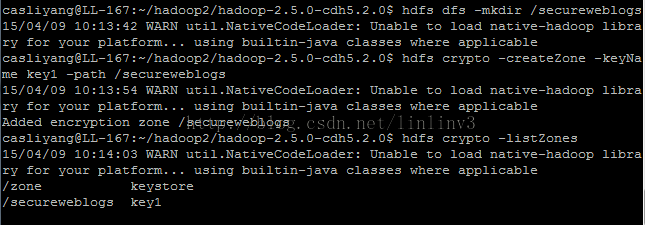

实验结果:

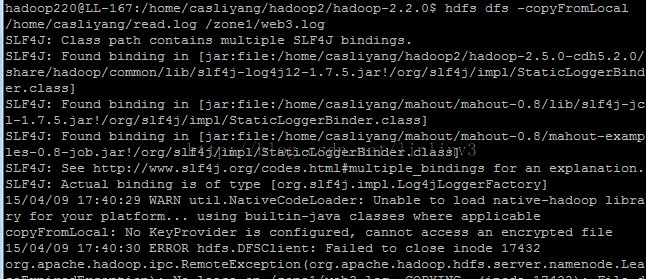


补充说明:
生成秘钥 keytool -delete -alias 'kms.keystore'; 删除别名为kms.keystore的秘钥keytool -genkey -alias 'kms.keystore'; 生成 别名为kms.keystore的秘钥使用生成秘钥的命令后,会在用户根目录下生成相应的文件


hdfs dfs -cat /.reserved/raw/zone1/localfile.dat zone1 是加密区 localfile.dat 是加密文件 ,查看该文件 显示的是被加密的文件(乱码);
十三:Transparent Encryption in HDFS(转)的更多相关文章
- hadoop2.6.0汇总:新增功能最新编译 32位、64位安装、源码包、API下载及部署文档
相关内容: hadoop2.5.2汇总:新增功能最新编译 32位.64位安装.源码包.API.eclipse插件下载Hadoop2.5 Eclipse插件制作.连接集群视频.及hadoop-eclip ...
- 安装部署Apache Hadoop (本地模式和伪分布式)
本节内容: Hadoop版本 安装部署Hadoop 一.Hadoop版本 1. Hadoop版本种类 目前Hadoop发行版非常多,有华为发行版.Intel发行版.Cloudera发行版(CDH)等, ...
- 【转载 Hadoop&Spark 动手实践 2】Hadoop2.7.3 HDFS理论与动手实践
简介 HDFS(Hadoop Distributed File System )Hadoop分布式文件系统.是根据google发表的论文翻版的.论文为GFS(Google File System)Go ...
- [HDFS Manual] CH3 HDFS Commands Guide
HDFS Commands Guide HDFS Commands Guide 3.1概述 3.2 用户命令 3.2.1 classpath 3.2.2 dfs 3.2.3 envvars 3.2.4 ...
- 从零自学Hadoop(12):Hadoop命令中
阅读目录 序 HDFS Commands User Commands Administration Commands Debug Commands 引用 系列索引 本文版权归mephisto和博客园共 ...
- HBASE 基础命令总结
HBASE基础命令总结 一,概述 本文中介绍了hbase的基础命令,作者既有记录总结hbase基础命令的目的还有本着分享的精神,和广大读者一起进步.本文的hbase版本是:HBase 1.2.0-cd ...
- 【大数据系列】hadoop命令指导官方文档翻译
Hadoop Commands Guide Overview Shell Options Generic Options User Commands archive checknative class ...
- Rootkit Hacking Technology && Defence Strategy Research
目录 . The Purpose Of Rootkit . Syscall Hijack . LKM Module Hidden . Network Communication Hidden . Fi ...
- OCP读书笔记(27) - 题库(ExamG)
601.You need to perform a block media recovery on the tools01.dbf data file in the SALES database by ...
随机推荐
- 开发机器上利用vs2013调试远程IIS上的c#程序
当远程IIS上的C#程序出现问题,怎么排错,一般我们通过看日志排查错误的方法,这种方法在程序异常日志都打印出来的情况下是可以解决的,但如果程序日志不详细,或者从日志看不出有用的内容的时候怎么排错? 本 ...
- 并发、并行与C++多线程——基础一
1.什么是并发? 并发指的是两个或多个独立的活动在同一时段内发生.生活中并发的例子并不少,例如在跑步的时候你可能同时在听音乐:在看电脑显示器的同时你的手指在敲击键盘.这时我们称我们大脑并发地处理这些事 ...
- Linux中文件函数(一)
一.stat.fstat.fstatat.lstat函数 函数的原型为: #include <sys/stat.h> int stat(const char *restrict pathn ...
- acm--1004
问题描述 再次比赛时间!看到气球在四周漂浮,多么兴奋.但要告诉你一个秘密,评委最喜欢的时间是猜测最流行的问题.比赛结束后,他们会统计每种颜色的气球并找出结果. 今年,他们决定离开这个可爱的工作给你. ...
- (Linux学习笔记一:压缩)[20180209]
学习笔记一:压缩 2015年2月5日 上午 10:23 压缩命令 压缩文件的扩展名大多是*.tar.*.tar.gz.*.tgz.*.gz.*.Z.*.bz2 常见的压缩命令gzip与bzip2,其中 ...
- mysql学习记录,CASE WHEN THEN ELSE END用法
记mysql,case when then else end用法 用法1:搜索函数 SELECT r.order_no, r.golds, r.pay_tool, , ) ) END AS price ...
- 生产环境MySQL数据库集群MHA上线实施方案
生产环境MySQL数据库集群MHA上线实施方案 一.不停库操作 1.在所有节点安装MHAnode所需的perl模块(需要有安装epel源) yum install perl-DBD-MySQL -y ...
- 转:30分钟学会如何使用Shiro
引自:http://www.cnblogs.com/learnhow/p/5694876.html 本篇内容大多总结自张开涛的<跟我学Shiro>原文地址:http://jinniansh ...
- Jquery中数值求和及根据余数改变对应的数值样式
Jquery内容 <script type="text/javascript"> $(function () { var num = 0; $(".box o ...
- 解决 LLVM 错误 fatal error: ‘csignal’ file not found
/Users/exchen/Downloads/Unity-iPhone/Classes/main.mm:3:10: fatal error: ‘csignal’ file not found#inc ...