
富文本使用之wangEditor3
一、介绍:
wangEditor —— 轻量级 web 富文本编辑器,配置方便,使用简单。支持 IE10+ 浏览器。
二、使用方式:
- 直接下载:https://github.com/wangfupeng1988/wangEditor/releases
- 使用
npm下载:npm install wangeditor(注意wangeditor全部是小写字母) - 使用
bower下载:bower install wangEditor(前提保证电脑已安装了bower) - 使用CDN://unpkg.com/wangeditor/release/wangEditor.min.js
三、使用:
重点是图片的上传和富文本内容的获取。
1.图片上传:
①存放在一个临时的文件夹里。
②将图片地址返给前台,富文本显示图片。
2.内容获取:
①获取富文本的内容,截取内容里的图片标签。
②将图片存入到一个新的文件夹里,替换图片的地址。
③将新的富文本的内容存储到数据库里。(这里我未作处理)
前台代码:
<!DOCTYPE html>

<html lang="en">

<head>

    <meta charset="UTF-8">

    <title>富文本的使用</title>

    <style type="text/css">

        body {

            width: 800px;

            margin: 0 auto 0 auto;

        }

    </style>

</head>

<body>

<!--wangEditor 使用 B-->

<div id="div1">

</div>

<!--wangEditor 使用 E-->

<button id="addBtn" onclick="addNews()">增加</button>

</body>

<script type="text/javascript" src="../release/wangEditor.js"></script>

<script src="js/jquery-3.2.1.js"></script>

<script type="text/javascript">

    var httpurl = "http://localhost:8081";

    //富文本使用

    var E = window.wangEditor;

    var editor = new E('#div1');

    //重新设置富文本的内容

    editor.customConfig.menus = [

        'head',  // 标题

        'bold',  // 粗体

        'fontSize',  // 字号

        'italic',  // 斜体

        'underline',  // 下划线

        'foreColor',  // 文字颜色

        'link',  // 插入链接

        'justify',  // 对齐方式

        'image',  // 插入图片

        'undo',  // 撤销

        'redo'  // 重复

    ];

    // 隐藏“网络图片”tab

    editor.customConfig.showLinkImg = false;

    // 将图片大小限制为 3M

    editor.customConfig.uploadImgMaxSize = 3 * 1024 * 1024;

    // 限制一次最多上传 1 张图片

    editor.customConfig.uploadImgMaxLength = 1;

    //开启wangEditor的错误提示

    editor.customConfig.debug=true;

    // 关闭粘贴样式的过滤

    editor.customConfig.pasteFilterStyle = false;

    // 忽略粘贴内容中的图片

    editor.customConfig.pasteIgnoreImg = true;

    //上传图片 将图片以文件的形式传给后台进行操作返回图片 url

    editor.customConfig.customUploadImg = function (files, insert) {

        var date = new FormData();

        date.append("file", files[0]);

        $.ajax({

            type: "POST",

            url: httpurl + "/test/upload",

            data: date,

            dataType: 'json',

            async: false,

            cache: false,

            contentType: false,

            processData: false,

            success: function (result) {

                insert(result.data);// insert 是获取图片 url 后,插入到编辑器的方法

            }

        })

    };

    editor.create();//创建富文本

    /**

     * 添加企业新闻

     */

    function addNews() {

        var formData = new FormData();

        formData.append("news",editor.txt.html());

        $.ajax({

            type: "POST",

            url: httpurl + "/test/addNews",

            data: formData,

            dataType: 'json',

            async: false,

            cache: false,

            contentType: false,

            processData: false,

            success: function (result) {

                console.log(result);

            }

        })

    }

</script>

</html>
后台代码:
/**

 * 图片上传

 * @param request

 * @param file

 * @return

 */

public JSONObject upload(HttpServletRequest request,MultipartFile file) {

    JSONObject imgPathObject = new JSONObject();

    Map map = new HashMap();

    boolean isMultipart = ServletFileUpload.isMultipartContent(request);

    List<FileItem> list = null  ;

    if(isMultipart){

        FileItemFactory factory = new DiskFileItemFactory();

        ServletFileUpload upload = new ServletFileUpload(factory);

        upload.setHeaderEncoding("UTF-8");

        try {

            //获取文件名(带后缀名)

            String fileName = file.getOriginalFilename();

            String suffixName = fileName.substring(fileName.lastIndexOf("."));

            //企业新闻id

            String entNewsImgId = UUIDUtil.getOneUUID();

            fileName = entNewsImgId + suffixName;

            //获取文件输入流

            InputStream input = file.getInputStream();

            // 获取当前时间

            String format = DateUtil.DEF_DATE_FORMAT_STR;

            String strDate = DateUtil.dateToString(new Date(),format);

            String StrDateTime = strDate.substring(0, 10);

            //获取工程路径

            String serverAddress = request.getServletContext().getRealPath("/");

            String entNewsImgPath = serverAddress +"tempRes/busiPic/" + StrDateTime +"/" + fileName;

            int result = writeToLocal(entNewsImgPath, input);

            String imgPath = "http://localhost:8081/tempRes/busiPic/" + StrDateTime +"/" + fileName;

            if(result == 1) {

                map.put("data", imgPath);

                String  entNewsStr = JSONObject.toJSONString(map);

                imgPathObject = JSONObject.parseObject(entNewsStr);

            }

        } catch (Exception e) {

            // TODO: handle exception

        }

    }

    return imgPathObject;

}

/**

 * 将InputStream写入本地文件

 * @param filePath 写入本地目录

 * @param input 输入流

 * @throws IOException

 */

private static int writeToLocal(String filePath, InputStream input)  {

    //定义每次读取的长度

    int index = -1;

    //定义每次读取字节的大小与保存字节的数据

    byte[] bytes = new byte[1024];

    FileOutputStream downloadFile;

    try {

        //保证创建一个新文件

        File file = new File(filePath);

        if (!file.getParentFile().exists()) { // 如果父目录不存在,创建父目录

            file.getParentFile().mkdirs();

        }

        file.createNewFile();

        downloadFile = new FileOutputStream(filePath);

        while ((index = input.read(bytes)) != -1) {

            downloadFile.write(bytes, 0, index);

            downloadFile.flush();

        }

        downloadFile.close();

        input.close();

    } catch (FileNotFoundException e) {

        e.printStackTrace();

        return 0;

    } catch (IOException e) {

        e.printStackTrace();

        return 0;

    }

    return 1;

}

/**

 * 获取富文本内容

 * @param request

 * @param file

 * @return

 */

public JSONObject addNews(HttpServletRequest request, MultipartFile file) {

    Map map = new HashMap();

    //新闻的UUID

    String entNewsId = UUIDUtil.getOneUUID();

    String newsCon = "";//新的新闻内容

    String newsImgPath = "";//新闻图片路径

    String newsContent = request.getParameter("news");//获取新闻内容

    System.out.println(newsContent);

    //截取图片路径

    String tempSrc= "<img src=\"";

    String[] imgStr = newsContent.split(tempSrc);

    String[] imgPathStr = new String[imgStr.length];//图片路径数组

    System.out.println(imgStr.length);

    if(imgStr.length > 1) {

        String[] imgLengthStr = imgStr[1].split("\"");

        int imgLength = imgLengthStr[0].length();

        for (int i=1; i< imgStr.length; i++) {

            newsImgPath = imgStr[i].substring(0,imgLength);

            System.out.println(newsImgPath);

            //改变图片路径

            String tempPort = "8081/";

            String tempImgPath = request.getServletContext().getRealPath("/") + newsImgPath.split(tempPort)[1];

            String tempImgUUID = newsImgPath.substring(newsImgPath.lastIndexOf("/")+1);

            System.out.println(tempImgPath);

            String imgPathNewAbove = request.getServletContext().getRealPath("/");

            String imgPathNewBehind ="busiPic/entNewsPic/"+ entNewsId +"/pic_" + tempImgUUID;

            String imgPathNew = imgPathNewAbove + imgPathNewBehind;

            File oldFile = new File(tempImgPath);

            File newFile = new File(imgPathNew);

            Boolean bln = copyFile(oldFile,newFile);

            if(bln)

                imgPathStr[i-1] = newsImgPath.split(tempPort)[0] + tempPort + imgPathNewBehind;

        }

        newsCon = imgStr[0];

        for (int i=1; i< imgStr.length; i++) {

            newsCon += tempSrc + imgPathStr[i-1] + imgStr[i].substring(imgLength);

        }

        System.out.print(newsCon);

        map.put("newsContent",newsCon);

    }else {

        map.put("newsContent",newsContent);

    }

    String  newContentStr = JSONObject.toJSONString(map);

    JSONObject result = JSONObject.parseObject(newContentStr);

    return result;

}

/**

 * 复制文件

 * @param source

 * @param dest

 * @throws IOException

 */

public static boolean copyFile(File source, File dest){

    //保证创建一个新文件

    if (!dest.getParentFile().exists()) { // 如果父目录不存在,创建父目录

        dest.getParentFile().mkdirs();

    }

    if (dest.exists()) { // 如果已存在,删除旧文件

        dest.delete();

    }

    InputStream input = null;

    OutputStream output = null;

    try {

        dest.createNewFile();//创建文件

        input = new FileInputStream(source);

        output = new FileOutputStream(dest);

        byte[] buf = new byte[1024];

        int bytesRead;

        while ((bytesRead = input.read(buf))>-1) {

            output.write(buf, 0, bytesRead);

        }

        output.close();

        input.close();

    }catch (IOException e) {

        e.printStackTrace();

    }catch(Exception e){

        e.printStackTrace();

        return false;

    }

    return true;

}
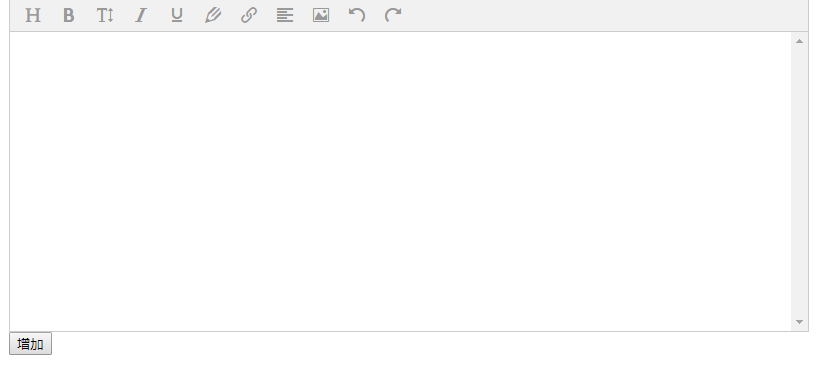
样式如图:
富文本使用之wangEditor3的更多相关文章
- 是时候选择一款富文本编辑器了(wangEditor)
需要一款富文本编辑器,当然不能自己造轮子.本来想使用cnblog也在用的TinyMCE,名气大,功能全.但是发现TinyMCE从4.0开始,不再支持直接下载.所以还是决定选用wangEditor.遗憾 ...
- 基于jeesite的cms系统(五):wangEditor富文本编辑器
一.关于wangEditor: wangEditor —— 轻量级 web 富文本编辑器,配置方便,使用简单.支持 IE10+ 浏览器. 官网:www.wangEditor.com 文档:www.ka ...
- wangEditor-基于javascript和css开发的 Web富文本编辑器, 轻量、简洁、易用、开源免费(2)
<!DOCTYPE html> <html lang="en"> <head> <meta charset="UTF-8&quo ...
- 富文本编辑器、日期选择器、软件天堂、防止XSS攻击、字体icon、转pdf
[超好用的日期选择器] Layui:http://www.layui.com/laydate/ 备注:日期选择器,用过很多很多,自己也写过一些:相信这个简单而又不简单的选择器,能够给你多些美好的时光 ...
- wangEditor - 轻量级web富文本编辑器(可带图片上传)
业务需求: 通过后台编辑文章和图片,上传到前端界面,展示新闻消息模块.这个时候,需要一款简洁的编辑器,百度编辑器是最常用的一种,但是功能太过于复杂,而wangEditor - 轻量级web富文本编辑器 ...
- 富文本编辑器(wangEditor)
近期在产品的开发工作中遇到要使用富文本编辑器的地方.于是对比了几款编辑器, 最后选择了wangEditor. 优点:轻量.简洁.界面美观.文档齐全. 缺点: 相较于百度ueditor等编辑器功能较 ...
- 富文本编辑器--引入demo和简单使用
wangEditor —— 轻量级 web 富文本编辑器,配置方便,使用简单.支持 IE10+ 浏览器. 官网:www.wangEditor.com 文档:www.kancloud.cn/wangfu ...
- web轻量级富文本框编辑
前言 主要介绍squire,wangeditor富文本编辑 以及用原生js 如何实现多个关键字标识 需求 如何标记多个关键字,取消关键字 第一种方法 原生 textarea 标记 准备资料参考:张鑫旭 ...
- 富文本编辑器Simditor的简易使用
最近打算自己做一个博客系统,并不打算使用帝国cms或者wordpress之类的做后台管理!自己处于学习阶段也就想把从前台到后台一起谢了.好了,废话不多说了,先来看看富文本编辑器SimDitor,这里是 ...
随机推荐
- 利用canvas制作图片(可缩放和平移)+相框+文字
前言: 公司一个售前问我能不能用H5做一个手机拍照,给相片添加相框和添加文字上传到服务器的功能,我当时一琢磨觉得可行,就利用空余时间做了一个demo,去掉了拍照和上传,如果以后有机会,会给补上,当然对 ...
- C#基础 (一)
值类型和引用类型 堆和栈 栈存放的数据: (1)某些类型变量的值(2)程序当前的执行环境(3)传递给方法的参数 堆是存放对象的地方 对象类型有两种: 值类型和引用类型,他们的存储方式不同值类型: 只需 ...
- golang学习之select用法
早期的select函数是用来监控一系列的文件句柄,一旦其中一个文件句柄发生IO操作,该select调用就会被返回.golang在语言级别直接支持select,用于处理异步IO问题. select用法同 ...
- 初识http2.0
初识http2.0 HTTP2.0性能增强的核心:二进制分帧 HTTP 2.0最大的特点: 不会改动HTTP 的语义,HTTP 方法.状态码.URI 及首部字段,等等这些核心概念上一如往常,却能致力于 ...
- [ERROR] Failed to execute goal org.apache.maven.plugins:maven-dependency-plugin:2.8:unpack (unpack) on project sq-integral-web: Unable to find artifact.
1.问题描述 项目maven打包报上述错误, 但是小伙伴运行好使. 2.问题解决 是idea工程编码(gbk)和项目编码(utf-8)不一致 idea->file->Other Setti ...
- SQLServer导入大sql文件报错 对 COM 组件的调用返回了错误 HRESULT E_FAIL。 (mscorlib)
打开cmd执行(d:\script.sql为sql文件位置): sqlcmd -S 127.0.0.1 -U sa -P sa -i d:\script.sql From:https://ww ...
- 提升PPT制作效率和颜值
[大咖分享]By汤帅,PPT定制师 网站有时比素材库更有效 学会多模板整合利用 网站推荐:花瓣,officeplus,演界网,pptstore 演讲提纲 思维导图听课笔记
- 小Y的轮回之路——攒机装机、B150装win7
两个月前,陪伴我5年多的小Y(ideapad-y460N卡)突然大伤元气,硬盘跪了,显示屏也黑了一小块.本着经济实惠凑合用的态度换了个320G的硬盘,没想过几天显示屏情况加重,出现无数个红绿相间的线条 ...
- Atlas+Keepalived实现MySQL读写分离、读负载均衡
一.基础介绍 ========================================================================================== 1. ...
- 修改 Linux VM 中单个用户最大进程数的限制
在部署有并发任务执行的虚机上, 会遇到 SSH 无法访问的问题. 本文将帮助你找出其中一种比较特殊的原因, 并提供解决方案. Note 以下案例分析基于 CentOS 7, 对于其他版本的 Linux ...