
点滴积累【C#】---C#实现上传word将路径保存到数据库,文件保存到服务器。并且按照名称读取服务器的word
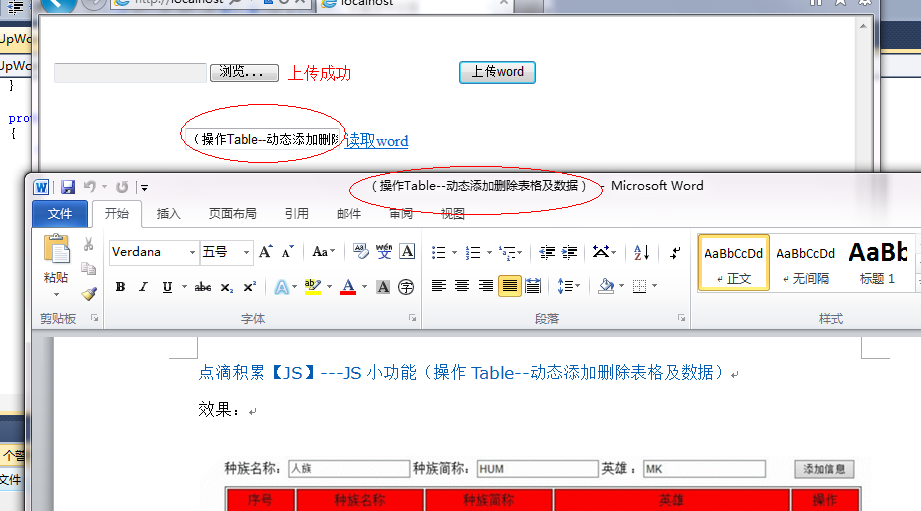
效果:
1.

.

.
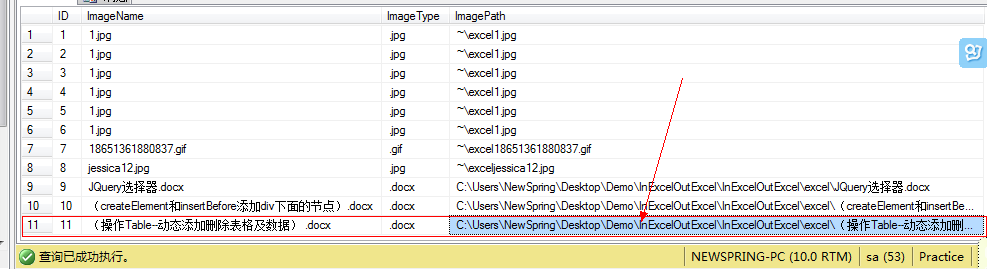
数据库:
思路:
上传:先获取word物理地址,然后根据文件的类型判断,然后再保存到相应的文件夹下,再把路径插入到数据库中。
读取:首先根据输入的文件名字在数据库中查找出来文件的路径,然后再根据路径把文件读取出来。
代码:
说明:需要导入COM库:Microsoft word 11.0 Object Library.
 using System;

 using System.Collections.Generic;

 using System.Linq;

 using System.Web;

 using System.Web.UI;

 using System.Web.UI.WebControls;

 using System.IO;

 using System.Configuration;

 using System.Data;

 using System.Data.SqlClient;

 namespace InExcelOutExcel

 {

     public partial class UpWord : System.Web.UI.Page

     {

         protected void Page_Load(object sender, EventArgs e)

         {

         }

         string SQLString = ConfigurationManager.ConnectionStrings["ConnectionStr"].ToString();

         protected void UploadButton_Click(object sender, EventArgs e)

         {

             try

             {

                 using (SqlConnection sqlcon = new SqlConnection(SQLString))

                 {

                     string FullName = FileUpload1.PostedFile.FileName;//获取word物理地址

                     FileInfo fi = new FileInfo(FullName);

                     string name = fi.Name;//获取word名称

                     string type = fi.Extension;//获取word类型

                     if (type == ".doc" || type == ".docx")

                     {

                         string SavePath = Server.MapPath("excel\\");//word保存到文件夹下

                         this.FileUpload1.PostedFile.SaveAs(SavePath + "\\" + name);//保存路径

                         string sql = "insert into image1(ImageName,ImageType,ImagePath) values('" + name + "','" + type + "','C:\\Users\\NewSpring\\Desktop\\Demo\\InExcelOutExcel\\InExcelOutExcel\\excel\\" + name + "')";

                         SqlCommand cmd = new SqlCommand(sql, sqlcon);

                         sqlcon.Open();

                         cmd.ExecuteNonQuery();

                         this.label1.Text = "上传成功";

                         this.tb1.Text = fi.Name;

                     }

                     else

                     {

                         this.label1.Text = "请选择正确的格式word";

                     }

                 }

             }

             catch (Exception ex)

             {

                 Response.Write(ex.Message);

             }

         }

         protected void lbtn_Click(object sender, EventArgs e)

         {

             try

             {

                 using (SqlConnection sqlcon = new SqlConnection(SQLString))

                 {

                     string sql = "select ImagePath from image1 where ImageName='" + tb1.Text.ToString() + "'";

                     SqlCommand cmd = new SqlCommand(sql, sqlcon);

                     sqlcon.Open();

                     cmd.CommandText = sql;

                     SqlDataReader sdr = cmd.ExecuteReader();

                     string ImagePath = "";

                     if (sdr.Read())

                     {

                         ImagePath = sdr["ImagePath"].ToString();

                     }

                     //下面是读取文档代码

                     object oMissing = System.Reflection.Missing.Value;

                     Microsoft.Office.Interop.Word._Application oWord;

                     Microsoft.Office.Interop.Word._Document oDoc;

                     oWord = new Microsoft.Office.Interop.Word.Application();

                     oWord.Visible = true;

                     object fileName = ImagePath;

                     oDoc = oWord.Documents.Open(ref fileName,

                     ref oMissing, ref oMissing, ref oMissing, ref oMissing, ref oMissing,

                     ref oMissing, ref oMissing, ref oMissing, ref oMissing, ref oMissing,

                     ref oMissing, ref oMissing, ref oMissing, ref oMissing, ref oMissing);

                     //        创建新Word

                     //object oMissing = System.Reflection.Missing.Value;

                     //Word._Application oWord;

                     //Word._Document oDoc;

                     //oWord = new Word.Application();

                     //oWord.Visible = true;

                     //oDoc = oWord.Documents.Add(ref oMissing, ref oMissing,

                     //    ref oMissing, ref oMissing);

                     //        导入模板

                     //object oMissing = System.Reflection.Missing.Value;

                     //Word._Application oWord;

                     //Word._Document oDoc;

                     //oWord = new Word.Application();

                     //oWord.Visible = true;

                     //object fileName = @"E:XXXCCXTest.doc";

                     //oDoc = oWord.Documents.Add(ref fileName, ref oMissing,

                     //                ref oMissing, ref oMissing);

                 }

             }

             catch (Exception ex)

             {

                 Response.Write(ex.Message);

             }

         }

     }

 }
点滴积累【C#】---C#实现上传word将路径保存到数据库,文件保存到服务器。并且按照名称读取服务器的word的更多相关文章
- 点滴积累【C#】---对上传文件的路径进行加密,以免将路径暴露在浏览器上,避免一些安全隐患!
效果: 描述: 本事例是为解决在上传或下载文件时避免将路径暴露在外.在上传时将路径进行加密保存到DataTable或数据库中,在下载是再读取DataTable中加密数据进行解密下载. 代码: [前台代 ...
- [转]ExtJs入门之filefield:文件上传的配置+结合Ajax完美实现文件上传的asp.net示例
原文地址:http://www.stepday.com/topic/?459 作文一个ExtJs的入门汉子,学习起来的确是比较费劲的事情,不过如今在这样一个网络资源如此丰富的时代,依然不是那么难了的. ...
- (配置)CKEditor+CKFinder+php上传配置,根据年月命名创建文件夹来存放
CKEditor+CKFinder+php上传配置 新版本的CKEditor只提供了基本的文本编辑功能,上传模块由另一个组件CKFinder.这里主要记录CKFinder上传的一些参数配置,能够成功上 ...
- 从0在windows上一次性上传本地整个项目(包含所有文件/文件夹)到 Github
1.注册并登陆Github. 2.登陆进去之后的页面,点击这个“库”,这表示你在Github上上的代码仓库,我这里已经创建过一个了,所以数量是1 3.在仓库选项卡中,点击“新建”按钮添加一个项目. 4 ...
- 简单的Django实现图片上传,并存储进MySQL数据库 案例——小白
目标:通过网页上传一张图片到Django后台,后台接收并存储进数据库 真是不容易!!这个案例的代码网上太乱,不适合我,自己摸索着写,终于成功了,记录一下,仅供自己参考,有的解释可能不对,自己明白就好, ...
- Angular14 利用Angular2实现文件上传的前端、利用springBoot实现文件上传的后台、跨域问题
一.angular2实现文件上传前端 Angular2使用ng2-file-upload上传文件,Angular2中有两个比较好用的上传文件的第三方库,一个是ng2-file-upload,一个是ng ...
- thinkphp项目上传到github,为什么缺少很多文件
thinkphp项目上传到github,为什么缺少很多文件 问题: 把tp5项目push到码云(类似github)上,为什么没有thinkphp这个核心库? 然后我看了下码云和github上,官方的t ...
- PHP 多图上传,图片批量上传插件,webuploader.js,百度文件上传插件
PHP 多图上传,图片批量上传插件,webuploader.js,百度文件上传插件(案例教程) WebUploader作用:http://fex.baidu.com/webuploader/gett ...
- springboot 静态资源访问,和文件上传 ,以及路径问题
springboot 静态资源访问: 这是springboot 默认的静态资源访问路径 访问顺序依次从前到后(http://localhost:8080/bb.jpg) spring.resourc ...
- 【Azure 应用服务】App Service 在使用GIt本地部署,上传代码的路径为/home/site/repository,而不是站点的根目录/home/site/wwwroot。 这个是因为什么?
问题描述 App Service 在使用GIt本地部署,上传代码的路径为/home/site/repository,而不是站点的根目录/home/site/wwwroot. 这个是因为什么? 并且通过 ...
随机推荐
- Linux下KVM的图形界面管理工具(virt-manager)(桌面版)
背景: virt-manager是用于管理KVM虚拟环境的主要工具,virt-manager默认设置下需要使用root用户才能够使用该工具.当你想在KVM hypervisor服务器上托管虚拟机,由最 ...
- 如何获取php错误
今天把项目放在测试服务器,但是出现一个问题,用的TP5框架,我把入口文件放在了根目录,访问的时候报错了,框架引导文件引入不了,也不报错,就是说访问不了. 所以就用了一段代码把错误获取出来了,代码如下: ...
- Android内存优化9 内存检测工具3 MAT比Menmery Monitor更强大
在Android性能优化第(一)篇---基本概念中讲了JAVA的四大引用,讲了一下GCRoot,第二篇Memory Monitor检测内存泄露仅仅说了Menmery Monitor的使用,这篇博客谈一 ...
- PostgreSQL配置文件--QUERY TUNING
5 QUERY TUNING 5.1 Planner Method Configuration. 下列参数控制查询优化器是否使用特定的存取方法.除非对优化器特别了解,一般情况下,使用它们默认值即可. ...
- Spring @Autowired 注解不生效
@Autowired默认不生效.为了生效,需要在xml配置:<context:annotation-config> 注解一<context:component-scan base-p ...
- iOS:菜单控制器和菜单项:UIMenuController和UIMenuItem
菜单控制器和菜单项:弹出自定义的菜单栏窗口 提示: 1. Menu所处的View必须实现 – (BOOL)canBecomeFirstResponder, 且返回YES2. Menu所处的View必须 ...
- 【Web】Rest API 验证授权如何做?
参考资料: [Web]Rest && 权限管理等:http://www.itdadao.com/2016/03/15/593144/ 无需OAuth就可以设计一个安全的REST (We ...
- PHP Variable Scope
原文: https://phppot.com/php/variable-scope-in-php/ Last modified on March 24th, 2017 by Vincy. ------ ...
- CentOS下配置HTTPS訪问主机并绑定訪问port号
系统环境: Linux: CentOS release 6.5 (Final) LAMP 步骤 1.lamp开启ssl # yum install openssl mod_ssl -y # 安装ope ...
- android wifi调试(无线调试) 一步到位
没有数据线时候,怎么进行调试开发?只要在一个局域网内,最好选择wifi调试! 网上有很多这样的教程,但是有很多步.很繁琐.最近我在gp上下载了一个软件可以实现点击一步就可以了.不需要在手机上输入任何命 ...