
点滴积累【C#】---C#实现上传word将路径保存到数据库,文件保存到服务器。并且按照名称读取服务器的word
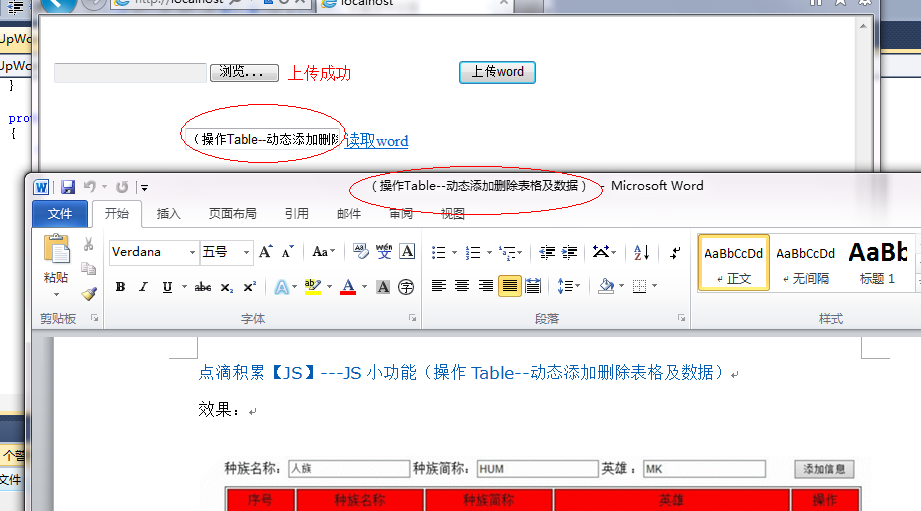
效果:
1.

.

.
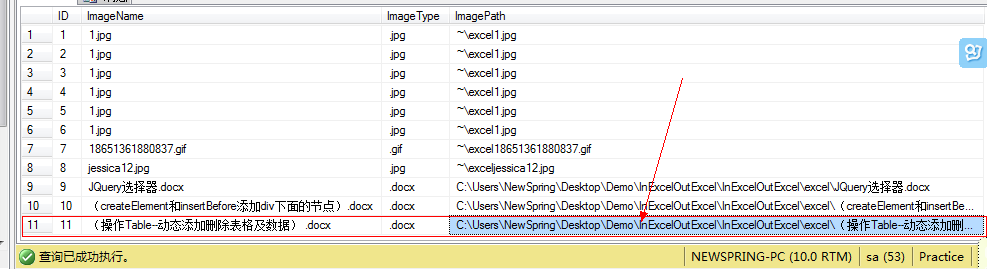
数据库:
思路:
上传:先获取word物理地址,然后根据文件的类型判断,然后再保存到相应的文件夹下,再把路径插入到数据库中。
读取:首先根据输入的文件名字在数据库中查找出来文件的路径,然后再根据路径把文件读取出来。
代码:
说明:需要导入COM库:Microsoft word 11.0 Object Library.
 using System;

 using System.Collections.Generic;

 using System.Linq;

 using System.Web;

 using System.Web.UI;

 using System.Web.UI.WebControls;

 using System.IO;

 using System.Configuration;

 using System.Data;

 using System.Data.SqlClient;

 namespace InExcelOutExcel

 {

     public partial class UpWord : System.Web.UI.Page

     {

         protected void Page_Load(object sender, EventArgs e)

         {

         }

         string SQLString = ConfigurationManager.ConnectionStrings["ConnectionStr"].ToString();

         protected void UploadButton_Click(object sender, EventArgs e)

         {

             try

             {

                 using (SqlConnection sqlcon = new SqlConnection(SQLString))

                 {

                     string FullName = FileUpload1.PostedFile.FileName;//获取word物理地址

                     FileInfo fi = new FileInfo(FullName);

                     string name = fi.Name;//获取word名称

                     string type = fi.Extension;//获取word类型

                     if (type == ".doc" || type == ".docx")

                     {

                         string SavePath = Server.MapPath("excel\\");//word保存到文件夹下

                         this.FileUpload1.PostedFile.SaveAs(SavePath + "\\" + name);//保存路径

                         string sql = "insert into image1(ImageName,ImageType,ImagePath) values('" + name + "','" + type + "','C:\\Users\\NewSpring\\Desktop\\Demo\\InExcelOutExcel\\InExcelOutExcel\\excel\\" + name + "')";

                         SqlCommand cmd = new SqlCommand(sql, sqlcon);

                         sqlcon.Open();

                         cmd.ExecuteNonQuery();

                         this.label1.Text = "上传成功";

                         this.tb1.Text = fi.Name;

                     }

                     else

                     {

                         this.label1.Text = "请选择正确的格式word";

                     }

                 }

             }

             catch (Exception ex)

             {

                 Response.Write(ex.Message);

             }

         }

         protected void lbtn_Click(object sender, EventArgs e)

         {

             try

             {

                 using (SqlConnection sqlcon = new SqlConnection(SQLString))

                 {

                     string sql = "select ImagePath from image1 where ImageName='" + tb1.Text.ToString() + "'";

                     SqlCommand cmd = new SqlCommand(sql, sqlcon);

                     sqlcon.Open();

                     cmd.CommandText = sql;

                     SqlDataReader sdr = cmd.ExecuteReader();

                     string ImagePath = "";

                     if (sdr.Read())

                     {

                         ImagePath = sdr["ImagePath"].ToString();

                     }

                     //下面是读取文档代码

                     object oMissing = System.Reflection.Missing.Value;

                     Microsoft.Office.Interop.Word._Application oWord;

                     Microsoft.Office.Interop.Word._Document oDoc;

                     oWord = new Microsoft.Office.Interop.Word.Application();

                     oWord.Visible = true;

                     object fileName = ImagePath;

                     oDoc = oWord.Documents.Open(ref fileName,

                     ref oMissing, ref oMissing, ref oMissing, ref oMissing, ref oMissing,

                     ref oMissing, ref oMissing, ref oMissing, ref oMissing, ref oMissing,

                     ref oMissing, ref oMissing, ref oMissing, ref oMissing, ref oMissing);

                     //        创建新Word

                     //object oMissing = System.Reflection.Missing.Value;

                     //Word._Application oWord;

                     //Word._Document oDoc;

                     //oWord = new Word.Application();

                     //oWord.Visible = true;

                     //oDoc = oWord.Documents.Add(ref oMissing, ref oMissing,

                     //    ref oMissing, ref oMissing);

                     //        导入模板

                     //object oMissing = System.Reflection.Missing.Value;

                     //Word._Application oWord;

                     //Word._Document oDoc;

                     //oWord = new Word.Application();

                     //oWord.Visible = true;

                     //object fileName = @"E:XXXCCXTest.doc";

                     //oDoc = oWord.Documents.Add(ref fileName, ref oMissing,

                     //                ref oMissing, ref oMissing);

                 }

             }

             catch (Exception ex)

             {

                 Response.Write(ex.Message);

             }

         }

     }

 }
点滴积累【C#】---C#实现上传word将路径保存到数据库,文件保存到服务器。并且按照名称读取服务器的word的更多相关文章
- 点滴积累【C#】---对上传文件的路径进行加密,以免将路径暴露在浏览器上,避免一些安全隐患!
效果: 描述: 本事例是为解决在上传或下载文件时避免将路径暴露在外.在上传时将路径进行加密保存到DataTable或数据库中,在下载是再读取DataTable中加密数据进行解密下载. 代码: [前台代 ...
- [转]ExtJs入门之filefield:文件上传的配置+结合Ajax完美实现文件上传的asp.net示例
原文地址:http://www.stepday.com/topic/?459 作文一个ExtJs的入门汉子,学习起来的确是比较费劲的事情,不过如今在这样一个网络资源如此丰富的时代,依然不是那么难了的. ...
- (配置)CKEditor+CKFinder+php上传配置,根据年月命名创建文件夹来存放
CKEditor+CKFinder+php上传配置 新版本的CKEditor只提供了基本的文本编辑功能,上传模块由另一个组件CKFinder.这里主要记录CKFinder上传的一些参数配置,能够成功上 ...
- 从0在windows上一次性上传本地整个项目(包含所有文件/文件夹)到 Github
1.注册并登陆Github. 2.登陆进去之后的页面,点击这个“库”,这表示你在Github上上的代码仓库,我这里已经创建过一个了,所以数量是1 3.在仓库选项卡中,点击“新建”按钮添加一个项目. 4 ...
- 简单的Django实现图片上传,并存储进MySQL数据库 案例——小白
目标:通过网页上传一张图片到Django后台,后台接收并存储进数据库 真是不容易!!这个案例的代码网上太乱,不适合我,自己摸索着写,终于成功了,记录一下,仅供自己参考,有的解释可能不对,自己明白就好, ...
- Angular14 利用Angular2实现文件上传的前端、利用springBoot实现文件上传的后台、跨域问题
一.angular2实现文件上传前端 Angular2使用ng2-file-upload上传文件,Angular2中有两个比较好用的上传文件的第三方库,一个是ng2-file-upload,一个是ng ...
- thinkphp项目上传到github,为什么缺少很多文件
thinkphp项目上传到github,为什么缺少很多文件 问题: 把tp5项目push到码云(类似github)上,为什么没有thinkphp这个核心库? 然后我看了下码云和github上,官方的t ...
- PHP 多图上传,图片批量上传插件,webuploader.js,百度文件上传插件
PHP 多图上传,图片批量上传插件,webuploader.js,百度文件上传插件(案例教程) WebUploader作用:http://fex.baidu.com/webuploader/gett ...
- springboot 静态资源访问,和文件上传 ,以及路径问题
springboot 静态资源访问: 这是springboot 默认的静态资源访问路径 访问顺序依次从前到后(http://localhost:8080/bb.jpg) spring.resourc ...
- 【Azure 应用服务】App Service 在使用GIt本地部署,上传代码的路径为/home/site/repository,而不是站点的根目录/home/site/wwwroot。 这个是因为什么?
问题描述 App Service 在使用GIt本地部署,上传代码的路径为/home/site/repository,而不是站点的根目录/home/site/wwwroot. 这个是因为什么? 并且通过 ...
随机推荐
- 手动清除或刷新Linux的Swap分区
物理内存接近饱和时,系统会自动将不常用的内存文件转储到Swap中,但Swap使用率达30%的时候对系统性能可能有一定影响.但当物理内存重新释放时,储存在Swap分区的其它应用不会重新回到物理内存中,所 ...
- 通过LoadBalancerClient获取所有服务列表的IP
说明:LoadBalanced采用轮训的方式请求服务提供者,但是如果针对某些业务需要精确到某个服务提供者或者遍历所有的服务提供者,那么可以通过LoadBalancerClient去获得. 参考: ht ...
- Android Broadcast Security(转)
原文地址:http://drops.wooyun.org/tips/4393 0x00 科普 Broadcast Recevier 广播接收器是一个专注于接收广播通知信息,并做出对应处理的组件.很多广 ...
- NServiceBus入门:启程(Introduction to NServiceBus: Getting started)
原文地址:https://docs.particular.net/tutorials/intro-to-nservicebus/1-getting-started/ 侵删. 最好的学习NService ...
- NHibernate官方文档中文版--基础ORM(Basic O/R Mapping)
映射声明 对象/关系映射在XML文件中配置.mapping文件这样设计是为了使它可读性强并且可修改.mapping语言是以对象为中心,意味着mapping是围绕着持久化类声明来建立的,而不是围绕数据表 ...
- 为什么fis没有freemarker的解决方案啊?_前端吧_百度贴吧
为什么fis没有freemarker的解决方案啊?_前端吧_百度贴吧 fis-plus:适用于PHP+Smarty后端选型jello:适用于Java+Velocity后端选型goiz:适用于go+ma ...
- Word中插入英文格式的算法流程
如图上部分所示,需要序号自动编号,那么插入一个一行一列的的表格,然后点击编号,使得项目自动编号,编号一个就在后面输入一些内容,按enter后第二行开始自动编号,如果要缩进,不能按Tab,Tab自动创建 ...
- 对js原型简单的理解和图解
对js原型简单的理解和图解 最近在努力的学习js中,今天就抽了个空把自己理解的原型,记下一下在笔记中,以后自己查看,有空在会把原型链记录一下. 1.prototype prototype:是一个函数的 ...
- C#读取Windows日志
管理-->事件查看器 可以查看[应用程序].[安全].[系统]等分类的日志 1 2 3 4 5 6 7 8 9 10 11 12 13 14 15 16 17 18 19 20 21 2 ...
- Oracle 11gR2 RAC的两个bug
Oracle 11.2.0.2 bug还是不少的.很多库迁到Oracle 11.2.0.2后都遇到了问题.现在正在跟的两个Oracle 11.2.0.2上的问题:1.ORA-00600: inte ...