
centos7系统配置系统用户基于ssh的google身份验证
最近也是服务器各种被入侵,所以在安全上,要万分注意,特此记录,借助google的身份验证插件,获取动态验证码完成ssh登陆。
OS:
centos7
安装配置:
1、 安装epel源
yum -y install epel-release
2、 安装Qrencode,谷歌身份验证器通过该程序生成二维码
yum install -y qrencode
3、安装谷歌身份验证器,编译安装
git clone https://github.com/google/google-authenticator-libpam.git

cd google-authenticator-libpam/
./bootstrap.sh
./configure –prefix=/usr/local/google-authenticator
make && make install
4、拷贝google的身份验证器pam模块到系统下
cp /usr/local/google-authenticator/lib/security/pam_google_authenticator.so /lib64/security/
5、配置sshd的pam认证,写在auth include password-auth 基于密码认证的上面一行,先基于google验证码认证
auth required pam_google_authenticator.so
6、修改ssh服务配置
ChallengeResponseAuthentication yes
7、 重启ssh服务
systemctl restart sshd
8、进入刚才克隆下来的 google-authenticator-libpam 目录,执行
./google-authenticator #基于当前用户做验证,如果切换别的系统用户,请登陆其他用户,执行此命令即可
Do you want authentication tokens to be time-based (y/n) y #输入y, 提示是否基于时间的认证
接下来会生成一张二维码图片: 手机上下载身份验证器app软件,扫描此二维码
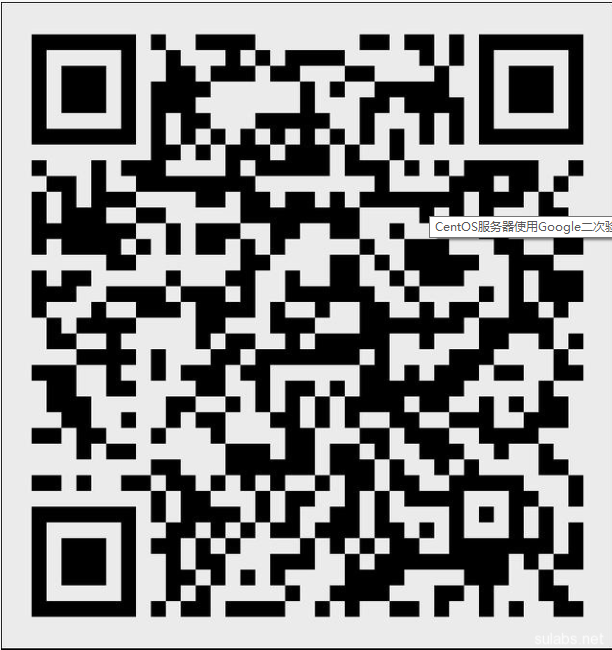
Your new secret key is:  JS57SLVUDEEA7SQ7LD6BEBWGAA   #此安全key需要备份,用于后续更换手机或者二维码丢失,浏览器的身份验证丢失后,通过此安全key获取新的验证吗

Your verification code is 005421   #扫描上述二维码后,查看验证吗,输入

Your emergency scratch codes are:

# 以下验证吗,是后续备用的,只能验证一次

45412365

21522365

85124632

85124631

14785216

Do you want me to update your “/root/.google_authenticator” file (y/n) y

Do you want to disallow multiple uses of the same authentication

token? This restricts you to one login about every 30s, but it increases

your chances to notice or even prevent man-in-the-middle attacks (y/n)

Do you want to disallow multiple uses of the same authentication

token? This restricts you to one login about every 30s, but it increases

your chances to notice or even prevent man-in-the-middle attacks (y/n) y

By default, tokens are good for 30 seconds. In order to compensate for

possible time-skew between the client and the server, we allow an extra

token before and after the current time. If you experience problems with

poor time synchronization, you can increase the window from its default

size of +-1min (window size of 3) to about +-4min (window size of

17 acceptable tokens).

Do you want to do so? (y/n) y

# 安全相关,默认继续

If the computer that you are logging into isn’t hardened against brute-force

login attempts, you can enable rate-limiting for the authentication module.

By default, this limits attackers to no more than 3 login attempts every 30s.

Do you want to enable rate-limiting (y/n) y

# 安全相关,默认继续
9、xshell终端配置基于google验证登陆linux主机
xshell终端的连接方式改为:keyboard Interactive
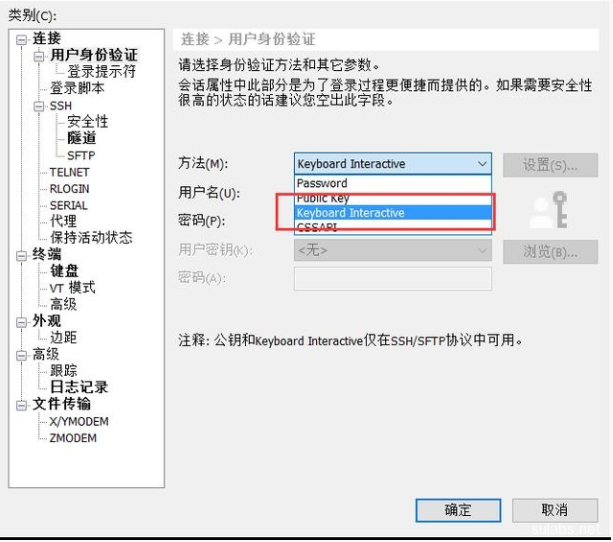
二次验证码输入:
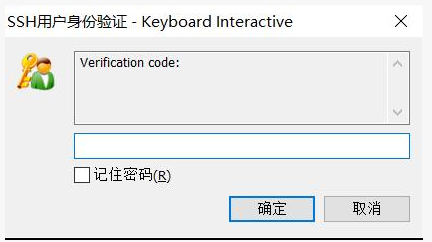
输入系统密码:

以上就是基于google身份验证的ssh登陆。
centos7系统配置系统用户基于ssh的google身份验证的更多相关文章
- linux上使用google身份验证器(简版)
系统:centos6.6 下载google身份验证包google-authenticator-master(其实只是一个.zip文件,在windwos下解压,然后传进linux) #cd /data/ ...
- centos 6 SSH配置Google Authentication 验证
创建工作目录: mkdir google-authentication 1. 安装二维码生成依赖 #wget http://fukuchi.org/works/qrencode/qrencode-3. ...
- 通过Google身份验证器加强Linux帐户安全
下载Google的身份验证模块: # wget https://google-authenticator.googlecode.com/files/libpam-google-authenticato ...
- Nginx集群之基于Redis的WebApi身份验证
目录 1 大概思路... 1 2 Nginx集群之基于Redis的WebApi身份验证... 1 3 Redis数据库... 2 4 Visualbox ...
- 两步验证杀手锏:Java 接入 Google 身份验证器实战
两步验证 大家应该对两步验证都熟悉吧?如苹果有自带的两步验证策略,防止用户账号密码被盗而锁定手机进行敲诈,这种例子屡见不鲜,所以苹果都建议大家开启两步验证的. Google 的身份验证器一般也是用于登 ...
- Win10系统进行远程桌面连接出现身份验证错误怎么办
在win10系统中,自带有远程桌面连接功能,但是有时候会遇到一些问题,比如有不少用户反映说在进行远程桌面连接的时候,出现身份验证错误的情况,导致远程连接失败,接下来给大家分享一下Win10系统进行远程 ...
- 在ASP.NET Web API 2中使用Owin基于Token令牌的身份验证
基于令牌的身份验证 基于令牌的身份验证主要区别于以前常用的常用的基于cookie的身份验证,基于cookie的身份验证在B/S架构中使用比较多,但是在Web Api中因其特殊性,基于cookie的身份 ...
- 使用google身份验证器实现动态口令验证
最近有用户反应我们现有的短信+邮件验证,不安全及短信条数限制和邮件收验证码比较慢的问题,希望我们 也能做一个类似银行动态口令的验证方式.经过对可行性的分析及慎重考虑,可以实现一个这样的功能. 怎么实现 ...
- 基于JWT的Token身份验证
身份验证,是指通过一定的手段,完成对用户身份的确认.为了及时的识别发送请求的用户身份,我们调研了常见的几种认证方式,cookie.session和token. 1.Cookie cookie是 ...
随机推荐
- mac git 命令自动补全
步骤如下: 1.下载Git-completion.bash 或者直接使用SourceTree去clone到本地. 下载地址:https://github.com/markgandolfo/git-ba ...
- node里有没有清理require和dependencies的工具
写node的时候,常常以为自己需要某个package,于是require了一下,结果写着写着,又没有用到,安装了某个包save了一下,最后也没用到. 一个项目写完发现整个require和depende ...
- fc全连接层的作用、卷积层的作用、pooling层、激活函数的作用
fc:1.起到分类器的作用.对前层的特征进行一个加权和,(卷积层是将数据输入映射到隐层特征空间)将特征空间通过线性变换映射到样本标记空间(也就是label) 2.1*1卷积等价于fc:跟原featur ...
- sendmail启动报错
sendmail启动不了,报错如下: 解决方法: 在/etc/mail/sendmail.cf 配置文件中查找 Dj$w,并在此行下面增加这一行. Dj$w. 在/etc/hosts 增加一行 192 ...
- sizeof笔试题--转
转自http://blog.csdn.net/yanyaohua0314/archive/2007/09/17/1787749.aspx sizeof笔试题 http://www.xici.net/b ...
- Spring入门第一课:Spring基础与配置Bean
1.入门 Spring是简化java开发的一个框架,其中IoC和AOP是Spring的两个重要核心.由于Spring是非侵入性的,通过Ioc容器来管理bean的生命周期,还整合了许多其他的优秀框架,所 ...
- 浅析OC语言
学习一门开发语言,首先要掌握的它的基本语法,这可能几天就能学会,但如果要融会贯通,就得去学习这门语言的框架和一些库,再结合一些项目的应用,这可能需要花几年的时间. OC是C语言的一个超集,是一门面向对 ...
- Swift_函数
Swift_函数 点击查看源码 定义和调用函数 //定义和调用函数 func testDefiningAndCallingFunctions() { func sayHello(_ personNam ...
- .Net core 使用TimeJob
在我以前的文章中有一个.Net core使用Quartz.Net ,一开始我们的设想就是定时操作数据库,所以有很多实现方法,后来发现TimeJob可以同样实现我们的需求,而且更简便. 所以我们就使用了 ...
- 利用MyFlash闪回丢失数据(续)
last night,i've tested flashback by MyFlash tool,but failed,now let's do some other test with ...