
Linux字符设备学习,总结
注册字符驱动的一种老方法:
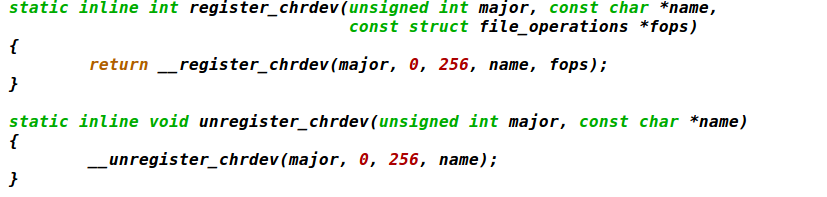
注册一个字符设备的经典方法是使用:
int register_chrdev(unsigned int major, const char *name, structfile_operations *fops);
这里, major 的主编号, name 是驱动的名子(出现在 /proc/devices),
fops file_operations 结构. 一个对 register_chrdev 的调用为给定的主编号注册 0 - 255 的次编号, 并且为每一个建立一个缺省的 cdev 结构。使用这个接口的驱动必须准备好处理对所有 256 个次编号的 open 调用( 不管它们是否对应真实设备 ), 它们不能使用大于 255 的主或次编号。
如果你使用 register_chrdev, 从系统中去除你的设备的正确的函数是:
int unregister_chrdev(unsigned int major, const char *name);
major 和 name 必须和传递给 register_chrdev 的相同, 否则调用会失败.
现在常用的方法,cdev
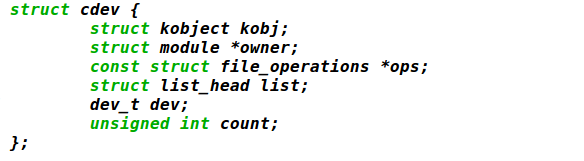
包含 <linux/cdev.h>, 这个结构和它的关联帮助函数定义在这里.
/**

 * cdev_init() - initialize a cdev structure

 * @cdev: the structure to initialize

 * @fops: the file_operations for this device

 *

 * Initializes @cdev, remembering @fops, making it ready to add to the

 * system with cdev_add().

 */

void cdev_init(struct cdev *cdev, const struct file_operations *fops)

{

        memset(cdev, , sizeof *cdev);

        INIT_LIST_HEAD(&cdev->list);

        kobject_init(&cdev->kobj, &ktype_cdev_default);

        cdev->ops = fops;

}
struct cdev 有一个拥有者成员, 应当设置为THIS_MODULE.
一旦 cdev 结构建立, 最后的步骤是把它告诉内核, 调用:
int cdev_add(struct cdev *dev, dev_t num, unsigned int count);
/**

 * cdev_add() - add a char device to the system

 * @p: the cdev structure for the device

 * @dev: the first device number for which this device is responsible

 * @count: the number of consecutive minor numbers corresponding to this

 *         device

 *

 * cdev_add() adds the device represented by @p to the system, making it

 * live immediately.  A negative error code is returned on failure.

 */

int cdev_add(struct cdev *p, dev_t dev, unsigned count)

{

        p->dev = dev;

        p->count = count;

        return kobj_map(cdev_map, dev, count, NULL, exact_match, exact_lock, p);

}
这里, dev 是 cdev 结构, dev 是这个设备响应的第一个设备号, count 是应当关联到设备的设备号的数目. 常常 count 是 1
在使用 cdev_add 是有几个重要事情要记住. 除非你的驱动完全准备好处理设备上的操作, 否则你不应当调用 cdev_add。
第一个是这个调用可能失败. 如果它返回一个负的错误码, 你的设备没有增加到系统中.
它几乎会一直成功,但是, 并且带起了其他的点: cdev_add 返回, 你的设备就是"活的",并且内核可以调用它的操作.
从系统去除一个字符设备, 调用:
void cdev_del(struct cdev *dev);
/**

 * cdev_del() - remove a cdev from the system

 * @p: the cdev structure to be removed

 *

 * cdev_del() removes @p from the system, possibly freeing the structure

 * itself.

 */

void cdev_del(struct cdev *p)

{

        cdev_unmap(p->dev, p->count);

        kobject_put(&p->kobj);

}
显然, 你不应当在传递给 cdev_del 后存取 cdev 结构。
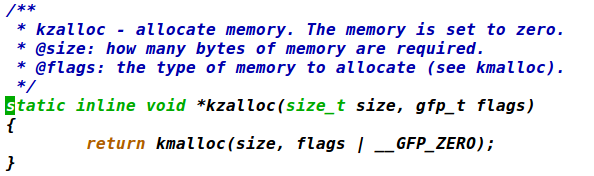
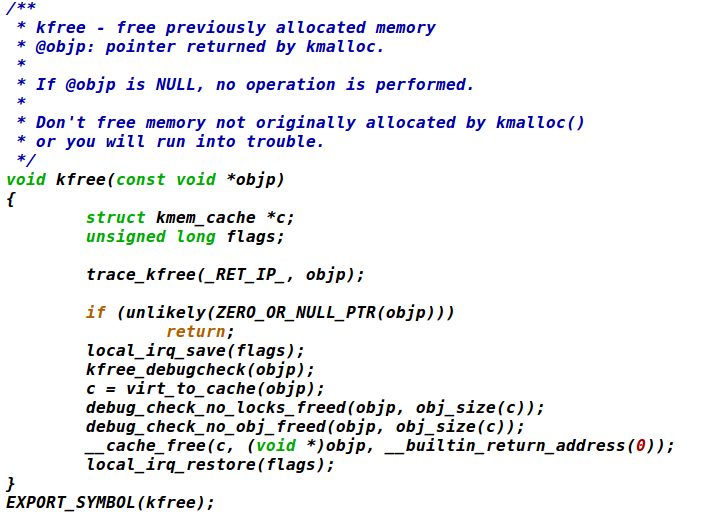
引入 2 个核心函数来管理 Linux 内核中的内存. 这些函数, 定义
在 <linux/slab.h>, 是:
void *kmalloc(size_t size, int flags);
void kfree(void *ptr);
 #define offsetof(TYPE, MEMBER) ((size_t) &((TYPE *)0)->MEMBER)

 /**

  * container_of - cast a member of a structure out to the containing structure

  * @ptr:        the pointer to the member.

  * @type:       the type of the container struct this is embedded in.

  * @member:     the name of the member within the struct.

  *

  */

 #define container_of(ptr, type, member) ({                      \

         const typeof( ((type *))->member ) *__mptr = (ptr);    \

         (type *)( (char *)__mptr - offsetof(type,member) );})
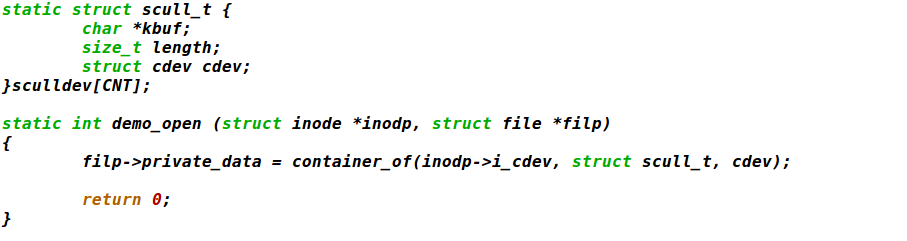
container_of的功能,通过结构体成员的地址,获得结构体的首地址。
以下是简单用法:
Linux字符设备学习,总结的更多相关文章
- linux字符设备学习笔记【原创】
1.申请设备号 int register_chrdev_region(dev_t from, unsigned count, const char *name) 指定从设备号from开始,申请coun ...
- Smart210学习记录----beep linux字符设备驱动
今天搞定了beep linux字符设备驱动,心里还是很开心的,哈哈...但在完成的过程中却遇到了一个非常棘手的问题,花费了我大量的时间,,,, 还是把问题描述一下吧,好像这个问题很普遍的,网上许多解决 ...
- Linux字符设备驱动实现
Linux字符设备驱动实现 要求 编写一个字符设备驱动,并利用对字符设备的同步操作,设计实现一个聊天程序.可以有一个读,一个写进程共享该字符设备,进行聊天:也可以由多个读和多个写进程共享该字符设备,进 ...
- (57)Linux驱动开发之三Linux字符设备驱动
1.一般情况下,对每一种设备驱动都会定义一个软件模块,这个工程模块包含.h和.c文件,前者定义该设备驱动的数据结构并声明外部函数,后者进行设备驱动的具体实现. 2.典型的无操作系统下的逻辑开发程序是: ...
- 深入理解Linux字符设备驱动
文章从上层应用访问字符设备驱动开始,一步步地深入分析Linux字符设备的软件层次.组成框架和交互.如何编写驱动.设备文件的创建和mdev原理,对Linux字符设备驱动有全面的讲解.本文整合之前发表的& ...
- Linux字符设备驱动结构(一)--cdev结构体、设备号相关知识机械【转】
本文转载自:http://blog.csdn.net/zqixiao_09/article/details/50839042 一.字符设备基础知识 1.设备驱动分类 linux系统将设备分为3类:字符 ...
- Linux字符设备中的两个重要结构体(file、inode)
对于Linux系统中,一般字符设备和驱动之间的函数调用关系如下图所示 上图描述了用户空间应用程序通过系统调用来调用程序的过程.一般而言在驱动程序的设计中,会关系 struct file 和 struc ...
- Linux字符设备简单示例
1. Linux字符设备是一种按字节来访问的设备,字符驱动则负责驱动字符设备,这样的驱动通常实现open.close.read和write系统调用.例如:串口.Led.按键等. 2. 通过字符设备文件 ...
- Linux字符设备驱动基本结构
1.Linux字符设备驱动的基本结构 Linux系统下具有三种设备,分别是字符设备.块设备和网络设备,Linux下的字符设备是指只能一个字节一个字节读写的设备,不能随机读取设备内存中某一数据,读取数据 ...
随机推荐
- MS15-051 修正版Exploit(Webshell可用)
MS15-051简介:Windows 内核模式驱动程序中的漏洞可能允许特权提升 (3057191) , 如果攻击者在本地登录并可以在内核模式下运行任意代码,最严重的漏洞可能允许特权提升. 攻击者可随后 ...
- 阿里云免费ssl,https证书的申请和校验
其实写这个之前一直在考虑要不要写出来 ,真的官方文档实在太强大了,连视频都给你录好了,配不好的,是不是可以考虑不用写程序了, 忽然想到第一次使用微信测试号,进行域名认证的时候,因为后台返回“echar ...
- OC Nsstring的使用
// // main.m // NSString // // Created by mj on 13-4-5. // Copyright (c) 2013年 itcast. All rights re ...
- Django 模型中DateField字段
DateField¶ class DateField([auto_now=False, auto_now_add=False, **options])¶ 这是一个使用Python的datetime.d ...
- UIView 动画 依赖与 CALayer的证据
- (nullable id<CAAction>)actionForLayer:(CALayer *)layer forKey:(NSString *)event Layer: -(voi ...
- DVR_RDK编译报错
报错信息: abnormal termination of /opt/dm8168/dvr_rdk/../ti_tools/cgt_dsp/cgt6x_7_3_5//bin/cmp6x make[2] ...
- numpy常用操作
numpy也可以说是随处可见了. ndarray(np.array),就相当于mxnet 里的ndarray一样,连名字都一样. import numpy as np # 创建 a = np.arra ...
- MyBatis框架(6)动态sql
本次全部学习内容:MyBatisLearning 什么是动态sql: mybatis的核心,对sql进行灵活的操作,通过对表达式的判断,对sql灵活的拼接 在之前小案例的基础上我们先进行简 ...
- springboot+mybatis+shiro——登录认证和权限控制
转载:https://z77z.oschina.io/ 一.引入依赖 shiro-all包含shiro所有的包.shiro-core是核心包.shiro-web是与web整合.shiro-spring ...
- Linux下rm -rf删除文件夹报错_ Device or resource busy
1.错误信息 rm: cannot remove `speechd-centos_6.2-prtl-pred-mf34/modules/t2p/py/third/g2p/.nfs00000000039 ...