
AssemblyExecuteAdapter
BizTalk custom adapter
AssemblyExecuteAdapter
功能
更为方便的扩展BizTalk custom adapter 的交互方式,只需要实现IAssemblyExecute 接口就可以让BizTalk AssemblyExecuteAdapter 执行需要的业务逻辑。
代码
AssemblyExecuteAdapterTransmitterEndpoint.cs
通过配置需要加载的dll 文件来执行dll 内部处理逻辑
private Stream SendAssemblyExecuteAdapterRequest(IBaseMessage msg, AssemblyExecuteAdapterTransmitProperties config)
{
VirtualStream responseStream = null;
string charset = string.Empty;
IBaseMessagePart bodyPart = msg.BodyPart;
Stream btsStream;
string messageid = msg.MessageID.ToString("D");
if (null != bodyPart && (null != (btsStream = bodyPart.GetOriginalDataStream())))
{
try
{
Type assemblyExecuteType = Type.GetType(config.AssemblyName);
IAssemblyExecute assemblyexecute = (IAssemblyExecute)Activator.CreateInstance(assemblyExecuteType);
object inputparameters = null;
if (!string.IsNullOrEmpty(config.InputParameterXml))
{
XmlDocument inputXml = new XmlDocument();
inputXml.LoadXml(config.InputParameterXml);
inputparameters = assemblyexecute.GetInputParameter(inputXml);
}
Stream stream = assemblyexecute.ExecuteResponse(btsStream, inputparameters);
#region saveresponsemessage
string responsefilename = string.Empty;
if (config.SaveResponseMessagePath != string.Empty && config.SaveResponseMessagePath != "N")
{
if (!Directory.Exists(config.SaveResponseMessagePath))
Directory.CreateDirectory(config.SaveResponseMessagePath);
responsefilename = Path.Combine(config.SaveResponseMessagePath, "res_" + messageid + ".txt");
SaveFile(responsefilename, stream);
stream.Seek(0, SeekOrigin.Begin);
}
#endregion
if (config.IsTwoWay)
{
responseStream = new VirtualStream(stream);
}
}
catch(Exception e)
{
#region saveerrormessage
string errorfilename = string.Empty;
if (config.SaveErrorMessagePath != string.Empty && config.SaveErrorMessagePath != "N") {
if (!Directory.Exists(config.SaveErrorMessagePath))
Directory.CreateDirectory(config.SaveErrorMessagePath);
errorfilename = Path.Combine(config.SaveErrorMessagePath ,messageid + ".txt");
SaveFile(errorfilename, btsStream);
}
#endregion
string Source = "AssemblyExecuteAdapter";
string Log = "Application";
string Event = e.Message + "\r\n request message saved :" + errorfilename;
if (!EventLog.SourceExists(Source))
EventLog.CreateEventSource(Source, Log);
EventLog.WriteEntry(Source, Event, EventLogEntryType.Error);
throw;
}
}
return responseStream;
}
配置
配置发送端口
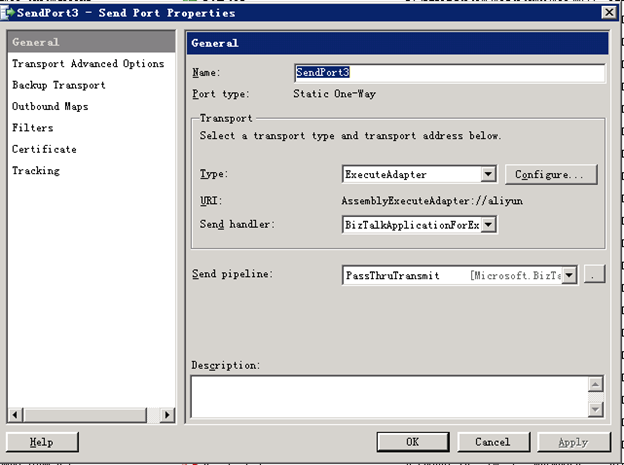
配置参数
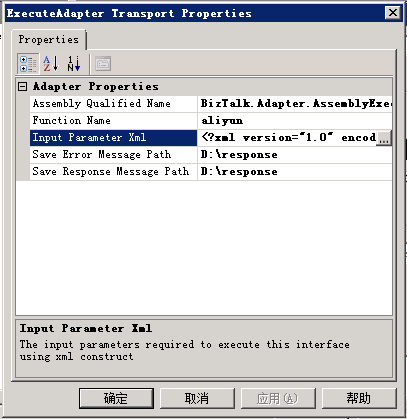
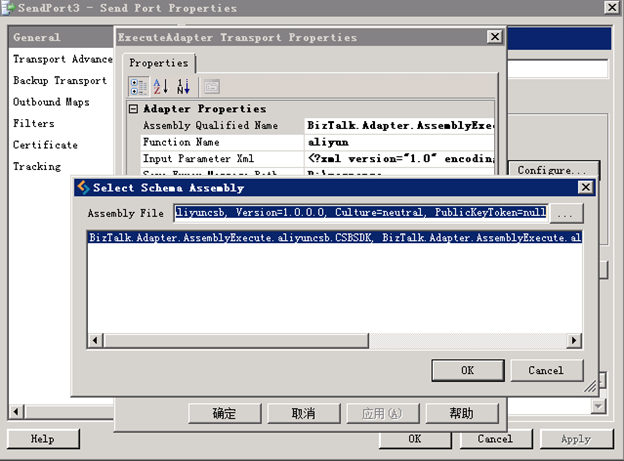
Assembly qualified name:实现了IAssemblyExecute接口的dll文件
Function Name: 这个adapter的功能名称,确保唯一
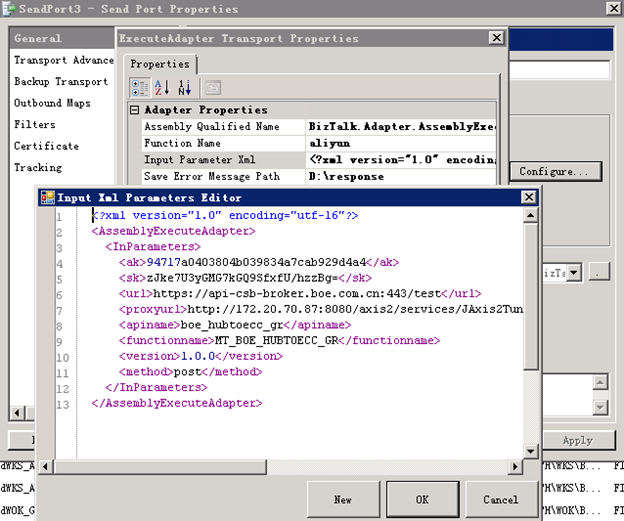
Input Parameter Xml: 执行ExecuteResponse需要的参数以XML的形式提供
Save Error Message Path:保存错误报文的路径
Save Response Message Path:保存执行ExecuteResponse方法返回的结果
选择实现了IAssemblyExecute 接口的dll文件
编辑输入参数
AssemblyExecuteAdapter的更多相关文章
随机推荐
- java多线程的常见例子
收藏 http://blog.csdn.net/wenzhi20102321/article/details/52524545
- Spring任务调度定时器
1.在spring-context.xml配置 <!-- 计划任务配置,用 @Service @Lazy(false)标注类,用@Scheduled(cron = "0 0 2 * * ...
- [转]SVN使用log,list,cat,diff查看所有及特定文件版本信息
[转]SVN使用log,list,cat,diff查看所有及特定文件版本信息 http://onefishum.blog.163.com/blog/static/5184730520113153402 ...
- APNS IOS 消息推送处理失效的Token
在开发苹果推送服务时候,要合理的控制ios设备的Token,而这个Token是由苹果服务器Apns产生的,就是每次app问Apns要Token,由苹果服务器产生的Token会记录到Apns里面,我们需 ...
- SparkHiveContext和直接Spark读取hdfs上文件然后再分析效果区别
最近用spark在集群上验证一个算法的问题,数据量大概是一天P级的,使用hiveContext查询之后再调用算法进行读取效果很慢,大概需要二十多个小时,一个查询将近半个小时,代码大概如下: try: ...
- lr11录制脚本出现中文乱码
录制脚本前,打开录制选项配置对话框Record-Options,进入到Advanced标签,先勾选“Support charset”,然后选择中支持UTF-8.在IIS中找到Web.Config文 ...
- VISUALSVN: UNABLE TO CONNECT TO A REPOSITORY AT URL 无法连接主机的解决办法
场景:我的系统是win7,安装的 VisualSVN Server 作为svn 服务器,昨天是好的,我手渐,使用鲁大师优化了系统,今天提交,更新的时候,直接提示:Unable to connect t ...
- Linux 新手应该知道的一些求助命令
Linux 真正的强大所在是他的[命令行].每一个 Linux 命令其实就是一个程序,借助这些命令,我们可以办到非常多的事情.遇到困难时应该用什么命令去解决呢?下面兄弟连教育Linux小编将会为大家介 ...
- 【Python】 SQLAlchemy的初步使用
SQLAlchemy 在很多Python的web框架中都整合进了SQLAlchemy这个主要发挥ORM作用的模块.所谓ORM,就是把复杂的SQL语句给包装成更加面向对象,易于理解的样子.在操作数据库的 ...
- 开源小工具 酷狗、网易音乐缓存文件转mp3工具
发布一个开源小工具,支持将酷狗和网易云音乐的缓存文件转码为MP3文件. 以前写过kgtemp文件转mp3工具,正好当前又有网易云音乐缓存文件需求,因此就在原来小工具的基础上做了一点修改,增加了对网易云 ...