
poi的合并单元格和冻结行列
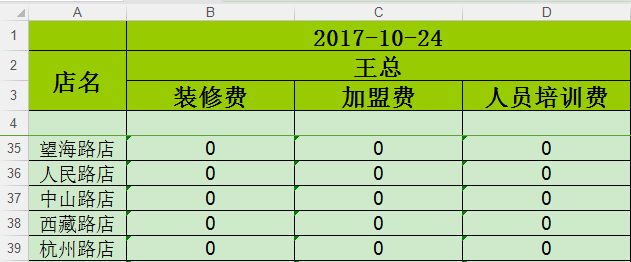
         //创建工作薄(excel)

         Workbook wb = new HSSFWorkbook();

         //创建sheet

         Sheet createSheet = wb.createSheet("sheet1");

         //设置标题字体

         Font fontTitle = wb.createFont();

         fontTitle.setFontHeightInPoints((short) 18); //字体大小

         fontTitle.setColor(HSSFColor.BLACK.index); //字体颜色

         fontTitle.setFontName("宋体"); //字体

         fontTitle.setBoldweight(Font.BOLDWEIGHT_BOLD); //粗体显示

         //font.setItalic(true); //是否使用斜体

         //font.setStrikeout(true); //是否使用划线

         //设置标题单元格类型

         CellStyle cellStyleTitle = wb.createCellStyle();

         cellStyleTitle.setFont(fontTitle);

         cellStyleTitle.setFillForegroundColor(IndexedColors.LIME.getIndex());

         cellStyleTitle.setFillPattern(CellStyle.SOLID_FOREGROUND);

         cellStyleTitle.setAlignment(CellStyle.ALIGN_CENTER); //水平布局:居中

         cellStyleTitle.setVerticalAlignment(CellStyle.VERTICAL_CENTER);

         cellStyleTitle.setWrapText(true);//设置自动换行

         cellStyleTitle.setBorderBottom(CellStyle.BORDER_THIN); //下边框

         cellStyleTitle.setBorderLeft(CellStyle.BORDER_THIN);//左边框

         cellStyleTitle.setBorderTop(CellStyle.BORDER_THIN);//上边框

         cellStyleTitle.setBorderRight(CellStyle.BORDER_THIN);//右边框

         cellStyleTitle.setBottomBorderColor(IndexedColors.BLACK.getIndex());

         cellStyleTitle.setLeftBorderColor(IndexedColors.BLACK.getIndex());

         cellStyleTitle.setTopBorderColor(IndexedColors.BLACK.getIndex());

         cellStyleTitle.setRightBorderColor(IndexedColors.BLACK.getIndex());

         //创建合并单元格  ---begin

         CellRangeAddress region = new CellRangeAddress(0, 0, 1, 3);// 下标从0开始 起始行号,终止行号, 起始列号,终止列号

         CellRangeAddress region2 = new CellRangeAddress(1, 2, 0, 0);// 起始行号,终止行号, 起始列号,终止列号

         CellRangeAddress region3 = new CellRangeAddress(1, 1, 1, 3);// 起始行号,终止行号, 起始列号,终止列号

         //在sheet里增加合并单元格

         createSheet.addMergedRegion(region);

         createSheet.addMergedRegion(region2);

         createSheet.addMergedRegion(region3);

         // -----------填充第一行数据-------------

         Row rowTitle = createSheet.createRow(0);

         Cell cellTitle = rowTitle.createCell(0);

         cellTitle.setCellStyle(cellStyleTitle);

         cellTitle.setCellValue("");// 设置标题内容

         Cell cellTitle1_1 = rowTitle.createCell(1);

         cellTitle1_1.setCellStyle(cellStyleTitle);

         cellTitle1_1.setCellValue(dateStr);// 设置标题内容

         // -----------填充第二行数据-------------

         Row rowTitle1 = createSheet.createRow(1);

         Cell cellTitle1 = rowTitle1.createCell(0);

         cellTitle1.setCellStyle(cellStyleTitle);

         cellTitle1.setCellValue("店名");//  设置内容

         Cell cellTitle11 = rowTitle1.createCell(1);

         cellTitle11.setCellStyle(cellStyleTitle);

         cellTitle11.setCellValue("王总");//

         Cell cellTitle111 = rowTitle1.createCell(2);

         cellTitle111.setCellStyle(cellStyleTitle);

         cellTitle111.setCellValue("");// 虽然这个单元格不可以不设置,但是要给它设置样式,所以也写了

         Cell cellTitle1111 = rowTitle1.createCell(3);

         cellTitle1111.setCellStyle(cellStyleTitle);

         cellTitle1111.setCellValue("");// 虽然这个单元格不可以不设置,但是要给它设置样式,所以也写了

         // -----------填充第三行数据-------------

         Row rowTitle2 = createSheet.createRow(2);

         Cell cellTitle2 = rowTitle2.createCell(1);

         cellTitle2.setCellStyle(cellStyleTitle);

         cellTitle2.setCellValue("装修费");//  设置内容

         Cell cellTitle22 = rowTitle2.createCell(2);

         cellTitle22.setCellStyle(cellStyleTitle);

         cellTitle22.setCellValue("加盟费");//  设置内容

         Cell cellTitle222 = rowTitle2.createCell(3);

         cellTitle222.setCellStyle(cellStyleTitle);

         cellTitle222.setCellValue("人员培训费");//  设置内容

         // 合并单元格 ----end

         // 第四行数据留着下面写

         //设置表头字体

         Font fontHead = wb.createFont();

         fontHead.setFontHeightInPoints((short) 14); //字体大小

         fontHead.setColor(Font.COLOR_NORMAL); //字体颜色

         fontHead.setFontName("Microsoft Sans Serif"); //字体

         fontHead.setBoldweight(Font.BOLDWEIGHT_BOLD); //粗体显示

         //font.setItalic(true); //是否使用斜体

         //font.setStrikeout(true); //是否使用划线

         //设置表头单元格类型

         CellStyle cellStyleHead = wb.createCellStyle();

         cellStyleHead.setFont(fontHead);

         cellStyleHead.setAlignment(CellStyle.ALIGN_CENTER); //水平布局:居中

         cellStyleHead.setFillForegroundColor(IndexedColors.LIME.getIndex());

         cellStyleHead.setVerticalAlignment(CellStyle.VERTICAL_CENTER);

         cellStyleHead.setWrapText(true);//设置自动换行

         cellStyleHead.setBorderBottom(CellStyle.BORDER_THIN); //下边框

         cellStyleHead.setBorderLeft(CellStyle.BORDER_THIN);//左边框

         cellStyleHead.setBorderTop(CellStyle.BORDER_THIN);//上边框

         cellStyleHead.setBorderRight(CellStyle.BORDER_THIN);//右边框

         cellStyleHead.setBottomBorderColor(IndexedColors.BLACK.getIndex());

         cellStyleHead.setLeftBorderColor(IndexedColors.BLACK.getIndex());

         cellStyleHead.setTopBorderColor(IndexedColors.BLACK.getIndex());

         cellStyleHead.setRightBorderColor(IndexedColors.BLACK.getIndex());

         //创建第一行,标题

         Row row = createSheet.createRow(3);

         String[] cellHead = {"", "","", ""};

         // 设置列宽

         double[] titleWidth = {10, 24, 24, 24};

         for (int i = 0; i < cellHead.length; i++) {

             Cell createCell = row.createCell(i);

             createCell.setCellValue(cellHead[i]);

             createCell.setCellStyle(cellStyleHead);

         }

         //设置内容字体

         Font fontData = wb.createFont();

         fontData.setFontHeightInPoints((short) 14); //字体大小

         fontData.setColor(Font.COLOR_NORMAL); //字体颜色

         fontData.setFontName("Microsoft Sans Serif"); //字体

         //font.setBoldweight(Font.BOLDWEIGHT_BOLD); //粗体显示

         //font.setItalic(true); //是否使用斜体

         //font.setStrikeout(true); //是否使用划线

         //设置内容单元格类型

         CellStyle cellStyleDataOdd = wb.createCellStyle();

         cellStyleDataOdd.setFont(fontData);

         cellStyleDataOdd.setFillPattern(CellStyle.SOLID_FOREGROUND);

         cellStyleDataOdd.setAlignment(CellStyle.ALIGN_CENTER); //水平布局:居中

         cellStyleDataOdd.setWrapText(true);

         cellStyleDataOdd.setBorderBottom(CellStyle.BORDER_THIN); //下边框

         cellStyleDataOdd.setBorderLeft(CellStyle.BORDER_THIN);//左边框

         cellStyleDataOdd.setBorderTop(CellStyle.BORDER_THIN);//上边框

         cellStyleDataOdd.setBorderRight(CellStyle.BORDER_THIN);//右边框

         cellStyleDataOdd.setBottomBorderColor(IndexedColors.BLACK.getIndex());

         cellStyleDataOdd.setLeftBorderColor(IndexedColors.BLACK.getIndex());

         cellStyleDataOdd.setTopBorderColor(IndexedColors.BLACK.getIndex());

         cellStyleDataOdd.setRightBorderColor(IndexedColors.BLACK.getIndex());

         try {

             int no = 1;

             for (int i = 0; i < datas.length(); i++) {

                 JSONObject dayData = datas.getJSONObject(i);

                 String date = dayData.optString("date");

                 JSONArray detail = dayData.getJSONArray("detail");

                 for (int k = 0; k < detail.length(); k++) {

                     JSONObject ss = detail.getJSONObject(k);

                     row = createSheet.createRow(k + 4);

                     int j = 0;

                     // 店名

                     Cell cell1 = row.createCell(j++);

                     cell1.setCellValue(ss.optString("xxxxx"));

                     cell1.setCellStyle(cellStyleDataOdd);

                     // 装修费

                     Cell cell2 = row.createCell(j++);

                     cell2.setCellValue(ss.optString("xxxxx"));

                     cell2.setCellStyle(cellStyleDataOdd);

                     // 加盟费

                     Cell cell7 = row.createCell(j++);

                     cell7.setCellValue(ss.optString("xxxxxx"));

                     cell7.setCellStyle(cellStyleDataOdd);

                     // 人员培训费

                     Cell cellH = row.createCell(j++);

                     cellH.setCellValue(ss.optString("xxxxxx"));

                     cellH.setCellStyle(cellStyleDataOdd);

                 }

             }

         } catch (JSONException e) {

             e.printStackTrace();

         }

         // 设置列宽

         for (int i = 0; i < titleWidth.length; i++) {

              createSheet.setColumnWidth((short) i, (short) titleWidth[i] * 256);

         }

         // 设置上面四行冻结

         createSheet.createFreezePane( 0, 4, 1, 4); // 前两个参数是你要用来拆分的列数和行数。后两个参数是下面窗口的可见象限,其中第三个参数是右边区域可见的左边列数,第四个参数是下面区域可见的首行
poi的合并单元格和冻结行列的更多相关文章
- poi读取合并单元格
poi读取合并单元格 学习了:http://blog.csdn.net/ycb1689/article/details/9764191 进行了列合并单元格的修正:原来是我自己找错了地方: import ...
- poi excel 合并单元格
结论:final CellRangeAddress cra = new CellRangeAddress(rowId, rowId + rowSkip, colId, colId + c ...
- poi获取合并单元格内的第一行第一列的值
当读取如图所示的excel时,显示为第1行 第1列 的内容是:合并单元格 其它在合并单元格区域内的单元格不显示 示例代码如下: import java.io.FileInputStream; impo ...
- Java导出Excel表,POI 实现合并单元格以及列自适应宽度(转载)
POI是apache提供的一个读写Excel文档的开源组件,在操作excel时常要合并单元格,合并单元格的方法是: sheet.addMergedRegion(new CellRangeAddress ...
- POI 实现合并单元格以及列自适应宽度
POI是apache提供的一个读写Excel文档的开源组件,在操作excel时常要合并单元格,合并单元格的方法是: sheet.addMergedRegion(new CellRangeAddress ...
- POI 简单合并单元格
public class MergedCells { /** 测试使用的POI版本是3.1 * @param args */ public static void main(String[] args ...
- poi导出Excel报表多表头双层表头、合并单元格
效果图: controller层方法: /** * * 导出Excel报表 * @param request * @return * */ @ ...
- java poi 合并单元格后边框问题
在项目中用poi合并单元格,但发现边框会有不显示的问题. 在网上搜集了答案,来记录一下. 解决方法: 将每个没用到的单元格都设空值. 例如: HSSFCell cell = row.createCel ...
- poi 合并单元格、设置边框
HSSFWorkbook wb = new HSSFWorkbook(); HSSFSheet sheet = wb.createSheet(); //创建一个样式 HSSFCellStyle sty ...
随机推荐
- U盘无法安装win10提示Your PC/Device needs to be repaired
前一阵子把笔记本自带的win8升级到8.1,又升级到win10. 差不多有一个月没有开机,前几天开机后进不了系统,出现如下图的提示.买电脑自带的win8是正版的,但升级到win10后就过期了,也真是坑 ...
- 滑动UITableViewCell出现多个按钮
iOS > = 5.0使用第三方效果图 iOS> = 8.0使用系统方法效果图 MGSwipeTableCell(Github上的三方库)- iOS >= 5.0 直接使用比较简单 ...
- unix重定向标记
stdin ,0,< << stdout,1,> >> stderr,2,2> 2>> 将stdout和stderr输出到同一个文件: > ...
- 转载 jQueryEasyUI Messager基本使用
http://www.cnblogs.com/libingql/archive/2011/07/17/2109020.html 一.jQueryEasyUI下载地址 http://www.jeasyu ...
- java并发包分析之———AQS框架
一.什么是同步器 多线程并发的执行,之间通过某种 共享 状态来同步,只有当状态满足 xxxx 条件,才能触发线程执行 xxxx . 这个共同的语义可以称之为同步器.可以认为以上所有的锁机制都可以基 ...
- RocketMQ源码 — 七、 RocketMQ高可用(2)
上一篇说明了RocketMQ怎么支持broker集群的,这里接着说RocketMQ实现高可用的手段之一--冗余. RocketMQ部署的时候一个broker set会有一个mater和一个或者多个sl ...
- 【转载】tomcat+nginx+redis实现均衡负载、session共享(二)
今天我们接着说上次还没完成session共享的部分,还没看过上一篇的朋友可以先看下上次内容,http://www.cnblogs.com/zhrxidian/p/5432886.html. 1.red ...
- 动态规划:给出两个字符串s1和s2,返回其中最大的公共子串
求公共子字符串问题(连续的) 这个题目是当时远景能源公司现场笔试的一道题目,当时根本就不知道动态规划是什么鬼,直接上来就暴力求解,面试官很谄媚的问我,你这能求出来吗?当时很年轻的说,能啊!现在想,当时 ...
- Django push: Using Server-Sent Events and WebSocket with Django
http://curella.org/blog/2012/jul/17/django-push-using-server-sent-events-and-websocket/ The goal of ...
- Dubbo配置引发的一个问题--- Duplicate spring bean id
1.原因 因项目业务需要,要调用RPC框架,项目原本已经依赖了很多RPC接口需要启动时加载,所以准备做成启动时不预加载. 就是在配置的时候加上check=false. 官方文档解释的作用,就是Dubb ...