
[LeetCode] Design In-Memory File System 设计内存文件系统
Design an in-memory file system to simulate the following functions:
ls: Given a path in string format. If it is a file path, return a list that only contains this file's name. If it is a directory path, return the list of file and directory names in this directory. Your output (file and directory names together) should in lexicographic order.
mkdir: Given a directory path that does not exist, you should make a new directory according to the path. If the middle directories in the path don't exist either, you should create them as well. This function has void return type.
addContentToFile: Given a file path and file content in string format. If the file doesn't exist, you need to create that file containing given content. If the file already exists, you need to append given content to original content. This function has void return type.
readContentFromFile: Given a file path, return its content in string format.
Example:
Input:

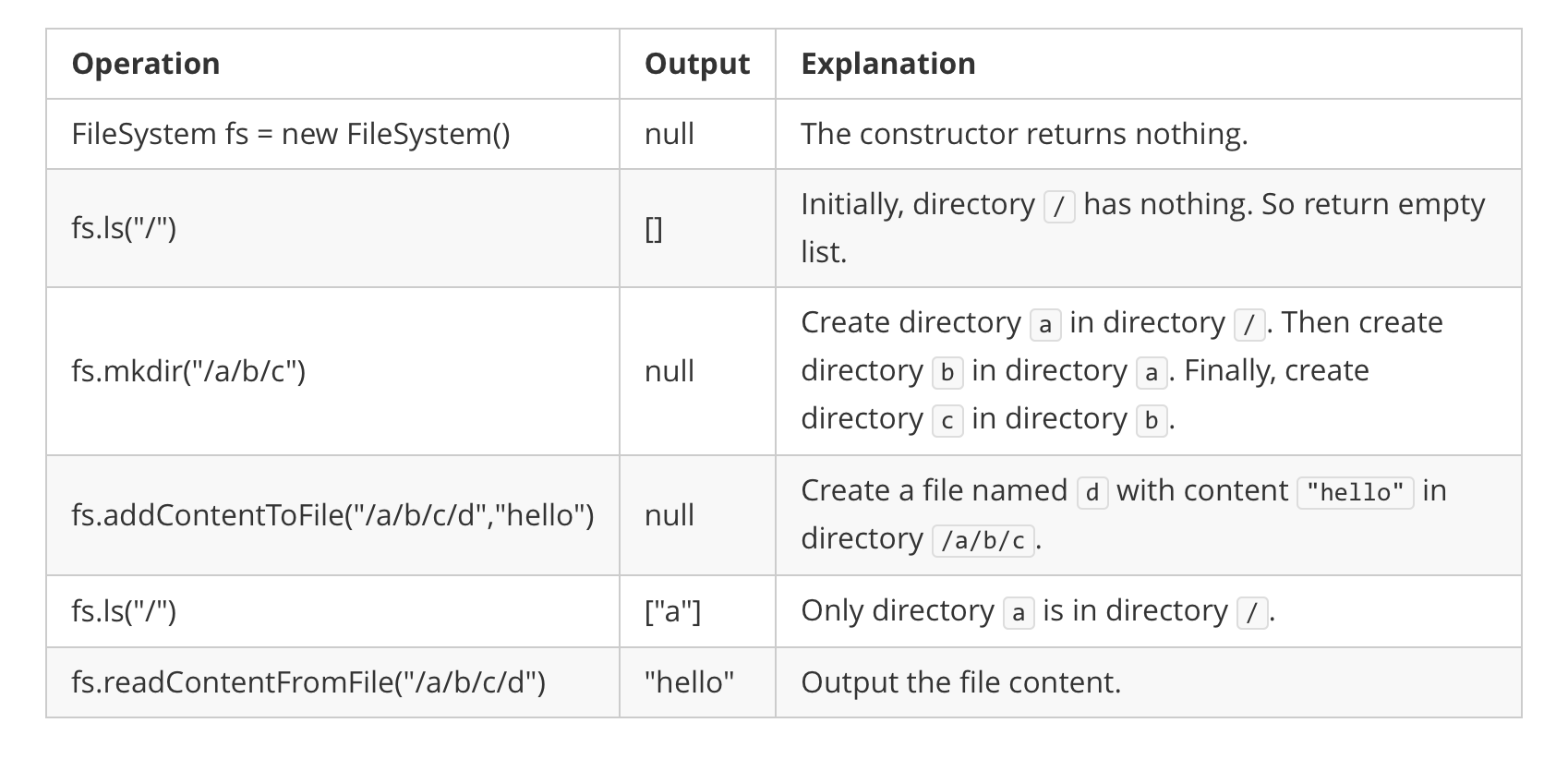
["FileSystem","ls","mkdir","addContentToFile","ls","readContentFromFile"]

[[],["/"],["/a/b/c"],["/a/b/c/d","hello"],["/"],["/a/b/c/d"]]

Output:

[null,[],null,null,["a"],"hello"]

Explanation:
Note:
- You can assume all file or directory paths are absolute paths which begin with
/and do not end with/except that the path is just"/". - You can assume that all operations will be passed valid parameters and users will not attempt to retrieve file content or list a directory or file that does not exist.
- You can assume that all directory names and file names only contain lower-case letters, and same names won't exist in the same directory.
这道题让我们设计一个内存文件系统,实现显示当前文件,创建文件,添加内容到文件,读取文件内容等功能,感觉像是模拟一个terminal的一些命令。这道题比较tricky的地方是ls这个命令,题目中的例子其实不能很好的展示出ls的要求,其对文件和文件夹的处理方式是不同的。由于这里面的文件没有后缀,所以最后一个字符串有可能是文件,也有可能是文件夹。比如a/b/c,那么最后的c有可能是文件夹,也有可能好是文件,如果c是文件夹的话,ls命令要输出文件夹c中的所有文件和文件夹,而当c是文件的话,只需要输出文件c即可。另外需要注意的是在创建文件夹的时候,路径上没有的文件夹都要创建出来,还有就是在给文件添加内容时,路径中没有的文件夹都要创建出来。论坛上这道题的高票解法都新建了一个自定义类,但是博主一般不喜欢用自定义类来解题,而且感觉那些使用了自定义类的解法并没有更简洁易懂,所以这里博主就不创建自定义类了,而是使用两个哈希表来做,其中dirs建立了路径和其对应的包含所有文件和文件夹的集合之间的映射,files建立了文件的路径跟其内容之间的映射。
最开始时将根目录"/"放入dirs中,然后看ls的实现方法,如果该路径存在于files中,说明最后一个字符串是文件,那么我们将文件名取出来返回即可,如果不存在,说明最后一个字符串是文件夹,那么我们到dirs中取出该文件夹内所有的东西返回即可。再来看mkdir函数,我们的处理方法就是根据"/"来分隔分隔字符串,如果是Java,那么直接用String自带的split函数就好了,但是C++没有Java那么多自带函数,所以只能借助字符串流类来处理,处理方法就是将每一层的路径分离出来,然后将该层的文件或者文件夹加入对应的集合中,注意的地方就是处理根目录时,要先加上"/",其他情况都是后加。下面来看addContentToFile函数,首先分离出路径和文件名,如果路径为空,说明是根目录,需要加上"/",然后看这个路径是否已经在dirs中存在,如果不存在,调用mkdir来创建该路径,然后把文件加入该路径对应的集合中,再把内容加入该文件路径的映射中。最后的读取文件内容就相当简单了,直接在files中返回即可,参见代码如下:
class FileSystem {

public:

    FileSystem() {

        dirs["/"];

    }

    vector<string> ls(string path) {

        if (files.count(path)) {

            int idx = path.find_last_of('/');

            return {path.substr(idx + )};

        }

        auto t = dirs[path];

        return vector<string>(t.begin(), t.end());

    }

    void mkdir(string path) {

        istringstream is(path);

        string t = "", dir = "";

        while (getline(is, t, '/')) {

            if (t.empty()) continue;

            if (dir.empty()) dir += "/";

            dirs[dir].insert(t);

            if (dir.size() > ) dir += "/";

            dir += t;

        }

    }

    void addContentToFile(string filePath, string content) {

        int idx = filePath.find_last_of('/');

        string dir = filePath.substr(, idx);

        string file = filePath.substr(idx + );

        if (dir.empty()) dir = "/";

        if (!dirs.count(dir)) mkdir(dir);

        dirs[dir].insert(file);

        files[filePath].append(content);

    }

    string readContentFromFile(string filePath) {

        return files[filePath];

    }

private:

    unordered_map<string, set<string>> dirs;

    unordered_map<string, string> files;

};
类似题目:
参考资料:
https://discuss.leetcode.com/topic/90250/c-fast-no-user-defined-types-needed
LeetCode All in One 题目讲解汇总(持续更新中...)
[LeetCode] Design In-Memory File System 设计内存文件系统的更多相关文章
- File System 之本地文件系统
上一篇文章提到了,最近做一个基于 File System/IndexedDB的应用,上一篇是定额和使用的查询. 因为LocalFileSystem只有chrome支持,有点尴尬,如果按需加载又何来尴尬 ...
- chattr lsattr linux file system attributes - linux 文件系统扩展属性
我们使用 linux 文件系统扩展属性,能够对linux文件系统进行进一步保护:从而给文件 赋予一些额外的限制:在有些情况下,能够对我们的系统提供保护: chattr命令用来改变文件属性.这项指令可改 ...
- GFS(Google File System,谷歌文件系统)----(1)文件系统简介
分布式文件系统 系统是构建在普通的.廉价的机器上,因此故障是常态而不是意外 系统希望存储的是大量的大型文件(单个文件size很大) 系统支持两种类型读操作:大量的顺序读取以及小规模的随机读取(larg ...
- GFS(Google File System,谷歌文件系统)----(1)读写一致性
GFS副本控制协议--中心化副本控制协议 对于副本集的更新操作有一个中心节点来协调管理,将分布式的并发操作转化为单点的并发操作,从而保证副本集内各节点的一致性.在GFS中,中心节点称之为Primary ...
- [CareerCup] 8.9 An In-memory File System 内存文件系统
8.9 Explain the data structures and algorithms that you would use to design an in-memory file system ...
- Design In-Memory File System
Design an in-memory file system to simulate the following functions: ls: Given a path in string form ...
- HDFS(Hadoop Distributed File System )
HDFS(Hadoop Distributed File System ) HDFS(Hadoop Distributed File System )Hadoop分布式文件系统.是根据google发表 ...
- Fast File System
不扯淡了,直接来写吧,一天一共要写三篇博客,还有两篇呢. 1. 这篇博客讲什么? Fast File System(FFS)快速文件系统,基本思想已经在在上一篇博客File System Implem ...
- File System Implementation 文件系统设计实现
先来扯淡吧,上一篇文章说到要补习的第二篇文章介绍文件系统的,现在就来写吧.其实这些技术都已经是很久以前的了,但是不管怎么样,是基础,慢慢来学习吧.有种直接上Spark源码的冲动.. 1. 这篇博客具体 ...
随机推荐
- ansible之二:模块用法
一:ansible远程执行命令 [root@ansible ~]# ansible test -m shell -a "date" >> 2016年 08月 02日 星 ...
- 开始补习JavaScript的第一天
JavaScript介绍: ①.JavaScript是一种解释性的,基于对象的脚本语言. ②.JavaScript是一种轻量级的编程语言,可以嵌入到html页面中,由浏览器来解释执行. ③.JavaS ...
- Java基础学习笔记二十四 MySQL安装图解
.MYSQL的安装 1.打开下载的mysql安装文件mysql-5.5.27-win32.zip,双击解压缩,运行“setup.exe”. 2.选择安装类型,有“Typical(默认)”.“Compl ...
- 从PRISM开始学WPF
我最近打算学习WPF ,在寻找MVVM框架的时候发现了PRISM,在此之前还从一些博客上了解了其他的MVVM框架,比如浅谈WPF中的MVVM框架--MVVMFoundation 中提到的MVVMFou ...
- 2018(上)C高级第0次作业
一:已关注邹欣老师的博客,以及一些任课老师的博客. 二:新学期新气象,走过基础C语言的学习,转眼间来到了C语言的高级学习... 1.翻阅邹欣老师博客关于师生关系博客,并回答下列问题. (1)最理想的师 ...
- 项目Beta冲刺第二天
1.昨天的困难,今天解决的进度,以及明天要做的事情 昨天的困难:昨天主要是在确认需求方面花了一些时间,后来终于确认了企业自查风险模块的需求问题 今天解决的进度:根据昨天确认下来的需求,我们基本上完成了 ...
- 20162318 实验三《 敏捷开发与XP实践》实验报告
北京电子科技学院(BESTI) 实 验 报 告 课程:程序设计与数据结构 班级:1623班 姓名:张泰毓 指导老师:娄老师.王老师 实验日期:2017年5月12日 实验密级:非密级 实验器材:带Lin ...
- 201621123031 《Java程序设计》第13周学习总结
作业13-网络 1.本周学习总结 以你喜欢的方式(思维导图.OneNote或其他)归纳总结多网络相关内容. 2. 为你的系统增加网络功能(购物车.图书馆管理.斗地主等)-分组完成 为了让你的系统可以被 ...
- 获取android项目的数据库地址或者数据库名
你不需要知道该路径.只是使用数据库,你可以将它们删除的列表. for (String databaseName : context.databaseList()) { context.deleteDa ...
- 关于kali linux 2.0的vmware tools的安装问题
在安装好kali linux 2.0 后,首先要做的就是添加源并更新系统,否则会出现软件定位问题. 在kali 2.0中,vmware tools已经不能使用了,官方放了一个工具下载安装就好. 添加源 ...