
SpringBoot + Spring Security 学习笔记(三)实现图片验证码认证
整体实现逻辑
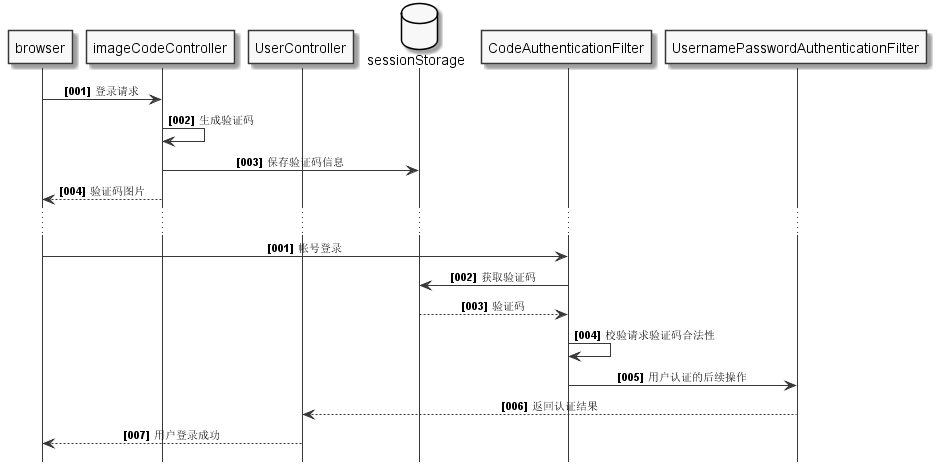
- 前端在登录页面时,自动从后台获取最新的验证码图片
- 服务器接收获取生成验证码请求,生成验证码和对应的图片,图片响应回前端,验证码保存一份到服务器的 session 中
- 前端用户登录时携带当前验证码
- 服务器校验验证码是否合法(验证码存在并未过期),继续后续的用户名和密码校验逻辑
通过一个时序图来表述如下图,图中细化了一下各个控制器和过滤器之间的功能职责,还不是很正规,只为了更好表达上述的流程描述,所以读者们将就一下:
时序图 plantUML 代码
plantUML 的使用教程请移步至之前发布过的文章:PlantUML 语法之时序图
@startuml

hide footbox

skinparam sequenceMessageAlign center

skinparam sequenceArrowFontSize 11

skinparam noteFontSize 11

skinparam monochrome true

skinparam lifelinestrategy solid

autonumber "<b>[000]"

participant browser as ui

participant imageCodeController as ic

participant UserController as uc

database sessionStorage as session

participant CodeAuthenticationFilter as cf

participant "UsernamePasswordAuthenticationFilter" as uf

ui -> ic: 登录请求

ic -> ic: 生成验证码

ic -> session: 保存验证码信息

ic --> ui: 验证码图片

...

autonumber "<b>[000]"

ui -> cf: 帐号登录

cf -> session: 获取验证码

session --> cf: 验证码

cf -> cf: 校验请求验证码合法性

cf -> uf: 用户认证的后续操作

uf --> uc: 返回认证结果

uc --> ui: 用户登录成功

@enduml
将上述的逻辑进行任务拆分:随机验证码和图片生成,生成验证码请求Controller,session存储器就临时使用spring-social-web包中的SessionStrategy来存储,验证码过滤器,配置过滤器到spring scuerity
过滤器中的用户密码验证过滤器之前。
前端控制器+生成验证码
服务器 session 容器
采用小步快走的开发模式,前端控制器和生成验证码的代码都写在一起,后期再进行代码重构, 这里主要引用了spring-social-web依赖:
<dependency>

    <groupId>org.springframework.social</groupId>

    <artifactId>spring-social-web</artifactId>

    <version>1.1.4.RELEASE</version>

</dependency>
这个包里面有个很小巧的session管理工具:SessionStrategy
考虑到这个 session 在验证码过滤器中还得使用,所以自定义了一个配置,直接注入到了spring中:
import org.springframework.context.annotation.Bean;

import org.springframework.context.annotation.Configuration;

import org.springframework.social.connect.web.HttpSessionSessionStrategy;

import org.springframework.social.connect.web.SessionStrategy;

@Configuration

public class AppConfig {

    @Bean("sessionStrategy")

    public SessionStrategy registBean() {

        SessionStrategy sessionStrategy = new HttpSessionSessionStrategy();

        return sessionStrategy;

    }

}
这样,在 Controller 层直接通过@Autowired引用即可。
图片验证码容器
图片验证码对象需要至少三个属性:图片,验证码,过期时间。
后期可能还有其他的验证形式,但是其中公共的部分:验证码和过期时间是可以抽象出来,这里为了演示不做重构。
import java.awt.image.BufferedImage;

import java.time.LocalDateTime;

import lombok.AllArgsConstructor;

import lombok.Data;

@Data

@AllArgsConstructor

public class ImageCode {

    private BufferedImage image;

    private String code;

    private LocalDateTime expireTime;

    public ImageCode(BufferedImage image, String code, int expireIn) {

        this.code = code;

        this.image = image;

        this.expireTime = LocalDateTime.now().plusSeconds(expireIn);

    }

    public boolean isExpried() {

        return LocalDateTime.now().isAfter(getExpireTime());

    }

}
公共常量
在图片生成代码中,图片的尺寸,验证码的随机随机数长度和过期时间,都设计在了静态常量类中,当然也可以做成配置文件。验证码的 session 的唯一标识也做成了公共的,以便在验证码过滤器中进行校验时使用:
public class MyConstants {

    public static final String SESSION_KEY = "SESSION_KEY_IMAGE_CODE";

    // 图片宽度

    public static final int WIDTH = 90;

    // 图片高度

    public static final int HEIGHT = 20;

    // 验证码的位数

    public static final int RANDOM_SIZE = 4;

    // 验证码过期秒数

    public static final int EXPIRE_SECOND = 30;

}
生成验证码请求Controller源码:
import static org.woodwhale.king.commons.MyConstants.EXPIRE_SECOND;

import static org.woodwhale.king.commons.MyConstants.HEIGHT;

import static org.woodwhale.king.commons.MyConstants.RANDOM_SIZE;

import static org.woodwhale.king.commons.MyConstants.SESSION_KEY;

import static org.woodwhale.king.commons.MyConstants.WIDTH;

import java.awt.Color;

import java.awt.Font;

import java.awt.Graphics;

import java.awt.image.BufferedImage;

import java.io.IOException;

import java.util.Random;

import javax.imageio.ImageIO;

import javax.servlet.http.HttpServletRequest;

import javax.servlet.http.HttpServletResponse;

import org.springframework.beans.factory.annotation.Autowired;

import org.springframework.social.connect.web.SessionStrategy;

import org.springframework.web.bind.ServletRequestUtils;

import org.springframework.web.bind.annotation.GetMapping;

import org.springframework.web.bind.annotation.RestController;

import org.springframework.web.context.request.ServletWebRequest;

import org.woodwhale.king.model.ImageCode;

@RestController

public class ValidateCodeController {

    @Autowired

    private SessionStrategy sessionStrategy;

    @GetMapping("/code/image")

    public void createCode(HttpServletRequest request, HttpServletResponse response) throws IOException {

        ImageCode imageCode = generate(new ServletWebRequest(request));

        sessionStrategy.setAttribute(new ServletWebRequest(request), SESSION_KEY, imageCode);

        ImageIO.write(imageCode.getImage(), "JPEG", response.getOutputStream());

    }

    /**

     * 生成图形验证码

     * @param request

     * @return

     */

    private ImageCode generate(ServletWebRequest request) {

        int width = ServletRequestUtils.getIntParameter(request.getRequest(), "width", WIDTH);

        int height = ServletRequestUtils.getIntParameter(request.getRequest(), "height", HEIGHT);

        BufferedImage image = new BufferedImage(width, height, BufferedImage.TYPE_INT_RGB);

        Graphics g = image.getGraphics();

        Random random = new Random();

        g.setColor(getRandColor(200, 250));

        g.fillRect(0, 0, width, height);

        g.setFont(new Font("Times New Roman", Font.ITALIC, 20));

        g.setColor(getRandColor(160, 200));

        for (int i = 0; i < 155; i++) {

            int x = random.nextInt(width);

            int y = random.nextInt(height);

            int xl = random.nextInt(12);

            int yl = random.nextInt(12);

            g.drawLine(x, y, x + xl, y + yl);

        }

        String sRand = "";

        int length = ServletRequestUtils.getIntParameter(request.getRequest(), "length", RANDOM_SIZE);

        for (int i = 0; i < length; i++) {

            String rand = String.valueOf(random.nextInt(10));

            sRand += rand;

            g.setColor(new Color(20 + random.nextInt(110), 20 + random.nextInt(110), 20 + random.nextInt(110)));

            g.drawString(rand, 13 * i + 6, 16);

        }

        g.dispose();

        return new ImageCode(image, sRand, EXPIRE_SECOND);

    }

    /**

     * 生成随机背景条纹

     *

     * @param fc

     * @param bc

     * @return

     */

    private Color getRandColor(int fc, int bc) {

        Random random = new Random();

        if (fc > 255) {

            fc = 255;

        }

        if (bc > 255) {

            bc = 255;

        }

        int r = fc + random.nextInt(bc - fc);

        int g = fc + random.nextInt(bc - fc);

        int b = fc + random.nextInt(bc - fc);

        return new Color(r, g, b);

    }

}
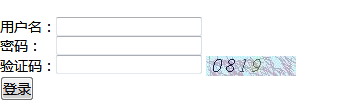
为了提升代码的可扩展性,随机验证码的生成方法generate()的方法最好是抽成接口,后期可能还有短信验证码,三方登录的验证码,这里仅做演示。上述验证码图片效果:
验证码过滤器
SpringSecurity 是通过过滤器链来进行校验的,我们想要验证图形验证码,所以可以在认证流程之前,也就是UsernamePasswordAuthenticationFilter之前进行校验。
那么自定义的验证码过滤器也需要实现j2EE的过滤器接口,同时验证方法validate()只做了内部方法抽象,后期可以做成可扩展的抽象接口,这个void方法可能会抛出异常,这里的异常设计成了spring security框架的AuthenticationException高级抽象异常的子类,为了就是保证和安全认证的异常同步,后期使用同一个失败处理器抓取AuthenticationException类型的异常即可:
import org.springframework.security.core.AuthenticationException;

public class MyException extends AuthenticationException {

    private static final long serialVersionUID = 1L;

    public MyException(String msg) {

        super(msg);

    }

}
而上述异常的接收者就是springboot + spring security 学习笔记(一)自定义基本使用及个性化登录配置里提到的自定义认证失败处理器。
import static org.woodwhale.king.commons.MyConstants.SESSION_KEY;

import java.io.IOException;

import java.util.Objects;

import javax.servlet.Filter;

import javax.servlet.FilterChain;

import javax.servlet.ServletException;

import javax.servlet.http.HttpServletRequest;

import javax.servlet.http.HttpServletResponse;

import org.apache.commons.lang3.StringUtils;

import org.springframework.beans.factory.annotation.Autowired;

import org.springframework.security.core.AuthenticationException;

import org.springframework.security.web.authentication.AuthenticationFailureHandler;

import org.springframework.social.connect.web.SessionStrategy;

import org.springframework.stereotype.Component;

import org.springframework.web.bind.ServletRequestBindingException;

import org.springframework.web.bind.ServletRequestUtils;

import org.springframework.web.context.request.ServletWebRequest;

import org.springframework.web.filter.OncePerRequestFilter;

import org.woodwhale.king.MyException;

import org.woodwhale.king.model.ImageCode;

import lombok.extern.slf4j.Slf4j;

@Slf4j

@Component("validateCodeFilter")

public class ValidateCodeFilter extends OncePerRequestFilter implements Filter {

    /**

     * 验证码校验失败处理器

     */

    @Autowired

    private AuthenticationFailureHandler authenticationFailureHandler;

    @Autowired

    private SessionStrategy sessionStrategy;

    @Override

    protected void doFilterInternal(HttpServletRequest request, HttpServletResponse response, FilterChain filterChain)

            throws ServletException, IOException {

        // 必须是登录的post请求才能进行验证,其他的直接放行

        if(StringUtils.equals("/user/login", request.getRequestURI()) && StringUtils.equalsIgnoreCase(request.getMethod(), "post")) {

            log.info("request : {}", request.getRequestURI());

            try {

                // 1. 进行验证码的校验

                validate(new ServletWebRequest(request));

            } catch (AuthenticationException e) {

                // 2. 捕获步骤1中校验出现异常,交给失败处理类进行进行处理

                authenticationFailureHandler.onAuthenticationFailure(request, response, e);

                return;

            }

        }

        // 3. 校验通过,就放行

        filterChain.doFilter(request, response);

    }

    private void validate(ServletWebRequest request) throws ServletRequestBindingException {

        // 1. 获取请求中的验证码

        String codeInRequest = ServletRequestUtils.getStringParameter(request.getRequest(), "imageCode");

        // 2. 校验空值情况

        if(StringUtils.isEmpty(codeInRequest)) {

            throw new MyException("验证码不能为空");

        }

        // 3. 获取服务器session池中的验证码

        ImageCode codeInSession = (ImageCode) sessionStrategy.getAttribute(request, SESSION_KEY);

        if(Objects.isNull(codeInSession)) {

            throw new MyException("验证码不存在");

        }

        // 4. 校验服务器session池中的验证码是否过期

        if(codeInSession.isExpried()) {

            sessionStrategy.removeAttribute(request, SESSION_KEY);

            throw new MyException("验证码过期了");

        }

        // 5. 请求验证码校验

        if(!StringUtils.equals(codeInSession.getCode(), codeInRequest)) {

            throw new MyException("验证码不匹配");

        }

        // 6. 移除已完成校验的验证码

        sessionStrategy.removeAttribute(request, SESSION_KEY);

    }

}
细节注意:这个过滤器继承了OncePerRequestFilter,目的在于接受 spring 的管理,它能保证我们的过滤器在一次请求中只被调用一次。
验证码过滤器配置
验证码的过滤应该在用户认证过滤之前,所以需要配置在UsernamePasswordAuthenticationFilter过滤器之前,自定义的ValidateCodeFilter过滤器由于配置了@Component("validateCodeFilter"),所以已经注入到了 spring 中,安全认证配置中直接@Autowired引用即可。
注意:因为在验证码Controller 中设置了这个
/code/image请求路径,因此要做不需验证配置,将其加入到.antMatchers()中。
@Configuration

@EnableWebSecurity

public class WebSecurityConfig extends WebSecurityConfigurerAdapter {

    @Autowired

    private ValidateCodeFilter validateCodeFilter;

    @Override

    protected void configure(HttpSecurity http) throws Exception {

        // 将自定义的验证码过滤器放置在 UsernamePasswordAuthenticationFilter 之前

        http.addFilterBefore(validateCodeFilter, UsernamePasswordAuthenticationFilter.class)

            .formLogin()

            .loginPage("/login")	 					// 设置登录页面

            .loginProcessingUrl("/user/login") 			// 自定义的登录接口

            .successHandler(myAuthenctiationSuccessHandler)

            .failureHandler(myAuthenctiationFailureHandler)

            .defaultSuccessUrl("/home").permitAll()		// 登录成功之后,默认跳转的页面

            .and().authorizeRequests()					// 定义哪些URL需要被保护、哪些不需要被保护

            .antMatchers("/", "/index", "/user/login", "/code/image").permitAll() // 设置所有人都可以访问登录页面

            .anyRequest().authenticated() 				// 任何请求,登录后可以访问

            .and().csrf().disable(); 					// 关闭csrf防护

    }

}
到此,整个图片验证码的安全认证流程设计就结束了,可以再回头看看笔者最开始画的时序图,感觉还是非常不专业规范的,这里辅助说明的草稿,如笔者有设计更好的时序图,欢迎交流。
SpringBoot + Spring Security 学习笔记(三)实现图片验证码认证的更多相关文章
- SpringBoot + Spring Security 学习笔记(二)安全认证流程源码详解
用户认证流程 UsernamePasswordAuthenticationFilter 我们直接来看UsernamePasswordAuthenticationFilter类, public clas ...
- SpringBoot + Spring Security 学习笔记(五)实现短信验证码+登录功能
在 Spring Security 中基于表单的认证模式,默认就是密码帐号登录认证,那么对于短信验证码+登录的方式,Spring Security 没有现成的接口可以使用,所以需要自己的封装一个类似的 ...
- SpringBoot + Spring Security 学习笔记(一)自定义基本使用及个性化登录配置
官方文档参考,5.1.2 中文参考文档,4.1 中文参考文档,4.1 官方文档中文翻译与源码解读 SpringSecurity 核心功能: 认证(你是谁) 授权(你能干什么) 攻击防护(防止伪造身份) ...
- SpringBoot + Spring Security 学习笔记(四)记住我功能实现
记住我功能的基本原理 当用户登录发起认证请求时,会通过UsernamePasswordAuthenticationFilter进行用户认证,认证成功之后,SpringSecurity 调用前期配置好的 ...
- Spring Security学习笔记(三)
之前提到过认证后怎么存放用户信息,令牌token是一种方式,session是另一种方式,这里介绍使用spring session data redis存储httpSession. 添加了以上依赖后,我 ...
- Spring Security学习笔记
Spring Web Security是Java web开发领域的一个认证(Authentication)/授权(Authorisation)框架,基于Servlet技术,更确切的说是基于Servle ...
- Spring Security学习笔记一
一.使用Spring Security 1.在pom 文件中添加Spring Security的依赖. <dependency> <groupId>org.springfram ...
- Spring security学习笔记(二)
对比两种承载认证信息的方式: session vs token token验证方案: session验证方案: session即会话是将用户信息保存在服务端,根据请求携带的session_id,从服务 ...
- Spring Security学习笔记(一)
认证和权限控制 AuthenticationManager是认证的主要接口,它只有一个authenticate方法,可以做3件事情. 返回一个认证信息(Authentication),表示认证成功 抛 ...
随机推荐
- bzoj3594 方伯伯的玉米田 树状数组优化dp
f[i][j]表示到第i位,使用了j次机会的最长不下降子序列长度 转移:f[i][j]=max(f[x][y])+1; x<i; y<=j; a[x]+y<=a[i]+j; 所以根据 ...
- 【小白学C#】谈谈C#多播委托因异常而终止的解决方案
一.前言 前几天,马三在与朋友闲聊技术的时候,朋友忽然抛出一个问题,把马三难倒了,本着求知的精神,回来以后马三就查阅了相关资料并做了一些实验,终于把问题搞明白了,因此写下本篇博客记录一下.首先,问题是 ...
- 阿里巴巴Java开发程序猿年薪40W是什么水平?
对于年薪40万的程序员,不只是技术过硬,还有一个原因是他们所在的公司福利高,或者会直接持股.在BAT中就是一个很好的案例,例如阿里巴巴P7,P8级别的员工不仅是年薪30到80万不等,还有更多股票持有. ...
- Windbg分析高内存占用问题
1. 问题简介 最近产品发布大版本补丁更新,一商超客户升级后,反馈系统经常奔溃,导致超市的收银系统无法正常收银,现场排队付款的顾客更是抱怨声声.为了缓解现场的情况, 客户都是手动回收IIS应用程序池才 ...
- Android 7.0 存储系统—Vold与MountService分析(三)(转 Android 9.0 分析)
Android的存储系统(三) 回顾:前帖分析了Vold的main()函数和NetlinkManager的函数调用流程,截止到NetlinkHandler的创建和start()调用,本帖继续分析源码 ...
- 分析Class类和ClassLoader类下的同名方法getResourceAsStream
在读取本地资源的时候我们经常需要用到输入流,典型的场景就是使用Druid连接池时读取连接池的配置文件.Java为我们提供了读取资源的方法getResourceAsStream(),该方法有三种: Cl ...
- python接口自动化(二十二)--unittest执行顺序隐藏的坑(详解)
简介 大多数的初学者在使用 unittest 框架时候,不清楚用例的执行顺序到底是怎样的.对测试类里面的类和方法分不清楚,不知道什么时候执行,什么时候不执行.虽然或许通过代码实现了,也是稀里糊涂的一知 ...
- [小技巧]EF Core中如何获取上下文中操作过的实体
原文地址:https://www.cnblogs.com/lwqlun/p/10576443.html 作者:Lamond Lu 源代码:https://github.com/lamondlu/EFC ...
- 视频当道的时代,这些珍藏的优质 Python 播客值得推荐
我国互联网的发展道路与欧美不同,在内容的形式上,我们似乎实现了跨越式的发展——早早进入了移动互联网时代,直播和短视频等形式的内容成为了潮流,而文字形式的博客(blog)与声音形式的播客(podcast ...
- python爬虫踩坑教程
我们的目标是爬取下面这个个网址上的2010~2018年的数据 http://stockdata.stock.hexun.com/zrbg/Plate.aspx?date=2015-12-31 获取我们 ...