
笔记13 AOP中After和AfterReturning的区别
AOP中 @Before @After @AfterThrowing@AfterReturning的执行顺序
 public Object invoke(Object proxy, Method method, Object[] args) throws Throwable {

    Object result;

    try {

        //@Before

        result = method.invoke(target, args);

        //@After

        return result;

    } catch (InvocationTargetException e) {

        Throwable targetException = e.getTargetException();

        //@AfterThrowing

        throw targetException;

    } finally {

        //@AfterReturning

    }

 }
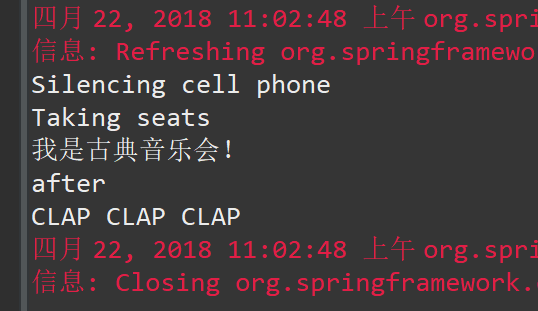
以Audience为例,代码如下:
 package concert;

 import org.aspectj.lang.annotation.After;

 import org.aspectj.lang.annotation.AfterReturning;

 import org.aspectj.lang.annotation.AfterThrowing;

 import org.aspectj.lang.annotation.Aspect;

 import org.aspectj.lang.annotation.Before;

 import org.aspectj.lang.annotation.Pointcut;

 import org.springframework.stereotype.Component;

 @Aspect

 @Component

 public class Audience {

     @Pointcut("execution(* concert.Performance.perform(..))")

     public void performs() {

     }

     @Before("performs()")

     public void silenceCellPhones() {

         System.out.println("Silencing cell phone");

     }

     @Before("performs()")

     public void takeSeats() {

         System.out.println("Taking seats");

     }

     @After("performs()")

     public void after() {

         System.out.println("after");

     }

     @AfterReturning("performs()")

     public void applause() {

         System.out.println("CLAP CLAP CLAP");

     }

     @AfterThrowing("performs()")

     public void demandRefund() {

         System.out.println("Demanding a refund");

     }

 }
执行结果:
注入AspectJ切面 (新)
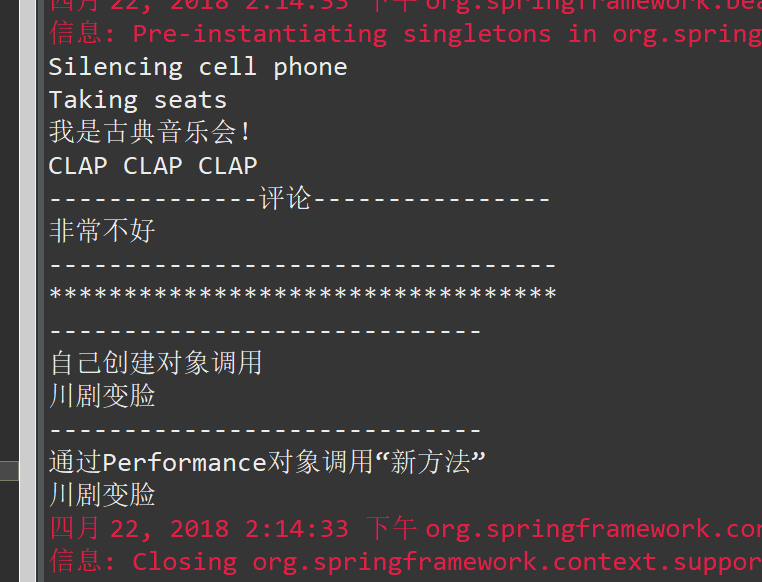
1.将原来的观众类定义为一个真正的切面,Audience.java 将观众的行为都放在这个切面中,然后在spring中引用这个切面,并且为这个切面注入新的方法,具体可参照笔记12。
 package concert4;

 public aspect Audience {

     public Audience(){}

     pointcut performance():execution(* perform(..));

     before():performance(){

         System.out.println("Silencing cell phone");

     }

     before():performance(){

         System.out.println("Taking seats");

     }

     after():performance(){

         System.out.println("CLAP CLAP CLAP");

     }

     after()returning :performance(){

         System.out.println("--------------评论----------------");

         System.out.println(criticismEngine.getCriticism());

         System.out.println("----------------------------------");

     }

     private CriticismEngine criticismEngine;

     public void setCriticismEngine(CriticismEngine criticismEngine){

         this.criticismEngine=criticismEngine;

     }

 }
2.修改XML配置文件
 <?xml version="1.0" encoding="UTF-8"?>

 <beans xmlns="http://www.springframework.org/schema/beans"

     xmlns:xsi="http://www.w3.org/2001/XMLSchema-instance"

     xmlns:aop="http://www.springframework.org/schema/aop"

     xmlns:tx="http://www.springframework.org/schema/tx"

     xmlns:context="http://www.springframework.org/schema/context"

     xmlns:c="http://www.springframework.org/schema/c"

     xsi:schemaLocation="

    http://www.springframework.org/schema/beans

    http://www.springframework.org/schema/beans/spring-beans-3.0.xsd

    http://www.springframework.org/schema/aop

    http://www.springframework.org/schema/aop/spring-aop-3.0.xsd

    http://www.springframework.org/schema/tx

    http://www.springframework.org/schema/tx/spring-tx-3.0.xsd

    http://www.springframework.org/schema/context

    http://www.springframework.org/schema/context/spring-context-3.0.xsd">

            <bean class="concert4.Classcial"></bean>

         <bean id="criticismEngine" class="concert4.CriticismEngineTmpl">

             <property name="criticismPool">

                 <list>

                     <value>不好</value>

                     <value>很不好</value>

                     <value>非常不好</value>

                 </list>

             </property>

         </bean>

         <bean id="audience" class="concert4.Audience" factory-method="aspectOf">

             <property name="criticismEngine" ref="criticismEngine"></property>

         </bean>

             <aop:config>

                    <aop:aspect ref="audience">

                        <aop:declare-parents types-matching="concert4.Performance+"

                                             implement-interface="concert4.Encoreable"

                                             default-impl="concert4.DefaultEncoreable"/>

                    </aop:aspect>

            </aop:config>

    </beans>
3.结果
笔记13 AOP中After和AfterReturning的区别的更多相关文章
- Spring AOP中 args和arg-names的区别
这两天在看aop aspectj的各种语法,发现里面有两个概念 args和arg-names很容易混淆,网上也基本没说清楚,所以就动手试了一下,发现还是自己试试比较好理解 先说结论: args是和ex ...
- spring aop中aspect和advisor的区别
之前看到spring AOP配置aspect(切面)有两种方式,一种是利用注解的方式配置,一种是利用XML的方式配置. 我们的配置是这样的<aop:aspect>,还有另外一种<ao ...
- C语言学习笔记 (002) - C++中引用和指针的区别(转载)
下面用通俗易懂的话来概述一下: 指针-对于一个类型T,T*就是指向T的指针类型,也即一个T*类型的变量能够保存一个T对象的地址,而类型T是可以加一些限定词的,如const.volatile等等.见下图 ...
- 前端学习笔记之HTML中的id,name,class区别
name 属性用于在 JavaScript 中对元素进行引用,或者在表单提交之后,对表单数据进行引用. html的name和id可以类比身份证的姓名和身份证编号,编号id具有唯一性,一个id只出现一次 ...
- 【学习笔记】js中undefined和null的区别和联系
在JavaScript中存在这样两种原始类型:Null与Undefined.这两种类型常常会使JavaScript的开发人员产生疑惑,在什么时候是Null,什么时候又是Undefined? Undef ...
- 机器学习实战 - 读书笔记(13) - 利用PCA来简化数据
前言 最近在看Peter Harrington写的"机器学习实战",这是我的学习心得,这次是第13章 - 利用PCA来简化数据. 这里介绍,机器学习中的降维技术,可简化样品数据. ...
- Spring AOP中定义切点(PointCut)和通知(Advice)
如果你还不熟悉AOP,请先看AOP基本原理,本文的例子也沿用了AOP基本原理中的例子.切点表达式 切点的功能是指出切面的通知应该从哪里织入应用的执行流.切面只能织入公共方法.在Spring AOP中, ...
- Ext.Net学习笔记13:Ext.Net GridPanel Sorter用法
Ext.Net学习笔记13:Ext.Net GridPanel Sorter用法 这篇笔记将介绍如何使用Ext.Net GridPanel 中使用Sorter. 默认情况下,Ext.Net GridP ...
- Spring AOP高级——源码实现(2)Spring AOP中通知器(Advisor)与切面(Aspect)
本文例子完整源码地址:https://github.com/yu-linfeng/BlogRepositories/tree/master/repositories/Spring%20AOP%E9%A ...
随机推荐
- C语言Linix服务器网络爬虫项目(一)项目初衷和网络爬虫概述
一.项目初衷和爬虫概述 1.项目初衷 本人的大学毕设就是linux上用c写的一个爬虫,现在我想把它完善起来,让他像一个企业级别的项目.为了重复发明轮子来学习轮子的原理,我们不使用第三方框架(这里是说的 ...
- JAVA工程师面试题【来自并发编程网】
基础题: Java线程的状态 进程和线程的区别,进程间如何通讯,线程间如何通讯 HashMap的数据结构是什么?如何实现的.和HashTable,ConcurrentHashMap的区别 Cookie ...
- 英语日常词汇:living-room、dining-room vs dining hall
hall 大厅 : living room起居室,客厅 : dining room餐厅.饭厅 dining room是家里的客厅,比较小啊,dining hall一般指酒店或宾馆啊什么的的大厅,宴客厅
- power designer 连接mysql提示“connection test failed”
本机环境: win10 64位 jdk8 64位 问题: 测试连接时,总是提示 根据网上搜索: 根源在于:PowerDesigner based on 32 bit JVM kernel 参考: ht ...
- Django ORM创建数据库
Python的WEB框架有Django.Tornado.Flask 等多种,Django相较与其他WEB框架其优势为:大而全,框架本身集成了ORM.模型绑定.模板引擎.缓存.Session等诸多功能. ...
- 如何使用Visual Studio 2017自带的源代码反编译功能
反编译C#源代码,大家可能第一时间想到 .NET Reflector 这个工具.但是这个工具反编译出来的代码跟实际源码还是有一定差距的,阅读起来不是很便利. 本人在查看Visual Studio 20 ...
- Linux:nohub启动后台永久进程
nohup 命令运行由 Command参数和任何相关的 Arg参数指定的命令,忽略所有挂断(SIGHUP)信号.在注销后使用 nohup 命令运行后台中的程序.要运行后台中的 nohup 命令,添加 ...
- POJ-1511 Invitation Cards---Dijkstra+队列优化+前向星正向反向存图
题目链接: https://vjudge.net/problem/POJ-1511 题目大意: 给定节点数n,和边数m,边是单向边. 问从1节点出发到2,3,...n 这些节点路程和从从这些节点回来到 ...
- Python无法导入Cython的.pyx文件
在import 相应包之前, 添加: import pyximport pyximport.install() 即可.
- 利用typescript生成Swagger文档
项目地址:https://github.com/wz2cool/swagger-ts-doc demo代码地址:https://github.com/wz2cool/swagger-ts-doc-de ...