
WebAssembly编译
环境:centos 7.9
1、准备环境
sudo yum install docker

sudo systemctl start docker.service

sudo docker pull trzeci/emscripten:latest
2、编写C++源文件
//main.cpp

#include<stdio.h>

#include<string>

#include<cstring>

#ifdef __EMSCRIPTEN__

#include<emscripten.h>

#endif

int main()

{

  return 0;

}

extern "C"{

#ifdef __EMSCRIPTEN__

  EMSCRIPTEN_KEEPALIVE

#endif

  int add(int x,int y)

  {

    return x + y;

  }

#ifdef __EMSCRIPTEN__

  EMSCRIPTEN_KEEPALIVE

#endif

  int min(int x,int y)

  {

    return x -y;

  }

#ifdef __EMSCRIPTEN__

  EMSCRIPTEN_KEEPALIVE

#endif

  char* get(char* a)

  {

    return a;

  }

#ifdef __EMSCRIPTEN__

  EMSCRIPTEN_KEEPALIVE

#endif

  char* data(char* a)

  {

    *a = '\0';

    char name[] = "hello from native code.";

    strcat(a,name);

    return a;

  }

#ifdef __EMSCRIPTEN__

  EMSCRIPTEN_KEEPALIVE

#endif

  int get_data(char* name,int lenth,char* onoutput)

  {

    char str[260]={0};

    sprintf(str,"name:%s,lenth:%d,from native code.",name,lenth);

    strcpy(onoutput,str);

    return strlen(str);

  }

}
3、启动docker,并将main.cc文件拷贝至docker中进行编译。
sudo docker run -ti 7634ecdacf21 /bin/bash
编译指令:
emcc main.cpp -o main.js -s EXTRA_EXPORTED_RUNTIME_METHODS=['ccall','cwrap','UTF8ToString']
编译后,产生如下main.js 和main.wasm文件。

4、测试
将main.js、main.wasm(两个文件存放目录一致)拷贝到web容器中,并编写main.html测试页面。
<html>

  <head>

    <meta charset="utf-8">

    <title>WebAssemble Demo</title>

  </head>

  <body>

    <button onclick="fun_add()">add</button>

    <button onclick="fun_min()">min</button>

    <button onclick="fun_get()">get</button>

    <button onclick="fun_data()">data</button>

    <button onclick="fun_get_data()">get_data</button>

    <div id="log"></div>

    <script>

      function fun_add()

      {

        const add=Module.cwrap('add','number',['number,number']);

        log.innerHTML=("add(12,5)的计算结果:" + add(12, 5));

      }

      function fun_min()

      {

        const min=Module.cwrap('min','number',['number','number']);

        log.innerHTML=("min(12,5)的计算结果:" + min(12, 5));

      }

      function fun_get()

      {

        const get = Module.cwrap('get','string',['string']);

        log.innerHTML=get('汉语-hanyu-demo!');

      }

      function fun_data()

      {

        const data = Module.cwrap('data','string',['string']);

        log.innerHTML=data('');

      }

      function fun_get_data()

      {

        let onoutput="";

        const pointer = Module._malloc(256);

        const get_data = Module.ccall('get_data','number',['string','number','number'],['hello from web',129,pointer]);

        onoutput = Module.UTF8ToString(pointer);

        log.innerHTML=onoutput;

        Module._free(pointer)

      }

    </script>

    <script src="democpp.js"></script>

  </body>

</html>
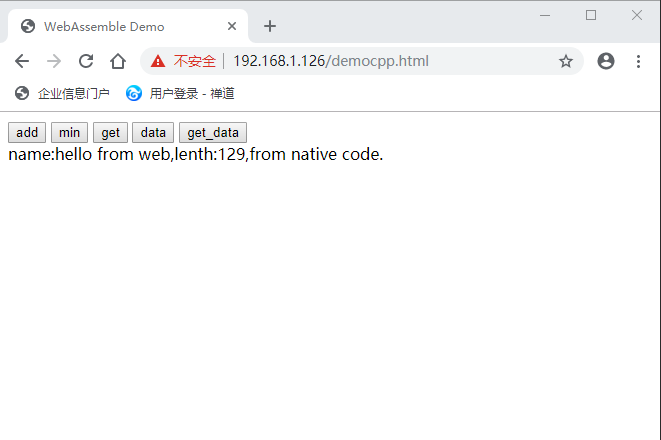
在浏览器中输入main.html页面请求地址,分别点击[add]、[min]、[ge]三个按钮进行测试,实验效果如下图所示:
WebAssembly编译的更多相关文章
- 对于WebAssembly编译出来的.wasm文件js如何调用
WebAssembly也叫浏览器字节码技术 这里就不过多的解释了网上很多介绍 主要是让大家知道在js里面如何调用执行它,我之前看WebAssemblyAPI时候反正是看得一脸懵逼 也是为了大家能更快的 ...
- 初探WebAssembly
1.前言 参加完2018年上海的QCon大会,想到了会议中来自Microsoft的朱力旻大佬讲的WebAssembly,感触颇深. 我之前完全没有了解过WebAssembly,之前没有了解的原因也很简 ...
- WebAssembly 介绍
http://blog.csdn.net/zhangzq86/article/details/61195685 WebAssembly 的出现是不是意味着 Javascript 要完? https:/ ...
- WebAssembly,Web的新时代
在浏览器之争中,Chrome凭借JavaScript的卓越性能取得了市场主导地位,然而由于javascript的无类型特性,导致其运行时消耗大量的性能做为代价,这也是JavaScript的瓶颈之一.W ...
- 纵论WebAssembly,JS在性能逆境下召唤强援
webassembly的作用 webassembly是一种底层的二进制数据格式和一套可以操作这种数据的JS接口的统称.我们可以认为webassembly的范畴里包含两部分 wasm: 一种体积小.加载 ...
- 在Windows10搭建WebAssembly开发环境
最近研究WebAssembly技术,准备用WebAssembly编译C/C++代码供前端调用.网上看了很多文章,收获很大,现在就遇到的问题做一个记录. 官网关于windows开发环境搭建基本上几句话, ...
- shell 中长命令的换行处理
考察下面的脚本: emcc -o ./dist/test.html --shell-file ./tmp.html --source-map-base dist -O3 -g4 --source-ma ...
- Linux 一条长命令占用多行
前言 考察下面的脚本: ? 1 emcc -o ./dist/test.html --shell-file ./tmp.html --source-map-base dist -O3 -g4 --so ...
- Blazor带我重玩前端(一)
写在前面 曾经我和前端朋友聊天的时候,我说我希望有一天可以用C#写前端,不过当时更多的是美好的想象,而现在这一切正变得真实…… 什么是Blazor 我们知道浏览器可以正确解释并执行JavaScript ...
随机推荐
- C. The Meaningless Game
C. The Meaningless Game 题目链接 题意 给你两个数,开始都为1,然后每轮可以任选一个k,一边可以乘以\(k\),另一边乘以\(k^2\),然后问你最终是否可以得到所给的两个数a ...
- 【LeetCode】131. Palindrome Partitioning 解题报告(Python & C++)
作者: 负雪明烛 id: fuxuemingzhu 个人博客: http://fuxuemingzhu.cn/ 目录 题目描述 题目大意 解题方法 回溯法 日期 题目地址:https://leetco ...
- 51Nod 1264:线段相交(计算几何)
51Nod 1264:线段相交 Decision 给出平面上两条线段的两个端点,判断这两条线段是否相交(有一个公共点或有部分重合认为相交). 如果相交,输出"Yes",否则输出&q ...
- HTML网页设计基础笔记 • 【第6章 背景和阴影】
全部章节 >>>> 本章目录 6.1 背景属性 6.1.1 背景颜色 6.1.2 背景图片 6.1.3 背景图片的重复方式 6.2 背景图片的定位 6.2.1 backg ...
- iNeuOS工业互联网操作系统,增加设备驱动的自定义参数模板,适配行业个性化设备的应用场景
目 录 1. 概述... 2 2. 平台演示... 2 3. 应用过程... 2 1. 概述 增加设备驱动的自定义参数模板,适配行业个性化设备的应用场景. ...
- Java 获取客户端浏览器中的语言设置
获取客户端的首选语言 javax.servlet.ServletRequest.getLocale() 根据Accept-Language请求头返回客户端的首选语言.如果客户端请求没有Accept-L ...
- Flask_获取请求信息(三)
引用request的方法: from flask import request 与Django不同的是,flask是不需要将request对象作为第一个参数传入视图函数,他的request对象是来自于 ...
- spring-aop(二)学习笔记
常用增强处理类型 增强处理类型 特点 before 前置增强处理,在目标方法前织入增强处理 ...
- Centos 7.6关闭selinux
查看selinux状态 [root@localhost ~]# sestatus SELinux status: enabled SELinuxfs mount: /sys/fs/selinux SE ...
- Word2010制作简单个人简历
原文链接:https://www.toutiao.com/i6489366535050625550/ 以学习使用按钮属性为主,具体样式可以根据个人设置 选择"页面布局"选项卡,&q ...