
leaflet 的 marker 弹框 iframe 嵌套代码
A页面 嵌套 B页面的代码
主要处理 leaflet 的 marker 的 popopen, marker的点击的显示/隐藏 pop 会导致pop中的页面的内容,消失,不在页面中,导致bootstrap的冻结表格实现不了(元素节点还没加载出来,自然冻结不了)
把B页面 嵌 在 A 页面的marker 的 弹窗中
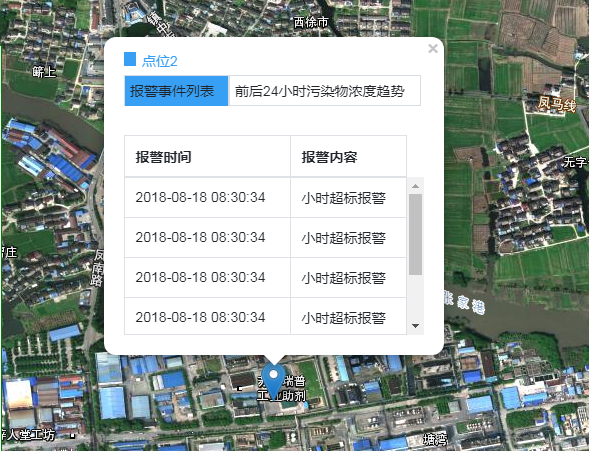
A页面部分代码:
// ---------------点击弹出信息/str----------

        let marker = L.marker([31.749662, 120.63073]).addTo(map)

        marker.bindPopup(

            '<div style="width:100%;height:100%">'+

            '<iframe style="width:100%;height:100%;" frameborder=0 border=0 scrolling="no" name="iframe1" src="projectFXHG.html"></iframe>'+

            '</div>', { minWidth: 300, maxHeight: 320 })
B页面
<!DOCTYPE html>

<html>

<head>

    <meta charset="UTF-8">

    <meta name="viewport" content="width=device-width, initial-scale=1.0">

    <meta http-equiv="X-UA-Compatible" content="ie=edge">

    <title>调用地图【EPSG:4490】</title>

    <link rel="stylesheet" href="./Lib/JS/bootstrap/css/bootstrap.css">

    <link rel="stylesheet" href="./Lib/JS/bootstrap-table/bootstrap-table.css">

    <link rel="stylesheet" href="./Lib/JS/bootstrap-table-fixed-columns-master/bootstrap-table-fixed-columns.css">

    <link rel="stylesheet" href="Lib/leaflet.css">

    <script src="Lib/jquery.min.js"></script>

    <script src="./Lib/JS/bootstrap/js/bootstrap.js"></script>

    <script src="./Lib/JS/bootstrap-table/bootstrap-table.js"></script>

    <script src="./Lib/JS/bootstrap-table-fixed-columns-master/bootstrap-table-fixed-columns.js"></script>

    <script src="./Lib/JS/echarts/echarts.js"></script>

    <script src="Lib/leaflet.js"></script>

    <script src="Lib/proj4.js"></script>

    <script src="Lib/proj4leaflet.js"></script>

    <script src="Lib/esri-leaflet_v2.2.4.js"></script>

    <style>

        html,

        body {

            margin: 0;

            padding: 0;

            width: 100%;

            height: 100%;

            font: 14px "Helvetica Neue", Arial, Helvetica, sans-serif;

        }

        .box {

            position: absolute;

            z-index: 1001;

            width: 100vh;

            color: white;

        }

        .infor {

            position: absolute;

            z-index: 1001;

            TOP: 20%;

            border: 1px green solid;

            height: 450px;

            background-color: white;

            color: #5e636c;

            display: flex;

            flex-direction: column;

            width: 300px;

        }

        .pop-li1 {

            border: 1px solid #d8dce5;

            width: 35%;

            padding: 5px;

        }

        .pop-li2 {

            border: 1px solid #d8dce5;

            width: 64%;

            padding: 5px;

        }

        .pop-table {

            margin-top: 9px;

        }

        .checked {

            border-bottom: 0px;

            background-color: #38a0f4;

        }

        #eventList:hover {

            cursor: pointer;

            background-color: #38a0f469;

        }

        #before24:hover {

            cursor: pointer;

            background-color: #38a0f469;

        }

        .leaflet-container a {

            color: black;

        }

        .leaflet-popup-content {

            width: 300px !important;

            height: 290px;

            background-color: #fff;

            position: relative;

            padding: 5px;

        }

        #map {

            margin: 0 auto;

            height: 100%;

            widows: 100%;

        }

    </style>

</head>

<body>

        <div style="width:100%;height:100%;">

                <div style="margin-bottom: 5px;"><div style="display: inline-block;width: 12px;height: 14px;background-color: #38a0f4;"></div><span style="color:#38a0f4;margin-left: 6px;">点位2</span></div>

                <ul class="nav nav-pills">

                <li id="eventList" class="active pop-li1 checked" onclick="checked()">报警事件列表</li>

                <li id="before24" class="pop-li2" onclick="initEcharts()">前后24小时污染物浓度趋势</li>

                </ul>

                <div class="tab-content pop-table">

                <div class="tab-pane active" id="A" style="height:200px;">

                <table id="poptable" class="table table-bordered table-hover"

                data-toggle="table"

                data-classes="table table-hover"

                data-show-columns="false"

                data-striped="true"

                data-show-toggle="false"

                data-search="false"

                data-show-refresh="false"

                data-toolbar="#toolbar"

                data-height="220"

                >

                <thead>

                <tr>

                <th>报警时间</th>

                <th>报警内容</th>

                </tr>

                </thead>

                <tr>

                <td>2018-08-18 08:30:34</td>

                <td>小时超标报警</td>

                </tr>

                <tr>

                <td>2018-08-18 08:30:34</td>

                <td>小时超标报警</td>

                </tr>

                <tr>

                <td>2018-08-18 08:30:34</td>

                <td>小时超标报警</td>

                </tr>

                <tr>

                <td>2018-08-18 08:30:34</td>

                <td>小时超标报警</td>

                </tr>

                <tr>

                <td>2018-08-18 08:30:34</td>

                <td>小时超标报警</td>

                </tr>

                <tr>

                <td>2018-08-18 08:30:34</td>

                <td>小时超标报警</td>

                </tr>

                </table>

                </div>

                <div class="tab-pane" id="B">

                <div style="display: flex;margin-top: 12px;">

                <div style="width: 26%;padding-top: 7px;"> 查询因子: </div>

                <div style="flex-grow:1">

                <select class="form-control">

                <option>SOz</option>

                <option>2</option>

                <option>3</option>

                <option>4</option>

                <option>5</option>

                </select>

                </div>

                </div>

                <div id="main" style="width: 300px;height:180px;overflow:auto;margin-top:15px"></div>

                </div>

                </div>

                </div>

    <script>

        function checked() {

            if ($("#eventList").hasClass("checked")) {

                $("#before24").removeClass("checked")

                $("#B").removeClass("active")

                $("#A").addClass("active")

            } else {

                $("#eventList").addClass("checked")

                $("#before24").removeClass("checked")

                $("#B").removeClass("active")

                $("#A").addClass("active")

            }

        }

        function initEcharts() {

            // $('.leaflet-popup-content-wrapper').css({'width':'283px','height': '232px'});

            $("#before24").addClass("checked");

            $("#eventList").removeClass("checked")

            $("#A").removeClass("active")

            $("#B").addClass("active")

            var myChart = echarts.init(document.getElementById('main'));

            // 指定图表的配置项和数据

            var option = {

                // 给echarts图设置背景色

                backgroundColor: '#FBFBFB',

                title: {

                    text: '2019-06-13',

                    textStyle: {

                        fontSize: '12'

                    }

                },

                tooltip: {

                    trigger: 'axis',

                    axisPointer: {

                        type: 'cross',

                        label: {

                            backgroundColor: '#6a7985'

                        }

                    }

                },

                legend: {

                    data: ['SQz']

                },

                grid: {

                    top: '20%',

                    left: '3%',

                    right: '4%',

                    bottom: '3%',

                    containLabel: true

                },

                xAxis: [{

                    axisLabel: {

                        rotate: 30,

                        interval: 0

                    },

                    type: 'category',

                    boundaryGap: false,

                    data: function () {

                        let list = ['00:00', '01:00', '02:00', '03:00', '04:00', '05:00', '06:00']

                        return list;

                    }()

                }],

                yAxis: { type: 'value' },

                series: [{

                    name: 'SQz',

                    data: [820, 932, 901, 934, 1290, 1330, 1320],

                    type: 'line',

                    color: '#007bff',

                    smooth: true,

                    symbolSize: 10

                }]

            };

            // 使用刚指定的配置项和数据显示图表。

            myChart.setOption(option);

        }

    </script>

</body>

</html>
leaflet 的 marker 弹框 iframe 嵌套代码的更多相关文章
- 分享一下在aspx页面弹框的设置代码
public static class MessageBox { /// <summary> /// 显示消息提示对话框 /// </summary> /// <para ...
- 微信小程序之底部弹框预约插件
代码地址如下:http://www.demodashi.com/demo/13982.html 一.前期准备工作: 软件环境:微信开发者工具 官方下载地址:https://mp.weixin.qq.c ...
- layer弹框在实际项目中的一些应用
官方介绍:layer至今仍作为layui的代表作,受众广泛并非偶然,而是这五年多的坚持,不断完善和维护.不断建设和提升社区服务,使得猿们纷纷自发传播,乃至于成为今天的Layui最强劲的源动力.目前,l ...
- vue 弹框
弹框展示: 代码: <template> <div> <el-col :span="9" style="text-align: right; ...
- layer的iframe弹框中父子元素的传值
项目中,左侧导航树,右侧是 iframe 嵌套的页面,在右侧页面中又有layer弹框,可以说是有两层 iframe 框架. 所以查询网上的parent什么的方法都不能用.自己摸索的下面的方法: 1.父 ...
- selenium常用api之切换:table切换、alert弹框切换、iframe框架切换
10.查看浏览器打开了多少个table和当前页面在哪个table 测试:打开了浏览器后,打开了一个新的标签页之后,显示此时有2个table,浏览器中当前页面展示的是第2个页面,但是代码打印显示的仍然是 ...
- git 本地提交代码到 github 远程库,没有弹框 github login
git 本地提交代码到 github 远程库,没有弹框 github login: 原因: win10 有个凭据管理器,给保存了历史登陆用户名密码,导致无法切换用户. 解决办法: 删除历史登陆用户 ...
- python selenium处理iframe和弹框(一)
处理iframe和弹框 # encoding:utf-8 from selenium import webdriver import time driver = webdriver.Firefox() ...
- easyui 中iframe嵌套页面,提示弹窗遮罩的解决方法,parent.$.messager.alert和parent.$.messager.confirm
项目中用到easyui 布局,用到north,west,center三个区域,且在center中间区域嵌入iframe标签.在主内容区做一些小提示弹窗(例如删除前的弹窗提示确认)时,会遇到遮罩问题,由 ...
随机推荐
- Django 基础05篇 上下文管理和前端代码复用
一.上下文管理器 在views中重复使用的代码,可以通过上下文管理器(在setting.py文件中的TEMPLATES中配置)中实现,减少代码冗余 上下文管理器的处理流程如下: 1.先走完views里 ...
- java001-java基础
基础数据类型 int--->Integer long--->Long float--->Float double--->Double boolean--->Boolean ...
- ubuntu平台下,字符集的转换命令iconv
iconv命令格式 iconv -f 源字符集(要转换文件的字符集) -t 目标字符集 file iconv -f gb18030 -t utf-8 file 默认情况下,不改变原文件,输出到屏幕. ...
- springboot-1-入门
springboot-1-入门 1.springboot简介,背景 简化Spring应用开发的一个框架: 整个Spring技术栈的一个大整合: J2EE开发的一站式解决方案: 2.极简hellowor ...
- Maven工程 报 Diamond types are not supported at language level '5'
Maven工程 报 Diamond types are not supported at language level '5' 出现这种信息,一般表示的是你的language level(IDEA下J ...
- linux系统安装+windows系统安装
linux 1.格式化U盘 打开管理员命令提示符 diskpart list disk select disk 2 clean create partition primary format fs=f ...
- Thinkphp大批量插入数据库的处理方法和速度对比
最近在使用TP框架写一个读取excel数据并将其插入到mysql数据库中的小功能.当excel中的数据条数非常多(几千甚至上万),并且多很多个列,并且某些列的内容还非常多的时候就容易出现问题. 第一种 ...
- 【排序+模拟】谁拿了最多奖学金 luogu-1051
题目描述 某校的惯例是在每学期的期末考试之后发放奖学金.发放的奖学金共有五种,获取的条件各自不同: 院士奖学金,每人$ 8000 $元,期末平均成绩高于\(80\)分(\(>80\)),并且在本 ...
- Python自动化测试面试题-编程篇
目录 Python自动化测试面试题-经验篇 Python自动化测试面试题-用例设计篇 Python自动化测试面试题-Linux篇 Python自动化测试面试题-MySQL篇 Python自动化测试面试 ...
- 解决VS2017调试卡住的问题
今天用VS2017调试程序时,程序没有按照预期的那样运行到断点处,并且结束调试时会卡很长时间. 那么解决方法是: 1. [Tools]-->[Options]-->[Debugging]- ...