
【java文件处理】java项目路径下的文件下载处理
1. controller类:
package com.neo.controller;

import javax.servlet.http.HttpServletResponse;

import org.springframework.web.bind.annotation.GetMapping;

import org.springframework.web.bind.annotation.PathVariable;

import org.springframework.web.bind.annotation.RequestMapping;

import org.springframework.web.bind.annotation.RestController;

/**

 * 通用文件处理controller

 * @author wjqhuaxia

 */

@RestController

@RequestMapping("/generalFile")

public class GeneralFileController {

	/**

	 * 模版文件下载

	 * @param fileType 文件类型 对应  TemplateFileTypeEnum 的key

	 * @param notIE 是否IE浏览器,true是,false不是

	 * @return

	 */

	@GetMapping("/downTemplate/{fileType}/{notIE}")

	public String downTemplate(HttpServletResponse response,

			@PathVariable String fileType, @PathVariable boolean notIE){

		TemplateFileTypeEnum fileTypeEnum = TemplateFileTypeEnum.getEnum(fileType);

		FileUtils.downloadFile(response, fileTypeEnum, notIE);

		return "下载成功!";

	}

	// 测试:http://localhost:8080/generalFile/downTemplate/test/false

}
2. 文件工具类
package com.neo.controller;

import java.io.BufferedInputStream;

import java.io.FileNotFoundException;

import java.io.IOException;

import java.io.InputStream;

import java.io.OutputStream;

import java.io.UnsupportedEncodingException;

import javax.servlet.http.HttpServletResponse;

import org.springframework.core.io.ClassPathResource;

/**

 * 文件工具类

 * @author wjqhuaxia

 */

public class FileUtils {

	/**

	 * 下载项目根目录下doc下的文件

	 * @param response response

	 * @param fileName 文件名

	 * @param notIE 是否IE浏览器,true是,false不是

	 * @return 返回结果 成功或者文件不存在

	 */

	public static String downloadFile(HttpServletResponse response, TemplateFileTypeEnum fileTypeEnum, boolean notIE) {

		String fileName = fileTypeEnum.getFileName();

		String filePath = fileTypeEnum.getFilePath();

		String contentType = fileTypeEnum.getContentType();

		ClassPathResource classPathResource = new ClassPathResource(filePath + fileName);

		InputStream stream = null;

		try {

			stream =classPathResource.getInputStream();

		} catch (IOException e3) {

			e3.printStackTrace();

		}

		response.setHeader("content-type", "application/octet-stream");

		response.setContentType(contentType);

		try {

			String name = java.net.URLEncoder.encode(fileName, "UTF-8");

			if (notIE) {

				name = java.net.URLDecoder.decode(name, "ISO-8859-1");

			}

			response.setHeader("Content-Disposition", "attachment;filename=" + name );

		} catch (UnsupportedEncodingException e2) {

			e2.printStackTrace();

		}

		byte[] buff = new byte[1024];

		BufferedInputStream bis = null;

		OutputStream os = null;

		try {

			os = response.getOutputStream();

			bis = new BufferedInputStream(stream);

			int i = bis.read(buff);

			while (i != -1) {

				os.write(buff, 0, buff.length);

				os.flush();

				i = bis.read(buff);

			}

		} catch (FileNotFoundException e1) {

			//e1.getMessage()+"系统找不到指定的文件";

			return "系统找不到指定的文件";

		}catch (IOException e) {

			e.printStackTrace();

		} finally {

			if (bis != null) {

				try {

					bis.close();

				} catch (IOException e) {

					e.printStackTrace();

				}

			}

		}

		return "success";

	}

}
3. 枚举类
package com.neo.controller;

/**

 * 模版文件类型枚举类

 * @author wjqhuaxia

 */

public enum TemplateFileTypeEnum {

	/**

	 * 测试试例

	 */

	TEMPLATE_TEST("test","测试模版.xlsx","static/templates/","application/vnd.openxmlformats-officedocument.spreadsheetml.sheet");

	private TemplateFileTypeEnum(String fileType,String fileName,

			String filePath,String contentType){

		this.contentType = contentType;

		this.fileName = fileName;

		this.fileType = fileType;

		this.filePath = filePath;

	}

	/**

	 * 文件类型

	 */

	private String fileType;

	/**

	 * 文件名

	 */

	private String fileName;

	/**

	 * 文件所在项目路径的位置

	 */

	private String filePath;

	/**

	 * response中设置的contentType

	 */

	private String contentType;

	public String getFileType() {

		return fileType;

	}

	public String getFileName() {

		return fileName;

	}

	public String getFilePath() {

		return filePath;

	}

	public String getContentType() {

		return contentType;

	}

	/**

	 * 通过文件类型获取对应枚举

	 * @param fileType 文件类型

	 * @return

	 */

	public static TemplateFileTypeEnum getEnum(String fileType){

		TemplateFileTypeEnum[] values = TemplateFileTypeEnum.values();

		for (TemplateFileTypeEnum templateFileTypeEnum : values) {

			if(templateFileTypeEnum.getFileType().equals(fileType)){

				return templateFileTypeEnum;

			}

		}

		return null;

	}

}
说明:
一、如果只是需要进行简单的静态资源访问,直接使用springboot提供的机制即可,不需要动代码。
可参考: https://www.cnblogs.com/gu-bin/p/11129066.html
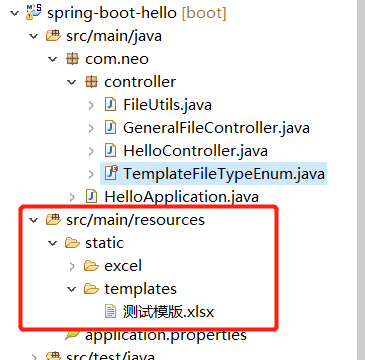
二、案例中的文件路径如下:
本案例参考:
https://blog.csdn.net/weixin_33915554/article/details/91710148 --- SpringBoot读取Resource下文件的几种方式
https://blog.csdn.net/liubin5620/article/details/79530490 --- Spring Boot项目实现下载项目根目录下指定目录(doc)里的文件
https://blog.csdn.net/xiaoyu19910321/article/details/79279364 --- 常见 content-type对应表
【java文件处理】java项目路径下的文件下载处理的更多相关文章
- java 压缩文件 传入文件数组,压缩文件,在指定路径下生成指定文件名的压缩文件
/** * 传入文件数组,压缩文件,在指定路径下生成指定文件名的压缩文件 * * @param files * 文件数组 * @param strZipName * 压缩文件路径及文件名 * @thr ...
- 夯实Java基础系列5:Java文件和Java包结构
目录 Java中的包概念 包的作用 package 的目录结构 设置 CLASSPATH 系统变量 常用jar包 java软件包的类型 dt.jar rt.jar *.java文件的奥秘 *.Java ...
- Java文件和Java包结构
Java中的包概念 Java中的包是封装一组类,子包和接口的机制.软件包用于: 防止命名冲突.例如,可以有两个名称分别为Employee的类,college.staff.cse.Employee和co ...
- tomcat中实现特定路径下的图片的url访问Tomcat配置图片保存路径,图片不保存在项目路径下
使用Tomcat作为服务器的时候,如果不配置图片保存路径,将图片保存在项目路径下,那么再次打war包发布项目可能会造成图片的丢失,每次重启前将图片先保存再copy到服务器明显不方便,这时可以配置图片保 ...
- C#实现把指定文件夹下的所有文件复制到指定路径下以及修改指定文件的后缀名
1.实现把指定文件夹下的所有文件复制到指定路径下 public static void copyFiles(string path) { DirectoryInfo dir = new Directo ...
- Java获取程序或项目路径的常用方法
在写java程序时不可避免要获取文件的路径,比较常用的方法有: 1 在任意的class里调用: this.getClass().getClassLoader().getResource("/ ...
- Java扫描classpath指定包路径下所有class
在写框架时 经常需要扫描classpath指定包路径下带有某个Annotation的类,自己整理了一下 封装成一个工具类了,供大家参考. 源代码ClassPathResourceScanner.jav ...
- 怎样把.git版本控制文件夹放在项目目录下
在上传本地代码到本地git库时,.git的存放目录不能放到项目根目录下(报错). 可以先把.git仓库选择其他保存路径,然后再copy到项目根目录下.
- java读取项目路径下的中文文件乱码问题
出现乱码错误: 处理方案: 对文件路径中存在中文的,都要进行URLDecoder.decode(path,"UTF-8")编码转换 wordContent = URLEncoder ...
随机推荐
- Gitbook配置目录折叠
如果有多个目录,Gitbook在浏览器上打开时,默认所有的目录都会打开,当目录比较多时,全部显示不利于阅读. 可以使用插件配置目录折叠,使得打开浏览器时这些目录默认是关闭的. 在执行gitbook i ...
- STP概述简介及生成树算法
目录: STP概述 STP简介 生成树算法 选择根网桥 选择根端口 选择指定端口 BPDU(桥协议数据单元) STP利用BPDU选择根网桥 STP的收敛 VLAN与STP关系 MSTP多生成树协议华为 ...
- SpringBoot总结之事务和AOP
一.事务 在Spring Boot中,当我们使用了spring-boot-starter-jdbc或spring-boot-starter-data-jpa依赖的时候,框架会自动默认分别注入DataS ...
- 解决clipboard.js在移动端复制失败的问题
1.前沿 在项目中使用clipboard.js插件去实现点击按钮,复制一段网址到剪切板的功能.功能做好后,一开始无论这pc端还是移动端都能正常使用.突然某一天测出了一个bug:移动端复制失败,pc端是 ...
- Qt+MPlayer音乐播放器开发笔记(一):ubuntu上编译MPlayer以及Demo演示
前言 在ubuntu上实现MPlayer播放器播放音乐. Demo Mplayer MPlayer是一款开源多媒体播放器,以GNU通用公共许可证发布.此款软件 ...
- SpringBoot中时间格式化的5种方法!
在我们日常工作中,时间格式化是一件经常遇到的事儿,所以本文我们就来盘点一下 Spring Boot 中时间格式化的几种方法. 时间问题演示 为了方便演示,我写了一个简单 Spring Boot 项 ...
- Ory Kratos 用户认证
Ory Kratos 为用户认证与管理系统.本文将动手实现浏览器(React+AntD)的完整流程,实际了解下它的 API . 代码: https://github.com/ikuokuo/start ...
- linux 之awk 次数统计
sort +awk+uniq 统计文件中出现次数 jps -v |grep jar|grep -v Jps|awk 'BEGIN{FS=".jar "} {print $1}' ...
- 如何写好技术文档——来自Google十多年的文档经验
本文大部分内容翻译总结自<Software Engineering at Google> 第10章节 Documentation. 另外,该书电子版近日已经可以免费下载了 https:// ...
- js 跨域请求失败
注:错误返回:Failed to load http://xxxxxxxxxxx: No 'Access-Control-Allow-Origin' header is present on the ...