
怎么安装ExpressionTreeVisualizer for Visual Studio 2019
1、下载 ExpressionTreeVisualizer https://github.com/zspitz/ExpressionTreeVisualizer/releases , 解压后把相应dll文件拷贝相应的目录
2、拷贝到以下路径之中的任何一个。
sualStudioInstallPath
\Common7\Packages\Debugger\Visualizers(这个是路径模板格式) 例如:C:\Program Files (x86)\Microsoft Visual Studio\2019\Enterprise\Common7\Packages\Debugger\VisualizersMy Documents\VisualStudioVersion\Visualizers(这个是路径模板格式)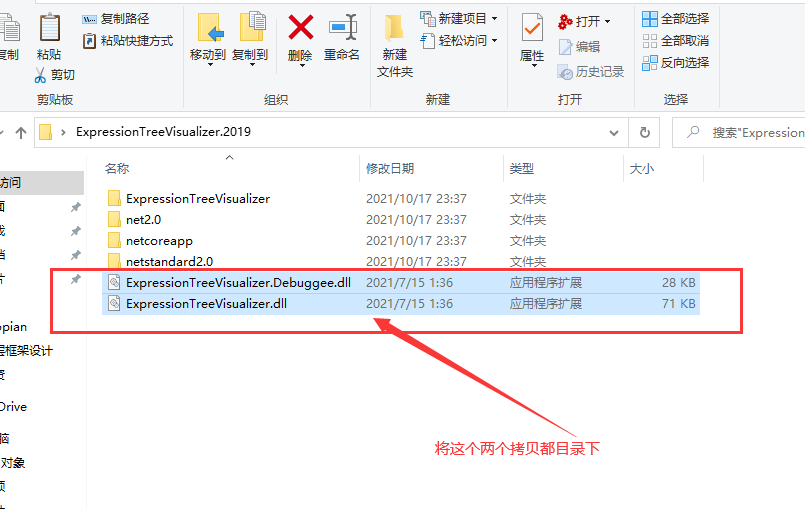
3、拷贝到以下路径之中的任何一个。
VisualStudioInstallPath
\Common7\Packages\Debugger\Visualizers\Framework例如:C:\Program Files (x86)\Microsoft Visual Studio\2019\Enterprise\Common7\Packages\Debugger\Visualizers\Framework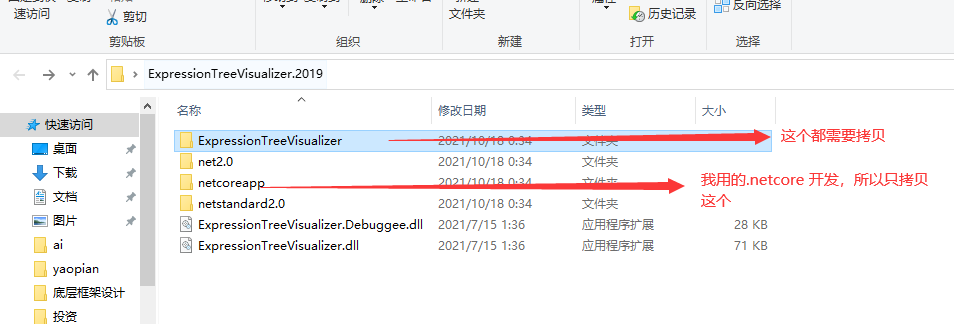
My Documents\VisualStudioVersion\Visualizers\Framework
where Framework is either:
net2.0for debuggees running the.NET Frameworkruntimenetstandard2.0for debuggees using a runtime that supportsnetstandard 2.0(.NET Framework v4.6.1+or.NET Core 2.0+).netcoreappfor debuggees running the.NET Coreruntime. (supports.NET Core 2.0+)(我是用这个框架我就拷贝这个框架下面)
测试案例:
大幅度反对法
using System;

using System.Collections.Generic;

using System.Linq;

using System.Linq.Expressions;

using System.Reflection;

namespace TestVisualizer

{

    class Program

    {

        static void Main(string[] args)

        {

            List<PeopleCopy> peoleCopyList = new List<PeopleCopy>();

            for (int i = 0; i < 5; i++)

            {

                People people = new People() { Id = 5 + 1, Age = 25, Name = "aaa" + i };

                peoleCopyList.Add(ExpressionTree.TransExp<People, PeopleCopy>(people));

            }

            foreach (var item in peoleCopyList)

            {

                Console.WriteLine(item);

            }

            Console.Read();

        }

    }

    public class People

    {

        public int Age { get; set; }

        public string Name { get; set; }

        public int Id;

    }

        public class PeopleCopy

        {

            public int Age { get; set; }

            public string Name { get; set; }

            public int Id;

            public override string ToString()

            {

                return "Age=" + Age + ";Name=" + Name + ";Id=" + Id;

            }

        }

    public class ExpressionTree

    {

        private static Dictionary<string, object> _Dic = new Dictionary<string, object>();

       public static TOut TransExp<TIn, TOut>(TIn tIn)

        {

            string key = $"funckey_{typeof(TIn).FullName}_{typeof(TOut).FullName}";

            if (!_Dic.Keys.Contains(key))

            {

                ParameterExpression parameterExpression = Expression.Parameter(typeof(TIn), "p");

                List<MemberBinding> memberBindingList = new List<MemberBinding>();

                foreach (var item in typeof(TOut).GetProperties())

                {

                    PropertyInfo propertyInfo = typeof(TIn).GetProperty(item.Name);

                    if (propertyInfo == null) { continue; }

                    MemberExpression property = Expression.Property(parameterExpression, propertyInfo);

                    memberBindingList.Add(Expression.Bind(item, property));

                }

                foreach (var item in typeof(TOut).GetFields())

                {

                    FieldInfo fieldInfo = typeof(TIn).GetField(item.Name);

                    if (fieldInfo == null) { continue; }

                    MemberExpression property = Expression.Field(parameterExpression, fieldInfo);

                    memberBindingList.Add(Expression.Bind(item, property));

                }

                Expression<Func<TIn, TOut>> expression = Expression.Lambda<Func<TIn, TOut>>(Expression.MemberInit(Expression.New(typeof(TOut)), memberBindingList), new ParameterExpression[]

                {

parameterExpression

                });

                Func<TIn, TOut> func = expression.Compile();

                _Dic.Add(key, func);

            }

            return ((Func<TIn, TOut>)_Dic[key])(tIn);

        }

    }

}
怎么安装ExpressionTreeVisualizer for Visual Studio 2019的更多相关文章
- Visual Studio 2019 RC入门
介绍 在本文中,让我们看看如何开始使用Visual Studio 2019 RC.Microsoft现已发布Visual Studio Release Candidate,现在可以下载了.最初,Mic ...
- Visual Studio 2019 RC
Visual Studio 2019 RC入门 介绍 在本文中,让我们看看如何开始使用Visual Studio 2019 RC.Microsoft现已发布Visual Studio Release ...
- Visual Studio 2019 (VS2019)正式版安装 Ankh SVN和VisualSVN插件
VS2019 正式版最近刚刚推出来,目前 Ankhsvn 还不支持,它最高只支持 VS2017,全网搜索了一下,也没有找到.在 Stackoverflow 上看了一下,找到这篇问答: 自己按照这种方法 ...
- Visual Studio 2019 (VS2019)正式版安装 VisualSVN Server 插件
VS2019 正式版最近刚刚推出来,目前 Ankhsvn 还不支持,它最高只支持 VS2017,全网搜索了一下,也没有找到.在 Stackoverflow 上看了一下,找到这篇问答: 自己按照这种方法 ...
- 在Visual Studio 2019中安装Blend 4.5 SDK
Visual Studio 2017安装时可以指定Blend SDK,到Visual Studio 2019时,安装时已经没有这个选项了. 官方提供的只有老版本4.0的安装包.要使用Blend SDK ...
- Visual Studio 2019 安装
目录 写在前面 官网下载 安装 等待安装 启动 写在前面 目前工作的开发环境还是旧版本的Visual Studio 2013版.个人感觉还是有点跟不上时代更新迭代的节奏了.毕竟,技术在进步.如果我们也 ...
- OpenCV(c++)-1 安装和配置OpenCV4.4(Windows+visual studio 2019)
@ 目录 安装OpenCV4 在Windows系统安装OpenCV4 配置visual studio 2019 配置包含路径 验证配置结果 安装OpenCV4 OpenCV是一个基于BSD许可(开源) ...
- visual studio 2019安装秘钥
美国时间4.2微软发布了最新版本的visual studio 2019 现在贴出visual studio2019的秘钥,有需要的请自取: Visual Studio 2019 Enterprise( ...
- Visual Studio 2019 正式发布,重磅更新,支持live share
如约而至,微软已于今天推出 Visual Studio 2019 正式版,一同发布的还有 Visual Studio 2019 for Mac. Visual Studio 2019 下载地址:htt ...
随机推荐
- Filter的生命周期及FilterConfig类介绍
Filter的生命周期包含几个方法 1,构造器方法 2,init初始化方法 第1,2步,在web工程 3,doFilter过滤方法 每次拦截到请求,就会执行 4,destroy销毁方法 停止web工程 ...
- setcontext+orw
setcontext+orw 大致可以把2.27,2.29做为两个分界点. 我们先来讨论 2.27 及以下的 setcontext + orw 的写法. 首先 setcontext 是什么?了解过 S ...
- 学习JAVAWEB第二天
DML:C:添加数据INSERT INTO 表名(列名1,2...) Values(值1,2,3..)查询表select * from表名D:删除数据delete from 表名 where 条件(i ...
- asyncio和aiohttp
asyncio官网 https://docs.python.org/zh-cn/3/library/asyncio-task.html 下面为伪代码: import aiohttp import as ...
- 计算机网络再次整理————UDP例子[六]
前言 简单的说,UDP 没有 TCP 用的广泛,但是还有很多是基于UDP的程序的,故而简单介绍一下. 正文 秉承节约脑容量的问题,只做简单的介绍和例子,因为自己几乎也没怎么用过UDP. 只是了解和知晓 ...
- 布客·ApacheCN 翻译/校对/笔记整理活动进度公告 2020.1
注意 请贡献者查看参与方式,然后直接在 ISSUE 中认领. 翻译/校对三个文档就可以申请当负责人,我们会把你拉进合伙人群.翻译/校对五个文档的贡献者,可以申请实习证明. 请私聊片刻(52981514 ...
- Android 12(S) 图形显示系统 - createSurface的流程(五)
题外话 刚刚开始着笔写作这篇文章时,正好看电视在采访一位92岁的考古学家,在他的日记中有这样一句话,写在这里与君共勉"不要等待幸运的降临,要去努力的掌握知识".如此朴实的一句话,此 ...
- Spring中NESTED和REQUIRED_NEW传播行为的区别
简介 PROPAGATION_REQUIRED_NEW: 表示当前方法必须运行在它自己的事务中.一个新的事务将被启动.如果存在当前事务,在该方法执行期间,当前事务会被挂起.如果使用JTATransac ...
- Redis-46面试题
1.什么是 Redis?简述它的优缺点? Redis 的全称是:Remote Dictionary.Server,本质上是一个 Key-Value 类型的内存数据库,很像 memcached,整个数据 ...
- docker的使用 (2)
使用Docker 想要玩转Docker,最简单的办法就是马上用Docker创建一些自己学习和工作中需要用到的容器,下面我们带着大家一起来创建这些容器. 运行Nginx Nginx是高性能的Web服务器 ...