
基于ASP.NET Core 5.0使用RabbitMQ消息队列实现事件总线(EventBus)
文章阅读请前先参考看一下 https://www.cnblogs.com/hudean/p/13858285.html 安装RabbitMQ消息队列软件与了解C#中如何使用RabbitMQ 和 https://www.cnblogs.com/Keep-Ambition/p/8038885.html 添加一个用户并可以远程访问,
消息队列的作用:跨服务通信、服务之间解耦,削峰、异步,其实还有一个作用是提高接收者性能
RabbitMQ 官方网站:https://www.rabbitmq.com/
RabbitMQ 中文文档网址:http://rabbitmq.mr-ping.com/
本文代码GitHub 地址是: https://github.com/hudean/MQDemo
一、初衷
- 开发难度大,各系统间分别隔离,需要关注消息中间件的各种复杂繁琐的配置,关注不同的消息则需要对接不同的消息队列
- 维护成本高,各系统或团队需要分别管理消息中间件、处理各种服务异常、(消息中间件的高可用、业务的高可用等)
- 管理难度大,没法对消息的生产和消费进行业务管理,也不方便对消息中的敏感数据进行权限管理
- 扩展成本高,无法统一消息系统扩展功能,如路由、延时、重试、消费确认等 总结消息队列是一个面向技术的接入,重点关注消息队列的配置、接口对接;而消息总线则是通过屏蔽部署、分组和通信等技术细节,实现一个面向业务的接入,重点关注要接收什么消息。
二、定义
事件总线是实现基于事件驱动模式的方式之一,事件发送者将事件消息发送到一个事件总线上,事件订阅者向事件总线订阅和接收事件,而后再处理接收到的事件。固然,订阅者不只能够接收和消费事件,它们自己也能够建立事件,并将它们发送到事件总线上。
事件总线是对发布-订阅模式的一种实现。它是一种集中式事件处理机制,容许不一样的组件之间进行彼此通讯而又不须要相互依赖,达到一种解耦的目的。
如前所述,使用基于事件的通信时,当值得注意的事件发生时,微服务会发布事件,例如更新业务实体时。 其他微服务订阅这些事件。 微服务收到事件时,可以更新其自己的业务实体,这可能会导致发布更多事件。 这是最终一致性概念的本质。 通常通过使用事件总线实现来执行此发布/订阅系统。 事件总线可以设计为包含 API 的接口,该 API 是订阅和取消订阅事件和发布事件所需的。 它还可以包含一个或多个基于跨进程或消息通信的实现,例如支持异步通信和发布/订阅模型的消息队列或服务总线。
可以使用事件来实现跨多个服务的业务事务,这可提供这些服务间的最终一致性。 最终一致事务由一系列分布式操作组成。 在每个操作中,微服务会更新业务实体,并发布可触发下一个操作的事件。 下面的图 6-18 显示了通过事件总线发布了 PriceUpdated 事件,因此价格更新传播到购物篮和其他微服务。
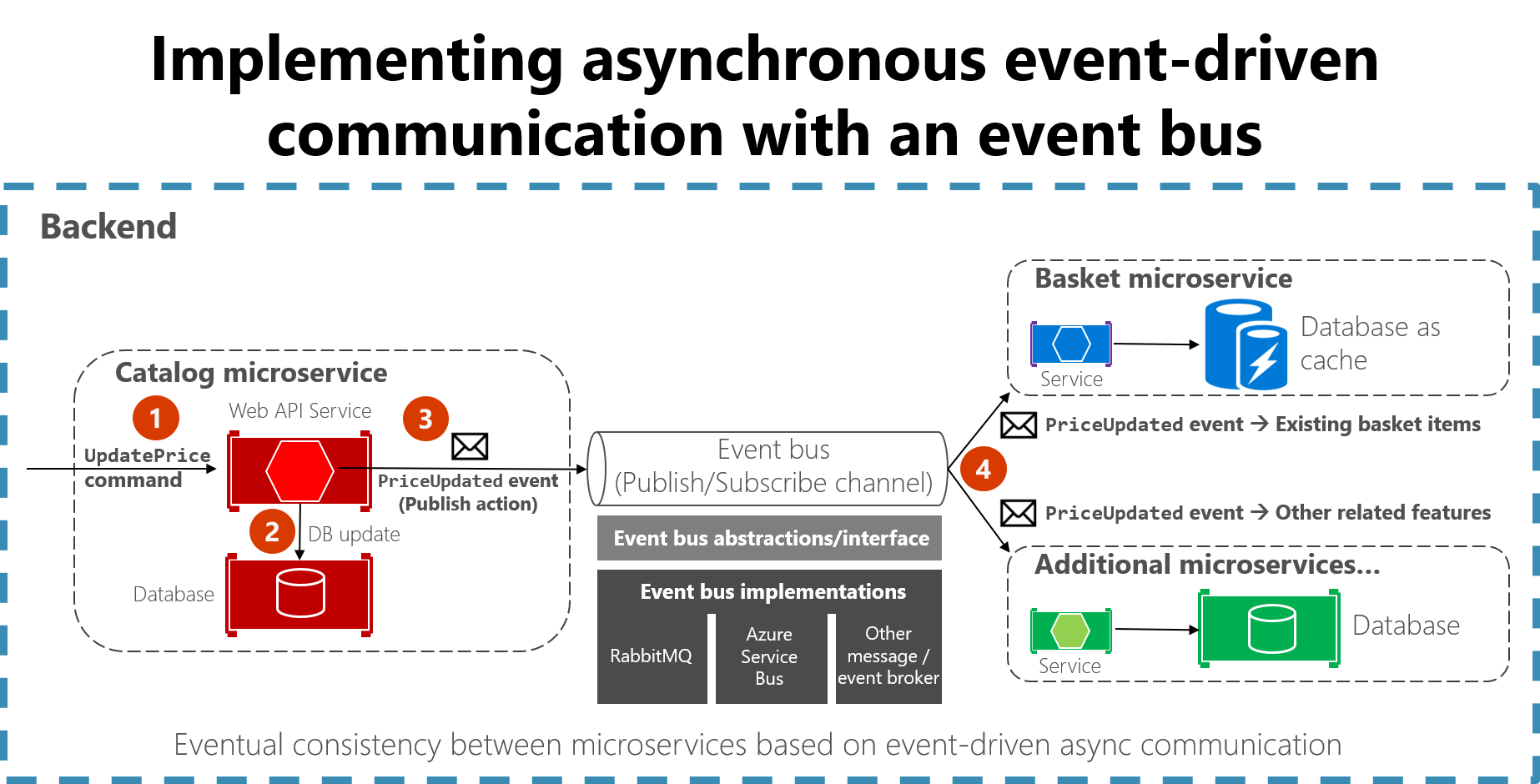
图 6-18。 基于事件总线的事件驱动的通信
本部分介绍如何使用通用事件总线接口(如图 6-18 所示)实现这种与 .NET 的通信。 存在多种可能的实现,每种实现使用不同的技术或基础结构,例如 RabbitMQ、Azure 服务总线或任何其他第三方开源或商用服务总线。
三、集成事件
集成事件用于跨多个微服务或外部系统保持域状态同步。 此功能可通过在微服务外发布集成事件来实现。 将事件发布到多个接收方微服务(订阅到集成事件的尽可能多个微服务)时,每个接收方微服务中的相应事件处理程序会处理该事件。
集成事件基本上是数据保持类,如以下示例所示:


 1 using System;

 2 using System.Collections.Generic;

 3 using System.Linq;

 4 using System.Text;

 5 using System.Text.Json.Serialization;

 6 using System.Threading.Tasks;

 7

 8 namespace EventBus.Events

 9 {

10     /// <summary>

11     /// 集成事件

12     /// </summary>

13     public record IntegrationEvent

14     {

15         public IntegrationEvent()

16         {

17             Id = Guid.NewGuid();

18             CreationDate = DateTime.UtcNow;

19         }

20         [JsonConstructor]

21         public IntegrationEvent(Guid id, DateTime createDate)

22         {

23             Id = id;

24             CreationDate = createDate;

25         }

26

27         [JsonInclude]

28         public Guid Id { get; private init; }

29

30         [JsonInclude]

31         public DateTime CreationDate { get; private init; }

32     }

33 }
 1 public class ProductPriceChangedIntegrationEvent : IntegrationEvent

 2 {

 3     public int ProductId { get; private set; }

 4     public decimal NewPrice { get; private set; }

 5     public decimal OldPrice { get; private set; }

 6

 7     public ProductPriceChangedIntegrationEvent(int productId, decimal newPrice,

 8         decimal oldPrice)

 9     {

10         ProductId = productId;

11         NewPrice = newPrice;

12         OldPrice = oldPrice;

13     }

14 }
事件总线
事件总线可实现发布/订阅式通信,无需组件之间相互显式识别,如图 6-19 所示。
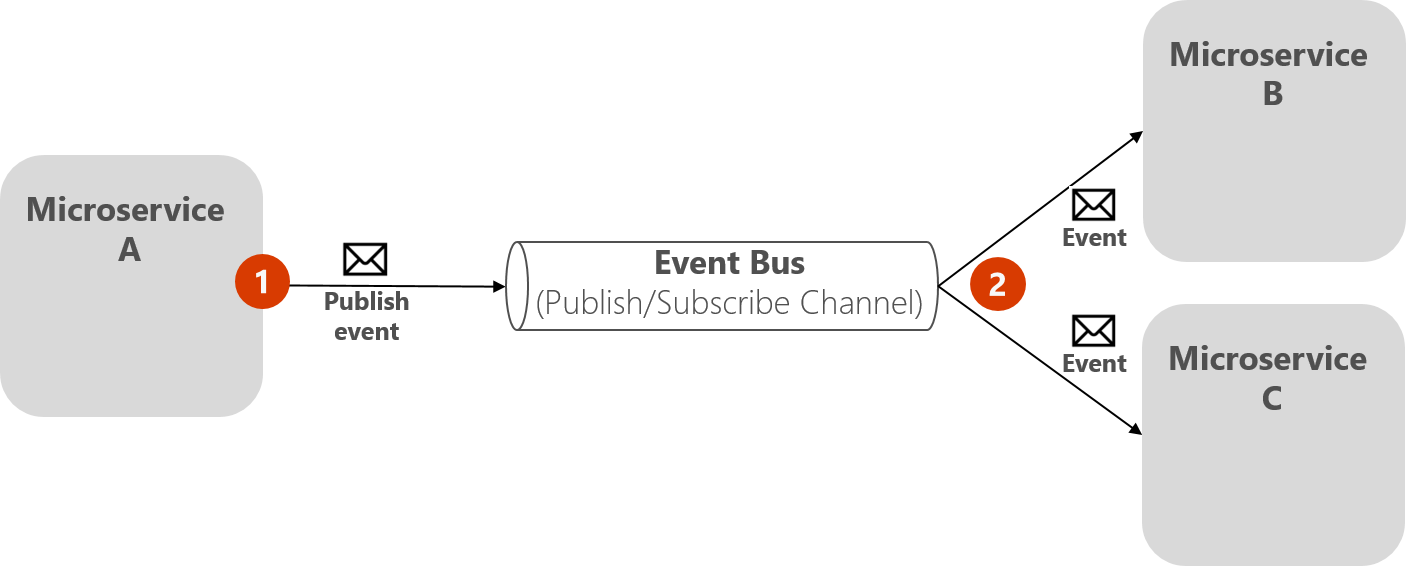
图 6-19。 事件总线的发布/订阅基础知识
上图显示了微服务 A 发布到事件总线,这会分发到订阅微服务 B 和 C,发布服务器无需知道订阅服务器。 事件总线与观察者模式和发布-订阅模式相关。
观察者模式
在观察者模式中,主对象(称为可观察对象)将相关信息(事件)告知其他感兴趣的对象(称为观察者)。
发布-订阅(发布/订阅)模式
发布/订阅模式的用途与观察者模式相同:某些事件发生时,需要告知其他服务。 但观察者模式与发布/订阅模式之间存在重要区别。 在观察者模式中,直接从可观察对象广播到观察者,因此它们“知道”彼此。 但在发布/订阅模式中,存在称为中转站、消息中转站或事件总线的第三个组件,发布服务器和订阅服务器都知道第三个组件。 因此,使用发布/订阅模式时,发布服务器和订阅服务器通过所述的事件总线或消息中转站精确分离。
中转站或事件总线
如何实现发布服务器和订阅服务器之间的匿名? 一个简单方法是让中转站处理所有通信。 事件总线是一个这样的中转站。
事件总线通常由两部分组成:
抽象或接口。
一个或多个实现。
在图 6-19 中,从应用程序角度看,会发现事件总线实际上是一个发布/订阅通道。 实现此异步通信的方式可能会有差异。 它可以具有多个实现,以便你进行交换,具体取决于环境要求(例如,生产和开发环境)。
在图 6-20 中,可看到事件总线的抽象,包含基于 RabbitMQ、Azure 服务总线或其他事件/消息中转站等基础结构消息技术的多个实现。
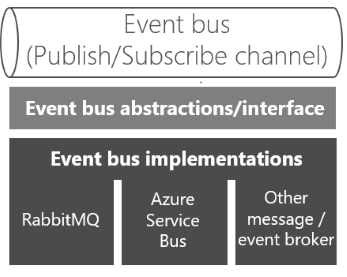
图 6- 20。 事件总线的多个实现
最好通过接口定义事件总线,以便它可使用多种技术(例如 RabbitMQ、Azure 服务总线等)来实现。 但是,如前所述,仅当需要由你的抽象支持的基本事件总线功能时,才适合使用你自己的抽象(事件总线接口)。 如果需要更丰富的服务总线功能,应使用你喜欢的商用服务总线提供的 API 和抽象,而不是你自己的抽象。
定义事件总线接口
首先,让我们了解一下事件总线接口的一些实现代码和可能的实现。 接口应是通用和简单的,如下所示接口。
 1 using EventBus.Events;

 2

 3 namespace EventBus.Abstractions

 4 {

 5     /// <summary>

 6     /// 事件总线接口

 7     /// </summary>

 8     public interface IEventBus

 9     {

10         /// <summary>

11         /// 发布

12         /// </summary>

13         /// <param name="event"></param>

14         void Publish(IntegrationEvent @event);

15

16         /// <summary>

17         /// 订阅

18         /// </summary>

19         /// <typeparam name="T"></typeparam>

20         /// <typeparam name="TH"></typeparam>

21         void Subscribe<T, TH>()

22             where T : IntegrationEvent

23             where TH : IIntegrationEventHandler<T>;

24

25         /// <summary>

26         /// 动态订阅

27         /// </summary>

28         /// <typeparam name="TH"></typeparam>

29         /// <param name="eventName"></param>

30         void SubscribeDynamic<TH>(string eventName)

31             where TH : IDynamicIntegrationEventHandler;

32

33         /// <summary>

34         /// 取消动态订阅

35         /// </summary>

36         /// <typeparam name="TH"></typeparam>

37         /// <param name="eventName"></param>

38         void UnsubscribeDynamic<TH>(string eventName)

39             where TH : IDynamicIntegrationEventHandler;

40

41         /// <summary>

42         /// 取消订阅

43         /// </summary>

44         /// <typeparam name="T"></typeparam>

45         /// <typeparam name="TH"></typeparam>

46         void Unsubscribe<T, TH>()

47             where TH : IIntegrationEventHandler<T>

48             where T : IntegrationEvent;

49     }

50 }
借助 RabbitMQ 的事件总线实现,微服务可订阅事件、发布事件和接收事件,如图 6-21 所示。
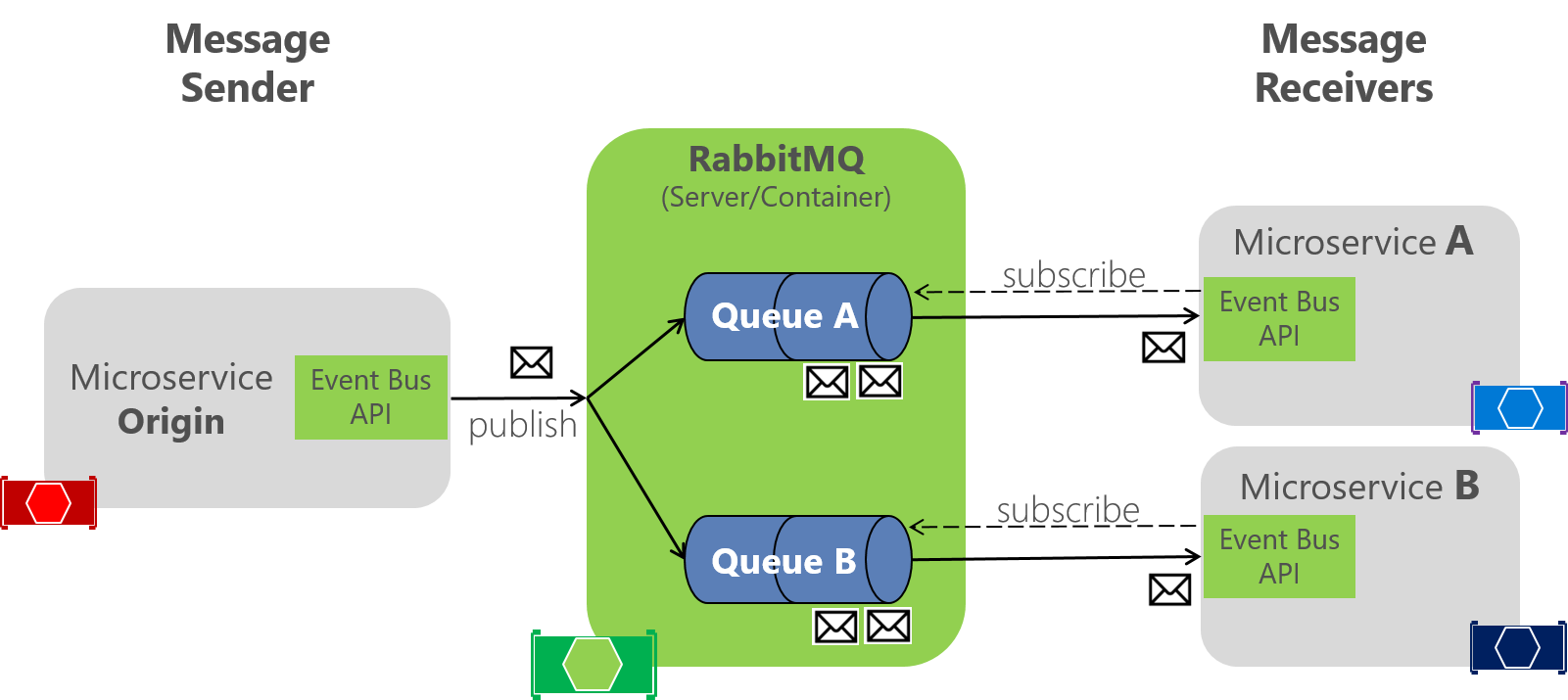
图 6-21。 事件总线的 RabbitMQ 实现
RabbitMQ 充当消息发布服务器和订阅者之间的中介,处理分发。 在代码中,EventBusRabbitMQ 类实现了泛型 IEventBus 接口。 此实现基于依赖项注入,以便可以从此开发/测试版本交换到生产版本。
1 public class EventBusRabbitMQ : IEventBus, IDisposable

2 {

3     // Implementation using RabbitMQ API

4     //...

5 }
示例开发/测试事件总线的 RabbitMQ 实现是样板代码。 它必须处理与 RabbitMQ 服务器的连接,并提供用于将消息事件发布到队列的代码。 它还必须为每个事件类型实现收集集成事件处理程序的字典;这些事件类型可以对每个接收器微服务具有不同的实例化和不同的订阅,如图 6-21 所示。
四、使用 RabbitMQ 实现一个简单的发布方法
下面的代码是 RabbitMQ 的事件总线实现的简化版,用以展示整个方案。 你真的不必以这种方式处理连接。 要查看完整的实现,在后面
 1 public class EventBusRabbitMQ : IEventBus, IDisposable

 2 {

 3     // Member objects and other methods ...

 4     // ...

 5

 6     public void Publish(IntegrationEvent @event)

 7     {

 8         var eventName = @event.GetType().Name;

 9         var factory = new ConnectionFactory() { HostName = _connectionString };

10         using (var connection = factory.CreateConnection())

11         using (var channel = connection.CreateModel())

12         {

13             channel.ExchangeDeclare(exchange: _brokerName,

14                 type: "direct");

15             string message = JsonConvert.SerializeObject(@event);

16             var body = Encoding.UTF8.GetBytes(message);

17             channel.BasicPublish(exchange: _brokerName,

18                 routingKey: eventName,

19                 basicProperties: null,

20                 body: body);

21        }

22     }

23 }
五、使用 RabbitMQ API 实现订阅代码
与发布代码一样,下面的代码是 RabbitMQ 事件总线实现的简化部分。
public class EventBusRabbitMQ : IEventBus, IDisposable

{

    // Member objects and other methods ...

    // ...

    public void Subscribe<T, TH>()

        where T : IntegrationEvent

        where TH : IIntegrationEventHandler<T>

    {

        var eventName = _subsManager.GetEventKey<T>();

        var containsKey = _subsManager.HasSubscriptionsForEvent(eventName);

        if (!containsKey)

        {

            if (!_persistentConnection.IsConnected)

            {

                _persistentConnection.TryConnect();

            }

            using (var channel = _persistentConnection.CreateModel())

            {

                channel.QueueBind(queue: _queueName,

                                    exchange: BROKER_NAME,

                                    routingKey: eventName);

            }

        }

        _subsManager.AddSubscription<T, TH>();

    }

}
每个事件类型都有一个相关的通道,以获取 RabbitMQ 中的事件。 然后,可以根据需要在每个通道和事件类型中拥有尽可能多的事件处理程序。
订阅方法接受一个 IIntegrationEventHandler 对象,该对象相当于当前微服务中的回调方法,以及其相关的 IntegrationEvent 对象。 然后,代码将该事件处理程序添加到事件处理程序列表,每个客户端微服务的每个集成事件类型都可具有事件处理程序。 如果客户端代码尚未订阅事件,该代码将为事件类型创建一个通道,以便在从任何其他服务中发布事件时,它可以从 RabbitMQ 以推送方式接收事件。
六、使用 RabbitMQ 完整实现事件总线代码
结构图如下:
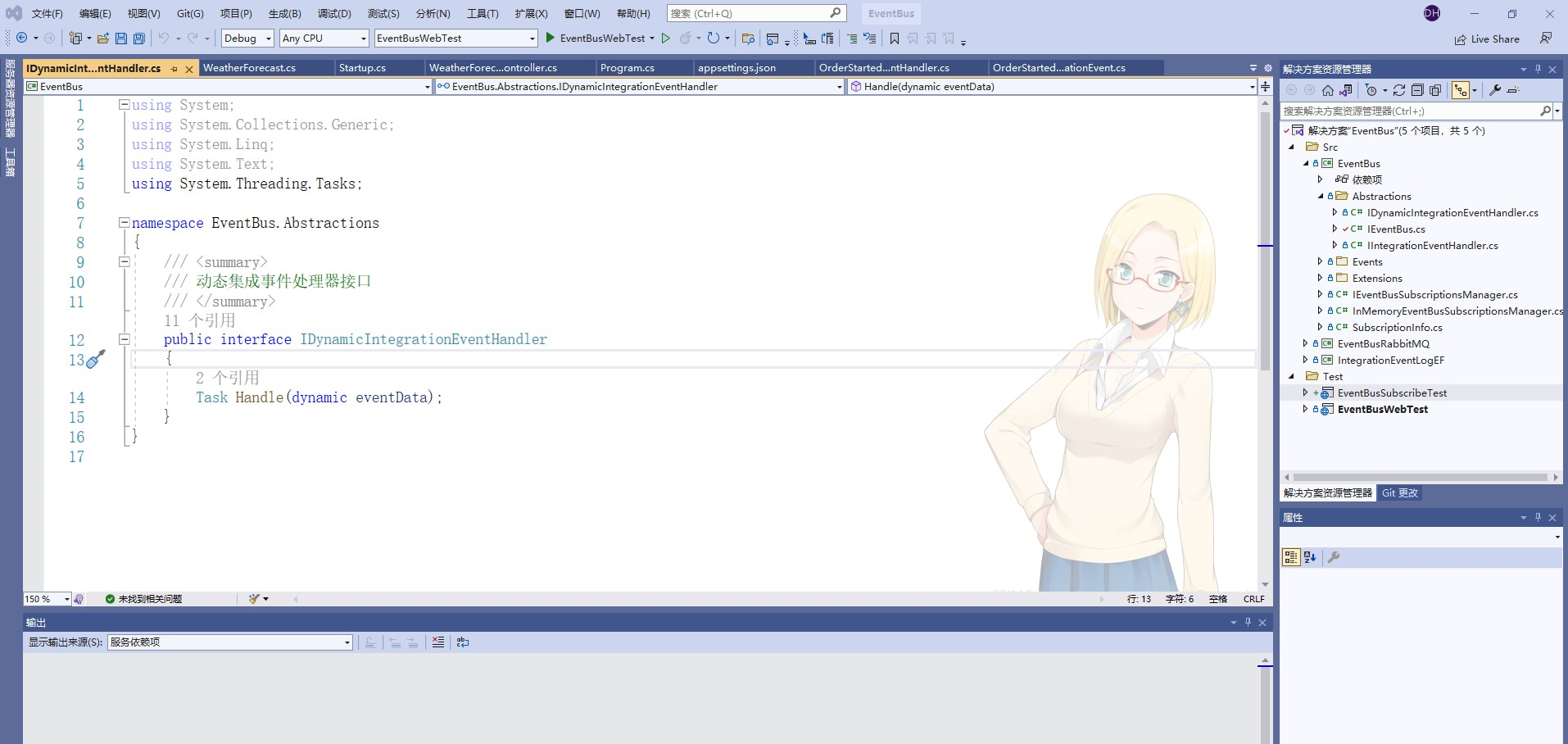
动态集成事件处理器接口
 1 using System.Threading.Tasks;

 2

 3 namespace EventBus.Abstractions

 4 {

 5     /// <summary>

 6     /// 动态集成事件处理器接口

 7     /// </summary>

 8     public interface IDynamicIntegrationEventHandler

 9     {

10         Task Handle(dynamic eventData);

11     }

12 }
事件总线接口
 1 using EventBus.Events;

 2

 3 namespace EventBus.Abstractions

 4 {

 5     /// <summary>

 6     /// 事件总线接口

 7     /// </summary>

 8     public interface IEventBus

 9     {

10         /// <summary>

11         /// 发布

12         /// </summary>

13         /// <param name="event"></param>

14         void Publish(IntegrationEvent @event);

15

16         /// <summary>

17         /// 订阅

18         /// </summary>

19         /// <typeparam name="T"></typeparam>

20         /// <typeparam name="TH"></typeparam>

21         void Subscribe<T, TH>()

22             where T : IntegrationEvent

23             where TH : IIntegrationEventHandler<T>;

24

25         /// <summary>

26         /// 动态订阅

27         /// </summary>

28         /// <typeparam name="TH"></typeparam>

29         /// <param name="eventName"></param>

30         void SubscribeDynamic<TH>(string eventName)

31             where TH : IDynamicIntegrationEventHandler;

32

33         /// <summary>

34         /// 取消动态订阅

35         /// </summary>

36         /// <typeparam name="TH"></typeparam>

37         /// <param name="eventName"></param>

38         void UnsubscribeDynamic<TH>(string eventName)

39             where TH : IDynamicIntegrationEventHandler;

40

41         /// <summary>

42         /// 取消订阅

43         /// </summary>

44         /// <typeparam name="T"></typeparam>

45         /// <typeparam name="TH"></typeparam>

46         void Unsubscribe<T, TH>()

47             where TH : IIntegrationEventHandler<T>

48             where T : IntegrationEvent;

49     }

50 }
集成事件处理器接口
 1 using EventBus.Events;

 2 using System;

 3 using System.Collections.Generic;

 4 using System.Linq;

 5 using System.Text;

 6 using System.Threading.Tasks;

 7

 8 namespace EventBus.Abstractions

 9 {

10     /// <summary>

11     /// 集成事件处理器接口

12     /// </summary>

13     /// <typeparam name="TIntegrationEvent">TIntegrationEvent泛型</typeparam>

14     public interface IIntegrationEventHandler<in TIntegrationEvent> : IIntegrationEventHandler

15        where TIntegrationEvent : IntegrationEvent

16     {

17         Task Handle(TIntegrationEvent @event);

18     }

19

20     /// <summary>

21     /// 集成事件处理器

22     /// </summary>

23     public interface IIntegrationEventHandler

24     {

25     }

26 }
集成事件
 1 using System.Text;

 2 using System.Text.Json.Serialization;

 3 using System.Threading.Tasks;

 4

 5 namespace EventBus.Events

 6 {

 7     /// <summary>

 8     /// 集成事件

 9     /// </summary>

10     public record IntegrationEvent

11     {

12         public IntegrationEvent()

13         {

14             Id = Guid.NewGuid();

15             CreationDate = DateTime.UtcNow;

16         }

17         [JsonConstructor]

18         public IntegrationEvent(Guid id, DateTime createDate)

19         {

20             Id = id;

21             CreationDate = createDate;

22         }

23

24         [JsonInclude]

25         public Guid Id { get; private init; }

26

27         [JsonInclude]

28         public DateTime CreationDate { get; private init; }

29     }

30 }
GenericTypeExtensions
 1 using System;

 2 using System.Collections.Generic;

 3 using System.Linq;

 4 using System.Text;

 5 using System.Threading.Tasks;

 6

 7 namespace EventBus.Extensions

 8 {

 9     public static class GenericTypeExtensions

10     {

11         public static string GetGenericTypeName(this Type type)

12         {

13             var typeName = string.Empty;

14             if (type.IsGenericType)

15             {

16                 var genericTypes = string.Join(",", type.GetGenericArguments().Select(t => t.Name).ToArray());

17                 typeName = $"{type.Name.Remove(type.Name.IndexOf('`'))}<{genericTypes}>";

18             }

19             else

20             {

21                 typeName = type.Name;

22             }

23

24             return typeName;

25         }

26

27         /// <summary>

28         /// 获取通用类型名称

29         /// </summary>

30         /// <param name="object"></param>

31         /// <returns></returns>

32         public static string GetGenericTypeName(this object @object)

33         {

34             return @object.GetType().GetGenericTypeName();

35         }

36     }

37 }
事件总线订阅管理器接口
  1 using EventBus.Abstractions;

  2 using EventBus.Events;

  3 using System;

  4 using System.Collections.Generic;

  5 using System.Linq;

  6 using System.Text;

  7 using System.Threading.Tasks;

  8 using static EventBus.InMemoryEventBusSubscriptionsManager;

  9

 10 namespace EventBus

 11 {

 12     /// <summary>

 13     /// 事件总线订阅管理器接口

 14     /// </summary>

 15     public interface IEventBusSubscriptionsManager

 16     {

 17         bool IsEmpty { get; }

 18         event EventHandler<string> OnEventRemoved;

 19

 20         /// <summary>

 21         /// 添加动态订阅

 22         /// </summary>

 23         /// <typeparam name="TH"></typeparam>

 24         /// <param name="eventName"></param>

 25         void AddDynamicSubscription<TH>(string eventName)

 26            where TH : IDynamicIntegrationEventHandler;

 27

 28         /// <summary>

 29         /// 添加订阅

 30         /// </summary>

 31         /// <typeparam name="T"></typeparam>

 32         /// <typeparam name="TH"></typeparam>

 33         void AddSubscription<T, TH>()

 34            where T : IntegrationEvent

 35            where TH : IIntegrationEventHandler<T>;

 36

 37         /// <summary>

 38         /// 删除订阅

 39         /// </summary>

 40         /// <typeparam name="T"></typeparam>

 41         /// <typeparam name="TH"></typeparam>

 42         void RemoveSubscription<T, TH>()

 43              where TH : IIntegrationEventHandler<T>

 44              where T : IntegrationEvent;

 45

 46         /// <summary>

 47         /// 移除动态订阅

 48         /// </summary>

 49         /// <typeparam name="TH"></typeparam>

 50         /// <param name="eventName"></param>

 51         void RemoveDynamicSubscription<TH>(string eventName)

 52             where TH : IDynamicIntegrationEventHandler;

 53

 54         /// <summary>

 55         /// 已订阅事件

 56         /// </summary>

 57         /// <typeparam name="T"></typeparam>

 58         /// <returns></returns>

 59         bool HasSubscriptionsForEvent<T>() where T : IntegrationEvent;

 60

 61         /// <summary>

 62         /// 已订阅事件

 63         /// </summary>

 64         /// <param name="eventName"></param>

 65         /// <returns></returns>

 66         bool HasSubscriptionsForEvent(string eventName);

 67

 68         /// <summary>

 69         /// 按名称获取事件类型

 70         /// </summary>

 71         /// <param name="eventName"></param>

 72         /// <returns></returns>

 73         Type GetEventTypeByName(string eventName);

 74

 75         /// <summary>

 76         /// 清空

 77         /// </summary>

 78         void Clear();

 79

 80         /// <summary>

 81         /// 获取事件处理程序

 82         /// </summary>

 83         /// <typeparam name="T"></typeparam>

 84         /// <returns></returns>

 85         IEnumerable<SubscriptionInfo> GetHandlersForEvent<T>() where T : IntegrationEvent;

 86

 87         /// <summary>

 88         /// 获取事件处理程序

 89         /// </summary>

 90         /// <param name="eventName"></param>

 91         /// <returns></returns>

 92         IEnumerable<SubscriptionInfo> GetHandlersForEvent(string eventName);

 93

 94         /// <summary>

 95         /// 获取事件密钥

 96         /// </summary>

 97         /// <typeparam name="T"></typeparam>

 98         /// <returns></returns>

 99         string GetEventKey<T>();

100     }

101 }
内存中事件总线订阅管理器
  1 using EventBus.Abstractions;

  2 using EventBus.Events;

  3 using System;

  4 using System.Collections.Generic;

  5 using System.Linq;

  6 using System.Text;

  7 using System.Threading.Tasks;

  8

  9 namespace EventBus

 10 {

 11     /// <summary>

 12     /// 内存中事件总线订阅管理器

 13     /// </summary>

 14     public partial class InMemoryEventBusSubscriptionsManager : IEventBusSubscriptionsManager

 15     {

 16         private readonly Dictionary<string, List<SubscriptionInfo>> _handlers;

 17         private readonly List<Type> _eventTypes;

 18

 19         public event EventHandler<string> OnEventRemoved;

 20

 21         public InMemoryEventBusSubscriptionsManager()

 22         {

 23             _handlers = new Dictionary<string, List<SubscriptionInfo>>();

 24             _eventTypes = new List<Type>();

 25         }

 26

 27         public bool IsEmpty => !_handlers.Keys.Any();

 28         public void Clear() => _handlers.Clear();

 29

 30         public void AddDynamicSubscription<TH>(string eventName)

 31             where TH : IDynamicIntegrationEventHandler

 32         {

 33             DoAddSubscription(typeof(TH), eventName, isDynamic: true);

 34         }

 35

 36         public void AddSubscription<T, TH>()

 37             where T : IntegrationEvent

 38             where TH : IIntegrationEventHandler<T>

 39         {

 40             var eventName = GetEventKey<T>();

 41

 42             DoAddSubscription(typeof(TH), eventName, isDynamic: false);

 43

 44             if (!_eventTypes.Contains(typeof(T)))

 45             {

 46                 _eventTypes.Add(typeof(T));

 47             }

 48         }

 49

 50         /// <summary>

 51         /// 添加订阅

 52         /// </summary>

 53         /// <param name="handlerType"></param>

 54         /// <param name="eventName"></param>

 55         /// <param name="isDynamic"></param>

 56         private void DoAddSubscription(Type handlerType, string eventName, bool isDynamic)

 57         {

 58             if (!HasSubscriptionsForEvent(eventName))

 59             {

 60                 _handlers.Add(eventName, new List<SubscriptionInfo>());

 61             }

 62

 63             if (_handlers[eventName].Any(s => s.HandlerType == handlerType))

 64             {

 65                 throw new ArgumentException(

 66                     $"Handler Type {handlerType.Name} already registered for '{eventName}'", nameof(handlerType));

 67             }

 68

 69             if (isDynamic)

 70             {

 71                 _handlers[eventName].Add(SubscriptionInfo.Dynamic(handlerType));

 72             }

 73             else

 74             {

 75                 _handlers[eventName].Add(SubscriptionInfo.Typed(handlerType));

 76             }

 77         }

 78

 79

 80         public void RemoveDynamicSubscription<TH>(string eventName)

 81             where TH : IDynamicIntegrationEventHandler

 82         {

 83             var handlerToRemove = FindDynamicSubscriptionToRemove<TH>(eventName);

 84             DoRemoveHandler(eventName, handlerToRemove);

 85         }

 86

 87

 88         public void RemoveSubscription<T, TH>()

 89             where TH : IIntegrationEventHandler<T>

 90             where T : IntegrationEvent

 91         {

 92             var handlerToRemove = FindSubscriptionToRemove<T, TH>();

 93             var eventName = GetEventKey<T>();

 94             DoRemoveHandler(eventName, handlerToRemove);

 95         }

 96

 97         /// <summary>

 98         /// 删除处理程序

 99         /// </summary>

100         /// <param name="eventName"></param>

101         /// <param name="subsToRemove"></param>

102         private void DoRemoveHandler(string eventName, SubscriptionInfo subsToRemove)

103         {

104             if (subsToRemove != null)

105             {

106                 _handlers[eventName].Remove(subsToRemove);

107                 if (!_handlers[eventName].Any())

108                 {

109                     _handlers.Remove(eventName);

110                     var eventType = _eventTypes.SingleOrDefault(e => e.Name == eventName);

111                     if (eventType != null)

112                     {

113                         _eventTypes.Remove(eventType);

114                     }

115                     RaiseOnEventRemoved(eventName);

116                 }

117

118             }

119         }

120

121         public IEnumerable<SubscriptionInfo> GetHandlersForEvent<T>() where T : IntegrationEvent

122         {

123             var key = GetEventKey<T>();

124             return GetHandlersForEvent(key);

125         }

126         public IEnumerable<SubscriptionInfo> GetHandlersForEvent(string eventName) => _handlers[eventName];

127

128         /// <summary>

129         /// 删除事件引发

130         /// </summary>

131         /// <param name="eventName"></param>

132         private void RaiseOnEventRemoved(string eventName)

133         {

134             var handler = OnEventRemoved;

135             handler?.Invoke(this, eventName);

136         }

137

138

139         private SubscriptionInfo FindDynamicSubscriptionToRemove<TH>(string eventName)

140             where TH : IDynamicIntegrationEventHandler

141         {

142             return DoFindSubscriptionToRemove(eventName, typeof(TH));

143         }

144

145

146         private SubscriptionInfo FindSubscriptionToRemove<T, TH>()

147              where T : IntegrationEvent

148              where TH : IIntegrationEventHandler<T>

149         {

150             var eventName = GetEventKey<T>();

151             return DoFindSubscriptionToRemove(eventName, typeof(TH));

152         }

153

154         /// <summary>

155         /// 找到要删除的订阅

156         /// </summary>

157         /// <param name="eventName"></param>

158         /// <param name="handlerType"></param>

159         /// <returns></returns>

160         private SubscriptionInfo DoFindSubscriptionToRemove(string eventName, Type handlerType)

161         {

162             if (!HasSubscriptionsForEvent(eventName))

163             {

164                 return null;

165             }

166

167             return _handlers[eventName].SingleOrDefault(s => s.HandlerType == handlerType);

168

169         }

170

171         public bool HasSubscriptionsForEvent<T>() where T : IntegrationEvent

172         {

173             var key = GetEventKey<T>();

174             return HasSubscriptionsForEvent(key);

175         }

176         public bool HasSubscriptionsForEvent(string eventName) => _handlers.ContainsKey(eventName);

177

178         public Type GetEventTypeByName(string eventName) => _eventTypes.SingleOrDefault(t => t.Name == eventName);

179

180         public string GetEventKey<T>()

181         {

182             return typeof(T).Name;

183         }

184     }

185 }
SubscriptionInfo
 1 using System;

 2 using System.Collections.Generic;

 3 using System.Linq;

 4 using System.Text;

 5 using System.Threading.Tasks;

 6

 7 namespace EventBus

 8 {

 9     public partial class InMemoryEventBusSubscriptionsManager : IEventBusSubscriptionsManager

10     {

11         /// <summary>

12         /// 订阅信息

13         /// </summary>

14         public class SubscriptionInfo

15         {

16             public bool IsDynamic { get; }

17             public Type HandlerType { get; }

18

19             private SubscriptionInfo(bool isDynamic, Type handlerType)

20             {

21                 IsDynamic = isDynamic;

22                 HandlerType = handlerType;

23             }

24

25             //public static SubscriptionInfo Dynamic(Type handlerType)

26             //{

27             //    return new SubscriptionInfo(true, handlerType);

28             //}

29             //public static SubscriptionInfo Typed(Type handlerType)

30             //{

31             //    return new SubscriptionInfo(false, handlerType);

32             //}

33             public static SubscriptionInfo Dynamic(Type handlerType) =>

34               new SubscriptionInfo(true, handlerType);

35

36             public static SubscriptionInfo Typed(Type handlerType) =>

37                 new SubscriptionInfo(false, handlerType);

38         }

39     }

40 }
EventBusRabbitMQ里的代码
默认 RabbitMQ 持久连接
  1 using Microsoft.Extensions.Logging;

  2 using Polly;

  3 using Polly.Retry;

  4 using RabbitMQ.Client;

  5 using RabbitMQ.Client.Events;

  6 using RabbitMQ.Client.Exceptions;

  7 using System;

  8 using System.IO;

  9 using System.Net.Sockets;

 10

 11 namespace EventBus.EventBusRabbitMQ

 12 {

 13     /// <summary>

 14     /// 默认 RabbitMQ 持久连接

 15     /// </summary>

 16     public class DefaultRabbitMQPersistentConnection

 17       : IRabbitMQPersistentConnection

 18     {

 19         private readonly IConnectionFactory _connectionFactory;

 20         private readonly ILogger<DefaultRabbitMQPersistentConnection> _logger;

 21         private readonly int _retryCount;

 22         IConnection _connection;

 23         bool _disposed;

 24

 25         object sync_root = new object();

 26

 27         public DefaultRabbitMQPersistentConnection(IConnectionFactory connectionFactory, ILogger<DefaultRabbitMQPersistentConnection> logger, int retryCount = 5)

 28         {

 29             _connectionFactory = connectionFactory ?? throw new ArgumentNullException(nameof(connectionFactory));

 30             _logger = logger ?? throw new ArgumentNullException(nameof(logger));

 31             _retryCount = retryCount;

 32         }

 33

 34         public bool IsConnected

 35         {

 36             get

 37             {

 38                 return _connection != null && _connection.IsOpen && !_disposed;

 39             }

 40         }

 41

 42         /// <summary>

 43         /// 创建rabbitmq模型

 44         /// </summary>

 45         /// <returns></returns>

 46         public IModel CreateModel()

 47         {

 48             if (!IsConnected)

 49             {

 50                 throw new InvalidOperationException("No RabbitMQ connections are available to perform this action");

 51             }

 52

 53             return _connection.CreateModel();

 54         }

 55

 56         public void Dispose()

 57         {

 58             if (_disposed) return;

 59

 60             _disposed = true;

 61

 62             try

 63             {

 64                 _connection?.Dispose();

 65             }

 66             catch (IOException ex)

 67             {

 68                 _logger.LogCritical(ex.ToString());

 69             }

 70         }

 71

 72         /// <summary>

 73         /// 尝试连接

 74         /// </summary>

 75         /// <returns></returns>

 76         public bool TryConnect()

 77         {

 78             _logger.LogInformation("RabbitMQ Client is trying to connect");

 79

 80             lock (sync_root)

 81             {

 82                 var policy = RetryPolicy.Handle<SocketException>()

 83                     .Or<BrokerUnreachableException>()

 84                     .WaitAndRetry(_retryCount, retryAttempt => TimeSpan.FromSeconds(Math.Pow(2, retryAttempt)), (ex, time) =>

 85                     {

 86                         _logger.LogWarning(ex, "RabbitMQ Client could not connect after {TimeOut}s ({ExceptionMessage})", $"{time.TotalSeconds:n1}", ex.Message);

 87                     }

 88                 );

 89

 90                 policy.Execute(() =>

 91                 {

 92                     _connection = _connectionFactory

 93                           .CreateConnection();

 94                 });

 95

 96                 if (IsConnected)

 97                 {

 98                     _connection.ConnectionShutdown += OnConnectionShutdown;

 99                     _connection.CallbackException += OnCallbackException;

100                     _connection.ConnectionBlocked += OnConnectionBlocked;

101

102                     _logger.LogInformation("RabbitMQ Client acquired a persistent connection to '{HostName}' and is subscribed to failure events", _connection.Endpoint.HostName);

103

104                     return true;

105                 }

106                 else

107                 {

108                     _logger.LogCritical("FATAL ERROR: RabbitMQ connections could not be created and opened");

109

110                     return false;

111                 }

112             }

113         }

114

115         /// <summary>

116         /// 连接阻塞

117         /// </summary>

118         /// <param name="sender"></param>

119         /// <param name="e"></param>

120         private void OnConnectionBlocked(object sender, ConnectionBlockedEventArgs e)

121         {

122             if (_disposed) return;

123

124             _logger.LogWarning("A RabbitMQ connection is shutdown. Trying to re-connect...");

125

126             TryConnect();

127         }

128

129         /// <summary>

130         /// 回调异常

131         /// </summary>

132         /// <param name="sender"></param>

133         /// <param name="e"></param>

134         void OnCallbackException(object sender, CallbackExceptionEventArgs e)

135         {

136             if (_disposed) return;

137

138             _logger.LogWarning("A RabbitMQ connection throw exception. Trying to re-connect...");

139

140             TryConnect();

141         }

142

143         /// <summary>

144         /// 连接关闭

145         /// </summary>

146         /// <param name="sender"></param>

147         /// <param name="reason"></param>

148         void OnConnectionShutdown(object sender, ShutdownEventArgs reason)

149         {

150             if (_disposed) return;

151

152             _logger.LogWarning("A RabbitMQ connection is on shutdown. Trying to re-connect...");

153

154             TryConnect();

155         }

156     }

157 }
使用RabbitMQ的事件总线
  1 using Autofac;

  2 using EventBus;

  3 using EventBus.Abstractions;

  4 using EventBus.Events;

  5 using EventBus.Extensions;

  6 using Microsoft.Extensions.Logging;

  7 using Polly;

  8 using Polly.Retry;

  9 using RabbitMQ.Client;

 10 using RabbitMQ.Client.Events;

 11 using RabbitMQ.Client.Exceptions;

 12 using System;

 13 using System.Collections.Generic;

 14 using System.Linq;

 15 using System.Net.Sockets;

 16 using System.Text;

 17 using System.Text.Json;

 18 using System.Threading.Tasks;

 19 using Microsoft.Extensions.DependencyInjection;

 20

 21 namespace EventBus.EventBusRabbitMQ

 22 {

 23     /// <summary>

 24     /// 使用RabbitMQ的事件总线

 25     /// </summary>

 26     public class EventBusRabbitMQ : IEventBus, IDisposable

 27     {

 28         const string BROKER_NAME = "hudean_event_bus";

 29         const string AUTOFAC_SCOPE_NAME = "hudean_event_bus";

 30

 31         private readonly IRabbitMQPersistentConnection _persistentConnection;

 32         private readonly ILogger<EventBusRabbitMQ> _logger;

 33         private readonly IEventBusSubscriptionsManager _subsManager;

 34         private readonly ILifetimeScope _autofac;

 35         private readonly int _retryCount;

 36

 37         private IModel _consumerChannel;

 38         private string _queueName;

 39         //后面把AutoFac的改成.net core 自带的生命周期

 40         private readonly IServiceProvider _serviceProvider;

 41

 42         public EventBusRabbitMQ(IServiceProvider serviceProvider, IRabbitMQPersistentConnection persistentConnection, ILogger<EventBusRabbitMQ> logger,

 43             ILifetimeScope autofac, IEventBusSubscriptionsManager subsManager, string queueName = null, int retryCount = 5)

 44         {

 45             _persistentConnection = persistentConnection ?? throw new ArgumentNullException(nameof(persistentConnection));

 46             _logger = logger ?? throw new ArgumentNullException(nameof(logger));

 47             _subsManager = subsManager ?? new InMemoryEventBusSubscriptionsManager();

 48             _queueName = queueName;

 49             _consumerChannel = CreateConsumerChannel();

 50             _autofac = autofac;

 51             _retryCount = retryCount;

 52             _subsManager.OnEventRemoved += SubsManager_OnEventRemoved;

 53

 54             _serviceProvider = serviceProvider;

 55         }

 56

 57

 58         /// <summary>

 59         /// 订阅管理器删除事件

 60         /// </summary>

 61         /// <param name="sender"></param>

 62         /// <param name="eventName"></param>

 63         private void SubsManager_OnEventRemoved(object sender, string eventName)

 64         {

 65             if (!_persistentConnection.IsConnected)

 66             {

 67                 _persistentConnection.TryConnect();

 68             }

 69

 70             using (var channel = _persistentConnection.CreateModel())

 71             {

 72                 channel.QueueUnbind(queue: _queueName,

 73                     exchange: BROKER_NAME,

 74                     routingKey: eventName);

 75

 76                 if (_subsManager.IsEmpty)

 77                 {

 78                     _queueName = string.Empty;

 79                     _consumerChannel.Close();

 80                 }

 81             }

 82         }

 83

 84         /// <summary>

 85         /// 发布

 86         /// </summary>

 87         /// <param name="event"></param>

 88         public void Publish(IntegrationEvent @event)

 89         {

 90             if (!_persistentConnection.IsConnected)

 91             {

 92                 _persistentConnection.TryConnect();

 93             }

 94

 95             var policy = RetryPolicy.Handle<BrokerUnreachableException>()

 96                 .Or<SocketException>()

 97                 .WaitAndRetry(_retryCount, retryAttempt => TimeSpan.FromSeconds(Math.Pow(2, retryAttempt)), (ex, time) =>

 98                 {

 99                     _logger.LogWarning(ex, "Could not publish event: {EventId} after {Timeout}s ({ExceptionMessage})", @event.Id, $"{time.TotalSeconds:n1}", ex.Message);

100                 });

101

102             var eventName = @event.GetType().Name;

103

104             _logger.LogTrace("Creating RabbitMQ channel to publish event: {EventId} ({EventName})", @event.Id, eventName);

105

106             using (var channel = _persistentConnection.CreateModel())

107             {

108                 _logger.LogTrace("Declaring RabbitMQ exchange to publish event: {EventId}", @event.Id);

109

110                 channel.ExchangeDeclare(exchange: BROKER_NAME, type: "direct");

111

112                 var body = JsonSerializer.SerializeToUtf8Bytes(@event, @event.GetType(), new JsonSerializerOptions

113                 {

114                     WriteIndented = true

115                 });

116

117                 policy.Execute(() =>

118                 {

119                     var properties = channel.CreateBasicProperties();

120                     properties.DeliveryMode = 2; // persistent

121

122                     _logger.LogTrace("Publishing event to RabbitMQ: {EventId}", @event.Id);

123

124                     channel.BasicPublish(

125                         exchange: BROKER_NAME,

126                         routingKey: eventName,

127                         mandatory: true,

128                         basicProperties: properties,

129                         body: body);

130                 });

131             }

132         }

133

134         /// <summary>

135         /// 动态订阅

136         /// </summary>

137         /// <typeparam name="TH"></typeparam>

138         /// <param name="eventName"></param>

139         public void SubscribeDynamic<TH>(string eventName)

140             where TH : IDynamicIntegrationEventHandler

141         {

142             _logger.LogInformation("Subscribing to dynamic event {EventName} with {EventHandler}", eventName, typeof(TH).GetGenericTypeName());

143

144             DoInternalSubscription(eventName);

145             _subsManager.AddDynamicSubscription<TH>(eventName);

146             StartBasicConsume();

147         }

148

149         public void Subscribe<T, TH>()

150             where T : IntegrationEvent

151             where TH : IIntegrationEventHandler<T>

152         {

153             var eventName = _subsManager.GetEventKey<T>();

154             DoInternalSubscription(eventName);

155

156             _logger.LogInformation("Subscribing to event {EventName} with {EventHandler}", eventName, typeof(TH).GetGenericTypeName());

157

158             _subsManager.AddSubscription<T, TH>();

159             StartBasicConsume();

160         }

161

162         /// <summary>

163         /// 做内部订阅

164         /// </summary>

165         /// <param name="eventName"></param>

166         private void DoInternalSubscription(string eventName)

167         {

168             var containsKey = _subsManager.HasSubscriptionsForEvent(eventName);

169             if (!containsKey)

170             {

171                 if (!_persistentConnection.IsConnected)

172                 {

173                     _persistentConnection.TryConnect();

174                 }

175

176                 _consumerChannel.QueueBind(queue: _queueName,

177                                     exchange: BROKER_NAME,

178                                     routingKey: eventName);

179             }

180         }

181

182         public void Unsubscribe<T, TH>()

183             where T : IntegrationEvent

184             where TH : IIntegrationEventHandler<T>

185         {

186             var eventName = _subsManager.GetEventKey<T>();

187

188             _logger.LogInformation("Unsubscribing from event {EventName}", eventName);

189

190             _subsManager.RemoveSubscription<T, TH>();

191         }

192

193         public void UnsubscribeDynamic<TH>(string eventName)

194             where TH : IDynamicIntegrationEventHandler

195         {

196             _subsManager.RemoveDynamicSubscription<TH>(eventName);

197         }

198

199         /// <summary>

200         /// 释放

201         /// </summary>

202         public void Dispose()

203         {

204             if (_consumerChannel != null)

205             {

206                 _consumerChannel.Dispose();

207             }

208

209             _subsManager.Clear();

210         }

211

212         /// <summary>

213         /// 开始基本消费

214         /// </summary>

215         private void StartBasicConsume()

216         {

217             _logger.LogTrace("Starting RabbitMQ basic consume");

218

219             if (_consumerChannel != null)

220             {

221                 var consumer = new AsyncEventingBasicConsumer(_consumerChannel);

222

223                 consumer.Received += Consumer_Received;

224

225                 _consumerChannel.BasicConsume(

226                     queue: _queueName,

227                     autoAck: false,

228                     consumer: consumer);

229             }

230             else

231             {

232                 _logger.LogError("StartBasicConsume can't call on _consumerChannel == null");

233             }

234         }

235

236         /// <summary>

237         /// 消费者收到消息

238         /// </summary>

239         /// <param name="sender"></param>

240         /// <param name="eventArgs"></param>

241         /// <returns></returns>

242         private async Task Consumer_Received(object sender, BasicDeliverEventArgs eventArgs)

243         {

244             var eventName = eventArgs.RoutingKey;

245             var message = Encoding.UTF8.GetString(eventArgs.Body.Span);

246

247             try

248             {

249                 if (message.ToLowerInvariant().Contains("throw-fake-exception"))

250                 {

251                     throw new InvalidOperationException($"Fake exception requested: \"{message}\"");

252                 }

253

254                 await ProcessEvent(eventName, message);

255                 //await ProcessEventByNetCore(eventName, message);

256             }

257             catch (Exception ex)

258             {

259                 _logger.LogWarning(ex, "----- ERROR Processing message \"{Message}\"", message);

260             }

261

262             // Even on exception we take the message off the queue.

263             // in a REAL WORLD app this should be handled with a Dead Letter Exchange (DLX).

264             // For more information see: https://www.rabbitmq.com/dlx.html

265             _consumerChannel.BasicAck(eventArgs.DeliveryTag, multiple: false);

266         }

267

268         private IModel CreateConsumerChannel()

269         {

270             if (!_persistentConnection.IsConnected)

271             {

272                 _persistentConnection.TryConnect();

273             }

274

275             _logger.LogTrace("Creating RabbitMQ consumer channel");

276

277             var channel = _persistentConnection.CreateModel();

278

279             channel.ExchangeDeclare(exchange: BROKER_NAME,

280                                     type: "direct");

281

282             channel.QueueDeclare(queue: _queueName,

283                                  durable: true,

284                                  exclusive: false,

285                                  autoDelete: false,

286                                  arguments: null);

287

288             channel.CallbackException += (sender, ea) =>

289             {

290                 _logger.LogWarning(ea.Exception, "Recreating RabbitMQ consumer channel");

291

292                 _consumerChannel.Dispose();

293                 _consumerChannel = CreateConsumerChannel();

294                 StartBasicConsume();

295             };

296

297             return channel;

298         }

299

300         /// <summary>

301         /// 进程事件(使用autofac)推荐

302         /// </summary>

303         /// <param name="eventName"></param>

304         /// <param name="message"></param>

305         /// <returns></returns>

306         private async Task ProcessEvent(string eventName, string message)

307         {

308             _logger.LogTrace("Processing RabbitMQ event: {EventName}", eventName);

309

310             if (_subsManager.HasSubscriptionsForEvent(eventName))

311             {

312                 using (var scope = _autofac.BeginLifetimeScope(AUTOFAC_SCOPE_NAME))

313                 {

314                     var subscriptions = _subsManager.GetHandlersForEvent(eventName);

315                     foreach (var subscription in subscriptions)

316                     {

317                         if (subscription.IsDynamic)

318                         {

319                             var handler = scope.ResolveOptional(subscription.HandlerType) as IDynamicIntegrationEventHandler;

320                             if (handler == null) continue;

321                             using dynamic eventData = JsonDocument.Parse(message);

322                             await Task.Yield();

323                             await handler.Handle(eventData);

324                         }

325                         else

326                         {

327                             var handler = scope.ResolveOptional(subscription.HandlerType);

328                             if (handler == null) continue;

329                             var eventType = _subsManager.GetEventTypeByName(eventName);

330                             var integrationEvent = JsonSerializer.Deserialize(message, eventType, new JsonSerializerOptions() { PropertyNameCaseInsensitive = true });

331                             var concreteType = typeof(IIntegrationEventHandler<>).MakeGenericType(eventType);

332

333                             await Task.Yield();

334                             await (Task)concreteType.GetMethod("Handle").Invoke(handler, new object[] { integrationEvent });

335                         }

336                     }

337                 }

338             }

339             else

340             {

341                 _logger.LogWarning("No subscription for RabbitMQ event: {EventName}", eventName);

342             }

343         }

344

345         /// <summary>

346         /// 进程事件(使用自带的)

347         /// </summary>

348         /// <param name="eventName"></param>

349         /// <param name="message"></param>

350         /// <returns></returns>

351         private async Task ProcessEventByNetCore(string eventName, string message)

352         {

353             _logger.LogTrace("Processing RabbitMQ event: {EventName}", eventName);

354

355             if (_subsManager.HasSubscriptionsForEvent(eventName))

356             {

357                 //安装 Microsoft.Extensions.DependencyInjection扩展包

358

359                 using (var scope = _serviceProvider.CreateScope())

360                 {

361                     var subscriptions = _subsManager.GetHandlersForEvent(eventName);

362                     foreach (var subscription in subscriptions)

363                     {

364                         if (subscription.IsDynamic)

365                         {

366                             var handler = scope.ServiceProvider.GetRequiredService(subscription.HandlerType) as IDynamicIntegrationEventHandler;

367                             if (handler == null) continue;

368                             using dynamic eventData = JsonDocument.Parse(message);

369                             await Task.Yield();

370                             await handler.Handle(eventData);

371                         }

372                         else

373                         {

374                             var handler = scope.ServiceProvider.GetRequiredService(subscription.HandlerType);

375                             if (handler == null) continue;

376                             var eventType = _subsManager.GetEventTypeByName(eventName);

377                             var integrationEvent = JsonSerializer.Deserialize(message, eventType, new JsonSerializerOptions() { PropertyNameCaseInsensitive = true });

378                             var concreteType = typeof(IIntegrationEventHandler<>).MakeGenericType(eventType);

379

380                             await Task.Yield();

381                             await (Task)concreteType.GetMethod("Handle").Invoke(handler, new object[] { integrationEvent });

382                         }

383                     }

384                 }

385

386

387

388

389             }

390             else

391             {

392                 _logger.LogWarning("No subscription for RabbitMQ event: {EventName}", eventName);

393             }

394         }

395

396     }

397 }
RabbitMQ持续连接接口
using System;

using RabbitMQ.Client;

namespace EventBus.EventBusRabbitMQ

{

    /// <summary>

    /// RabbitMQ持续连接

    /// </summary>

    public interface IRabbitMQPersistentConnection

         : IDisposable

    {

        /// <summary>

        /// 已连接

        /// </summary>

        bool IsConnected { get; }

        /// <summary>

        /// 尝试连接

        /// </summary>

        /// <returns></returns>

        bool TryConnect();

        IModel CreateModel();

    }

}
完整代码 地址 : https://github.com/hudean/EventBusTest.git
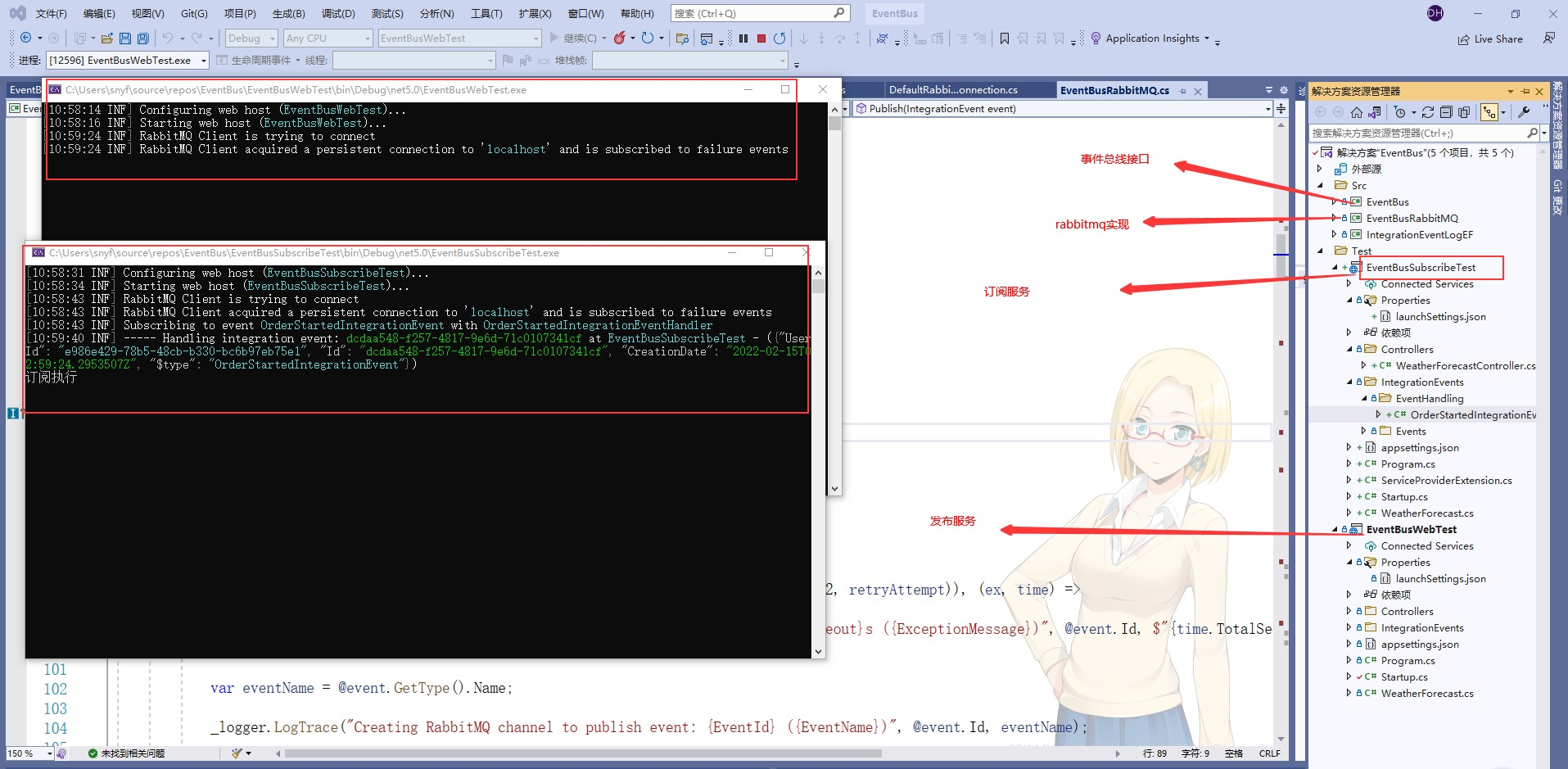
运行订阅服务和发布服务结果如图
基于ASP.NET Core 5.0使用RabbitMQ消息队列实现事件总线(EventBus)的更多相关文章
- 用VSCode开发一个基于asp.net core 2.0/sql server linux(docker)/ng5/bs4的项目(1)
最近使用vscode比较多. 学习了一下如何在mac上使用vscode开发asp.netcore项目. 这里是我写的关于vscode的一篇文章: https://www.cnblogs.com/cgz ...
- [译]基于ASP.NET Core 3.0的ABP v0.21已发布
基于ASP.NET Core 3.0的ABP v0.21已发布 在微软发布仅仅一个小时后, 基于ASP.NET Core 3.0的ABP v0.21也紧跟着发布了. v0.21没有新功能.它只是升级到 ...
- 基于ASP.NET Core 3.0快速搭建Razor Pages Web应用
前言 虽然说学习新的开发框架是一项巨大的投资,但是作为一个开发人员,不断学习新的技术并快速上手是我们应该掌握的技能,甚至是一个.NET Framework开发人员,学习.NET Core 新框架可以更 ...
- 基于ASP.NET Core 6.0的整洁架构
大家好,我是张飞洪,感谢您的阅读,我会不定期和你分享学习心得,希望我的文章能成为你成长路上的垫脚石,让我们一起精进. 本节将介绍基于ASP.NET Core的整洁架构的设计理念,同时基于理论落地的代码 ...
- 打造静态分析器(二)基于Asp.Net Core 3.0的AspectCore组件检测
上一篇,我们打造了一个简单的分析器,但是我们实际使用分析器就是为了对项目做分析检测,增加一些非语法的自检的 比如Asp.Net Core 3.0的替换依赖注入检测 设计分析 我们创建一个默认的Asp. ...
- 基于Asp.Net Core 5.0依赖Quartz.Net框架编写的任务调度web管理平台
源码地址: https://github.com/246850/Calamus.TaskScheduler 演示地址:http://47.101.47.193:1063/ 1.Quartz.NET框架 ...
- 用VSCode开发一个基于asp.net core 2.0/sql server linux(docker)/ng5/bs4的项目(2)
第一部分: http://www.cnblogs.com/cgzl/p/8478993.html 为Domain Model添加约束 前一部分, 我们已经把数据库创建出来了. 那么我们先看看这个数据库 ...
- 用VSCode开发一个基于asp.net core 2.0/sql server linux(docker)/ng5/bs4的项目(3)
第一部分: http://www.cnblogs.com/cgzl/p/8478993.html 第二部分: http://www.cnblogs.com/cgzl/p/8481825.html 由于 ...
- 从头编写 asp.net core 2.0 web api 基础框架 (1)
工具: 1.Visual Studio 2017 V15.3.5+ 2.Postman (Chrome的App) 3.Chrome (最好是) 关于.net core或者.net core 2.0的相 ...
随机推荐
- Jenkins_centos7安装jenkins(1)
Jenkins自动化部署的流程 一.下载安装 下载安装JDK wget -O /etc/yum.repos.d/jenkins.repo https://pkg.jenkins.io/redhat/j ...
- Nginx_安装配置
一.安装gcc依赖库 检查是否安装(linux默认是安装了的) gcc –version
- 怎样用命令行导入注册表 .reg 文件
https://stackoverflow.com/questions/49676660/how-to-run-the-reg-file-using-powershell Get-Command re ...
- 新增访客数量MR统计之NewInstallUserMapper中维度信息准备
关注公众号:分享电脑学习回复"百度云盘" 可以免费获取所有学习文档的代码(不定期更新)云盘目录说明:tools目录是安装包res 目录是每一个课件对应的代码和资源等doc 目录是一 ...
- Elasticsearch安装与配置
一.下载(华为云) https://mirrors.huaweicloud.com/elasticsearch/https://mirrors.huaweicloud.com/kibana/7.6.2 ...
- access注入 - 联合查询
1.access数据库简介 简介:Microsoft Office Access是由微软发布的关系数据库管理系统.它结合了 MicrosoftJet Database Engine 和 图形用户界面两 ...
- Elasticsearch使用系列-ES简介和环境搭建
一.简介 Elasticsearch是一个基于Lucene的搜索服务器.它提供了一个分布式多用户能力的全文搜索引擎,基于RESTful web接口.Elasticsearch是用Java语言开发的,并 ...
- 使用 ES Module 的正确姿势
前面我们在深入理解 ES Module 中详细介绍过 ES Module 的工作原理.目前,ES Module 已经在逐步得到各大浏览器厂商以及 NodeJS 的原生支持.像 vite 等新一代的构建 ...
- 集合框架-TreeSet-Comparator比较器
1 package cn.itcast.p5.treeset.demo; 2 3 import java.util.Iterator; 4 import java.util.TreeSet; 5 6 ...
- 学习JAVAWEB第三天
## 数据库的设计· 1. 多表之间的关系 1. 分类: 1. 一对一(了解): * 如:人和身份证 * 分析:一个人只有一个身份证,一个身份证只能对应一个人 2. 一对多(多对一): * 如:部门和 ...