
Tutorial_6 运行结果
1.buyer_favorites.txt
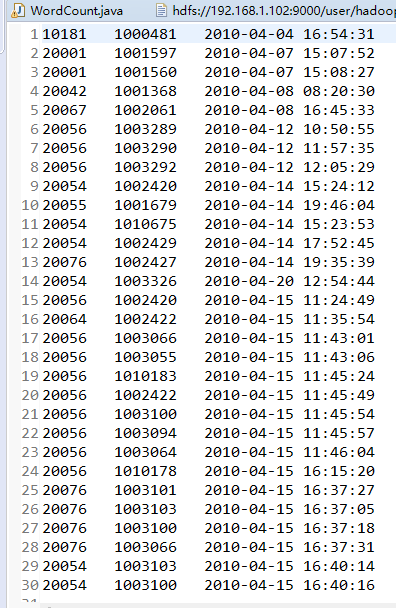
2.代码
package mapreduce;

import java.io.IOException;

import java.util.Iterator;

import java.util.StringTokenizer;

import java.io.IOException;

import java.util.Iterator;

import java.util.StringTokenizer;

import org.apache.hadoop.conf.Configuration;

import org.apache.hadoop.fs.Path;

import org.apache.hadoop.io.IntWritable;

import org.apache.hadoop.io.Text;

import org.apache.hadoop.mapreduce.Job;

import org.apache.hadoop.mapreduce.Mapper;

import org.apache.hadoop.mapreduce.Reducer;

import org.apache.hadoop.mapreduce.lib.input.FileInputFormat;

import org.apache.hadoop.mapreduce.lib.output.FileOutputFormat;

import org.apache.hadoop.util.GenericOptionsParser;

public class WordCount {

    public WordCount() {

    }

    public static void main(String[] args) throws Exception {

        Configuration conf = new Configuration();

//        String[] otherArgs = new GenericOptionsParser(conf, args).getRemainingArgs();

        String input = "hdfs://192.168.1.102:9000/user/hadoop/input/buyer_favorite1.txt";

        String output = "hdfs://192.168.1.102:9000/user/hadoop/output";

        String[] otherArgs = new String[] { input, output }; /* 直接设置输入参数 */

        if (otherArgs.length < 2) {

            System.err.println("Usage: wordcount <in> [<in>...] <out>");

            System.exit(2);

        }

        Job job = Job.getInstance(conf, "word count");

        job.setJarByClass(WordCount.class);

        job.setMapperClass(WordCount.TokenizerMapper.class);

        job.setCombinerClass(WordCount.IntSumReducer.class);

        job.setReducerClass(WordCount.IntSumReducer.class);

        job.setOutputKeyClass(Text.class);

        job.setOutputValueClass(IntWritable.class);

        for (int i = 0; i < otherArgs.length - 1; ++i) {

            FileInputFormat.addInputPath(job, new Path(otherArgs[i]));

        }

        FileOutputFormat.setOutputPath(job, new Path(otherArgs[otherArgs.length - 1]));

        System.exit(job.waitForCompletion(true) ? 0 : 1);

    }

    public static class IntSumReducer extends Reducer<Text, IntWritable, Text, IntWritable> {

        private IntWritable result = new IntWritable();

        public IntSumReducer() {

        }

        public void reduce(Text key, Iterable<IntWritable> values,

                Reducer<Text, IntWritable, Text, IntWritable>.Context context)

                throws IOException, InterruptedException {

            int sum = 0;

            IntWritable val;

            for (Iterator i$ = values.iterator(); i$.hasNext(); sum += val.get()) {

                val = (IntWritable) i$.next();

            }

            this.result.set(sum);

            context.write(key, this.result);

        }

    }

    public static class TokenizerMapper extends Mapper<Object, Text, Text, IntWritable> {

        private static final IntWritable one = new IntWritable(1);

        private Text word = new Text();

        public TokenizerMapper() {

        }

        public void map(Object key, Text value, Mapper<Object, Text, Text, IntWritable>.Context context)

                throws IOException, InterruptedException {

            StringTokenizer itr = new StringTokenizer(value.toString(), "\t");

            while (itr.hasMoreTokens()) {

                this.word.set(itr.nextToken().split("   ")[0]);

                context.write(this.word, one);

            }

        }

    }

}
3.运行结果

4.遇到的问题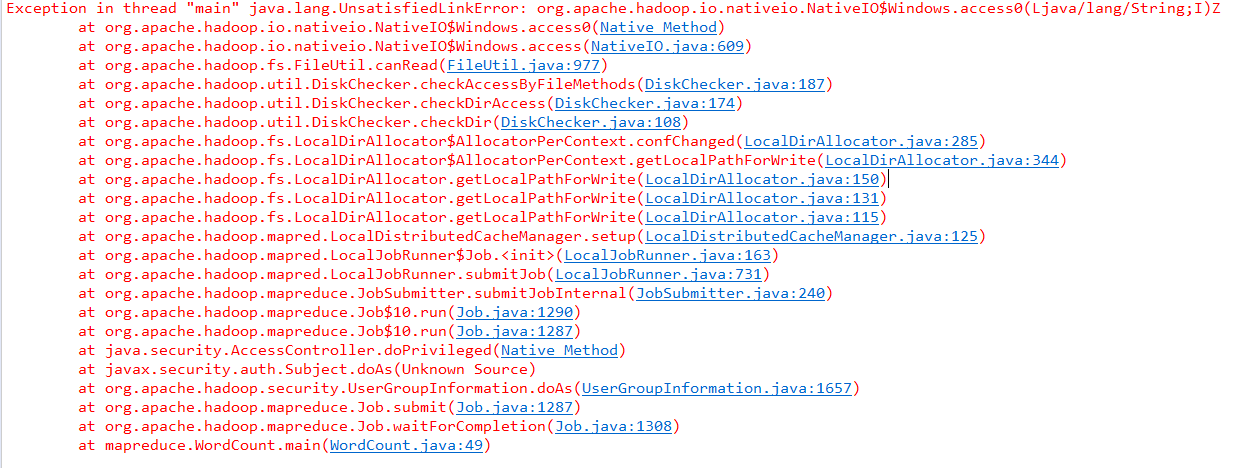
解决办法:
分析:
C:\Windows\System32下缺少hadoop.dll,把这个文件拷贝到C:\Windows\System32下面即可。
解决:
hadoop-common-2.2.0-bin-master下的bin的hadoop.dll放到C:\Windows\System32下,然后重启电脑,也许还没那么简单,还是出现这样的问题。(原博主是这么写的,实际上只是将hadoop.dll粘到了 C:\Windows\System32目录下就行了)
————————————————
声明:仅解决办法参考CSDN博客,文末附原文链接。
原文链接:https://blog.csdn.net/congcong68/article/details/42043093
Tutorial_6 运行结果的更多相关文章
- ASP.NET Aries 入门开发教程1:框架下载与运行
背景: 鉴于框架的使用者越来越多,文档太少,不少用户反映框架的入门门槛太高. 好吧,再辛苦下,抽时间写教程吧! 步骤1:下载框架源码 开源地址:https://github.com/cyq1162/A ...
- 在传统.NET Framework 上运行ASP.NET Core项目
新的项目我们想用ASP.NET Core来开发,但是苦于我们历史的遗产很多,比如<使用 JavaScriptService 在.NET Core 里实现DES加密算法>,我们要估计等到.N ...
- Sublime Text3配置在可交互环境下运行python快捷键
安装插件 在Sublime Text3下面写代码感觉很不错,但是写Python的时候遇到了一些问题. 用Sublime Text3打开python文件,或者在Sublime Text3下写好pytho ...
- hadoop 2.7.3本地环境运行官方wordcount-基于HDFS
接上篇<hadoop 2.7.3本地环境运行官方wordcount>.继续在本地模式下测试,本次使用hdfs. 2 本地模式使用fs计数wodcount 上面是直接使用的是linux的文件 ...
- hadoop 2.7.3本地环境运行官方wordcount
hadoop 2.7.3本地环境运行官方wordcount 基本环境: 系统:win7 虚机环境:virtualBox 虚机:centos 7 hadoop版本:2.7.3 本次先以独立模式(本地模式 ...
- Docker笔记一:基于Docker容器构建并运行 nginx + php + mysql ( mariadb ) 服务环境
首先为什么要自己编写Dockerfile来构建 nginx.php.mariadb这三个镜像呢?一是希望更深入了解Dockerfile的使用,也就能初步了解docker镜像是如何被构建的:二是希望将来 ...
- Linux scp 设置nohup后台运行
Linux scp 设置nohup后台运行 1.正常执行scp命令 2.输入ctrl + z 暂停任务 3.bg将其放入后台 4.disown -h 将这个作业忽略HUP信号 5.测试会话中断,任务继 ...
- 在docker中运行ASP.NET Core Web API应用程序(附AWS Windows Server 2016 widt Container实战案例)
环境准备 1.亚马逊EC2 Windows Server 2016 with Container 2.Visual Studio 2015 Enterprise(Profresianal要装Updat ...
- Android数据存储之Android 6.0运行时权限下文件存储的思考
前言: 在我们做App开发的过程中基本上都会用到文件存储,所以文件存储对于我们来说是相当熟悉了,不过自从Android 6.0发布之后,基于运行时权限机制访问外置sdcard是需要动态申请权限,所以以 ...
随机推荐
- Selenium-python 之弹窗处理
在Selenium-python 中,有时候需要对弹窗进行处理,比如获取弹窗上的内容.确定.取消.在弹窗上输入内容后点击确定-再次点出弹窗,需要专门的处理. 一.获取弹窗的内容 driver.find ...
- 使用regulator_get时的一个小注意事项
Linux kernel 使用 regulator 框架来管理电源,比如 PMIC 芯片上常见的LDO.使用 regulator 的常规流程如以下代码所示: void set_vbus_voltage ...
- 端午总结Vue3中computed和watch的使用
1使用计算属性 computed 实现按钮是否禁用 我们在有些业务场景的时候,需要将按钮禁用. 这个时候,我们需要使用(disabled)属性来实现. disabled的值是true表示禁用.fals ...
- Mac下安装及配置Appium环境
candiceli Mac下安装及配置Appium环境 我是小白,自己研究appium好几周了. 一开始按照同事这篇文章设置Mac下的环境,http://www.cnblogs.com/tangd ...
- 01:HTTP协议
软件开发架构 cs 客户端 服务端bs 浏览器 服务端ps:bs本质也是cs 浏览器窗口输入网址回车发生了几件事 """ 1 浏览器朝服务端发送请求 2 服务端接受请 ...
- PTA7~9题目集总结与归纳
前言: 总结三次题目集的知识点.题量.难度等情况. 目录: 题目集7(7-1).(7-2)两道题目的递进式设计分析总结 题目集8和题目集9两道ATM机仿真题目的设计思路分析总结 一. 题目集7(7-1 ...
- StackOverflow上面 7个最好的Java答案
StackOverflow发展到目前,已经成为了全球开发者的金矿.它能够帮助我们找到在各个领域遇到的问题的最有用的解决方案,同时我们也会从中学习到很多新的东西.这篇文章是在我们审阅了StackOver ...
- UNREFERENCED_PARAMETER的用处
UNREFERENCED_PARAMETER的用处 作用:告诉编译器,已经使用了该变量,不必检测警告! 在VC编译器下,如果您用最高级别进行编译,编译器就会很苛刻地指出您的非常细小的警告.当你生命了一 ...
- 关于Linux服务器部署
服务器信息: 此小节的内容: SecurityCRT:用来连接到Linux服务器命令操作. FTP(FTPRush):本地文件和Linux服务器文件交互的 工具服务器 借助客户端工具来链接到Linux ...
- CMD批处理(3)——批处理选择语句结构
if 的用法详解 命令格式1:if [NOT] ERRORLEVEL number command 命令格式2:if [NOT] string1==string2 command 命令格式3:if [ ...