
Tutorial_6 运行结果
1.buyer_favorites.txt
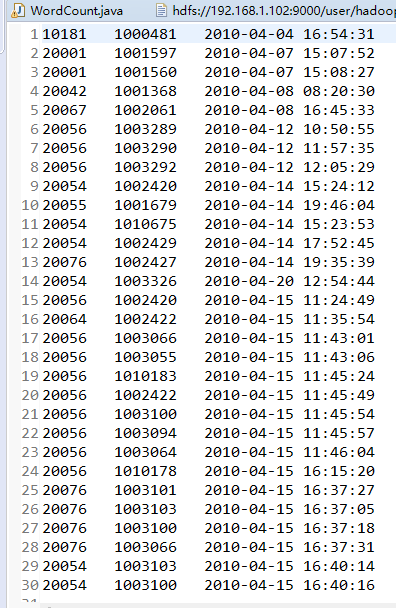
2.代码
package mapreduce;

import java.io.IOException;

import java.util.Iterator;

import java.util.StringTokenizer;

import java.io.IOException;

import java.util.Iterator;

import java.util.StringTokenizer;

import org.apache.hadoop.conf.Configuration;

import org.apache.hadoop.fs.Path;

import org.apache.hadoop.io.IntWritable;

import org.apache.hadoop.io.Text;

import org.apache.hadoop.mapreduce.Job;

import org.apache.hadoop.mapreduce.Mapper;

import org.apache.hadoop.mapreduce.Reducer;

import org.apache.hadoop.mapreduce.lib.input.FileInputFormat;

import org.apache.hadoop.mapreduce.lib.output.FileOutputFormat;

import org.apache.hadoop.util.GenericOptionsParser;

public class WordCount {

    public WordCount() {

    }

    public static void main(String[] args) throws Exception {

        Configuration conf = new Configuration();

//        String[] otherArgs = new GenericOptionsParser(conf, args).getRemainingArgs();

        String input = "hdfs://192.168.1.102:9000/user/hadoop/input/buyer_favorite1.txt";

        String output = "hdfs://192.168.1.102:9000/user/hadoop/output";

        String[] otherArgs = new String[] { input, output }; /* 直接设置输入参数 */

        if (otherArgs.length < 2) {

            System.err.println("Usage: wordcount <in> [<in>...] <out>");

            System.exit(2);

        }

        Job job = Job.getInstance(conf, "word count");

        job.setJarByClass(WordCount.class);

        job.setMapperClass(WordCount.TokenizerMapper.class);

        job.setCombinerClass(WordCount.IntSumReducer.class);

        job.setReducerClass(WordCount.IntSumReducer.class);

        job.setOutputKeyClass(Text.class);

        job.setOutputValueClass(IntWritable.class);

        for (int i = 0; i < otherArgs.length - 1; ++i) {

            FileInputFormat.addInputPath(job, new Path(otherArgs[i]));

        }

        FileOutputFormat.setOutputPath(job, new Path(otherArgs[otherArgs.length - 1]));

        System.exit(job.waitForCompletion(true) ? 0 : 1);

    }

    public static class IntSumReducer extends Reducer<Text, IntWritable, Text, IntWritable> {

        private IntWritable result = new IntWritable();

        public IntSumReducer() {

        }

        public void reduce(Text key, Iterable<IntWritable> values,

                Reducer<Text, IntWritable, Text, IntWritable>.Context context)

                throws IOException, InterruptedException {

            int sum = 0;

            IntWritable val;

            for (Iterator i$ = values.iterator(); i$.hasNext(); sum += val.get()) {

                val = (IntWritable) i$.next();

            }

            this.result.set(sum);

            context.write(key, this.result);

        }

    }

    public static class TokenizerMapper extends Mapper<Object, Text, Text, IntWritable> {

        private static final IntWritable one = new IntWritable(1);

        private Text word = new Text();

        public TokenizerMapper() {

        }

        public void map(Object key, Text value, Mapper<Object, Text, Text, IntWritable>.Context context)

                throws IOException, InterruptedException {

            StringTokenizer itr = new StringTokenizer(value.toString(), "\t");

            while (itr.hasMoreTokens()) {

                this.word.set(itr.nextToken().split("   ")[0]);

                context.write(this.word, one);

            }

        }

    }

}
3.运行结果

4.遇到的问题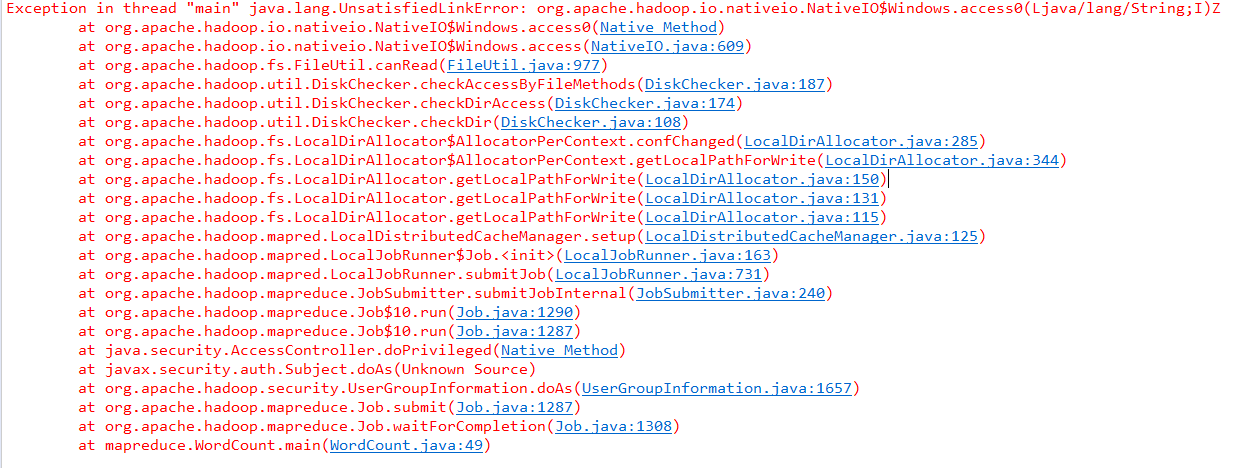
解决办法:
分析:
C:\Windows\System32下缺少hadoop.dll,把这个文件拷贝到C:\Windows\System32下面即可。
解决:
hadoop-common-2.2.0-bin-master下的bin的hadoop.dll放到C:\Windows\System32下,然后重启电脑,也许还没那么简单,还是出现这样的问题。(原博主是这么写的,实际上只是将hadoop.dll粘到了 C:\Windows\System32目录下就行了)
————————————————
声明:仅解决办法参考CSDN博客,文末附原文链接。
原文链接:https://blog.csdn.net/congcong68/article/details/42043093
Tutorial_6 运行结果的更多相关文章
- ASP.NET Aries 入门开发教程1:框架下载与运行
背景: 鉴于框架的使用者越来越多,文档太少,不少用户反映框架的入门门槛太高. 好吧,再辛苦下,抽时间写教程吧! 步骤1:下载框架源码 开源地址:https://github.com/cyq1162/A ...
- 在传统.NET Framework 上运行ASP.NET Core项目
新的项目我们想用ASP.NET Core来开发,但是苦于我们历史的遗产很多,比如<使用 JavaScriptService 在.NET Core 里实现DES加密算法>,我们要估计等到.N ...
- Sublime Text3配置在可交互环境下运行python快捷键
安装插件 在Sublime Text3下面写代码感觉很不错,但是写Python的时候遇到了一些问题. 用Sublime Text3打开python文件,或者在Sublime Text3下写好pytho ...
- hadoop 2.7.3本地环境运行官方wordcount-基于HDFS
接上篇<hadoop 2.7.3本地环境运行官方wordcount>.继续在本地模式下测试,本次使用hdfs. 2 本地模式使用fs计数wodcount 上面是直接使用的是linux的文件 ...
- hadoop 2.7.3本地环境运行官方wordcount
hadoop 2.7.3本地环境运行官方wordcount 基本环境: 系统:win7 虚机环境:virtualBox 虚机:centos 7 hadoop版本:2.7.3 本次先以独立模式(本地模式 ...
- Docker笔记一:基于Docker容器构建并运行 nginx + php + mysql ( mariadb ) 服务环境
首先为什么要自己编写Dockerfile来构建 nginx.php.mariadb这三个镜像呢?一是希望更深入了解Dockerfile的使用,也就能初步了解docker镜像是如何被构建的:二是希望将来 ...
- Linux scp 设置nohup后台运行
Linux scp 设置nohup后台运行 1.正常执行scp命令 2.输入ctrl + z 暂停任务 3.bg将其放入后台 4.disown -h 将这个作业忽略HUP信号 5.测试会话中断,任务继 ...
- 在docker中运行ASP.NET Core Web API应用程序(附AWS Windows Server 2016 widt Container实战案例)
环境准备 1.亚马逊EC2 Windows Server 2016 with Container 2.Visual Studio 2015 Enterprise(Profresianal要装Updat ...
- Android数据存储之Android 6.0运行时权限下文件存储的思考
前言: 在我们做App开发的过程中基本上都会用到文件存储,所以文件存储对于我们来说是相当熟悉了,不过自从Android 6.0发布之后,基于运行时权限机制访问外置sdcard是需要动态申请权限,所以以 ...
随机推荐
- 解决maven依赖冲突问题
解决maven依赖冲突问题 1.idea 安装maven helper插件 2.打开pom.xml文件 底部多出一个Dependency Analyzer选项 点开这个选项 找到冲突,点击右键,选择E ...
- CVPR2020论文解读:CNN合成的图片鉴别
CVPR2020论文解读:CNN合成的图片鉴别 <CNN-generated images are surprisingly easy to spot... for now> 论文链接:h ...
- NVIDIA® TensorRT™ supports different data formats
NVIDIA TensorRT supports different data formats NVIDIATensorRT公司 支持不同的数据格式.需要考虑两个方面:数据类型和布局. ...
- 尚硅谷Java——宋红康笔记【day6-day10】
day6 一.数组的概述 1.数组的理解:数组(Array),是多个相同类型数据按一定顺序排列的集合,并使用一个名字命名,并通过编号的方式对这些数据进行统一管理. 2.数组相关的概念: 数组名 元素 ...
- 02:HTML
HTML介绍 Web服务本质 import socket sk = socket.socket() sk.bind(("127.0.0.1", 8080)) sk.listen(5 ...
- centos 7 增加一块硬盘的步骤
1) 增加一块硬盘 1G [到设置中添加一块硬盘即可] 2) 重启一下服务器 lsblk -f 查看硬盘 3) 给 sdb 硬盘分区 fdisk /dev/sdb n,p,enter,enter,w ...
- 『假如我是面试官』RabbitMQ我会这样问
1. 为什么你们公司选择RabbitMQ作为消息中间件 在消息队列选型时,我们调研了市场上比较常用ActiveMQ,RabbitMQ,RocketMQ,Kafka. RabbitMQ相对成熟稳定,这是 ...
- 【题解】Luogu P2875 [USACO07FEB]牛的词汇The Cow Lexicon
题目描述 Few know that the cows have their own dictionary with W (1 ≤ W ≤ 600) words, each containing no ...
- 开关电源(1)之BUCK降压变换器工作原理及Multisim实例仿真
开关电源(Switching Mode Power Supply)即开关稳压电源,是相对于线性稳压电源的一种的新型稳压电源电路,它通过对输出电压实时监测并动态控制开关管导通与断开的时间比值来稳定 ...
- 把 STM32 bluepill 变成调试器(daplink)
在调一块 ARM M0 内核的板子,使用官方的 DEMO 板子来调,板子上集成了 daplink 调试器. 为了方便使用,我把目标板跟 daplink 剪开了,然后用杜邦线把 daplink 跟目标板 ...