
MaterialDesignInXamlToolkit“无法绑定到目标方法,因其签名或安全透明度与委托类型的签名或安全透明度不兼容”异常的解决思路
前言:
MaterialDesignInXAML 控件库高度封装,有一些控件在使用过程中有隐晦前提条件,使用前还得多读读源码。
针对这个问题,我分步骤说明一下解决思路。
1.首先解释下“无法绑定到目标方法,因其签名或安全透明度与委托类型的签名或安全透明度不兼容”异常。字面看是提示有属性绑定失败,而且提到是委托类型,由此需检查哪些属性是绑定到委托类型的。
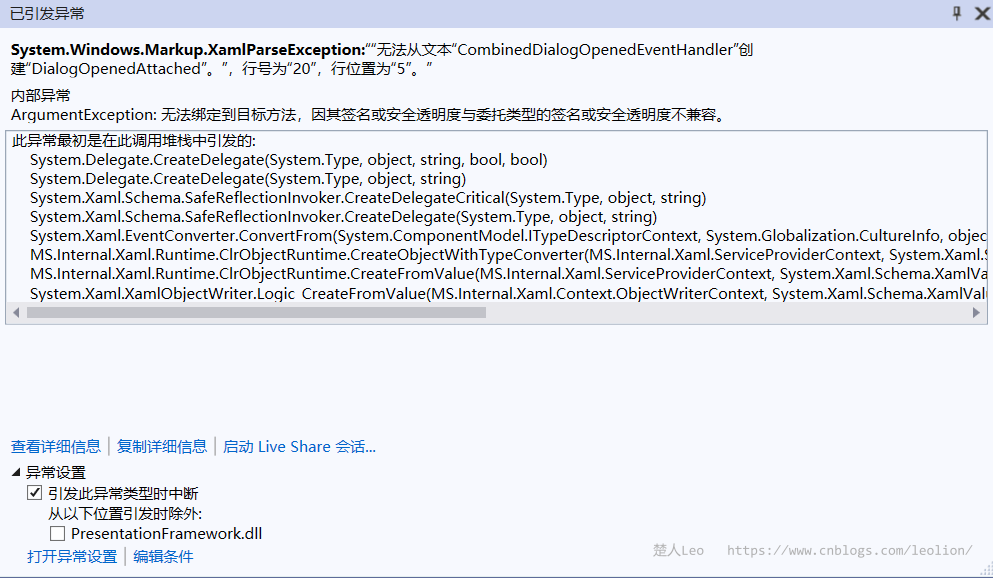
DialogOpenedAttached、DialogClosingAttached是DialogHost控件的两个附件属性,官方示例是绑定到CombinedDialogOpenedEventHandler、CombinedDialogClosingEventHandler上,这两个事件处理函数是需要我们在后置代码中去定义的。我们可以在这两个事件处理函数中添加一些自定义逻辑。
public void CombinedDialogOpenedEventHandler(object sender, DialogOpenedEventArgs eventArgs)

{

    CombinedCalendar.SelectedDate = _mainViewModel.Date;

    CombinedClock.Time = _mainViewModel.Time;

}

public void CombinedDialogClosingEventHandler(object sender, DialogClosingEventArgs eventArgs)

{

    if (Convert.ToBoolean(Convert.ToUInt16(eventArgs.Parameter)) && CombinedCalendar.SelectedDate is DateTime selectedDate)

    {

        DateTime combined = selectedDate.AddSeconds(CombinedClock.Time.TimeOfDay.TotalSeconds);

        _mainViewModel.Time = combined;

        _mainViewModel.Date = combined;

    }

}
编译不再报错,这样最直接的问题就解决了。
2.接下来还会遇到一个问题,就是弹出时间选择器对话框的按钮是禁用状态。
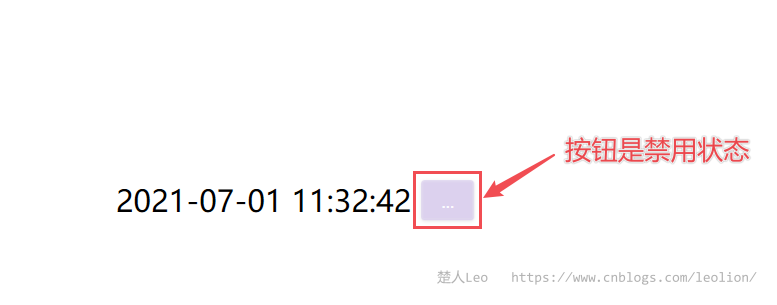
这个问题在控件GitHub主页的wiki中有详细解答,issues中也有相关问题。
翻译如下:
- 第一种类型是一个简单的ICommand实现,通过视图模型(或类似的)提供。这些命令在执行时通常只是调用一个方法。尽管WPF并没有为此提供一个本地实现,但许多流行的MVVM库确实有一些ICommand接口的实现,旨在使方法调用变得简单。
- 路由命令的设置是为了明确地在调用命令的元素和处理命令执行的元素之间造成分离。当一个路由命令被调用时,WPF通过可视化树(从调用命令的元素开始)寻找一个可以处理该命令的元素。如果没有找到处理程序,那么该命令将导致该按钮被禁用。在DialogHost.OpenDialogCommand的例子中,这种情况经常发生,因为在视觉树中没有找到DialogHost实例。你也可以通过使用CommandTarget属性来指定另一个命令目标,以找到RoutedCommand的处理程序。
根本原因就是“因为在视觉树中没有找到DialogHost实例”。这就是隐晦前提条件。
GitHub主页的wiki中介绍了打开对话框的4种方式,分别如下:
DialogHost.OpenDialogCommand
<Button Command="{x:Static md:DialogHost.OpenDialogCommand}" />
RoutedCommand 通常从一个按钮中使用,可通过CommandParameter提供可选的内容。
DialogHost.IsOpen
<md:DialogHost IsOpen="True" />
依赖属性,可以从XAML触发,从代码后台或通过绑定设置。内容必须在DialogHost.DialogContent中设置。
DialogHost.Show
DialogHost.Show(viewOrModel);
基于异步/等待的静态API,可以纯粹地在代码中使用(例如从视图模型中)。内容可以直接传递给对话框。注意,如果你有多个窗口和多个DialogHost实例,你可以设置DialogHost.Identifier属性,并向.Show(..)方法提供标识符,以帮助找到所需的DialogHost。
如果有多个可能的对话主机实例,在正确的窗口显示对话框的替代方法是使用扩展方法。
.Show() 扩展方法
该方法同时扩展了Window和DepedencyObject,将尝试定位最合适的DialogHost来显示对话框。
但文档还漏了一种很实用也很常见的方式,官方的示例就是这种用法。将 MainWindow 的根容器定义为 DialogHost。
<materialDesign:DialogHost DialogTheme="Inherit"

                            Identifier="RootDialog">

    <!--Content-->

</materialDesign:DialogHost>
这样在视觉树中始终能找到DialogHost实例,对于实现弹框全局模态效果,这种方式值得推荐。
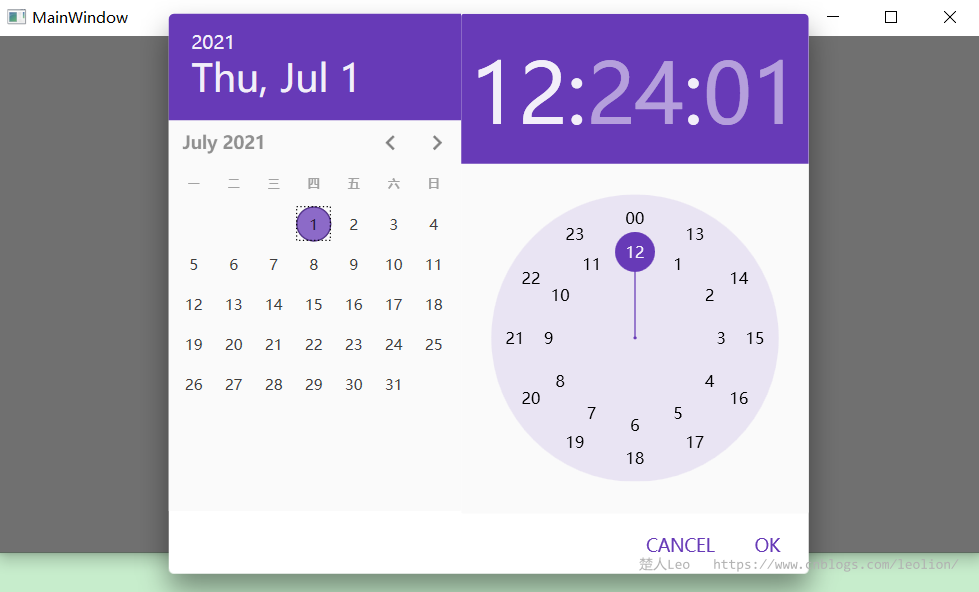
代码如下:
<materialDesign:DialogHost DialogTheme="Inherit"

                       Identifier="RootDialog">

    <Grid>

        <StackPanel HorizontalAlignment="Center"

                VerticalAlignment="Center"

                Orientation="Horizontal">

            <TextBlock VerticalAlignment="Center"

                   FontSize="24"

                   Text="{Binding Date, StringFormat={}{0:yyyy-MM-dd HH:mm:ss}}" />

            <Button Margin="8 0 0 0"

                materialDesign:DialogHost.DialogClosingAttached="CombinedDialogClosingEventHandler"

                materialDesign:DialogHost.DialogOpenedAttached="CombinedDialogOpenedEventHandler"

                Command="{x:Static materialDesign:DialogHost.OpenDialogCommand}"

                Content="...">

                <Button.CommandParameter>

                    <Grid Margin="-1">

                        <Grid.RowDefinitions>

                            <RowDefinition Height="*" />

                            <RowDefinition Height="Auto" />

                        </Grid.RowDefinitions>

                        <StackPanel Grid.Row="0"

                                Orientation="Horizontal">

                            <Calendar x:Name="CombinedCalendar"

                                  Margin="-1 -4 -1 0" />

                            <materialDesign:Clock x:Name="CombinedClock"

                                              DisplayAutomation="CycleWithSeconds"

                                              Is24Hours="True" />

                        </StackPanel>

                        <StackPanel Grid.Row="1"

                                Margin="8"

                                HorizontalAlignment="Right"

                                Orientation="Horizontal">

                            <Button Command="{x:Static materialDesign:DialogHost.CloseDialogCommand}"

                                CommandParameter="0"

                                Content="CANCEL"

                                Style="{DynamicResource MaterialDesignFlatButton}" />

                            <Button Command="{x:Static materialDesign:DialogHost.CloseDialogCommand}"

                                CommandParameter="1"

                                Content="OK"

                                Style="{DynamicResource MaterialDesignFlatButton}" />

                        </StackPanel>

                    </Grid>

                </Button.CommandParameter>

            </Button>

        </StackPanel>

    </Grid>

</materialDesign:DialogHost>
3.除了定义DialogHost作为根容器,还可以通过指定CommandTarget的来解决。
<Grid>

    <StackPanel HorizontalAlignment="Center"

                VerticalAlignment="Center"

                Orientation="Horizontal">

        <TextBlock VerticalAlignment="Center"

                   FontSize="24"

                   Text="{Binding Date, StringFormat={}{0:yyyy-MM-dd HH:mm:ss}}" />

        <Button Margin="8 0 0 0"

                materialDesign:DialogHost.DialogClosingAttached="CombinedDialogClosingEventHandler"

                materialDesign:DialogHost.DialogOpenedAttached="CombinedDialogOpenedEventHandler"

                Command="{x:Static materialDesign:DialogHost.OpenDialogCommand}"

                CommandTarget="{Binding ElementName=DatePickerDialogHost}"

                Content="...">

            <Button.CommandParameter>

                <Grid Margin="-1">

                    <Grid.RowDefinitions>

                        <RowDefinition Height="*" />

                        <RowDefinition Height="Auto" />

                    </Grid.RowDefinitions>

                    <StackPanel Grid.Row="0"

                                Orientation="Horizontal">

                        <Calendar x:Name="CombinedCalendar"

                                  Margin="-1 -4 -1 0" />

                        <materialDesign:Clock x:Name="CombinedClock"

                                              DisplayAutomation="CycleWithSeconds"

                                              Is24Hours="True" />

                    </StackPanel>

                    <StackPanel Grid.Row="1"

                                Margin="8"

                                HorizontalAlignment="Right"

                                Orientation="Horizontal">

                        <Button Command="{x:Static materialDesign:DialogHost.CloseDialogCommand}"

                                CommandParameter="0"

                                Content="CANCEL"

                                Style="{DynamicResource MaterialDesignFlatButton}" />

                        <Button Command="{x:Static materialDesign:DialogHost.CloseDialogCommand}"

                                CommandParameter="1"

                                Content="OK"

                                Style="{DynamicResource MaterialDesignFlatButton}" />

                    </StackPanel>

                </Grid>

            </Button.CommandParameter>

        </Button>

    </StackPanel>

    <materialDesign:DialogHost x:Name="DatePickerDialogHost">

    </materialDesign:DialogHost>

</Grid>
这种方式的Content部分是通过CommandParameter传递给Command的。下面的源代码一目了然。
CommandBindings.Add(new CommandBinding(OpenDialogCommand, OpenDialogHandler));

private void OpenDialogHandler(object sender, ExecutedRoutedEventArgs executedRoutedEventArgs)

{

    if (executedRoutedEventArgs.Handled) return;

    if (executedRoutedEventArgs.OriginalSource is DependencyObject dependencyObject)

    {

        _attachedDialogOpenedEventHandler = GetDialogOpenedAttached(dependencyObject);

        _attachedDialogClosingEventHandler = GetDialogClosingAttached(dependencyObject);

    }

    if (executedRoutedEventArgs.Parameter != null)

    {

        AssertTargetableContent();

        if (_popupContentControl != null)

        {

            _popupContentControl.DataContext = OpenDialogCommandDataContextSource switch

            {

                DialogHostOpenDialogCommandDataContextSource.SenderElement

                    => (executedRoutedEventArgs.OriginalSource as FrameworkElement)?.DataContext,

                DialogHostOpenDialogCommandDataContextSource.DialogHostInstance => DataContext,

                DialogHostOpenDialogCommandDataContextSource.None => null,

                _ => throw new ArgumentOutOfRangeException(),

            };

        }

        DialogContent = executedRoutedEventArgs.Parameter;

    }

    SetCurrentValue(IsOpenProperty, true);

    executedRoutedEventArgs.Handled = true;

}
4.如果不想通过CommandParameter传递内容参数,还可以直接在DialogContent定义内容部分。这是使用Dialog控件的常见方式。
<Grid>

    <materialDesign:DialogHost>

        <materialDesign:DialogHost.DialogContent>

            <Grid Margin="-1">

                <Grid.RowDefinitions>

                    <RowDefinition Height="*" />

                    <RowDefinition Height="Auto" />

                </Grid.RowDefinitions>

                <StackPanel Grid.Row="0"

                            Orientation="Horizontal">

                    <Calendar x:Name="CombinedCalendar"

                              Margin="-1 -4 -1 0" />

                    <materialDesign:Clock x:Name="CombinedClock"

                                          DisplayAutomation="CycleWithSeconds"

                                          Is24Hours="True" />

                </StackPanel>

                <StackPanel Grid.Row="1"

                            Margin="8"

                            HorizontalAlignment="Right"

                            Orientation="Horizontal">

                    <Button Command="{x:Static materialDesign:DialogHost.CloseDialogCommand}"

                            CommandParameter="0"

                            Content="CANCEL"

                            Style="{DynamicResource MaterialDesignFlatButton}" />

                    <Button Command="{x:Static materialDesign:DialogHost.CloseDialogCommand}"

                            CommandParameter="1"

                            Content="OK"

                            Style="{DynamicResource MaterialDesignFlatButton}" />

                </StackPanel>

            </Grid>

        </materialDesign:DialogHost.DialogContent>

        <StackPanel HorizontalAlignment="Center"

                    VerticalAlignment="Center"

                    Orientation="Horizontal">

            <TextBlock VerticalAlignment="Center"

                       FontSize="24"

                       Text="{Binding Date, StringFormat={}{0:yyyy-MM-dd HH:mm:ss}}" />

            <Button Margin="8 0 0 0"

                    materialDesign:DialogHost.DialogClosingAttached="CombinedDialogClosingEventHandler"

                    materialDesign:DialogHost.DialogOpenedAttached="CombinedDialogOpenedEventHandler"

                    Command="{x:Static materialDesign:DialogHost.OpenDialogCommand}"

                    CommandTarget="{Binding ElementName=DatePickerDialogHost}"

                    Content="..." />

        </StackPanel>

    </materialDesign:DialogHost>

</Grid>
MaterialDesignInXamlToolkit“无法绑定到目标方法,因其签名或安全透明度与委托类型的签名或安全透明度不兼容”异常的解决思路的更多相关文章
- Spring AOP中使用args表达式访问目标方法的参数
Spring AOP 的使用过程理解 首先,aop的使用场景介绍: 1.处理一些通用的非功能性的需求,不影响业务流程,比如说打印日志.性能统计.推送消息等: 2.aop无法拦截static.final ...
- jquery 绑定事件的方法
jQuery中提供了四种绑定事件的方法,分别是bind.live.delegate.on,对应的解除监听的函数分别是unbind.die.undelegate.off: 一.on()方法(首选方法) ...
- JavaScript绑定事件的方法[3种]
在JavaScript中,有三种常用的绑定事件的方法: 在DOM元素中直接绑定: 在JavaScript代码中绑定: 绑定事件监听函数. 一. 在DOM元素中直接绑定 这里的DOM元素,可以理解为HT ...
- GridView等表格模板列绑定数据的方法
//绑定GridView每一行中的CheckBoxList protected void GridView1_RowDataBound(object sender, GridViewRowEventA ...
- elementui command绑定变量对象方法
command绑定变量对象方法 使用v-bind : command绑定 简写 :command
- Spring Aop 修改目标方法参数和返回值
一.新建注解 @Target({ElementType.METHOD, ElementType.TYPE}) @Retention(RetentionPolicy.RUNTIME) @Document ...
- Android studio button 按钮 四种绑定事件的方法
package com.geli_2.sujie.sujiegeili2testbutton; import android.os.Bundle; import android.support.v7. ...
- AOP实现拦截对象以及获取切入目标方法和注解
AOP实现拦截对象以及获取切入目标方法和注解 一.JoinPoint是什么? AspectJ使用org.aspectj.lang.JoinPoint接口表示目标类连接点对象,如果是环绕增强时,使用 o ...
- SpringMVC系列(五)使用 Serlvet 原生的 API 作为目标方法的参数
SpringMVC的Handler方法可以接受哪些 ServletAPI 类型的参数 • HttpServletRequest• HttpServletResponse• HttpSession• j ...
随机推荐
- Python运算符 - Python零基础入门教程
目录 一.算术运算符 二.赋值运算符 三.比较运算符 四.运算符的优先等级 五.重点总结 六.猜你喜欢 零基础 Python 学习路线推荐 : Python 学习目录 >> Python ...
- JMeter四种参数化方式
JMeter参数化是指把固定的数据动态化,这样更贴合实际的模拟用户请求,比如模拟多个不同账号.JMeter一共有四种参数化方式,分别是: CSV Data Set Config Function He ...
- CPU缓存是位于CPU与内存之间的临时数据交换器,它的容量比内存小的多但是交换速度却比内存要快得多。CPU缓存一般直接跟CPU芯片集成或位于主板总线互连的独立芯片上
一.什么是CPU缓存 1. CPU缓存的来历 众所周知,CPU是计算机的大脑,它负责执行程序的指令,而内存负责存数据, 包括程序自身的数据.在很多年前,CPU的频率与内存总线的频率在同一层面上.内存的 ...
- centos7下iperf的安装
场景: 1.系统centos7.0-123,该版本下的网络测试工具iperf3 下载gz包#wget http://downloads.es.net/pub/iperf/iperf-3.0.6.tar ...
- Java 四种内置线程池
引言 我们之前使用线程的时候都是使用 new Thread 来进行线程的创建,但是这样会有一些问题 每次 new Thread 新建对象性能差 线程缺乏统一管理,可能无限制新建线程,相互之间竞争,及可 ...
- 面试侃集合 | SynchronousQueue公平模式篇
面试官:呦,小伙子来的挺早啊! Hydra:那是,不能让您等太久了啊(别废话了快开始吧,还赶着去下一场呢). 面试官:前面两轮表现还不错,那我们今天继续说说队列中的SynchronousQueue吧. ...
- Single Shot Multibox Detection (SSD)实战(上)
Single Shot Multibox Detection (SSD)实战(上) 介绍了边界框.锚框.多尺度对象检测和数据集.现在,我们将利用这些背景知识构建一个目标检测模型:单次多盒检测(SSD) ...
- Redis系列(四):地理信息
除了Bitmaps和HyperLogLog,Redis还提供了关于地理空间的相关操作,主要是经纬度.Redis提供的地理信息操作是有误差的,最大误差可能会达到5%.Redis提供的Geo的操作如下: ...
- 编译原理-确定有穷自动机(deterministic finite automata ,DFA)
是一个五元组 M=(S,∑,f,S0,F) 其中 S:有穷状态集 ∑:输入字母表(有穷) f:状态转换函数.f(S,a)=S' 是单值部分映射,每个状态面临一个输入符号时,转入的后继状态是确定的. S ...
- Python集合:set
集合 集合的描述 set是一个无序不重复的序列,可以用{}或者 set() 函数创建集合,它存放不可变类型(如字符串.数字.元组)数据. 注意:创建一个空集合必须使用set()方法,因为{}是用来生成 ...