
android项目1:打电话
android项目1:打电话
一、效果图
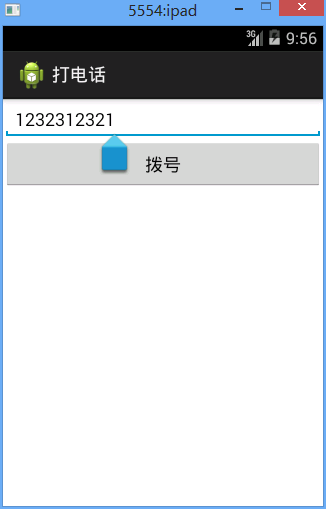
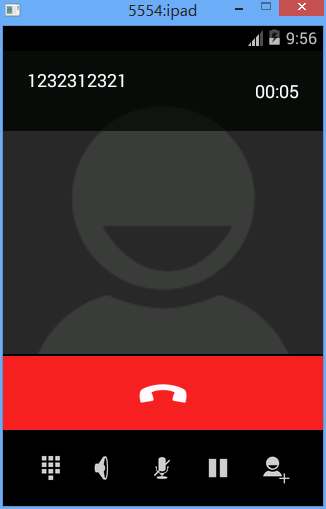
二、步骤
1、画好主界面
/call/res/layout/activity_main.xml
 <?xml version="1.0" encoding="utf-8"?>

 <LinearLayout xmlns:android="http://schemas.android.com/apk/res/android"

     android:layout_width="match_parent"

     android:layout_height="match_parent"

     android:orientation="vertical" >

     <EditText

         android:id="@+id/editText_phoneNumber"

         android:layout_width="match_parent"

         android:layout_height="wrap_content"

         android:layout_weight="0.00"

         android:ems="10" >

         <requestFocus />

     </EditText>

     <Button

         android:id="@+id/btn_call"

         android:layout_width="match_parent"

         android:layout_height="50dp"

         android:layout_weight="0.00"

         android:text="@string/btn_call" />

 </LinearLayout>
2、编好代码
com.fry.call_1.MainActivity
 package com.fry.call_1;

 import android.app.Activity;

 import android.content.Intent;

 import android.net.Uri;

 import android.os.Bundle;

 import android.view.View;

 import android.view.View.OnClickListener;

 import android.widget.Button;

 import android.widget.EditText;

 public class MainActivity extends Activity{

     private Button btn_call;//创建一个button对象

     private EditText editText_phoneNumber;

      protected void onCreate(Bundle savedInstanceState) {

             super.onCreate(savedInstanceState);//父类操作

             setContentView(R.layout.activity_main);//引入名为activity_main的界面

             btn_call=(Button) findViewById(R.id.btn_call);//找id为btn_openActivity的button

             editText_phoneNumber=(EditText) findViewById(R.id.editText_phoneNumber);

             //1、给按钮设置点击事件

             btn_call.setOnClickListener(new OnClickListener() {//设置button点击监听

                 @Override

                 public void onClick(View v) {//onclick事件

                     // TODO Auto-generated method stub

                     //2、拿到编辑框中的号码

                     String phoneNumber=editText_phoneNumber.getText().toString();

                     //3、给这个号码打电话

                     Intent intent=new Intent();//初始化intent

38                     intent.setAction("android.intent.action.CALL");

39                     intent.addCategory("android.intent.category.DEFAULT");

40                     intent.setData(Uri.parse("tel:"+phoneNumber));

                     startActivity(intent);//打开activity

                 }

             });

         }

 }
3、设置好权限
/call/AndroidManifest.xml
 <manifest xmlns:android="http://schemas.android.com/apk/res/android"

     package="com.fry.call_1"

     android:versionCode="1"

     android:versionName="1.0" >

     <uses-permission android:name="android.permission.CALL_PHONE" />

     <uses-sdk

         android:minSdkVersion="8"

         android:targetSdkVersion="19" />

     <application

         android:allowBackup="true"

         android:icon="@drawable/ic_launcher"

         android:label="@string/app_name"

         android:theme="@style/AppTheme" >

         <activity

             android:name="com.fry.call_1.MainActivity"

             android:label="@string/app_name" >

             <intent-filter>

                 <action android:name="android.intent.action.MAIN" />

                 <category android:name="android.intent.category.LAUNCHER" />

             </intent-filter>

         </activity>

         <activity android:name="com.fry.call_1.Activity01" android:exported="true"></activity>

     </application>

 </manifest>
android项目1:打电话的更多相关文章
- Android项目结构 以及体系结构
学习Android平台的人一般对Android的平台的应该有点认识 其它的就不多讲了 Android项目一般由以下几个部分构成 以上是一个简单的Android项目结构目录图 1. src 主要是 源 ...
- Android项目的目录结构 初学者记录
Android项目的目录结构 Activity:应用被打开时显示的界面 src:项目代码 R.java:项目中所有资源文件的资源id Android.jar:Android的jar包,导入此包方可使用 ...
- Android——eclipse下运行android项目报错 Conversion to Dalvik format failed with error 1解决
在eclipse中导入android项目,项目正常没有任何错误,但是运行时候会报错,(clean什么的都没用了.....)如图: 百度大神大多说是jdk的问题,解决: 右键项目-Properties如 ...
- eclipse — 导入android项目后识别成java项目的问题及解决
最近在eclipse导入android项目的时候遇到了奇葩问题,再此记录 遇到的问题就是:将完好的android项目导入到eclipse的时候,原本这是一个很容易的事情,但是导入成功后发现,,,靠ec ...
- 用Kotlin创建第一个Android项目(KAD 01)
原文标题:Create your first Android project using Kotlin (KAD 01) 作者:Antonio Leiva 时间:Nov 21, 2016 原文链接:h ...
- Android之什么是Activity和常用的ADB命令以及Android项目结构的认识
总结一下之前学习Android的一些内容 一: Android常用的ADB命令(adb android调试桥) 1.adb devices 查看模拟器设备并重新连接. 2.adb ki ...
- eclipse将android项目生成apk并且给apk签名
转载:http://www.cnblogs.com/tianguook/archive/2012/09/27/2705724.html 生成apk最懒惰的方法是:只要你运行过android项目,到工作 ...
- Android开发学习——Android项目的目录结构
Android项目的目录结构: 资源文件夹: 清单配置文件: Android的四大组件在使用前全部需要在清单文件中配置 <?xml version="1.0" encodin ...
- Android项目实战(二十五):Android studio 混淆+打包+验证是否成功
前言: 单挑Android项目,最近即时通讯用到环信,集成sdk的时候 官方有一句 在 ProGuard 文件中加入以下 keep. -keep class com.hyphenate.** {*;} ...
随机推荐
- MongoDB学习笔记系列~目录
MongoDB学习笔记~环境搭建 (2015-03-30 10:34) MongoDB学习笔记~MongoDBRepository仓储的实现 (2015-04-08 12:00) MongoDB学习笔 ...
- Spark2.0机器学习系列之6:GBDT(梯度提升决策树)、GBDT与随机森林差异、参数调试及Scikit代码分析
概念梳理 GBDT的别称 GBDT(Gradient Boost Decision Tree),梯度提升决策树. GBDT这个算法还有一些其他的名字,比如说MART(Multiple Addi ...
- 专项训练错题整理-nowcoder-算法
一.排序 1.快速排序在下列哪种情况下最易发挥其长处? 答案是: 被排序的数据完全无序. 在数据基本有序的情况下,会退化为冒泡排序,复杂度会退化为O(n^2). ①[因为,如果是基本有序的话, 那么每 ...
- genymotion——在虚拟机中当中安装genymotion,启动已经新增好的设备时,提示:the virtual device got no ip address
1.启动已经新增好的设备时,提示:the virtual device got no ip address,于是在网上搜索该问题,便得到提示,先启动virtual box中的该模拟设备,于是便启动,出 ...
- Java中的高精度整数和高精度小数
在实际编码中,会遇到很多高精度的事例,比如,在计算金钱的时候就需要保留高精度小数,这样计算才不会有太大误差: 在下面的代码中,我们验证了,当两个float型的数字相加,得到的结果和我们的预期结果是有误 ...
- The Cheap KD 8 is rumored to arrive online
Nike and also the Oklahoma City Thunder star revealed the Cheap KD 8, which they are calling probabl ...
- webService 总结
Web Service基本概念 Web Service也叫XML Web Service WebService是一种可以接收从Internet或者Intranet上的其它系统中传递过来的请求,轻量级的 ...
- XVII Open Cup named after E.V. Pankratiev Stage 14, Grand Prix of Tatarstan, Sunday, April 2, 2017 Problem F. Matrix Game
题目: Problem F. Matrix GameInput file: standard inputOutput file: standard inputTime limit: 1 secondM ...
- python3.5实现购物车
一.购物车实现: 购物车功能: 用户登录:密码错误三次锁定账户. 商品列表分页显示:输入页码查看指定页数商品信息. 已购买商品列表:显示已购买的物品列表:可以模糊查询已购买的商品并在终端打印. 充值: ...
- Linux远程管理器xshell和xftp使用教程,以及遇到关闭Xshell后项目也停止的解决方法
1.xshell 是一个强大的安全终端模拟软件,它支持SSH1, SSH2, 以及Microsoft Windows 平台的TELNET 协议. 2.是一个基于 MS windows 平台的功能强大的 ...