
HTML的footer置于页面最底部的方法
方法一:footer高度固定+绝对定位
<html>

  <head>

    <style type="text/css">

        html{height:%;}

        body{min-height:%;margin:;padding:;position:relative;}

        .header{background-color: #ffe4c4;}

        .main{padding-bottom:100px;background-color: #bdb76b;}/* main的padding-bottom值要等于或大于footer的height值 */

        .footer{position:absolute;bottom:;width:%;height:100px;background-color: #ffc0cb;}

    </style>

  </head>

  <body>

    <div class="header">header</div>

    <div class="main">main content</div>

    <div class="footer">footer</div>

  </body>

</html>
效果:
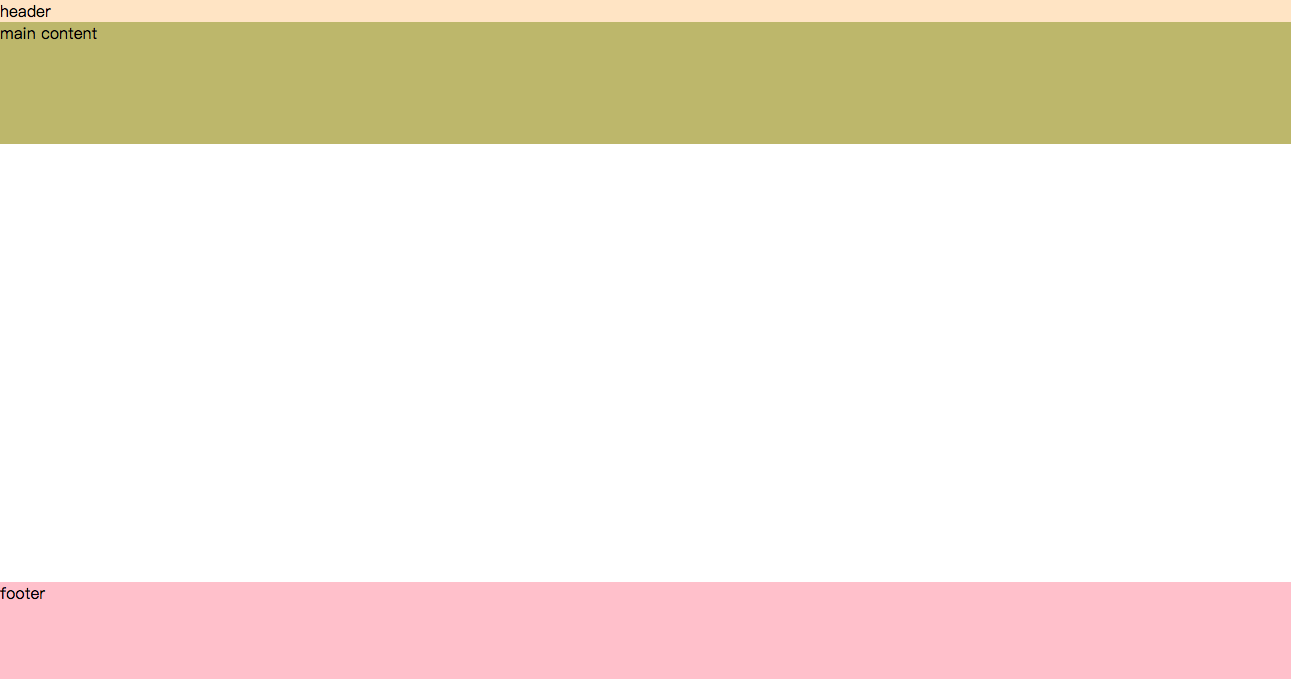
方法二:footer高度固定+margin负值
<html>

  <head>

    <style type="text/css">

      html,body{height:%;margin:;padding:;}

      .container{min-height:%;}

      .header{background-color: #ffe4c4;}

      .main{padding-bottom:100px;background-color: #bdb76b;}/* main的padding-bottom值要等于或大于footer的height值 */

      .footer{height:100px;margin-top:-100px;background-color: #ffc0cb;}/* margin-top(负值的)高度等于footer的height值 */

    </style>

  </head>

  <body>

    <div class="container">

        <div class="header">header</div>

        <div class="main">main content</div>

    </div>

    <div class="footer">footer</div>

</html>
方法三:footer高度任意+js
<html>

  <head>

    <style type="text/css">

      html,body{margin:;padding: ;}

      .header{background-color: #ffe4c4;}

      .main{background-color: #bdb76b;}

      .footer{background-color: #ffc0cb;}

      /* 动态为footer添加类fixed-bottom */

      .fixed-bottom {position: fixed;bottom: ;width:%;}

    </style>

    <script src="http://libs.baidu.com/jquery/1.7.2/jquery.min.js"></script>

    <script type="text/javascript">

      $(function(){

          function footerPosition(){

              $("footer").removeClass("fixed-bottom");

              var contentHeight = document.body.scrollHeight,//网页正文全文高度

                  winHeight = window.innerHeight;//可视窗口高度,不包括浏览器顶部工具栏

              if(!(contentHeight > winHeight)){

                  //当网页正文高度小于可视窗口高度时,为footer添加类fixed-bottom

                  $("footer").addClass("fixed-bottom");

              } else {

                  $("footer").removeClass("fixed-bottom");

              }

          }

          footerPosition();

          $(window).resize(footerPosition);

      });

    </script>

  </head>

  <body>

    <div class="header">header</div>

    <div class="main">main content</div>

    <div class="footer">footer</div>

  </body>

</html>
ref: https://segmentfault.com/a/1190000004453249
HTML的footer置于页面最底部的方法的更多相关文章
- HTML5将footer置于页面最底部的方法(CSS+JS)
JavaScript: <script type="text/javascript"> $(function(){ function footerPosition(){ ...
- HTML的footer置于页面最底部
vue项目中,使用element-ui的布局,仍然出现footer不固定页面底部的情况,网上找到的一个管用的 方法是:footer高度固定+绝对定位 <html> <head> ...
- [JavaScript] css将footer置于页面最底部
<!-- 父层 --> <div id="wapper"> <!-- 主要内容 --> <div id="main-conten ...
- 记一些让footer始终位于网页底部的方法
上次说把网页的头部和尾部分离出来作为一个单独的文件,所有网页共用,这样比较方便修改,然而,,,我发现某些方法里尾部会紧跟在头部后面,把内容挤在下面..而且有的页面内容少的话不能把尾部挤到最下面,所以, ...
- footer始终在页面最底部的方法(问题待检验)
一.css方法 <style type="text/css"> html,body{ height: 100%; } body{ display: flex; flex ...
- 将HTML页面页脚固定在页面底部(多种方法实现)
当一个HTML页面中含有较少的内容时,Web页面的footer部分随着飘上来,处在页面的半腰中间,给视觉效果带来极大的影响,接下来为大家介绍下如何将页脚固定在页面底部,感兴趣的朋友可以了解下 作为一个 ...
- vue实现部分页面导入底部 vue配置公用头部、底部,可控制显示隐藏
vue实现部分页面导入底部 vue配置公用头部.底部,可控制显示隐藏 在app.vue文件里引入公共的header 和 footer header 和 footer 默认显示,例如某个页面不需要显示h ...
- 网站设计:将Footer固定在浏览器底部
在设计网站的时候,如果你某个页面的内容没有满屏,那你的footer会离浏览器底部很远,整体看起来很难看,这里用JavaScript提供一种方法来将footer固定在浏览器底部. function fi ...
- div+css页面右侧底部悬浮层
效果体验:http://hovertree.com/texiao/css/23/ 效果图: 代码如下: <!DOCTYPE html> <html> <head> ...
随机推荐
- ionic 调用手机的打电话功能
1.需求描述 在ionic项目用调用手机的打电话功能.开始还想找cordova和ng-cordova的插件那,现在H5实现起来特别方便. 2.准备 在cordova中所有的URL Schemes 都是 ...
- [Android exception] /data/app/com.tongyan.tutelage-1/lib/arm/libstlport_shared.so: has text relocations
java.lang.UnsatisfiedLinkError: dlopen failed: /data/app/com.tongyan.tutelage-1/lib/arm/libstlport_s ...
- Linux环境下GNU, GCC, G++编译器(转)
一,GNU GNU是“GNU 's Not Unix”的递归缩写, Stallman宣布GNU应当发音为Guh-NOO(革奴)以避免与new这个单词混淆(注:Gnu在英文中原意为非洲牛羚,发音与new ...
- mysql恢复和数据导入的问题(ERROR 2006 (HY000) at line 1016: MySQL server has gone away)
今天在上班过程中需要将一个1.3G的数据库sql文件导入到mysql数据库中去,在执行过程遇到了一些问题,执行到一半时报错,错误如下 ERROR 2006 (HY000) at line 1016: ...
- Android 识别身份证号码(图片识别)
概述 Android 身份证号码识别 (本地,在线,实时),网络识别用的别人的接口,不保障什么时候就用不了了,本地识别基于tess_two,位置对的话识别准确率达到90%以上. 详细 代码下载:htt ...
- Redis总结(六)Redis配置文件全解(转载)
前面已经写了一些关于redis 的介绍,redis 的基本功能和用法,基本上都说了,有问题的可以去看看 http://www.cnblogs.com/zhangweizhong/category/77 ...
- substr.js 字符串切割
substr.js 字符串切割 GitHub 以一个中文字的宽度为一个单位进行字符串切割 substr('南拳的妈妈1992', 4) // => 南拳的妈... substr('imliane ...
- Python操作redis系列以 哈希(Hash)命令详解(四)
# -*- coding: utf-8 -*- import redis #这个redis不能用,请根据自己的需要修改 r =redis.Redis(host=") 1. Hset 命令用于 ...
- django 官方文档下载
今天发现自己的django文档有点过时了,于是想去下载一份新,找了老半天才找到pdf的下载地址:于是把它记录下来,希望以后可以直接用. 一.进行django官方网站: 二.文档的pdf文件就在docu ...
- java后台分页实例一
后台框架:jfinal + velocity.前台框架:jquery 页面 <!DOCTYPE html> <html> <head> <meta char ...